Parking Your Vehicle
When Stopped
- Depress the brake pedal firmly.
- With the brake pedal depressed, pull up the electric parking brake switch slowly, but fully.
- Change the shift position to P.
- Turn off the engine.
- The parking brake and brake system indicator (red) goes off in about 30 seconds.
Always set the parking brake, in particular if you are parked on an incline.
The vehicle can roll away if left unattended without confirming that Park is engaged.
A vehicle that rolls away could cause a crash resulting in serious injury or death.
Always keep your foot on the brake pedal until you have confirmed that P is shown on the shift position indicator.
- WARNING
Heat from the exhaust can cause a fire.
NOTICE
The following can damage the transmission:
- Depressing the accelerator and brake pedals simultaneously.
- Holding the vehicle in place when facing uphill by depressing the accelerator pedal.
- Moving the shift lever into P before the vehicle stops completely.
- Detail
Parking Sensor System*
The corner and center sensors monitor obstacles around your vehicle, and the beeper, driver information interface and audio/information screen let you know the approximate distance between your vehicle and the obstacle.
- The sensors are covered with snow, ice, mud, or dirt.
- The vehicle has been out in hot or cold weather.
- There is something nearby that emits ultrasonic waves or high frequency sounds.
- Driving in bad weather (rain, fog, snow, etc.).
- Thin or low objects.
- Sonic-absorptive materials, such as snow, cotton, or sponge.
- Objects directly under the bumper.
- The vehicle is on uneven surface, such as grass, bumps, or a hill.
- When close to other vehicles with sonar sensors or other objects that emit ultrasonic waves.
- There is splashing water near the sensors due to heavy rains, etc.
- Detail
The sensor location and range
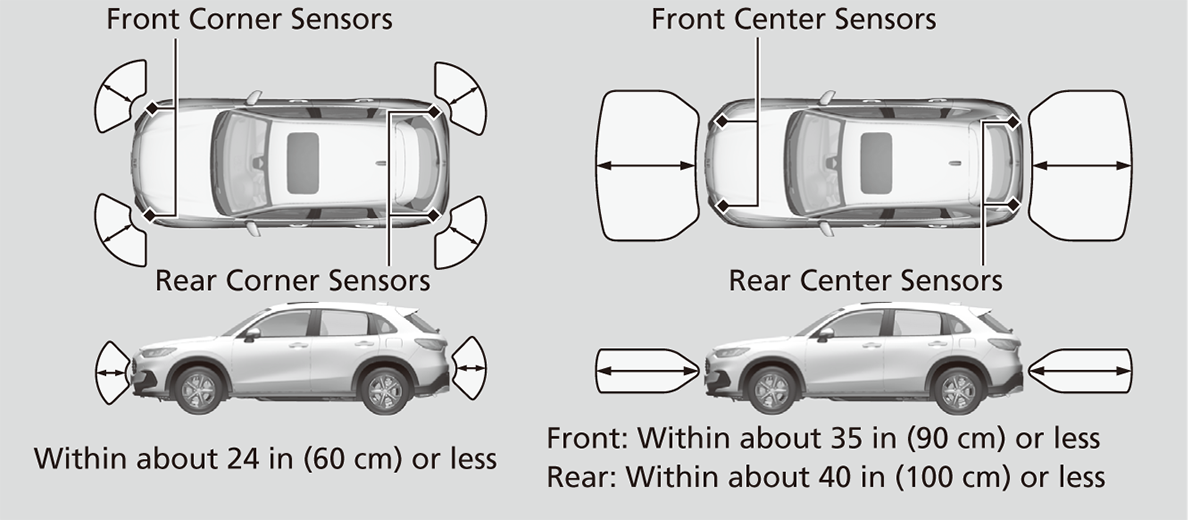
Parking sensor system on and off
You can turn the system on and off using the driver information interface.
Switching the Display Safety Support
The front corner, rear corner and rear center sensors start to detect an obstacle when the transmission is in R, and the vehicle speed is less than 5 mph (8 km/h).
The front corner and front center sensors start to detect an obstacle when the transmission is in any position other than P or R, and the vehicle speed is less than 5 mph (8 km/h).
Screen Operation
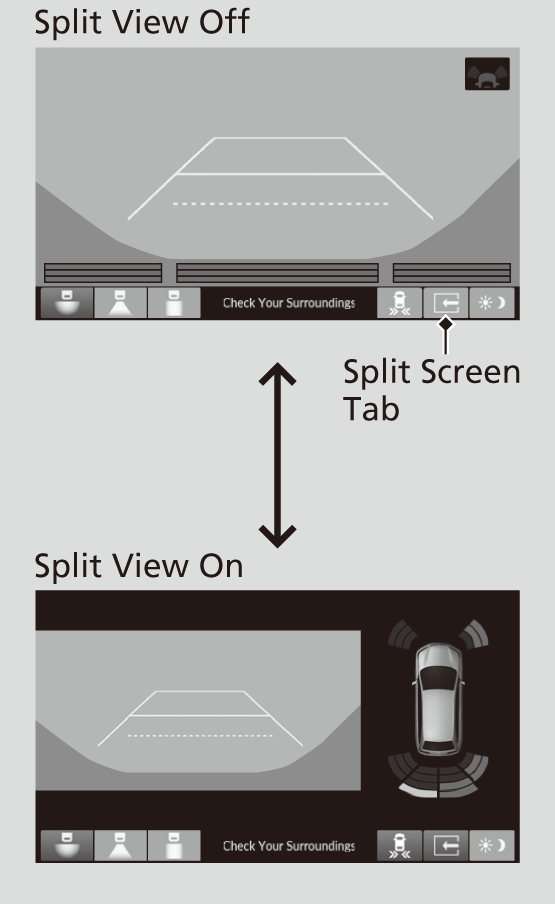
-
You can switch between split view off and split view on by touching the split screen tab.
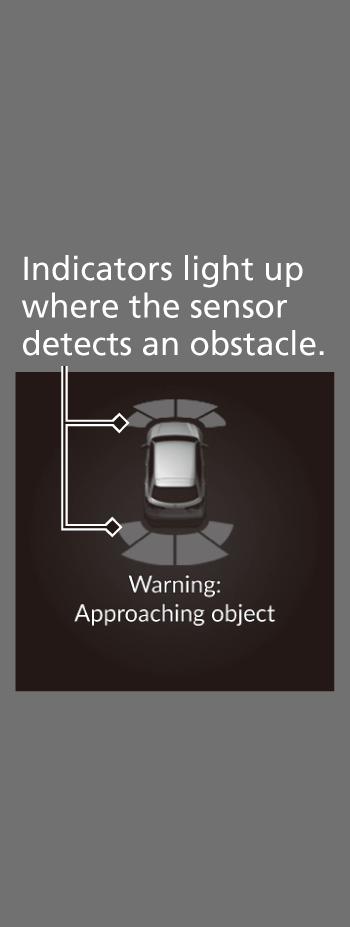
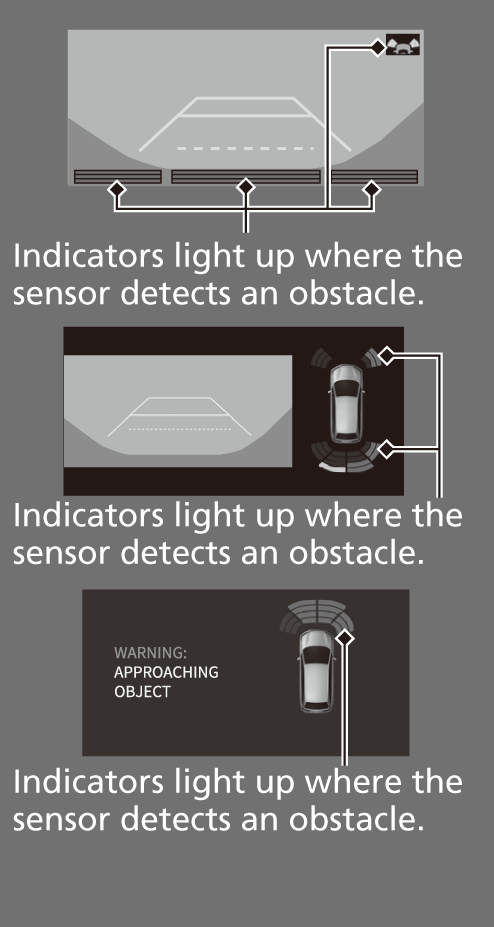
When the distance between your vehicle and detected obstacles becomes shorter
|
Interval between beeps
|
Distance between the Bumper and Obstacle
|
Indicator
|
Driver information interface
|
Audio/Information Screen
|
|
|---|---|---|---|---|---|
|
Corner Sensors
|
Center Sensors
|
||||
|
Moderate
|
—
|
About 43-30 in
(110-75cm) |
Comes on*1/
Blinks*2 in Yellow*3 |
 |
 |
|
Short
|
About 24-18 in
(60-45 cm) |
About 30-24 in
(75-60cm) |
Comes on*1/
Blinks*2 in Amber |
||
|
Very short
|
About 18-14 in
(45-35 cm) |
Front:
About 24-20 in (60-50cm) Rear: About 24-16 in (60-40cm) |
|||
|
Continuous
|
About 14 in
(35 cm) or less |
Front:
About 20 in (50 cm) or less Rear: About 16 in (40 cm) or less |
Comes on*1/
Blinks*2 in Red |
- On the driver information interface
- On the audio/information screen
- At this stage, only the center sensors detect obstacles.
To temporarily turn off the beeper, press the left selector wheel while it is sounding. Temporary OFF will be canceled when the shift position is switched or the vehicle speed reaches 9 mph (14 km/h) or higher.
* Not available on all models
Cross Traffic Monitor*
Monitors the rear corner areas using the radar sensors when reversing, and alerts you if a vehicle approaching from a rear corner is detected.
The system is convenient when you are backing out of a parking space.
- CAUTION
- Cross Traffic Monitor cannot detect all approaching vehicles and may not detect an approaching vehicle at all.
Failure to visually confirm that it is safe to back up the vehicle before doing so may result in a collision.
Do not solely rely on the system when reversing; always also use your mirrors, and look behind and to the sides of your vehicle before reversing.
- An obstacle, such as another vehicle and a wall, near your vehicle’s rear bumper, is blocking the radar sensor’s scope.
- Your vehicle is moving at the speed of about 3 mph (5 km/h) or higher.
- A vehicle is approaching at the speed other than between about 6 mph (10 km/h) and 16 mph (25 km/h).
- The system picks up external interference such as other radar sensors from another vehicle or strong radio wave transmitted from a facility nearby.
- Either corner of the rear bumper is covered with snow, ice, mud or dirt.
- When there is bad weather.
- Your vehicle is on an incline.
- Your vehicle is tilted due to a heavy load in the rear.
- Your vehicle is reversing towards a wall, a pole, a vehicle, and so on.
Do not cover the rear bumper corner area with labels or stickers of any kind.
- Detail
How the System Works

-
The system activates when:
- The power mode is in ON.
- The Cross Traffic Monitor is turned on.
Cross Traffic Monitor On and Off
- The transmission is in R.
- Your vehicle is moving at 3 mph (5 km/h) or lower.
When a vehicle is detected approaching from a rear corner, Cross Traffic Monitor alerts you with a buzzer and a displayed warning.
The system will not detect a vehicle that approaches from directly behind your vehicle, nor will it provide alerts about a detected vehicle when it moves directly behind your vehicle.
The system does not provide alerts for a vehicle that is moving away from your vehicle, and it may alert for pedestrians, bicycles, or stationary objects.
When the System Detects a Vehicle

An arrow icon appears on the side a vehicle is approaching on the audio/information screen.
 on the lower right changes to
  in amber when the transmission is in R, mud, snow or ice, etc. may have accumulated in the vicinity of the sensor. The system is temporarily canceled. Check the bumper corners for any obstructions, and thoroughly clean the area if necessary.
 comes on when the transmission is in R, there may be a problem with the Cross Traffic Monitor system. Do not use the system and have your vehicle checked by a dealer.
Do not use the system and have your vehicle checked by a dealer.
- Detail
Cross Traffic Monitor On and Off

-
The system can be turned on and off on the audio/information screen by pressing the Cross Traffic Monitor icon.
You can also switch the system on and off from the customized feature on the audio/information screen.
Customized Features (Models with 7-in. Color Touchscreen) Defaulting All the Settings (Models with 7-in. Color Touchscreen) Customized Features (Models with 9-in. Color Touchscreen) Defaulting All the Settings (Models with 9-in. Color Touchscreen)
* Not available on all models
Download Manual