Vehicle Features
The base radio information is included in this manual. See the infotainment manual for information on the uplevel radios, audio players, phone, navigation system, Rear Seat Entertainment (RSE), and voice or speech recognition,
if equipped.
O : Press to turn the system on. Press and hold to turn it off. When on, press to mute; press again to unmute. Turn to increase or decrease the volume.
{ : Press to go to the Home Page. 7 : Press to seek the previous station or track.
6 : Press to seek the next station or track.
See Overview 0 183.
See Clock 0 129.
Vehicles with a SiriusXM satellite radio tuner and a valid SiriusXM satellite radio subscription can receive SiriusXM programming.
SiriusXM is a satellite radio service based in the 48 contiguous United States and 10 Canadian provinces. SiriusXM satellite radio has a wide variety of programming and commercial-free music, coast to coast, and in digital-quality sound. A fee is required to receive the SiriusXM service.
For more information refer to:
1-877-438-9677 (Canada).
See Satellite Radio 0 187.
This vehicle may have a 3.5 mm (1/8 in) auxiliary input jack and USB ports in the center console or armrest. There may be USB ports in the center stack below the climate controls. External devices such as iPods, laptop computers, MP3 players, and USB storage devices may be connected, depending on the audio system.
See USB Port 0 190 and Auxiliary Jack 0 195.
The Bluetooth system allows users with a Bluetooth-enabled cell phone to make and receive hands-free calls using the vehicle audio system and controls.
The Bluetooth-enabled cell phone must be paired with the in-vehicle Bluetooth system before it can be used in the vehicle. Not all phones will support all functions.
See Bluetooth (Overview) 0 203 or Bluetooth (Infotainment Controls) 0 205.
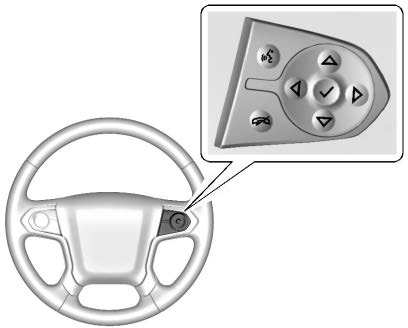
If equipped, some audio controls can be adjusted at the steering wheel.
g : If equipped with OnStar® or a Bluetooth® system, press to interact
with those systems. See OnStar Overview 0 464, Bluetooth
(Overview) 0 203 or Bluetooth
(Infotainment Controls) 0 205, or “Bluetooth (Overview)” in the infotainment manual.
i : Press to reject an incoming call or end a current call. Press to
mute or unmute the infotainment system when not on a call.
o or p : Press to go to the previous or next menu option.
w or x : Press to go to the next or previous selection.
V : Press to select a highlighted menu option.
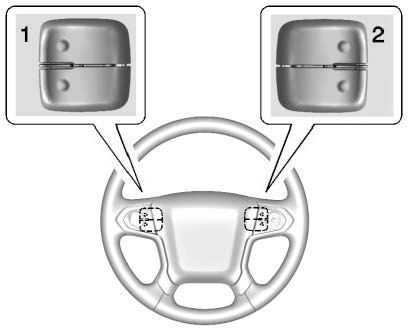
The favorite and volume switches are on the back of the steering wheel.
See Steering Wheel Controls 0 127.
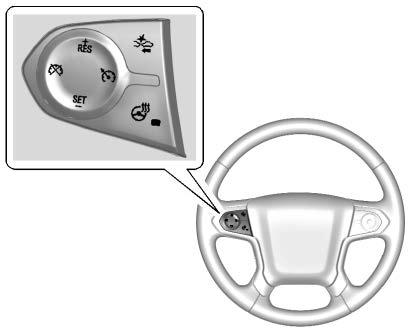
5 : Press to turn the system on or off. The indicator light is white when cruise control is on and turns off
when cruise control is off.
+RES : If there is a set speed in memory, press briefly to resume to that speed or press and hold to accelerate. If cruise control is already active, use to increase vehicle speed.
SET− : Press briefly to set the speed and activate cruise control. If cruise control is already active, use to decrease vehicle speed.
* : Press to disengage cruise control without erasing the set speed from memory.
See Cruise Control 0 276.
The DIC display is in the instrument cluster. It shows the status of many vehicle systems.
If the vehicle has the base level instrument cluster, the trip odometer reset stem is used to operate
the DIC.
If the vehicle has the uplevel instrument cluster, the right steering wheel controls are used to operate the DIC.
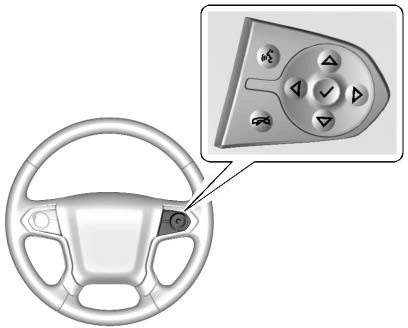
w or x : Press to move up or down in a list.
o or p : Press to move between the interactive display zones in the cluster.
V : Press to open a menu or select a menu item. Press and hold to reset values on certain screens.
See Driver Information Center (DIC) (Base Level) 0 154 or Driver Information Center (DIC) (Uplevel) 0 156.
If equipped, FCA may help avoid or reduce the harm caused by
front-end crashes. FCA provides a green indicator, V, when a vehicle is detected ahead. This indicator displays amber when following a vehicle much too closely. When approaching a vehicle ahead too quickly, FCA provides a flashing red alert on the windshield and rapidly beeps or pulses the driver seat.
See Forward Collision Alert (FCA) System 0 282.
If the vehicle has Forward Collision Alert (FCA), it also has FAB, which includes Intelligent Brake
Assist (IBA). When the system detects a vehicle ahead in your path that is traveling in the same direction that you may be about to crash into, it can provide a boost to braking or automatically brake the vehicle. This can help avoid or lessen the severity of crashes when driving in a forward gear.
See Forward Automatic Braking (FAB) (1500 Series) 0 285.
If equipped, LDW may help avoid unintentional lane departures at speeds of 56 km/h (35 mph) or greater. LDW uses a camera sensor to detect the lane markings. The LDW light, @, is green if a lane marking is detected. If the vehicle departs the lane, the light will change to amber and flash. In addition, beeps will sound or the driver seat will pulse.
See Lane Departure Warning (LDW) (2500/3500 Series) 0 286.
If equipped, LKA may help avoid crashes due to unintentional lane departures. It may assist by gently turning the steering wheel if the vehicle approaches a detected lane marking without using a turn signal in that direction. It may also provide a Lane Departure Warning (LDW) alert as the lane marking is crossed. The system will not assist or alert if it detects that you are actively steering. Override LKA by turning the steering wheel. LKA uses a camera to detect lane markings between 60 km/h (37 mph) and
180 km/h (112 mph).
See Lane Departure Warning (LDW) (2500/3500 Series) 0 286 and Lane Keep Assist (LKA) (1500 Series)
0 287.
If equipped, RVC shows a view of the area behind the vehicle on the infotainment display when the
vehicle is shifted into R (Reverse) to aid with parking and low-speed backing maneuvers.
See Assistance Systems for Parking or Backing 0 280.
If equipped, Rear Park Assist (RPA) uses sensors on the rear bumper to assist with parking and avoiding objects while in R (Reverse).
It operates at speeds less than 8 km/h (5 mph). RPA may show a warning triangle on the infotainment display and a graphic on the instrument cluster to provide the object distance. In addition, multiple beeps or seat pulses may occur if very close to an object.
The vehicle may also have the Front Park Assist system.
See Assistance Systems for Parking or Backing 0 280.
Accessory power outlets can be used to plug in electrical equipment, such as a cell phone, MP3
player, etc.
The vehicle may have up to four accessory power outlets.
Vehicles with a Center Console
Vehicles with Bench Seats
Lift the cover to access and replace when not in use.
See Power Outlets 0 130.
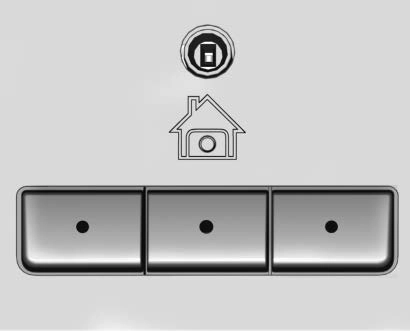
If equipped with the Universal Remote system, these buttons will be in the front overhead console.
This system provides a way to replace up to three remote control transmitters used to activate devices such as garage door openers, security systems, and home automation devices.
See Universal Remote System
0 167.
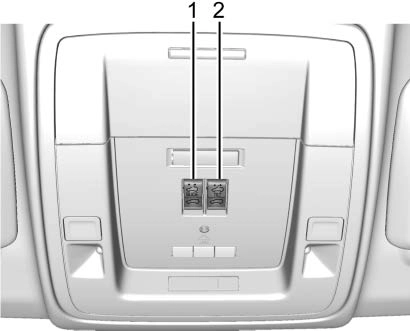
If equipped, the sunroof operates when the ignition is on or in ACC/ ACCESSORY, or when Retained Accessory Power (RAP) is active. See Retained Accessory Power (RAP) 0 251.
Slide Switch
Express-Open/Express-Close : To express-open the sunroof, fully press and release I (1). Press and release I (1) again to stop the
movement. To express-close the sunroof, fully press and release K (1). Press and release K (1) again to stop the movement.
Open/Close (Manual Mode) : To open the sunroof, press and hold I (1). Release I (1) to stop the movement. Press and hold K (1) to close the sunroof. Release K
Tilt Switch
Vent : From the closed position, press J (2) to vent the sunroof. Press K (2) to close the vent.
When the sunroof is opened, an air deflector will automatically raise.
The air deflector will retract when the sunroof is closed.
The sunroof also has a sunshade, which can be pulled forward to block sun rays. The sunshade must be opened and closed manually.
The sunroof is equipped with an automatic reversal system. See Sunroof 0 53.
Download Manual