Wireless remote control
The wireless remote control can be used to lock and unlock the vehicle.
Vehicles without a smart key system
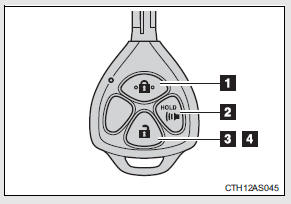
1. Locks all the doors 2. Sounds the alarm (press and hold) 3. Unlocks all the doors Pressing the button unlocks the driver’s door. Pressing the button again within 3 seconds unlocks the other doors.
4. Opens the windows and moon roof (press and hold)* *: This setting must be customized at your Toyota dealer.
Vehicles with a smart key system
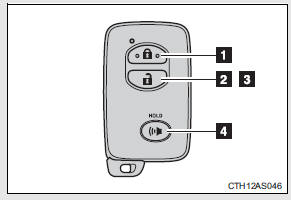
1. Locks all the doors
2. Unlocks all the doors
Pressing the button unlocks the driver’s door. Pressing the button again within 3 seconds unlocks the other doors.
3. Opens the windows and moon roof (press and hold)*
4. Sounds the alarm (press and hold)
*: This setting must be customized at your Toyota dealer.
Operation signals
A buzzer sounds and the emergency flashers flash to indicate that the doors have been locked/unlocked. (Locked: once; Unlocked: twice)
Door lock buzzer
If an attempt to lock the doors is made when a door is not fully closed, a buzzer sounds continuously. Fully close the door to stop the buzzer, and lock the vehicle once more.
Panic mode
Vehicles without a smart key system
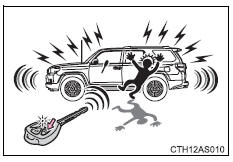
When  is pressed for longer than
about one second, an alarm will sound intermittently and the vehicle lights will flash to deter any person from trying to break into or damage your vehicle.
To stop the alarm, press any button on the wireless remote control.
Vehicles with a smart key system
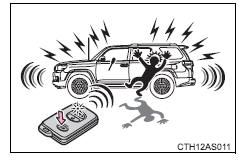
When is pressed for longer than
about one second, an alarm will sound intermittently and the vehicle lights will flash to deter any person from trying to break into or damage your vehicle.
To stop the alarm, press any button on the electronic key.
Security feature
If a door is not opened within approximately 60 seconds after the vehicle is unlocked, the security feature automatically locks the vehicle again.
Alarm
Using the wireless remote control to lock the doors will set the alarm system.
Conditions affecting operation
Vehicles without a smart key system
The wireless remote control function may not operate normally in the following situations:
• Near a TV tower, radio station, electric power plant, airport or other facility that generates strong radio waves
• When carrying a portable radio, cellular phone or other wireless communication devices
• When multiple wireless keys are in the vicinity
• When the wireless key is in contact with, or is covered by, a metallic object
• When a wireless key (that emits radio waves) is being used nearby
• When the wireless key has been left near an electrical appliance such as a personal computer
Vehicles with a smart key system
If the wireless remote control does not operate properly (vehicles with a smart key system)
Locking and unlocking the doors: Use the mechanical key.
Key battery depletion
Vehicles without a smart key system
If the wireless remote control function does not operate, the battery may be depleted. Replace the battery when necessary.
Vehicles with a smart key system
When the electronic key battery is fully depleted
When riding in an aircraft
When bringing a key with wireless remote control function onto an aircraft, make sure you do not press any buttons on the key while inside the aircraft cabin. If you are carrying the key in your bag etc, ensure that the buttons are not likely to be pressed accidentally. Pressing a button may cause the key to emit radio waves that could interfere with the operation of the aircraft.
Customization that can be configured at Toyota dealer
Settings (e.g. wireless remote control system) can be changed.
(Customizable features )
Certification for wireless remote control
For vehicles sold in the U.S.A.
FCC ID: HYQ14ACX
FCC ID: HYQ13CZD
FCC ID: HYQ14ADF
FCC ID: HYQ13CZE
FCC ID: HYQ12BBY
FCC ID: HYQ13BDC
NOTE:
This device complies with part 15 of the FCC Rules. Operation is subject to the following two conditions: (1) This device may not cause harmful interference, and (2) this device must accept any interference received, including interference that may cause undesired operation.
FCC WARNING:
Changes or modifications not expressly approved by the party responsible for compliance could void the user’s authority to operate the equipment.
For vehicles sold in Canada
NOTE:
Operation is subject to the following two conditions: (1) this device may not cause interference, and (2) this device must accept any interference, including interference that may cause undesired operation of the device.
Side doors
The Automatic running boards are linked to the side door operations, extending and retracting when a side door is opened and closed. When a door is opened or closed, the board on the same side extends or retracts.
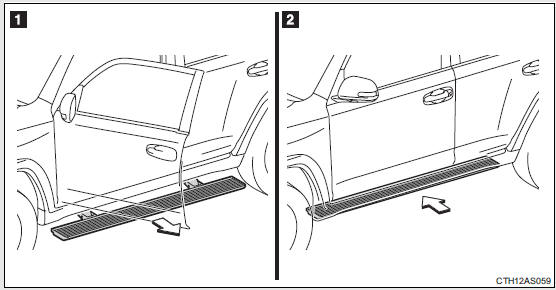
1. Opening a door: The appropriate board extends 2. Closing a door: The appropriate board retracts
Turning off the Automatic running boards system
Press “OFF” on the Automatic running boards switch to turn off the Automatic running boards system.
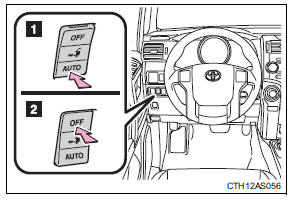
1. On (Automatic mode) 2. Off
The orange line at the top of the switch illuminates to indicate that the Automatic running boards system is on.
When extension of the boards is not necessary, or extension of a board is not desirable due to an obstacle, turn the Automatic running boards switch off before opening the side door.
Jam protection function
During Automatic running boards operation: If a board contacts an obstacle when extending, it will retract. If an obstacle gets caught between a board and the vehicle when retracting, the board will extend.
If an obstacle is detected 3 times in a row during Automatic running boards operation, the board will stop at the position it contacts the obstacle. When a side door on the same side as the board is opened and closed one more time, the board will extend and retract, or retract and extend. After this, the board will resume normal operation.
Automatic retraction function
The boards will be automatically retracted, for safety, under the following conditions:
• A board is not completely retracted
• Vehicle speed is approximately 5 mph (8 km/h) or higher
The boards will not automatically extend again when vehicle speed returns to less than 5 mph (8 km/h).
If the Automatic running boards indicator comes on when driving first commences
A board has not completely retracted. Check that no obstacles are caught between a board and the vehicle.
If the Automatic running boards indicator light flashes
There may be a malfunction in the Automatic running boards system. Have the vehicle inspected by your Toyota dealer immediately.
When snow or mud is attached to the board or the board is frozen
The Automatic running boards may not operate correctly. Before stepping on a board, check that it is completely extended. If the Automatic running boards are not operating correctly, turn the Automatic running boards switch off and refrain from use.
When removing snow or mud, turn the Automatic running boards switch off.
After recharging/reconnecting the battery
If the Automatic running boards have not completely extended or retracted, the boards may not move in the intended direction the first time they are operated. However, from the second time onwards, the boards will resume normal operation.
When getting in and out of the vehicle
Take care because clothes and shoes may become dirty due to contact with the lower part of the vehicle body.
CAUTION
Jam protection function
Observe the following precautions.
Failure to do so may cause serious injury.
Never use any part of your body to intentionally activate the jam protection function.
The jam protection function may not work depending on the shape of the object that is caught. Be careful not to get fingers or other body parts caught.
Cautions regarding the Automatic running boards
Observe the following precautions.
Failure to do so may cause serious injury.
• Check to make sure that all passengers and people in the vehicle’s surrounding area do not have a hand on a board or any part of their body in a position where it could be caught between a board and the vehicle when an Automatic running board is being operated.
• Confirm that the boards have completely extended or retracted before getting in or out of the vehicle. If someone gets in or out of the vehicle during Automatic running board operation, the boards may stop extending or retracting.
• Drive the vehicle after confirming that the boards have completely retracted. Driving with a board extended is dangerous because it may hit other people or objects.
• Take care when pressing the Automatic running boards switch. The board will extend or retract and may hit other people or objects.
• Always check that the Automatic running boards switch is turned off when cleaning a board.
• Do not allow children to operate the Automatic running boards.
Operating Automatic running boards in a manner so that a board contacts someone can cause serious injury, and in some instances, even death.
Automatic running boards
The Automatic running boards are linked to the side door operations, extending and retracting when a side door is opened and closed. When a door is opened or closed, the board on the same side extends or retracts.
1. Opening a door: The appropriate board extends 2. Closing a door: The appropriate board retracts
Turning off the Automatic running boards system
Press “OFF” on the Automatic running boards switch to turn off the Automatic running boards system.
1. On (Automatic mode) 2. Off
The orange line at the top of the switch illuminates to indicate that the Automatic running boards system is on.
When extension of the boards is not necessary, or extension of a board is not desirable due to an obstacle, turn the Automatic running boards switch off before opening the side door.
Jam protection function
During Automatic running boards operation: If a board contacts an obstacle when extending, it will retract. If an obstacle gets caught between a board and the vehicle when retracting, the board will extend.
If an obstacle is detected 3 times in a row during Automatic running boards operation, the board will stop at the position it contacts the obstacle. When a side door on the same side as the board is opened and closed one more time, the board will extend and retract, or retract and extend. After this, the board will resume normal operation.
Automatic retraction function
The boards will be automatically retracted, for safety, under the following conditions:
• A board is not completely retracted
• Vehicle speed is approximately 5 mph (8 km/h) or higher
The boards will not automatically extend again when vehicle speed returns to less than 5 mph (8 km/h).
If the Automatic running boards indicator comes on when driving first commences
A board has not completely retracted. Check that no obstacles are caught between a board and the vehicle.
If the Automatic running boards indicator light flashes
There may be a malfunction in the Automatic running boards system. Have the vehicle inspected by your Toyota dealer immediately.
When snow or mud is attached to the board or the board is frozen
The Automatic running boards may not operate correctly. Before stepping on a board, check that it is completely extended. If the Automatic running boards are not operating correctly, turn the Automatic running boards switch off and refrain from use.
When removing snow or mud, turn the Automatic running boards switch off.
After recharging/reconnecting the battery
If the Automatic running boards have not completely extended or retracted, the boards may not move in the intended direction the first time they are operated. However, from the second time onwards, the boards will resume normal operation.
When getting in and out of the vehicle
Take care because clothes and shoes may become dirty due to contact with the lower part of the vehicle body.
CAUTION
Jam protection function
Observe the following precautions.
Failure to do so may cause serious injury.
Never use any part of your body to intentionally activate the jam protection function.
The jam protection function may not work depending on the shape of the object that is caught. Be careful not to get fingers or other body parts caught.
Cautions regarding the Automatic running boards
Observe the following precautions.
Failure to do so may cause serious injury.
• Check to make sure that all passengers and people in the vehicle’s surrounding area do not have a hand on a board or any part of their body in a position where it could be caught between a board and the vehicle when an Automatic running board is being operated.
• Confirm that the boards have completely extended or retracted before getting in or out of the vehicle. If someone gets in or out of the vehicle during Automatic running board operation, the boards may stop extending or retracting.
• Drive the vehicle after confirming that the boards have completely retracted. Driving with a board extended is dangerous because it may hit other people or objects.
• Take care when pressing the Automatic running boards switch. The board will extend or retract and may hit other people or objects.
• Always check that the Automatic running boards switch is turned off when cleaning a board.
• Do not allow children to operate the Automatic running boards.
Operating Automatic running boards in a manner so that a board contacts someone can cause serious injury, and in some instances, even death.
Back door
The back door can be locked/unlocked and opened by the following procedures:
Locking and unlocking the back door Entry function (vehicles with a smart key system) Wireless remote control Door lock switch
Keys (vehicles without a smart key system)
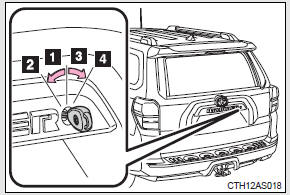
1. Unlocks all the doors 2. Opens the back window (turn and hold) 3. Locks all the doors
4. Closes the back window (turn and hold)
Opening the back door from outside the vehicle
Back door opener
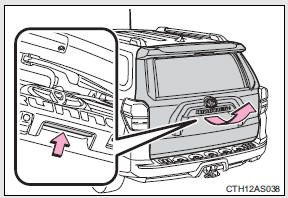
Raise the back door while pushing up the back door opener switch.
Rear step bumper
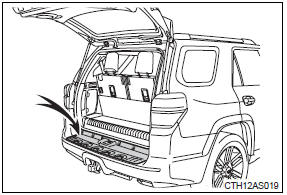
The rear step bumper is intended for rear end protection and easier step-up loading.
When closing the back door
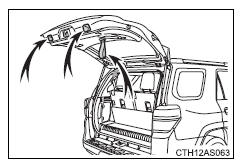
Lower the back door using the back door strap and/or the back door handle, and make sure to push the back door down from the outside to close it.
Luggage compartment lights
Each luggage compartment light has the following 3 positions:
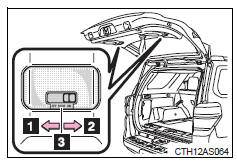
1. Turns the light off 2. Turns the light on
3. Turns the light on/off linked to back door position
If the luggage compartment lights remain on, the lights will go off automatically after 20 minutes.
If the back door opener is inoperative or the battery is discharged
CAUTION
Caution while driving
• Keep the back door closed.
If the back door is left open, it may hit nearby objects while driving or luggage may be unexpectedly thrown out, causing an accident.
In addition, exhaust gases may enter the vehicle, causing death or a serious health hazard. Make sure to close the back door before driving.
• Before driving the vehicle, make sure that the back door is fully closed. If the back door is not fully closed, it may open unexpectedly while driving, causing an accident.
• Never let anyone sit in the luggage compartment. In the event of sudden braking or a collision, they are susceptible to death or serious injury.
• Do not get on the rear step bumper.
When children are in the vehicle
Observe the following precautions.
Failure to do so may result in death or serious injury.
• Do not leave children alone in the luggage compartment.
If a child is accidentally locked in the luggage compartment, they could have heat exhaustion or any other injuries.
• Do not allow a child to open or close the back door.
Doing so may cause the back door to move unexpectedly, or cause the child’s hands, head, or neck to be caught by the closing back door, which may result in death or serious injury of the child.
CAUTION
Operating the back door
Observe the following precautions.
Failure to do so may cause parts of the body to be caught, resulting in death or serious injury.
• Remove any heavy loads, such as snow and ice, from the back door before opening it. Failure to do so may cause the back door to suddenly shut again after it is opened.
• When opening or closing the back door, thoroughly check to make sure the surrounding area is safe.
• If anyone is in the vicinity, make sure they are safe and let them know that the back door is about to open or close.
• Use caution when opening or closing the back door in windy weather as it may move abruptly in strong wind.
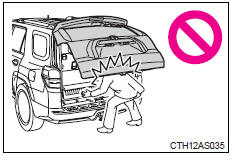
• The back door may suddenly shut if it is not opened fully. It is more difficult to open or close the back door on an incline than on a level surface, so beware of the back door unexpectedly opening or closing by itself. Make sure that the back door is fully open and secure before using the luggage compartment.
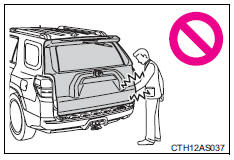
• When closing the back door, take extra care to prevent your fingers etc. from being caught.
• When closing the back door, make sure to press it lightly on its outer surface. If the back door handle or back door strap is used to fully close the back door, it may result in hands or arms being caught.
CAUTION
• Do not pull on the back door damper stay to close the back door, and do not hang on the back door damper stay.
Doing so may cause hands to be caught or the back door damper stay to break, causing an accident.
• If a bicycle carrier or similar heavy object is attached to the back door, it may suddenly shut again after being opened, causing someone’s hands, head or neck to be caught and injured. When installing an accessory part to the back door, using a genuine Toyota part is recommended.
NOTICE
To prevent damage to the back door components
Do not allow more than one person to get on the rear step bumper at a time.
Back door damper stays
The back door is equipped with damper stays that hold the back door in place.
Observe the following precautions.
Failure to do so may cause damage to the back door damper stay, resulting in malfunction.
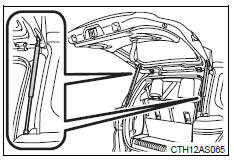
• Do not attach any foreign objects, such as stickers, plastic sheets, or adhesives to the damper stay rod..
• Do not touch the damper stay rod with gloves or other fabric items..
• Do not attach any accessories other than genuine Toyota parts to the back door..
• Do not place your hand on the damper stay or apply lateral forces to it.
Download Manual