Using other driving systems
Cruise control
Use the cruise control to maintain a set speed without depressing the accelerator pedal.
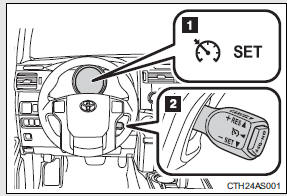
1. Indicators
2. Cruise control switch
Setting the vehicle speed
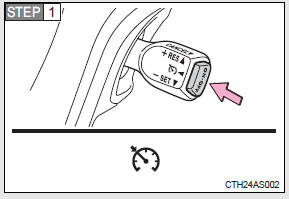
Press the “ON-OFF” button to activate the cruise control.
Cruise control indicator will come on.
Press the button again to deactivate the cruise control.
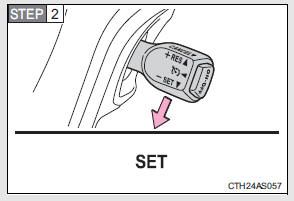
Accelerate or decelerate the vehicle to the desired speed, and push the lever down to set the speed.
“SET” indicator will come on.
The vehicle speed at the moment the lever is released becomes the set speed.
Adjusting the set speed
To change the set speed, operate the lever until the desired set speed is obtained.
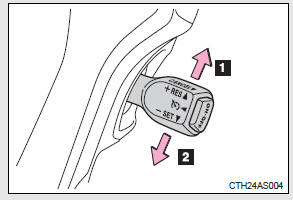
1. Increases the speed 2. Decreases the speed
Fine adjustment: Momentarily move the lever in the desired direction.
Large adjustment: Hold the lever in the desired direction.
The set speed will be increased or decreased as follows:
Fine adjustment: By approximately 1 mph (1.6 km/h) each time the lever is operated.
Large adjustment: The set speed can be increased or decreased continually until the lever is released.
Canceling and resuming the constant speed control
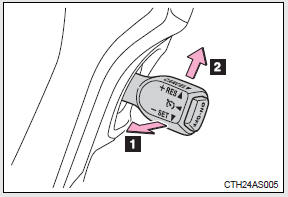
1. Pulling the lever toward you cancels the constant speed control.
The speed setting is also canceled when the brakes are applied.
2. Pushing the lever up resumes the constant speed control.
Resuming is available when the vehicle speed is more than approximately 25 mph (40 km/h).
Cruise control can be set when
• The shift lever is in the D or range 4 or higher of S has been selected.
• Vehicle speed is above approximately 25 mph (40 km/h).
Accelerating after setting the vehicle speed
• The vehicle can be accelerated normally. After acceleration, the set speed resumes.
• Even without canceling the cruise control, the set speed can be increased by first accelerating the vehicle to the desired speed and then pushing the lever down to set the new speed.
Automatic cruise control cancelation
Cruise control will stop maintaining the vehicle speed in any of the following situations.
• Actual vehicle speed falls more than approximately 10 mph (16 km/h) below the preset vehicle speed.
At this time, the memorized set speed is not retained.
• Actual vehicle speed is below approximately 25 mph (40 km/h).
• VSC is activated.
• The operation cannot be switched for 5 seconds or more after operating the front-wheel drive control switch (part-time 4WD models) or the fourwheel drive control switch (full-time 4WD models).
If the cruise control indicator light flashes
Press the “ON-OFF” button once to deactivate the system, and then press the button again to reactivate the system.
If the cruise control speed cannot be set or if the cruise control cancels immediately after being activated, there may be a malfunction in the cruise control system. Have the vehicle inspected by your Toyota dealer.
CAUTION
To avoid operating the cruise control by mistake
Switch the cruise control off using the “ON-OFF” button when not in use.
Situations unsuitable for cruise control
Do not use cruise control in any of the following situations.
Doing so may result in loss of control and could cause an accident resulting in death or serious injury.
• In heavy traffic
• On roads with sharp bends
• On winding roads
• On slippery roads, such as those covered with rain, ice or snow
• On steep hills
Vehicle speed may exceed the set speed when driving down a steep hill.
• When your vehicle is towing a trailer
Intuitive parking assist
The distance from your vehicle to nearby obstacles when parallel parking or maneuvering into a garage is measured by the sensors and communicated via an indicator and a buzzer. Always check the surrounding area when using this system.
Types of sensors
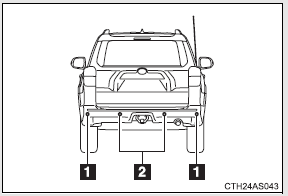
1. Rear corner sensors 2. Rear center sensors
Intuitive parking assist switch
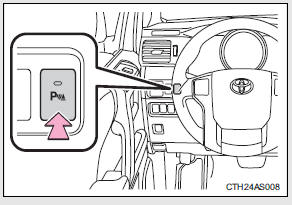
Turns the intuitive parking assist on/off
When on, the indicator light comes on and the buzzer sounds to inform the driver that the system is operational.
The indicator and buzzer
When a sensor detects an obstacle, the direction of the obstacle is indicated and the buzzer sounds.
Sensor operation and distance to an obstacle
The system operates when the vehicle approaches an obstacle, as shown by the following table.
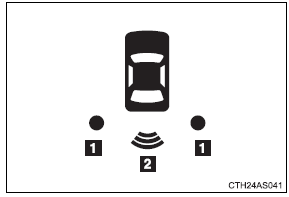
1. Rear corner sensors
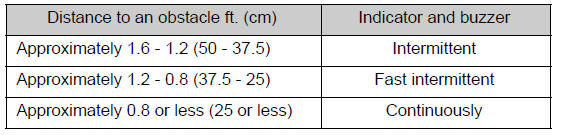
2. Rear center sensors
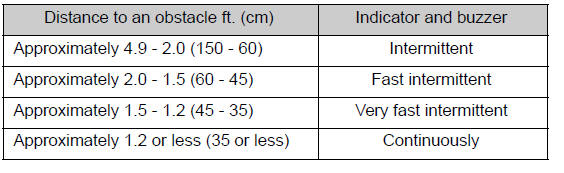
Detection range of the sensors
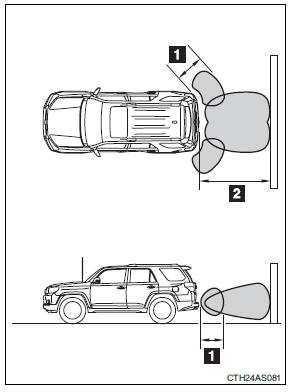
1. Approximately 1.6 ft. (50 cm) 2. Approximately 4.9 ft. (150 cm)
The diagram shows the detection range of the sensors. Note that the sensors cannot detect obstacles that are extremely close to the vehicle.
The range of the sensors may change depending on the shape of the object etc.
Intuitive parking assist can be operated when
Vehicles without a smart key system: The engine switch is in the “ON” position and the shift lever is in R.
Vehicles with a smart key system: The “ENGINE START STOP” switch is in IGNITION ON mode and the shift lever is in R.
Sensor detection information
• Certain vehicle conditions and the surrounding environment may affect the ability of a sensor to correctly detect an obstacle. Particular instances where this may occur are listed below.
• There is dirt, snow or ice on a sensor.
• A sensor is frozen.
• A sensor is covered in any way.
• The vehicle is leaning considerably to one side.
• On an extremely bumpy road, on an incline, on gravel, or on grass • The vicinity of the vehicle is noisy due to vehicle horns, motorcycle engines, air brakes of large vehicles, or other loud noises producing ultrasonic waves.
• There is another vehicle equipped with parking assist sensors in the vicinity.
• A sensor is coated with a sheet of spray or heavy rain.
• A bumper or sensor receives a strong impact.
• The vehicle is approaching a tall or right-angled curb.
• In harsh sunlight or intense cold weather • A non-genuine Toyota suspension (lowered suspension etc.) is installed.
In addition to the examples above, there are instances in which, because of their shape, signs and other objects may be judged by a sensor to be closer than they are.
• The shape of the obstacle may prevent a sensor from detecting it. Pay particular attention to the following obstacles:
• Wires, fences, ropes, etc.
• Cotton, snow and other materials that absorb sound waves • Sharply-angled objects • Low obstacles
• Tall obstacles with upper sections projecting outwards in the direction of your vehicle
When the system malfunctions
If a malfunction occurs and no obstacles have been detected, the indicator flashes and the buzzer sounds for approximately 7 seconds.
If the indicator comes on and stays on after that, have the vehicle inspected by your Toyota dealer.
Customization that can be configured at Toyota dealer
Settings (e.g. buzzer volume) can be changed.
(Customizable features )
Certification For vehicles sold in the U.S.A.
This device complies with Part 15 of the FCC Rules. Operation is subject to the following two conditions; (1) This device may not cause harmful interference, and (2) This device must accept any interference received, including interference that may cause undesired operation.
For vehicles sold in Canada
This ISM device complies with Canadian ICES-001.
Cet appareil ISM est conforme a la norme NMB-001 du Canada.
CAUTION
Caution when using the intuitive parking assist-sensor
Do not attach any accessories within the sensor range.
Doing so may result in the vehicle being unable to be driven safely and possibly cause an accident.
NOTICE
Notes when washing the vehicle
Do not apply intensive bursts of water or steam to the sensor area.
Doing so may result in the sensor malfunctioning.
Rear view monitor system (rear view mirror-attached type)
The rear view monitor assists the driver by displaying an image of the area behind the vehicle while reversing. The image is displayed in reverse on the screen. This reversed image is a similar image to the one on the inside rear view mirror.
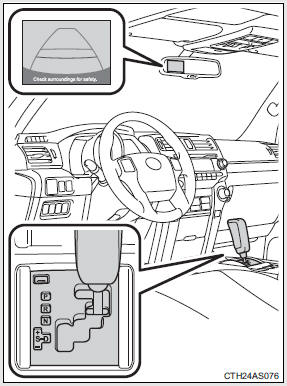
The rear view image is displayed when the shift lever is in R.
• If the shift lever is shifted out of R, the screen is turned off.
• The screen remains on for approximately 5 minutes.
Rear view monitor guide lines
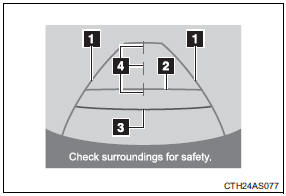
Guide lines are displayed on the screen.
The guide lines may look different depending on vehicle orientation or road conditions.
1. Vehicle width extension guide lines (blue) These lines indicate the estimated vehicle width extension.
2. Distance guide line (blue) This line indicates a position on the ground about 3 ft. (1 m) behind on the ground of the rear bumper of your vehicle.
3. Distance guide line (red) This line indicates a position on the ground about 1.5 ft. (0.5 m) behind on the ground of the rear bumper of your vehicle.
4. Vehicle center guide lines (blue) These lines indicate the estimated vehicle center on the ground.
The rear view monitor system can be operated when
Vehicles without a smart key system
The shift lever is in R, the engine switch is in the “ON” position.
Vehicles with a smart key system
The shift lever is in R, the “ENGINE START STOP” switch is in IGNITION ON mode.
Changing display modes
The rear view monitor display mode can be changed while the screen is on.
• To temporarily disable the rear view monitor system
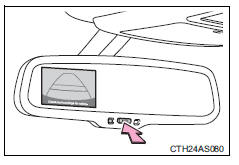
Push the “AUTO” button.
The indicator will turn amber.
Vehicles without a smart key system
The system will be re-enabled once the engine switch is turned OFF and then turned to the “ON” position.
Vehicles with a smart key system
The system will be re-enabled once the “ENGINE START STOP” switch is turned OFF and then turned to IGNITION ON mode.
• To constantly disable the rear view monitor system Push and hold the “AUTO” button for 12 to 15 seconds.
The screen will turn off and on after 6 seconds. Continue to push and hold the button until the screen turns back off. The indicator will flash amber.
Vehicles without a smart key system
The system will not automatically turn on again after the engine switch is turned OFF and then turned to the “ON” position.
Vehicles with a smart key system
The system will not automatically turn on again after the “ENGINE START STOP” switch is turned OFF and then turned to IGNITION ON mode.
• To re-enable the rear view monitor system Push the “AUTO” button. The indicator will turn green.
Selecting a language (English, French or Spanish)
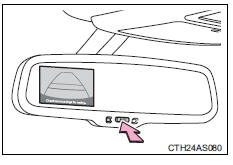
 Push and hold the “AUTO” button
for 6 to 12 seconds.
The screen will turn on and the indicator will turn green.
 Push the “AUTO” button.
Each time the “AUTO” switch is pushed, the language changes. Stop pushing the button when the message is displayed in the desired language.
After approximately 5 seconds, the warning message will flash once and the language will be set.
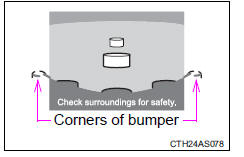
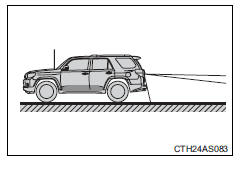
Displayed area
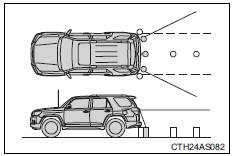
The area covered by the camera is limited.
Objects that are close to either corner of the bumper or under the bumper cannot be seen on the screen.
The area displayed on the screen may vary depending on vehicle orientation or road conditions.
Driving precautions
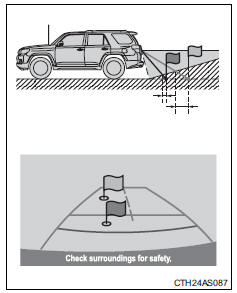
When the grade behind the vehicle slopes up sharply, objects appear to be farther away than they actually are.
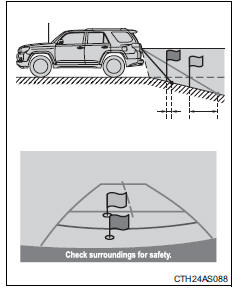
When the grade behind the vehicle slopes down sharply, objects appear to be closer than they actually are.
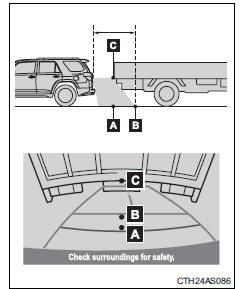
The distance that appears on the screen between three-dimensional objects (such as vehicles) and flat surfaces (such as the road) and the actual distance differ as follows.
In reality, C = A < B (C and A are equally far away; B is farther than C and A). However, on the screen, the situation appears to be A < B < C.
On the screen, it appears that a truck is parking about 1.5 ft. (0.5 m) away. However, in reality if you back up to point A, you will hit the truck.
Rear view monitor system camera
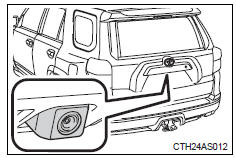
The rear view monitor system camera is located on the back door as shown in the illustration. The camera uses a special lens. The distance of the image that appears on the screen differs from the actual distance.
In the following cases, it may become difficult to see images on the screen even when the system is functioning correctly:
• The vehicle is in a dark area, such as at night.
• The temperature near the lens is extremely high or low.
• Water droplets are on the camera lens or humidity is high, such as when it rains.
• Foreign matter, such as snow or mud, adheres to the camera lens.
• When the camera has scratches or dirt on it.
• The sun or headlights are shining directly into the camera lens.
• A bright object such as a white wall is reflected in the mirror surface over the monitor.
Smear effect
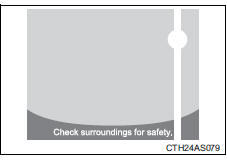
If a bright light, such as sunlight reflected off the vehicle body, is picked up by the camera, a smear effect* characteristic to the camera may occur.
*: Smear effect -- A phenomenon that occurs when a bright light is picked up by the camera; when transmitted by the camera, the light source appears to have a vertical streak above and below it.
Flicker effect
When the camera is used under fluorescent light, sodium lights, or mercury lights etc., the lights and the illuminated areas may appear to flicker.
CAUTION
When using the rear view monitor system
Observe the following precautions to avoid an accident that could result in death or serious injuries:
• Never depend solely on the monitor system when reversing.
• Always check visually and with the mirrors to confirm your intended path is clear.
• Use your own eyes to confirm the vehicle’s surroundings, as the displayed image may become faint or dark, and moving images will be distorted, or not entirely visible when the outside temperature is low. When backing up, be sure to check behind and all around the vehicle visually and with the mirrors before proceeding.
• Always check the vehicle surrounding area, because the guide lines are ancillary lines.
• The guide lines are ancillary lines and do not change even if the steering wheel is turned.
• Depicted distances between objects and flat surfaces differ from actual distances.
• Do not use the system if the back door is open.
Conditions which may affect the rear view monitor system
• If the back of the vehicle has been hit, the camera’s position and mounting angle may have changed. Have the vehicle inspected by your Toyota dealer.
• Rapid temperature changes, such as when hot water is poured on the vehicle in cold weather, may cause the system to function abnormally.
• If the camera lens is dirty, it cannot transmit a clear image. Rinse with water and wipe with a soft cloth. If the camera lens is extremely dirty, wash with a mild cleanser and rinse.
• The displayed image may be darker and moving images may be slightly distorted when the system is cold.
Caution while driving in reverse
Do not change modes while the vehicle is moving.
NOTICE
Camera precautions
• As the camera has a water proof construction, do not detach, disassemble or modify it. This may cause incorrect operation.
• Do not subject the camera to a strong impact.
• If the camera lens becomes dirty, it cannot transmit a clear image. If water droplets, snow, or mud adhere to the lens, rinse with water and wipe with a soft cloth. If the lens is extremely dirty, wash it with a mild cleanser and rinse. Do not rub hard.
• Do not allow organic solvent, car wax, window cleaner or glass coat to adhere to the camera. If this happens, wipe it off as soon as possible.
• When replacing tires, please consult your Toyota dealer. If you replace the tires, the area displayed on the screen may change.
Four-wheel drive system (part-time 4WD models)
Use the front-wheel drive control lever or switch to select the following transfer modes:
Type A
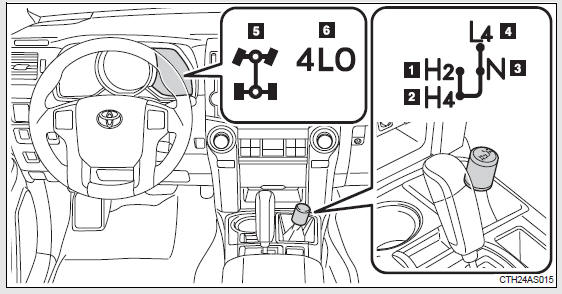
The four-wheel drive indicator comes on when H4, N or L4 mode is selected.
1. H2 (high speed position, two-wheel drive)
Use this for normal driving on dry hard-surfaced roads. This position gives greater economy, quietest ride and least wear.
2. H4 (high speed position, four-wheel drive)
Use this for driving only on tracks that permit the tires slide, like offroad, icy or snow-covered roads. This position provides greater traction than two-wheel drive.
3. N (neutral position)
No power is delivered to the wheels. The vehicle must be stopped.
4. L4 (low speed position, four-wheel drive)
Use this for maximum power and traction. Use “L4” for climbing or descending steep hills, off-road driving, and hard pulling in sand, mud or deep snow.
5. Four-wheel drive indicator
6. Low speed four-wheel drive indicator
Type B
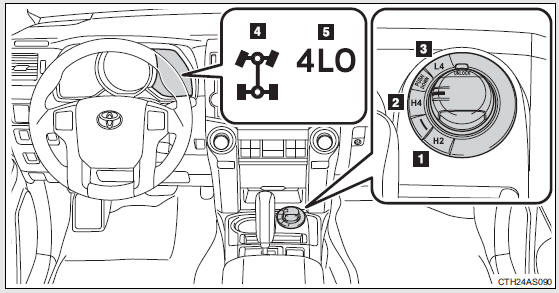
The four-wheel drive indicator comes on when H4 or L4 mode is selected.
1. H2 (high speed position, two-wheel drive)
Use this for normal driving on dry hard-surfaced roads. This position gives greater economy, quietest ride and least wear.
2. H4 (high speed position, four-wheel drive)
Use this for driving only on tracks that permit the tires slide, like offroad, icy or snow-covered roads. This position provides greater traction than two-wheel drive.
3. L4 (low speed position, four-wheel drive)
Use this for maximum power and traction.
Use “L4” for climbing or descending steep hills, off-road driving, and hard pulling in sand, mud or deep snow.
4. Four-wheel drive indicator
5. Low speed four-wheel drive indicator
Shifting between H2 and H4
Shifting from H2 to H4
Type A
Reduce vehicle speed to less
than 50 mph (80 km/h).
Shift the front-wheel drive
control lever to H4.
Type B
Reduce vehicle speed to less
than 62 mph (100 km/h).
Push the “UNLOCK” button and
turn the front-wheel drive control switch to H4.
The four-wheel drive indicator will turn on.
Shifting from H4 to H2
Type A
Shift the front-wheel drive control lever to H2.
Type B
Push the “UNLOCK” button and turn the front-wheel drive control switch to H2.
This can be done at any speed.
The four-wheel drive indicator will go off.
Shifting between H4 and L4
Shifting from H4 to L4
Stop the vehicle completely and
continue to depress the brake pedal.
Shift the shift lever to N.
Type A
 Shift the front-wheel drive
control lever to L4.
Type B
Push the “UNLOCK” button and
then push and turn the frontwheel drive control switch to L4.
The low speed four-wheel drive indicator will turn on.
Shifting from L4 to H4
Stop the vehicle completely and
continue to depress the brake pedal.
Shift the shift lever to N.
Type A
Shift the front-wheel drive
control lever to H4.
Type B
Push the “UNLOCK” button and
turn the front-wheel drive control switch to H4.
The low speed four-wheel drive indicator will go off.
When the front-wheel drive control lever or switch is shifted to L4
VSC and TRAC are automatically turned off.
If the four-wheel drive indicator flashes
The transfer mode may not successfully change. Drive straight ahead while accelerating or decelerating, or drive in reverse.
If the low speed four-wheel drive indicator continues to flash
The transfer mode may not successfully change. Operate the four-wheel drive control switch again.
If the low speed four-wheel drive indicator continues to flash and a buzzer sounds
The shift lever is not in N and/or the vehicle is moving. Stop the vehicle completely, shift the shift lever to N and make sure that the indicator stops flashing.
If the four-wheel drive or low speed four-wheel drive indicator flashes rapidly
There may be a malfunction in the four-wheel drive system. Have the vehicle inspected by your Toyota dealer immediately.
Four-wheel drive usage frequency
You should drive in four-wheel drive for at least 10 miles (16 km) each month.
This will assure that the front drive components are lubricated.
CAUTION
Shifting the front-wheel drive control lever or switch from H2 to H4 while driving
Never operate the front-wheel drive control lever or switch if the wheels are slipping.
Stop the slipping or spinning before shifting.
Four-wheel drive system (full-time 4WD models)
Use the four-wheel drive control switch to select the following transfer modes:
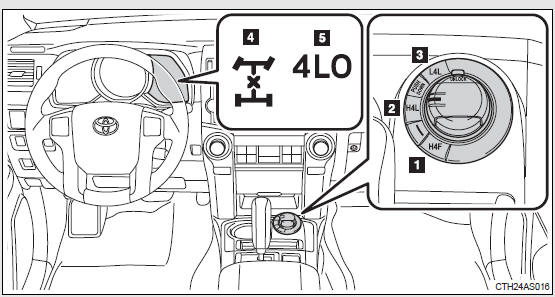
1. H4F (high speed position)
Use this for normal driving on dry hard-surfaced roads. This position gives greater economy, quietest ride and least wear.
2. H4L (high speed position, center differential locked)
Use this for driving only on tracks that permit the tires slide, like offroad, icy or snow-covered roads.
3. L4L (low speed position, center differential locked)
Use this for maximum power and traction. Use “L4L” for climbing or descending steep hills, off-road driving, and hard pulling in sand, mud or deep snow.
4. Center differential lock indicator
5. Low speed four-wheel drive indicator
Shifting between H4F and H4L
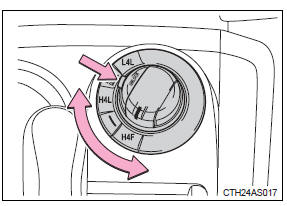
Push the “UNLOCK” button and turn the four-wheel drive control switch to H4L or H4F.
This can be done at any speed.
The center differential lock indicator will turn on (H4L) or go off (H4F).
Shifting between H4L and L4L
Shifting from H4L to L4L
Stop the vehicle completely and
continue to depress the brake pedal.
Shift the shift lever to N.
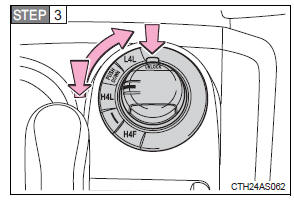
Push the “UNLOCK” button and then push and turn the fourwheel drive control switch to L4L.
Maintain this condition until the low speed four-wheel drive indicator turns on.
Shifting from L4L to H4L
Stop the vehicle completely and
continue to depress the brake pedal.
Shift the shift lever to N.
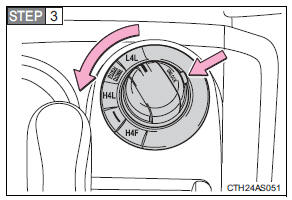
Push the “UNLOCK” button and turn the four-wheel drive control switch to H4L.
Maintain this condition until the low speed four-wheel drive indicator goes off.
The four-wheel drive control switch can be operated when
The “ENGINE START STOP” switch is in IGNITION ON mode.
When the four-wheel drive control switch is turned to L4L
VSC and TRAC are automatically turned off.
If the center differential lock indicator flashes
Locking or unlocking of the center differential is not complete. Drive straight ahead while accelerating or decelerating, or drive in reverse.
If the center differential lock indicator flashes and a buzzer sounds
Locking of the center differential is not complete. Stop the wheels from slipping or spinning and, if the indicator still flashes, operate the four-wheel drive control switch again.
If the low speed four-wheel drive indicator continues to flash
The transfer mode may not successfully change. Operate the four-wheel drive control switch again.
If the low speed four-wheel drive indicator continues to flash and a buzzer sounds
The shift lever is not in N and/or the vehicle is moving. Stop the vehicle completely, shift the shift lever to N and make sure that the indicator stops flashing.
If the low speed four-wheel drive indicator or the center differential
lock indicator flashes rapidly
There may be a malfunction in the four-wheel drive system. Have the vehicle inspected by your Toyota dealer immediately.
CAUTION
Operating the four-wheel drive control switch
Never operate the four-wheel drive control switch if the wheels have lost traction. Doing so may cause an accident resulting in death or serious injury.
Stop the wheels from slipping or spinning before operating the switch.
NOTICE
To prevent damage to the center differential
• For normal driving on dry and hard surface roads, unlock the center differential.
• Unlock the center differential after the wheels are out of the ditch or off the slippery or bumpy surface.
• Do not lock or unlock the center differential when the vehicle is turning or when its wheels are spinning freely off the ground.
Active traction control system
The active traction control system automatically helps prevent the spinning of 4 wheels when the vehicle is started or accelerated on slippery road surfaces.
System operation
 Part-time 4WD models:
Stop the vehicle, shift the shift lever to N and shift the frontwheel drive control lever into L4.
Full-time 4WD models:
Stop the vehicle, shift the shift lever to N and then push and turn the four-wheel drive control switch to L4L.
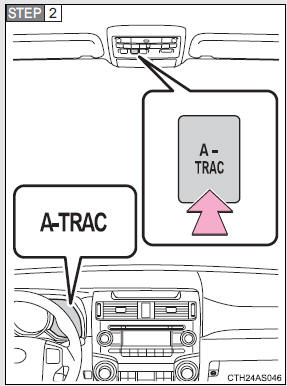
Press the “A-TRAC” switch to activate the system.
At this time, the “A-TRAC” indicator will come on.
To cancel the system, push the switch again.
When the active traction control system is operating
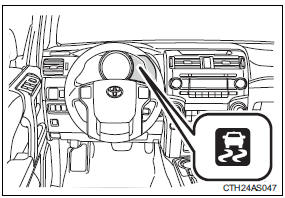
If all wheels spin, the slip indicator flashes to indicate that the active traction control system has been engaged.
When the rear differential is locked (vehicles with a rear differential lock system)
The active traction control system is activated only when vehicle speed is less than 4 mph (6 km/h).
Sounds and vibrations caused by the active traction control system
• A sound may be heard from the engine compartment when the engine is started or just after the vehicle begins to move. This sound does not indicate that a malfunction has occurred in the system.
• Vibrations may be felt through the vehicle body and steering. This may occur when the system is operating.
If the brake system overheats
The system will cease operation and a buzzer will sound to alert the driver.
At this time, the “A-TRAC” indicator will go off and the “TRAC OFF” indicator will come on. Stop the vehicle in a safe place. (There is no problem with continuing normal driving.) The system will be automatically restored after a short time.
CAUTION
The active traction control system may not operate effectively when
Directional control and power may not be achievable while driving on slippery road surfaces, even if the active traction control system is operating.
Do not drive the vehicle in conditions where stability and power may be lost.
AUTO LSD system (2WD models)
The AUTO LSD system aids traction by using the traction control system to control engine performance and braking when one of the rear wheels begins to spin.
The system should be used only when wheel spinning occurs in a ditch or rough surface.
System operation
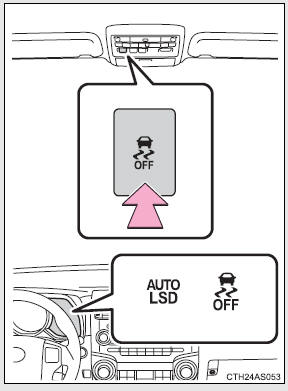
Press the VSC off switch to turn on the system.
At this time, the “AUTO LSD” and VSC off indicators will come on.
To turn off the system, press the switch again.
When the AUTO LSD system is operating
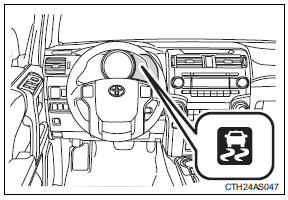
If the rear wheels spin, the slip indicator flashes to indicate that the AUTO LSD system has controlled the spinning of the rear wheels.
If the engine is turned off and restarted
The AUTO LSD system and the indicators are automatically turned off.
If the brake system overheats
The system will cease operation and a buzzer will sound to alert the driver.
At this time, the “AUTO LSD” indicator will flash and the “TRAC OFF” indicator will come on. Stop the vehicle in a safe place. (There is no problem with continuing normal driving.)
The system will be automatically restored after a short time.
CAUTION
To avoid an accident
• Do not use the AUTO LSD system in conditions other when wheel spinning occurs in a ditch or rough surfaces.
A much greater steering effort and more careful cornering control will be required.
• Do not drive with the AUTO LSD system continuously turned on.
NOTICE
Activating while driving
Never activate the AUTO LSD system if the wheel is slipping.
Stop the slipping or spinning before activating.
Rear differential lock system
The rear differential lock system is provided for use only when wheel spinning occurs in a ditch or on a slippery or rugged surface.
The rear differential lock system is effective in case one of the rear wheels is spinning.
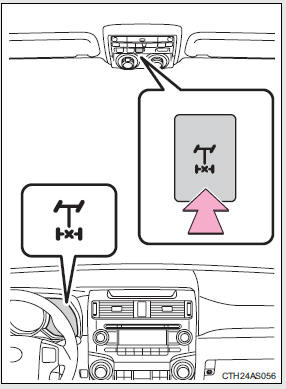
Press the switch to lock the rear differential.
At this time, the rear differential lock indicator will flash. Wait a few seconds for the system to complete operation. After the rear differential is locked, the indicator will stop flashing and remain on.
To unlock the rear differential, press the switch again.
Using the rear differential lock system
 Before using the rear
differential lock system: Stop the vehicle, shift the shift lever to N and shift the frontwheel drive control lever into L4 to see if this is sufficient. If this has no effect, additionally use the rear differential lock system.
 Be sure the wheels have stopped
spinning.
 Press the rear differential lock
switch.
 Gently depress the accelerator
pedal.
After the rear differential is locked, the indicator will come on.
Unlock the rear differential as soon as the vehicle moves.
To unlock the rear differential, press the switch again.
Locking the rear differential
The following systems do not operate when the rear differential is locked. It is normal operation for the ABS warning light and VSC off indicator to be on at this time.
• ABS
• Multi Terrain ABS
• Brake assist system
• VSC
• Hill-start assist control
The rear differential lock is disengaged when
The front-wheel drive control lever or switch is shifted to H2 or H4.
Never forget to turn off the switch after using this feature.
After unlocking the rear differential
Check that the indicator goes off.
If the rear differential lock indicator flashes rapidly
There may be a malfunction in the rear differential lock system. Have the vehicle inspected by your Toyota dealer immediately.
CAUTION
To avoid an accident
• Do not use the rear differential lock system except when wheel spinning occurs in a ditch or on a slippery or rugged surface. Large steering effort and careful cornering control will be required.
• Do not lock the rear differential until the wheels have stopped spinning.
Otherwise, the vehicle may move in an unexpected direction when the differential lock is engaged, resulting in an accident. This may also lead to possible damage to rear differential lock component parts.
• Do not drive over 5 mph (8 km/h) when the rear differential is locked.
• Do not keep driving with the rear differential lock switch on.
Downhill assist control system
With the downhill assist control system, the vehicle is able to descend a steep hill while maintaining a constant low speed of about 3 mph (5 km/h) without brake pedal operation.
Activating the system
The system will activate when
• The vehicle is traveling under 15 mph (25 km/h) with the accelerator and brake pedals released.
• Part-time 4WD models: The front-wheel drive control lever or switch is in L4.
Full-time 4WD models: The four-wheel drive control switch is in L4L.
• The rear differential is unlocked (if equipped).
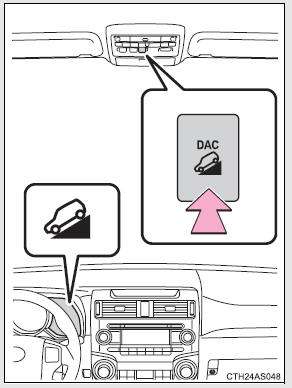
Press the “DAC” switch.
The downhill assist control system indicator will come on to indicate that the downhill assist control system is activated.
Pressing the switch again turns the system off.
While the downhill assist control system is operating
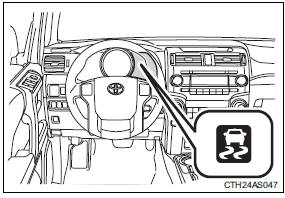
The slip indicator will flash to indicate that the downhill assist control system is operating, and the stop lights and high mounted stoplight will turn on.
Operating tips
The system will operate when the shift lever is in any position other than P.
However, to make effective use of the system it is recommended that the shift lever be shifted to the “2” or “1” range of S.
If the downhill assist control system indicator flashes
• In the following situations, the indicator flashes and the system will not operate:
• The transfer mode is not in L4 (part-time 4WD models) or L4L (full-time 4WD models).
• The rear differential is locked.
• The brake system overheats.
The system will cease operation and a buzzer will sound to alert the driver. At this time, the “TRAC OFF” indicator will come on. Stop the vehicle in a safe place. Refrain from using the system until the indicator stops flashing and stays on. (There is no problem with continuing normal driving.)
• In the following situations, the indicator flashes to alert the driver, but the system will still operate:
• The shift lever is in N. (Engine braking will not occur.)
• The “DAC” switch is turned off while the system is operating.
The system will gradually ceases operation. The indicator will flash during operation, and then go off when the system is fully off.
System malfunction
In case of a system malfunction, the following may occur:
• The downhill assist control system indicator flashes in a situation other than those listed above.
• The downhill assist control system indicator does not come on when the engine switch is turned to the “ON” position (vehicles without a smart key system) or the “ENGINE START STOP” switch is turned to IGNITION ON mode (vehicles with a smart key system).
Have your vehicle inspected by your Toyota dealer.
CAUTION
Conditions which may affect the downhill assist control system operation
• Do not rely too heavily on the downhill assist control system. On extremely steep inclines, icy surfaces or muddy roads, the vehicle may slip and the system may not be able to maintain the constant low vehicle speed of about 3 mph (5 km/h), leading to an accident causing death or serious injury.
• Do not shift the shift lever to R while driving forward, or to D while driving backward. Doing so may cause the wheels to lock up, leading to an accident causing death or serious injury. In addition, excessive stress will be applied to the automatic transmission, possibly resulting in damage.
Crawl Control
Allows travel on extremely rough off-road surfaces at a fixed low speed without pressing the accelerator or brake pedal. Minimizes loss of traction or vehicle slip when driving on slippery road surfaces, allowing for stable driving.
Crawl Control switch
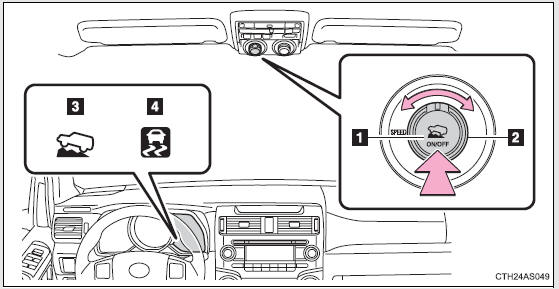
1. “ON/OFF” switch The Crawl Control indicator comes on and the slip indicator flashes when operating.
2. Speed selector dial Turn the dial clockwise to increase the speed and counterclockwise to decrease the speed.
3. Crawl Control indicator 4. Slip indicator
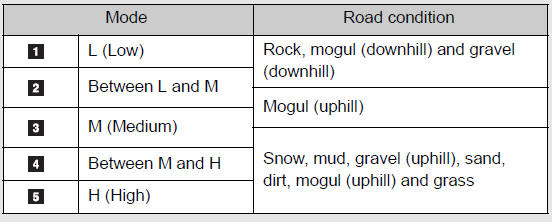
Speed modes
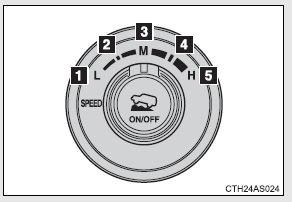
The following table shows some typical terrains and the recommended speed modes.
Crawl Control can be operated when
• The engine is running.
• The shift lever is in any position other than P or N.
• The front-wheel drive control lever or switch is in L4.
• The driver’s door is closed.
Crawl Control is temporarily canceled when
Vehicle speed exceeds 15 mph (25 km/h). The Crawl Control indicator flashes until the vehicle speed is reduced.
Automatic system cancelation
In the following situations, the system will cease operation and a buzzer will sound to alert the driver. The Crawl Control indicator will flash until the system is turned off completely.
• When the shift lever is shifted to P or N
• When the front-wheel drive control lever or switch is shifted to H4
• When the driver’s door is opened
• When the system is malfunctioning
• When the brake system overheats
Stop the vehicle in a safe place. (There is no problem with continuing normal driving.)
• When the automatic transmission system overheats
Stop the vehicle in a safe place until the automatic transmission fluid temperature warning light goes off.
Sounds and vibrations caused by the Crawl Control system
• A sound may be heard from the engine compartment when the engine is started or just after the vehicle begins to move. This sound does not indicate that a malfunction has occurred in Crawl Control system.
• Either of the following conditions may occur when the Crawl Control system is operating. None of these indicates that a malfunction has occurred.
• Vibrations may be felt through the vehicle body and steering.
• A motor sound may be heard after the vehicle comes to a stop.
CAUTION
When using Crawl Control
• Do not overly rely on Crawl Control. This function does not extend the vehicle’s performance limitations. Always check the terrain thoroughly and drive safely.
• The recommended speed modes for the listed terrains are only a reference. The selected mode may not be suitable to actual off-road conditions due to factors such as the type or unevenness of the terrain or the degree of incline. Check the actual terrain thoroughly and drive safely.
• After activating Crawl Control, make sure that the Crawl Control indicator comes on. If the indicator flashes, the vehicle is not under system control.
Conditions under which the system may not operate correctly
When driving on the following surfaces, the system may not be able to maintain a fixed low speed, which may result in an accident:
• Extremely steep inclines
• Extremely uneven surfaces
• Snow-covered roads, or other slippery surfaces
Multi-terrain Select
The Multi-terrain Select system has 4 terrain modes. When a terrain mode is selected in accordance with terrain conditions, engine power and active traction control system is controlled to enhance off-road drivability.
Additionally, guidance messages such as transfer mode selection advice are displayed on the accessory meter to assist the driver in operating the vehicle.
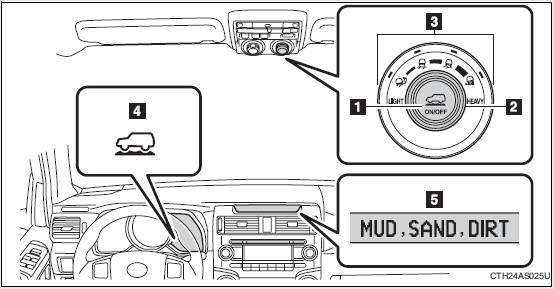
1. “ON/OFF” switch 2. Mode selector dial
3. Mode indicators
4. Multi-terrain Select indicator 5. Accessory meter
Multi-terrain Select modes
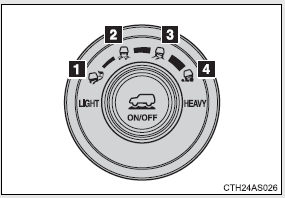
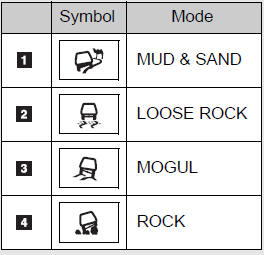
The following table shows some typical terrains and the recommended Multi-terrain Select modes.
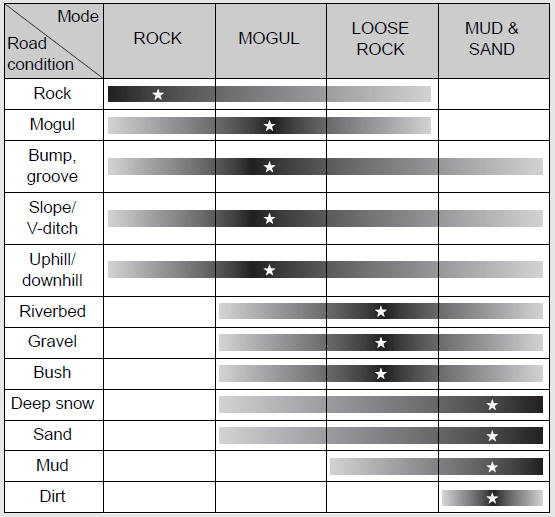
Multi-terrain Select can be activated when
• Vehicle speed is approximately 7 mph (12 km/h) or less.
• MUD & SAND: The front-wheel drive control lever or switch is in L4 or H4.
LOOSE ROCK, MOGUL and ROCK: The front-wheel drive control lever or switch is in L4.
• Crawl Control is not operating.
Selecting modes
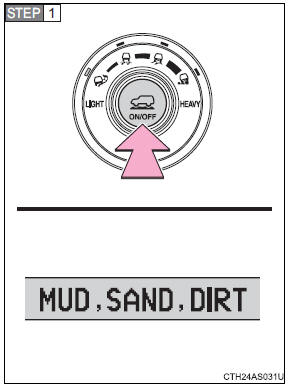
Press the “ON/OFF” switch.
All the mode indicators will come on and then go off except the indicator for the present mode. The applicable road conditions will be displayed on the accessory meter.
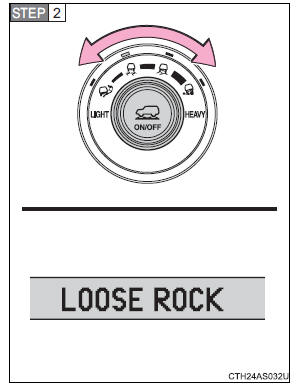
Turn the dial to select the desired mode.
The indicator of the selected mode will come on and the applicable road conditions will be displayed on the accessory meter.
If the mode indicator flashes, Multi-terrain Select cannot be operated. Follow the instructions displayed on the accessory meter and check that the mode indicator stops flashing.
Messages displayed on the accessory meter
Depending on switch operation, one of the following messages may appear on the accessory meter to provide guidance on transfer mode selection etc:
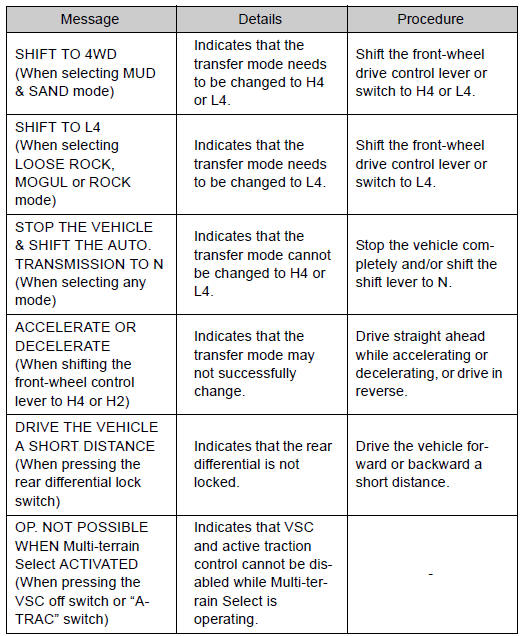
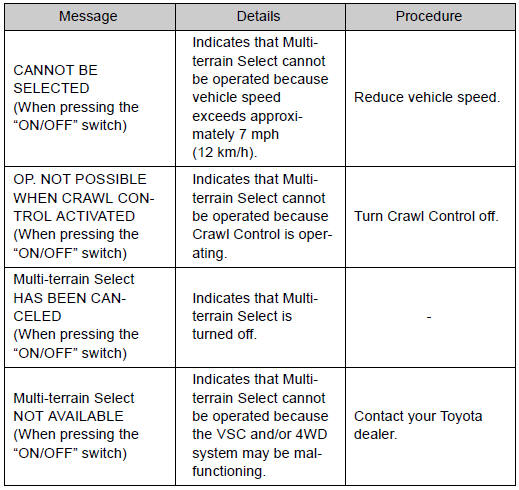
Multi-terrain Select is temporarily canceled when
The front-wheel drive control lever or switch is shifted to H4 when Multi-terrain Select is in ROCK, MOGUL or LOOSE ROCK mode. The mode indicator will flash until the lever is shifted back to L4.
If the Multi-terrain Select indicator continues to flash
This may indicate a malfunction in the Multi-terrain Select system.
In this case, Multi-terrain Select is automatically canceled. Have your vehicle inspected by your Toyota dealer.
If the Multi-terrain Select indicator goes off while Multi-terrain Select is operating
• One of the vehicle systems related to Multi-terrain Select may be malfunctioning.
Have your vehicle inspected by your Toyota dealer.
• The brake actuator may be at risk of overheating.
A buzzer will sound, the “A-TRAC” indicator will go off and the “TRAC OFF” indicator will come on. Stop the vehicle in a safe place. Refrain from using Multi-terrain Select until the “A-TRAC” indicator comes back on and the “TRAC OFF” indicator goes off. (The vehicle can still be driven, even if Multi-terrain Select is inoperative.)
In the above cases, Multi-terrain Select is automatically canceled.
CAUTION
Before driving
To avoid an accident, observe the precautions relating to off-road driving.
When using Multi-terrain Select
• Do not use the Multi-terrain Select system for normal (on-road) driving.
The Multi-terrain Select system is designed for off-road use only.
• Do not overly rely on Multi-terrain Select. This function does not extend the vehicle’s performance limitations. Always check the terrain thoroughly and drive safely.
• The recommended modes for the listed terrains are only a reference.
The selected mode may not be suitable to actual off-road conditions due to factors such as the type or unevenness of the terrain or the degree of incline. Check the actual terrain thoroughly and drive safely.
• After selecting a mode, make sure that the Multi-terrain Select indicator and the selected mode indicator come on. If any related indicator flashes, the vehicle is not under Multi-terrain Select control.
Driving assist systems
To help enhance driving safety and performance, the following systems operate automatically in response to various driving situations.
Be aware, however, that these systems are supplementary and should not be relied upon too heavily when operating the vehicle.
ABS (Anti-lock Brake System)
Helps to prevent wheel lock when the brakes are applied suddenly, or if the brakes are applied while driving on a slippery road surface
Multi Terrain ABS (Anti-lock Brake System) (if equipped)
Helps to prevent wheel lock when the brakes are applied suddenly, or if the brakes are applied while driving on a slippery road surface, or in offroad conditions (such as rough roads, sand and mud) The Multi Terrain ABS operates in synchronization with the Multi-terrain Select.
Brake assist
Generates an increased level of braking force after the brake pedal is depressed when the system detects a panic stop situation
VSC (Vehicle Stability Control)
Helps the driver to control skidding when swerving suddenly or turning on slippery road surfaces
TRAC (Traction Control)
Helps to maintain drive power and prevent the drive wheels from spinning when starting the vehicle or accelerating on slippery roads
Hill-start assist control (if equippe
d)
Helps to prevent the vehicle from rolling backward when starting on an incline or slippery slope
LSD (Limited Slip Differential) (if equipped)
Transfers drive power to the rear tires when front tires spin, and vice versa, in order to improve traction
KDSS (Kinetic Dynamic Suspension System) (if equipped)
Enhances ride comfort and handling response by using a hydraulic control system to control the suspension stabilizer bars in response to road surface and driving conditions during cornering or off-road driving
When the TRAC/VSC systems are operating (2WD models)
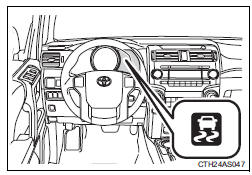
If the vehicle is in danger of slipping or if any of the drive wheels spins, the slip indicator flashes to indicate that the TRAC/VSC systems are operating.
When the TRAC/VSC/hill-start assist control systems are operating (4WD models)
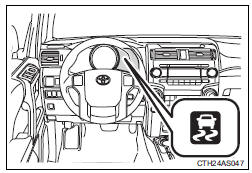
If the vehicle is in danger of slipping or rolling backward when starting on an incline, or if any of the drive wheels spins, the slip indicator flashes to indicate that the TRAC/VSC/hill-start assist control systems are operating.
The stop lights and high mounted stoplight turn on and a buzzer (intermittent) sounds when the hill-start assist control system is operating.
Disabling the TRAC/VSC systems (2WD models)
If the vehicle gets stuck in fresh snow or mud, the TRAC/VSC systems may reduce power from the engine to the wheels. You may need to turn the system off to enable you to rock the vehicle in order to free it.
Turning off the TRAC system only (turning on the AUTO LSD system [])
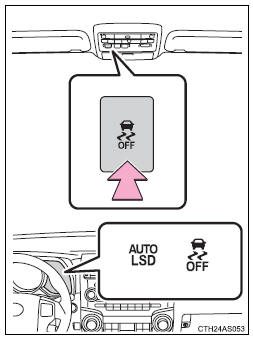
To turn the TRAC system off, quickly press and release the switch.
The VSC off and “AUTO LSD” indicators will come on.
Press the switch again to turn the system back on.
Turning off both TRAC and VSC systems
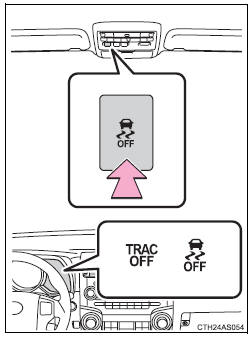
To turn the TRAC and VSC systems off, press and hold the switch for more than 3 seconds while the vehicle is stopped.
The “TRAC OFF” and VSC off indicators will come on.
Press the switch again to turn the systems back on.
Disabling the TRAC/VSC systems (4WD models)
If the vehicle gets stuck in fresh snow or mud, the TRAC/VSC systems may reduce power from the engine to the wheels. You may need to turn the system off to enable you to rock the vehicle in order to free it.
Turning off the TRAC system only
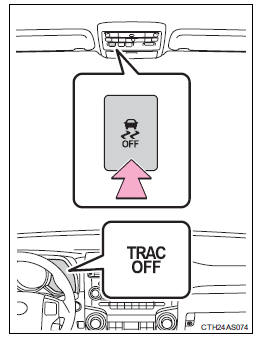
To turn the TRAC system off, quickly press and release the switch.
The “TRAC OFF” indicator will come on.
Press the switch again to turn the system back on.
Turning off both TRAC and VSC systems
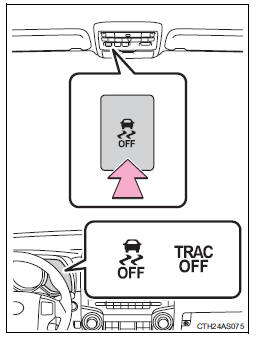
To turn the TRAC and VSC systems off, press and hold the switch for more than 3 seconds while the vehicle is stopped.
The “TRAC OFF” and VSC off indicators will come on.
Press the switch again to turn the systems back on.
When the “TRAC OFF” indicator light comes on even if the VSC off switch has not been pressed
TRAC, hill-start assist control, downhill assist control and Crawl Control cannot be operated. Contact your Toyota dealer.
Hill-start assist control operation conditions
• The shift lever is in D or S.
• The brake pedal is not depressed.
• The rear differential is unlocked (if equipped).
If the brake system overheats
The hill-start assist control will cease operation and a buzzer will sound to alert the driver. At this time, the “TRAC OFF” indicator will come on. Stop the vehicle in a safe place. (There is no problem with continuing with normal driving.)
The system will be automatically restored after a short time.
Sounds and vibrations caused by the ABS, Multi Terrain ABS (if equipped), brake assist, VSC, TRAC and hill-start assist control (if equipped) systems
• A sound may be heard from the engine compartment when the engine is started or just after the vehicle begins to move. This sound does not indicate that a malfunction has occurred in any of these systems.
• Any of the following conditions may occur when the above systems are operating. None of these indicates that a malfunction has occurred.
• Vibrations may be felt through the vehicle body and steering.
• A motor sound may be heard after the vehicle comes to a stop.
• The brake pedal may pulsate slightly after the ABS or Multi Terrain ABS is activated.
• The brake pedal may move down slightly after the ABS or Multi Terrain ABS is activated.
Reactivation of the TRAC/VSC systems after turning off the engine
Turning off the engine after turning off the TRAC/VSC systems will automatically reactivate them.
Reactivation of the VSC system linked to vehicle speed (2WD models)
When the TRAC system is turned off and the AUTO LSD system is turned on, the VSC system will turn on when vehicle speed increases. However, when the TRAC and VSC systems are turned off, the systems will not turn on even when vehicle speed increases.
Reactivation of the TRAC/VSC systems (4WD models)
If the TRAC/VSC systems are turned off, the systems will not turn on even when vehicle speed increases.
CAUTION
The ABS and Multi Terrain ABS do not operate effectively when
• The limits of tire gripping performance have been exceeded (such as excessively worn tires on a snow covered road).
• The vehicle hydroplanes while driving at high speed on wet or slick roads.
Stopping distance when the ABS or Multi Terrain ABS is operating may exceed that of normal conditions
The ABS and Multi Terrain ABS are not designed to shorten the vehicle’s stopping distance. Always maintain a safe distance from the vehicle in front of you, especially in the following situations:
• When driving on dirt, gravel or snow-covered roads
• When driving with tire chains
• When driving over bumps in the road
• When driving over roads with potholes or roads with uneven surfaces
TRAC may not operate effectively when
Directional control and power may not be achievable while driving on slippery road surfaces, even if the TRAC system is operating.
Do not drive the vehicle in conditions where stability and power may be lost.
Hill-start assist control does not operate effectively wh
en
Do not overly rely on the hill-start assist control. The hill-start assist control may not operate effectively on steep inclines and roads covered with ice.
CAUTION
When the VSC is activated
The slip indicator light flashes. Always drive carefully.
Reckless driving may cause an accident. Exercise particular care when the indicator light flashes.
When TRAC/VSC systems are turned off
Be especially careful and drive at a speed appropriate to the road conditions.
As these are systems to ensure vehicle stability and driving force, do not turn the TRAC/VSC systems off unless necessary.
Replacing tires
Make sure that all tires are of the specified size, brand, tread pattern and total load capacity. In addition, make sure that the tires are inflated to the recommended tire inflation pressure level.
The ABS, Multi Terrain ABS and VSC will not function correctly if different tires are fitted on the vehicle.
Contact your Toyota dealer for further information when replacing tires or wheels.
Handling of tires and the suspension
Using tires with any kind of problem or modifying the suspension will affect the driving assist systems, and may cause a system to malfunction.
Download Manual