Using the hands-free phone system (for cellular phone)
Hands-free phone system (for cellular phone) features
This system supports Bluetooth®, which allows you to make or receive calls without using cables to connect a cellular phone and the system, and without operating the cellular phone.
Owners of models equipped with a Display Audio system should refer to the “Display Audio System Owner's Manual”.
Owners of models equipped with a navigation system should refer to the “Navigation System Owner's Manual”.
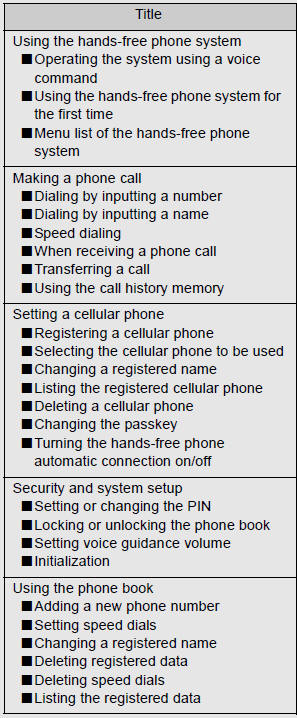
Hands-free system quick guide
 Setting a cellular phone.
 Adding an entry to the phonebook
(Up to 20 names can be stored).
 Dialing by inputting a name.
Conditions under which the system will not operate
• If using a cellular phone that does not support Bluetooth®
• If the cellular phone is switched off
• If you are outside service range
• If the cellular phone is not connected
• If the cellular phone's battery is low
• If the cellular phone is behind the seat or in the glove box or console box
• If metal is covering or touching the cellular phone
When transferring ownership of the vehicle
Be sure to initialize the system to prevent personal data from being improperly accessed.
Required profiles for the cellular phone
• HFP (Hands Free Profile) Ver. 1.0
• OPP (Object Push Profile) Ver. 1.1
About Bluetooth®

Bluetooth is a registered trademark of Bluetooth SIG. Inc.
Certification for the hands-free phone system
FCC ID: AJDK025 AJDK032 IC ID: 775E-K025 775E-K032 MADE IN JAPAN This device complies with Part 15 of FCC Rules and Industry Canada licence-exempt RSS standard(s). Operation is subject to the following two conditions: (1) this device may not cause interference, and (2) this device must accept any interference, including interference that may cause undesired operation of this device.
Le présent appareil est conforme aux la partie 15 des règles de la FCC et CNR d’Industrie Canada applicables aux appareils radio exempts de licence. L’exploitation est autorisée aux deux conditions suivantes: (1) l’appareil ne doit pas produire de brouillage, et (2) l’utilisateur de l’appareil doit accepter tout brouillage radioélectrique subi, même si le brouillage est susceptible d’en compromettre le fonctionnement.
CAUTION
FCC WARNING
Changes or modifications not expressly approved by the party responsible for compliance could void the user's authority to operate the equipment.
Radio Frequency Radiation Exposure. This equipment complies with FCC/ IC radiation exposure limits set forth for an uncontrolled environment and meets the FCC radio frequency (RF) Exposure Guidelines in Supplement C to OET65 and RSS-102 of the IC radio frequency (RF) Exposure rules. This equipment has very low levels of RF energy that it deemed to comply without maximum permissive exposure evaluation (MPE). But it is desirable that it should be installed and operated keeping the radiator at least 20 cm or more away from person’s body (excluding extremities: hands, wrists, feet and ankles).
Cet équipement est conforme aux limites d’exposition aux rayonnements énoncées pour un environnement non contrôlé et respecte les règles les radioélectriques (RF) de la FCC lignes directrices d’exposition dans le Supplément C à OET65 et d’exposition aux fréquences radioélectriques (RF) CNR-102 de l’IC. Cet équipement émet une énergie RF très faible qui est considérée conforme sans évaluation de l’exposition maximale autorisée. Cependant, cet équipement doit être installé et utilisé en gardant une distance de 20 cm ou plus entre le dispositif rayonnant et le corps (à l’exception des extrémités: mains, poignets, pieds et chevilles).
This transmitter must not be co-located or operated in conjunction with any other antenna or transmitter.
Caution while driving
Do not use a cellular phone, or connect the Bluetooth® phone.
NOTICE
To prevent damage to a cellular phone
Do not leave a cellular phone in the vehicle. The temperature inside may become high resulting in damage to the phone.
Using the hands-free phone system (for cellular phone)
Audio unit
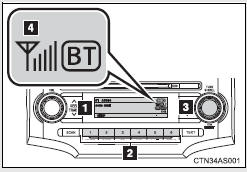
1. Display A message, name, phone number, etc. is displayed.
Lower-case characters and special characters, such as an umlaut, cannot be displayed.
2. Selects speed dials 3. Selects items such as menu or number Turn: Selects an item Press: Inputs the selected item 4. Bluetooth® connection condition and reception level If “BT” is not displayed, the hands-free phone system cannot be used.
Steering wheel switches
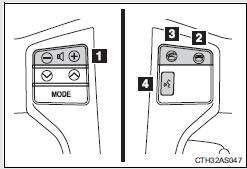
1. Volume The voice guidance volume cannot be adjusted using this button.
2. On-hook switch Turns the hands-free system off/ends a call/refuses a call 3. Off-hook switch Turns the hands-free system on/starts a call 4. Talk switch Turns the voice command system on (press)/turns the voice command system off (press and hold)
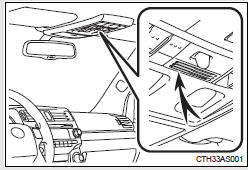
Microphone
Operating the system using a voice command
By following voice guidance instructions output from the speaker, voice commands enable the operation of the hands-free phone system without the need to check the display or operate  .
.
Operation procedure when using a voice command
Press the talk switch and follow voice guidance instructions.
Auxiliary commands when using a voice command
The following auxiliary commands can be used when operating the system using a voice command:
“Cancel”: Exits the hands-free phone system
“Repeat”: Repeats the previous voice guidance instruction
“Go back”: Returns to the previous procedure
“Help”: Reads aloud the function summary if a help comment is registered for the selected function.
Using the hands-free phone system for the first time
Before using the hands-free phone system, it is necessary to register a cellular phone in the system. The phone registration mode will be entered automatically when starting the system with no cellular phone registered. Follow the procedure below to register a cellular phone:
Press the off-hook switch or the
talk switch.
The introductory guidance and phone name registration instructions are heard.
Select “Pair Phone” using a voice
command or  .
.
Register a phone name by either
of the following methods.
a. Select “Record Name” using  ,
,
and say a name to be registered.
b. Press the talk switch and say a name to be registered.
A voice guidance instruction to confirm the input is heard.
 Select “Confirm” using a voice
command or  .
.
Registration to the hands-free phone system only
 Select “Phone Only” using a
voice command or  .
.
Registration to the hands-free phone system and Bluetooth® audio system at the same time
Select “Int. Audio (Internal
audio)” using a voice command or  .
.
 Select “Confirm” using a voice
command or  .
.
A passkey is displayed and heard, and a voice guidance instruction for inputting the passkey into the cellular phone is heard.
 Input the passkey into the
cellular phone.
Refer to the manual that comes with the cellular phone for the operation of the phone.
Guidance for registration completion is heard.
Menu list of the hands-free phone system
Normal operation
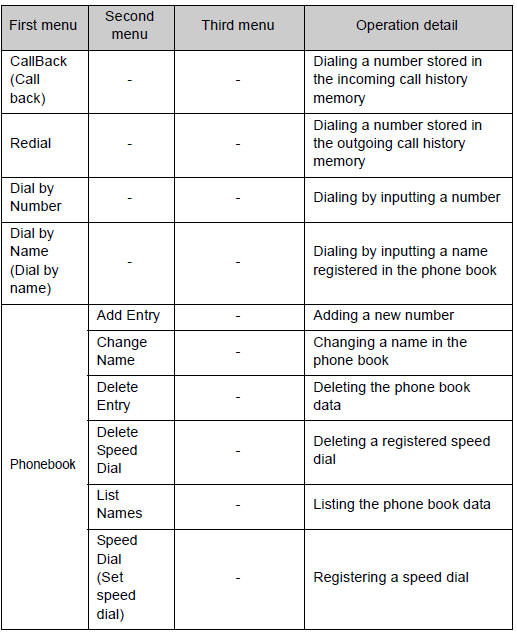
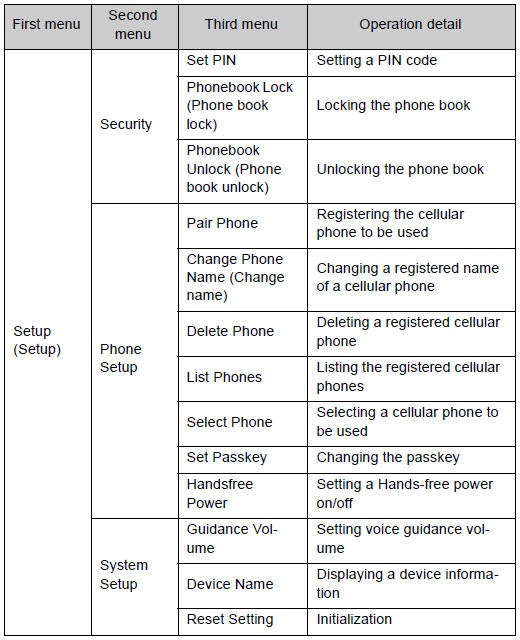
Using a short cut key
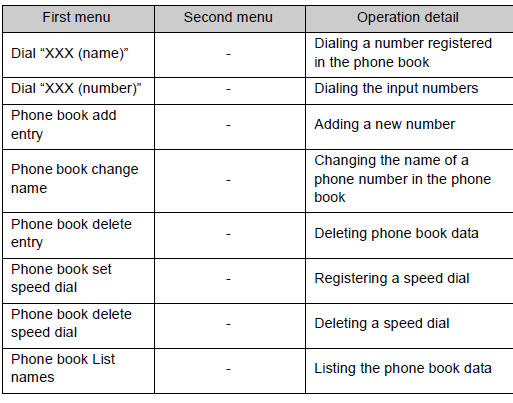
Automatic volume adjustment
When vehicle speed reaches 50 mph (80 km/h) or more, the volume automatically increases. The volume returns to the previous volume setting when vehicle speed drops to 43 mph (70 km/h) or less.
When using a voice command
For numbers, say a combination of single digits from zero to nine, # (pound), * (star), and + (plus).
Say a command correctly and clearly.
Situations that the system may not recognize your voice
• When driving on a rough road
• When driving at high speeds
• When air is blowing out of the vents onto the microphone
• When the air conditioning fan emits a loud noise
Operations that cannot be performed while driving
• Operating the system with
• Registering a cellular phone to the system
Changing the passkey
Making a phone call
Making a phone call
• Dialing by inputting a number
“Dial by Number”
• Dialing by inputting a name
“Dial by Name (Dial by name)”
• Speed dialing
• Dialing a number stored in the outgoing history memory
“Redial”
• Dialing a number stored in the incoming history memory
“CallBack (Callback)”
Receiving a phone call
• Answering a phone call
• Refusing a phone call
Transferring a phone call
Using the call history memory
• Dialing
• Storing data in the phone book
• Deleting
Dialing by inputting a number
Press the talk switch and say
“Dial by number”.
Press the talk switch and say the
phone number.
Dial by one of the following
methods:
a. Press the off-hook switch.
b. Press the talk switch and say “Dial”.
c. Select “Dial” using  .
.
Dialing by inputting a name
Press the talk switch and say
“Dial by name”.
Select a registered name to be
input by either of the following methods:
a. Press the talk switch and say a registered name.
b. Press the talk switch and say “List names”. Press the talk switch while the desired name is being read aloud.
Dial by one of the following
methods:
a. Press the off-hook switch.
b. Press the talk switch and say “Dial”.
c. Select “Dial” using  .
.
Speed dialing
Press the off-hook switch.
Press the preset button to which
the desired number is registered.
Press the off-hook switch.
When receiving a phone call
Answering a phone call
Press the off-hook switch.
Refusing a phone call
Press the on-hook switch.
Transferring a phone call
A call can be transferred between the cellular phone and system while dialing, receiving a call, or during a call. Use one of the following methods:
a. Operate the cellular phone.
Refer to the manual that comes with the cellular phone for the operation of the phone.
b. Press the off-hook switch*1.
c. Press the talk switch and say “Call transfer”*2.
*1: This operation can be performed only when transferring a call from the cellular phone to the system during a call.
*2: While the vehicle is in motion, a call cannot be transferred from the system to the cellular phone. Also, this operation is invalid while dialing or receiving a call.
Using the call history memory
Follow the procedure below to use a number stored in the call history memory:
Press the talk switch and say
“Redial” (when using a number stored in the outgoing call history memory) or “Callback” (when using a number stored in the incoming call history memory).
Select the number by either of
the following methods:
a. Say “Previous” or “Go back” until the desired number is displayed.
b. Select the desired number using  .
.
The following operations can be performed:
Dialing: Press the off-hook switch or select “Dial” using a voice command or .
Storing the number in the phone book: Select “Store” using a voice command or .
Deleting: Select “Delete” using a voice command or .
Call history
Up to 5 numbers can be stored in each of the outgoing and incoming call history memories.
When talking on the phone
• Do not talk at the same time as the other party.
• Keep the volume of the incoming voice down. Otherwise, voice echo will increase.
Download Manual