Performance and Maintenance
The vehicle has a Traction Control System (TCS) that limits wheel spin and the StabiliTrak/Electronic Stability Control (ESC) system that assists with directional control of the vehicle in difficult driving conditions. Both systems come on automatically when the vehicle is started and begins to move.
 on the center stack.
The traction off light i displays in the instrument cluster. The
appropriate Driver Information Center (DIC) message displays.
 until i and
  illuminate
in the instrument cluster and the appropriate DIC message displays.
 again to turn on both systems.
StabiliTrak/ESC will automatically turn on if the vehicle exceeds 56 km/h (35 mph). Traction control will remain off.
See Traction Control/Electronic Stability Control 0 246.
This vehicle may have a Tire Pressure Monitor System (TPMS).

The low tire pressure warning light alerts to a significant loss in pressure of one of the vehicle's tires. If the warning light comes on, stop as soon as possible and inflate
the tires to the recommended pressure shown on the Tire and Loading Information label. See Vehicle Load Limits 0 211. The warning light will remain on until the tire pressure is corrected.
The low tire pressure warning light may come on in cool weather when the vehicle is first started, and then turn off as the vehicle is driven. This may be an early indicator that the tire pressures are getting low and the tires need to be inflated to the proper pressure.
The TPMS does not replace normal monthly tire maintenance. Maintain the correct tire pressures.
See Tire Pressure Monitor System
0 373.
Tire Fill Alert (If Equipped)
This feature provides visual and audible alerts outside the vehicle to help when inflating an underinflated tire to the recommended cold tire pressure. See “Tire Fill Alert (If Equipped)” under Tire Pressure Monitor Operation 0 374.
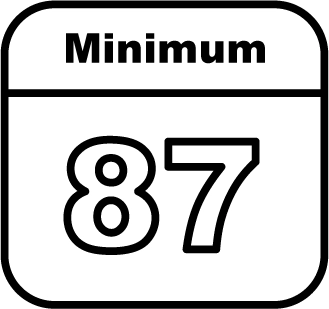
Regular Unleaded Fuel
Use only Regular 87 octane — (R
+M)/2 — or higher unleaded gasoline in your vehicle. TOP TIER Detergent Gasoline is recommended. Do not use gasoline with an octane rating lower as it will result in reduced performance and lower fuel economy. See Recommended Fuel (Except 6.2L V8 Engine) 0 275 or Recommended Fuel (6.2L
V8 Engine) 0 275.
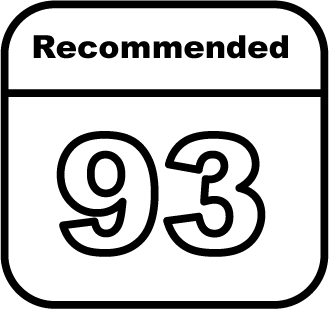
Premium Recommended
Use premium 93 octane — (R+M)/2
— unleaded gasoline in your vehicle. TOP TIER Detergent Gasoline is recommended. Unleaded gasoline with an octane rating as low as 87 may be used, but it will reduce performance and fuel economy. See Recommended Fuel (Except 6.2L V8 Engine) 0 275 or
Recommended Fuel (6.2L V8 Engine) 0 275.
For diesel vehicles, do not use gasoline. See “Fuel for Diesel Engines” in the Duramax diesel supplement.
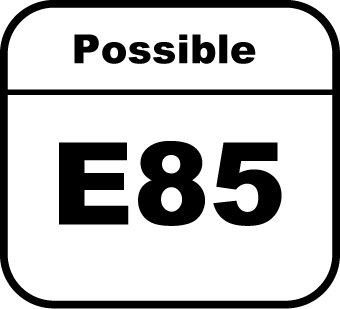
FlexFuel Possible
Certain models are compatible with E85 fuel. See E85 or FlexFuel
0 276.
The engine oil life system calculates engine oil life based on vehicle use and, on most vehicles, displays a DIC message when it is necessary to change the engine oil and filter. The oil life system should be reset to 100% only following an oil change.
Resetting the Oil Life System
To reset the engine oil life system:
The oil life will change to 100%.
The oil life system can also be reset as follows:
See Engine Oil Life System 0 327.
Driving habits can affect fuel mileage. Here are some driving tips to get the best fuel economy possible:
U.S.: 1-888-881-3302
TTY Users (U.S. Only):
1-888-889-2438
Canada: 1-800-268-6800
New GMC owners are automatically enrolled in the Roadside Assistance Program.
See Roadside Assistance Program
0 441.
Keys 31
Remote Keyless Entry (RKE) System 34
Remote Keyless Entry (RKE) System Operation (Keyless Access) 34
Remote Keyless Entry (RKE) System Operation (Key
Access) 42
Remote Vehicle Start 44
Door Locks 45
Power Door Locks 46
Delayed Locking 46
Automatic Door Locks 47
Lockout Protection 47
Safety Locks 47
Tailgate 48
Power Assist Steps 54
Vehicle Security 55
Vehicle Alarm System 55
Immobilizer 56
Immobilizer Operation 56
Convex Mirrors 57
Manual Mirrors 57
Power Mirrors 58
Folding Mirrors 58
Heated Mirrors 59
Automatic Dimming Mirror 59
Blind Spot Mirrors 59
Reverse Tilt Mirrors 60
Interior Rearview Mirrors 61
Manual Rearview Mirror 61
Automatic Dimming Rearview Mirror 61
Rear Camera Mirror 61
Windows 63
Manual Windows 64
Power Windows 64
Rear Windows 66
Sun Visors 66
Sunroof 66
Download Manual