Brakes
This vehicle has an Antilock Brake System (ABS), an advanced electronic braking system that helps prevent a braking skid.

If there is a problem with ABS, this warning light stays on. See Antilock Brake System (ABS) Warning Light 0 155.
If driving safely on a wet road and it becomes necessary to slam on the brakes and continue braking to avoid a sudden obstacle, a computer senses the wheels are slowing down. If one of the wheels is about to stop rolling, the computer will separately work the brakes at each wheel.
ABS can change the brake pressure to each wheel, as required, faster than any driver could. This can help you steer around the obstacle while braking hard.
As the brakes are applied, the computer keeps receiving updates on wheel speed and controls braking pressure accordingly.
Remember: ABS does not change the time needed to get a foot up to the brake pedal or always decrease stopping distance. If you get too close to the vehicle in front of you, there will not be enough time to apply the brakes if that vehicle suddenly slows or stops. Always leave enough room up ahead to stop, even with ABS.
Do not pump the brakes. Just hold the brake pedal down firmly and let ABS work. You may hear noise or feel vibration while the ABS is operating.
The Traction Control System (TCS)/ StabiliTrak indicator light will flash to indicate that ABS is active. When
ABS is active, it may indicate that road surfaces are slippery. Braking sooner may be required for driving conditions.
ABS allows you to steer and brake at the same time. In many emergencies, steering can help more than even the very best braking.
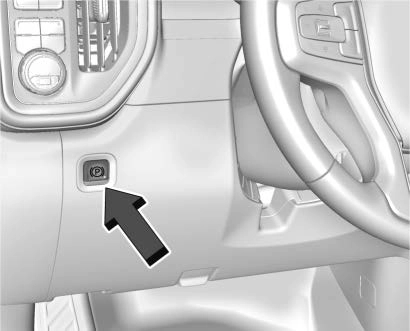
The vehicle has an Electric Parking Brake (EPB). The EPB can always be activated, even if the ignition is
off. To prevent draining the battery, avoid repeated cycles of the EPB when the engine is not running.
The system has a Y or PARK Electric Parking Brake light, and a 8 Service Parking Brake light. See Electric Parking Brake Light 0 154 and
Service Electric Parking Brake Light
0 154. There are also parking brake-related Driver Information Center (DIC) messages.
Before leaving the vehicle, check for the Y or PARK light to ensure that the parking brake is applied.
To apply the EPB:
The Y or PARK light will flash and then stay on once the EPB is fully applied. If the Y or PARK light flashes continuously, then the EPB
is only partially applied or there is a problem with the EPB. A DIC message will display. Release the EPB and try to apply it again. If the light does not come on, or keeps flashing, have the vehicle serviced. Do not drive the vehicle if the Y or PARK light is flashing. See your dealer. See Electric Parking Brake Light 0 154.
If the 8 light is on, press the EPB switch and hold it. Continue to hold the switch until the Y or PARK light remains on. If the 8 light remains on, see your dealer.
If the EPB is applied while the vehicle is moving, the vehicle will decelerate as long as the switch is pressed. If the switch is pressed until the vehicle comes to a stop, the EPB will remain applied.
The vehicle may automatically apply the EPB in some situations when the vehicle is not moving. This is normal, and is done to periodically check the correct operation of the EPB system.
If the EPB fails to apply, block the rear wheels to prevent vehicle movement.
To release the EPB:
The EPB is released when the Y or PARK light is off.
If the 8 light is on, release the EPB by pressing and holding the EPB switch. Continue to hold the switch until the Y or PARK light is off.
If either light stays on after release is attempted, see your dealer.
The EPB will automatically release if the vehicle is running, placed into gear, and an attempt is made to drive away. Avoid rapid acceleration when the EPB is applied, to preserve parking brake lining life.
The Brake Assist feature assists in stopping or decreasing vehicle speed in emergency driving conditions. This feature uses the Electronic Brake Control Module (EBCM) which controls the hydraulic brake circuits to detect when the driver has quickly and forcefully
applied the brake pedal in an attempt to quickly stop or slow down the vehicle and to provide additional braking beyond a normal brake pedal apply. Minor noise during this time is normal and the brake pedal should be applied as the driving dictates. The Brake Assist feature will automatically disengage when the brake pedal is released or brake pedal pressure is quickly decreased.
This feature is designed to prevent the vehicle from rolling, either forward or rearward, during vehicle drive off. HSA will be automatically activated after the vehicle has come to a complete standstill on a grade. During the transition period between when the brake pedal is released and the accelerator pedal is pressed, HSA holds the braking pressure to ensure that there is no rolling. The brakes will automatically release when the accelerator pedal is applied. It will not activate if the vehicle is in a drive gear and facing downhill, or if the vehicle is facing uphill and in R (Reverse).
Download Manual