Parking Aids
Rear parking sensors detect objects behind your vehicle when in reverse (R).
Parking Aid Precautions
 WARNING: To help avoid personal injury, always use caution when in reverse (R) and when using the sensing system. WARNING: The system may not detect objects with surfaces that absorb reflection. Always drive with due care and attention. Failure to take care may result in a crash. WARNING: Traffic control systems, fluorescent lamps, inclement weather, air brakes, external motors and fans may affect the correct operation of the sensing system. This may cause reduced performance or false alerts. WARNING: The system may not detect small or moving objects, particularly those close to the ground. WARNING: The parking aid system can only assist you to detect objects when your vehicle is moving at parking speeds. To help avoid personal injury you must take care when using the parking aid system. WARNING: The system may not function if the sensor is blocked. WARNING: In cold and severe weather conditions the system may not function. Rain, snow and spray can all limit sensor performance. WARNING: If damage occurs in the immediate area surrounding the sensor, have your vehicle checked as soon as possible. WARNING: To help avoid personal injury, always use caution when in reverse (R) and when using the sensing system. WARNING: The system may not detect objects with surfaces that absorb reflection. Always drive with due care and attention. Failure to take care may result in a crash. WARNING: Traffic control systems, fluorescent lamps, inclement weather, air brakes, external motors and fans may affect the correct operation of the sensing system. This may cause reduced performance or false alerts. WARNING: The system may not detect small or moving objects, particularly those close to the ground. WARNING: The parking aid system can only assist you to detect objects when your vehicle is moving at parking speeds. To help avoid personal injury you must take care when using the parking aid system. WARNING: The system may not function if the sensor is blocked. WARNING: In cold and severe weather conditions the system may not function. Rain, snow and spray can all limit sensor performance. WARNING: If damage occurs in the immediate area surrounding the sensor, have your vehicle checked as soon as possible. |
Note: If your vehicle sustains damage leaving the sensors misaligned, this will cause inaccurate measurements or false alerts.
When you connect a trailer to your vehicle, the rear parking aid detects the trailer and provides an alert. Disable the parking aid when you connect a trailer to prevent the alert.
Note: The system might detect a connected trailer, if so, it turns parking aid off.
Note: Certain add-on devices installed around the bumper or fascia may create false alerts. For example, large trailer hitches, bike or surfboard racks, license plate brackets, bumper covers or any other device could block the normal detection zone of the parking aid system. Aftermarket spare tires or spare tire covers mounted to the rear tailgate could cause false alerts from the park aid system. Remove the add-on device to prevent false alerts.
Note: Keep the sensors free of debris. Accumulation of dirt, snow or ice over the sensors can affect the accuracy of the system.
Do not clean the sensors with sharp objects.
Note: When using a programmed MyKey, you cannot switch the parking aids off.
Rear Parking Aid Limitations
There is a decreased coverage area at the outer corners.
When using a programmed MyKey, you cannot switch the rear parking aid off.
The rear parking aid sensors are active when your vehicle is in reverse (R) and the vehicle speed is less than 5 mph (8 km/h).
The sensor coverage area is up to 71 in (180 cm) from the rear bumper.
The rear parking aid detects large objects when you shift into reverse (R) and any of the following occur:
- Your vehicle is moving backward at a low speed.
- Your vehicle is stationary but an object is approaching the rear of your vehicle at a low speed.
- Your vehicle is moving backward at a low speed and an object is moving towards your vehicle, for example another vehicle at a low speed.
The system shall provide no audible warning for the object behind the vehicle when in neutral (N) gear.
Locating the Rear Parking Aid Sensors
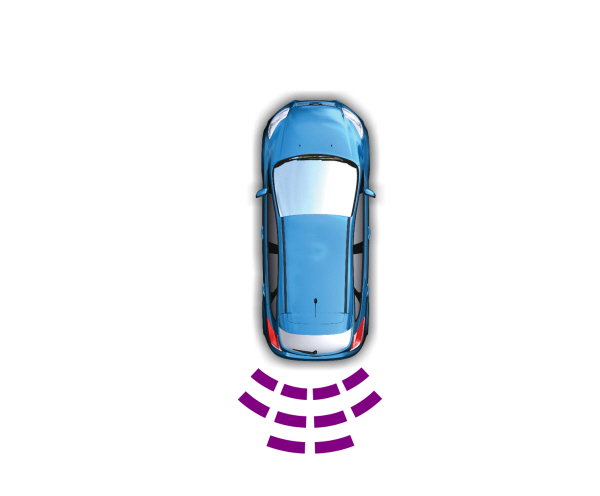
The rear parking aid sensors are in the rear bumper.
Rear Parking Aid Audible Warnings
A warning tone sounds when your vehicle approaches an object. As your vehicle moves closer to an object, the rate of the tone increases.The warning tone continuously sounds when an object is 12 in (30 cm) or less from the rear bumper.
If your vehicle remains stationary for a few seconds, the audible warning turns off. If your vehicle moves backward the tone sounds again.
Note: When the parking aid system sounds a tone, the audio system could reduce the set volume.
What is the Front Parking Aid
Front parking sensors detect objects in front of your vehicle.
Front Parking Aid Limitations
The front parking aid sensors are active when your vehicle is in any position other than park (P) and the vehicle speed is less than 5 mph (8 km/h).
The sensor coverage area is up to 28 in (70 cm) from the front bumper.
If your vehicle is in reverse (R), the front parking aid detects objects and provides an audible warning when your vehicle is moving at a low speed and when an object is moving toward your vehicle, for example, another vehicle at a low speed. If your vehicle remains stationary for a few seconds, the audible warning turns off. Visual indication is always active in reverse (R).
If your vehicle is in any forward gear, the front parking aid provides audible warnings and a visual indication when your vehicle is moving at a speed of 5 mph (8 km/h) or below and the system detects an object within the detection zone. If your vehicle remains stationary for a few seconds, the visual indication and audible warning turns off.
If your vehicle is in neutral (N), the front and rear sensors provide a visual indication only when your vehicle is moving below a speed of 5 mph (8 km/h) and the system detects obstacles inside the detection areas. Once your vehicle stops, the visual indication and audible warning stops after a few seconds.
Locating the Front Parking Aid Sensors
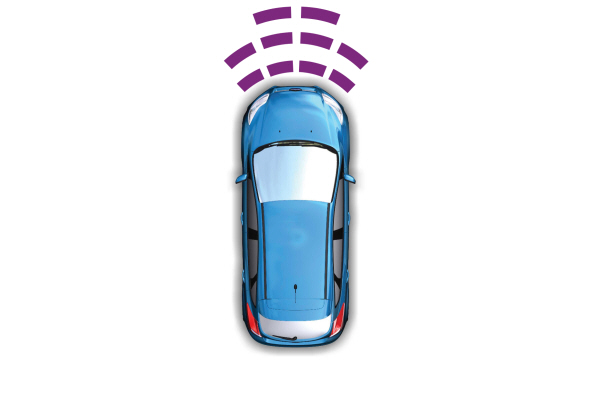
The front parking aid sensors are in the front bumper.
Front Parking Aid Audible Warnings
A warning tone sounds when there is an object within 28 in (70 cm) from the front bumper. As your vehicle moves closer to an object, the rate of the tone increases.
The warning tone continuously sounds when an object is 12 in (30 cm) or less from the front bumper.
Note: If the detected object is 12 in (30 cm) or less from your vehicle, visual indication remains on.
WHAT IS THE SIDE PARKING AID
The front and rear outermost parking aid sensors map objects that are near to the sides of your vehicle.
SIDE PARKING AID LIMITATIONS
The sensor coverage is up to 24 in (60 cm) from the sides of your vehicle.
The side parking aid may not function if:
- Your vehicle remains stationary for over two minutes.
- The anti-lock brake system activates.
- The traction control system activates.
- Your vehicle is in park (P).
- The steering wheel angle information is not available. To reset the steering wheel angle information, drive straight for at least 492 ft (150 m) above 19 mph (30 km/h).
Note: If you switch traction control off, the side sensing system also turns off.
To reinitialize the system, drive the length of your vehicle.
The side parking aid does not detect an object that is moving toward the side of your vehicle, for example another vehicle moving at a low speed, if it does not pass a front or rear parking aid sensor.
If the transmission is in reverse (R), the side sensing system provides audible warnings. When your vehicle is moving slowly, the system detects obstacles within 24 in (60 cm) and are inside the driving path of your vehicle. If your vehicle remains stationary for a few seconds, the audible warning turns off. Visual indication is always present in reverse (R).
If your vehicle is in neutral (N), the side sensing system provides visual indication only when your vehicle is moving slowly and there is a front or rear parking aid obstacle detected, and the side obstacle is within 24 in (60 cm) from the side of your vehicle. If your vehicle remains stationary for a few seconds, the visual indication turns off.
If the transmission is in drive (D) or any other forward gear, the side sensing system provides audible and visual warnings. When your vehicle is moving slowly, the system detects obstacles within 24 in (60 cm) and are inside the driving path of your vehicle. If your vehicle remains stationary for a few seconds, the visual indication and audible warning turns off.
LOCATING THE SIDE PARKING AID SENSORS
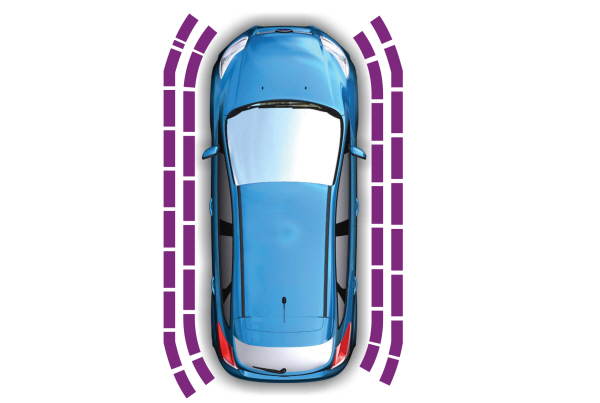
The side parking sensors are located in the sides of the front and rear bumpers.
SIDE PARKING AID AUDIBLE WARNINGS
When the side parking aid detects an object within the coverage area and the driving path of your vehicle, an audible warning sounds. As your vehicle moves closer to the object, the rate of the tone increases.
Parking Aid Indicators
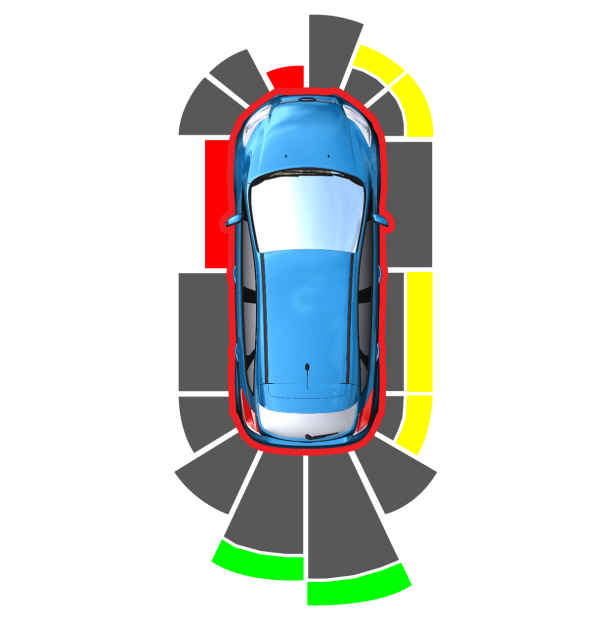
The system provides object distance indication through the information and entertainment display.
- As the distance to the object decreases, the indicator waves and the lines move toward the vehicle icon.
- If there is no object detected, the distance indicator lines are grey.
Visual indication remains on when your vehicle is in reverse (R). In any other gear, when you stop your vehicle, visual indication turns off after four seconds.
If the parking aids are not available, the side distance indicator lines do not display.
Parking Aids – Information Messages
If a fault is present in the parking aids, a warning message appears in the instrument cluster or the touchscreen.
Note: When the front or rear park aid presents a fault message, the side parking aid also disables.
| Message | Action |
|---|---|
| Check Front Park Aid | The system detects a condition that requires service.Have your vehicle checked as soon as possible. |
| Check Rear Park Aid | The system detects a condition that requires service.Have your vehicle checked as soon as possible. |
| Front Park Aid On Off | Displays the park aid status. |
| Rear Park Aid On Off | Displays the park aid status. |
Download Manual