Drive Mode Control
The system delivers a driving experience through a suite of sophisticated electronic vehicle systems. These systems optimize steering, handling and powertrain response. This provides a single location to control multiple systems performance settings.
Changing the drive mode changes the functionality of the following systems:
- Electric power-assisted steering system adjusts steering effort and feel based on the mode you select. See Electric Power Steering Precautions.
- Electronic stability control and traction control maintain your vehicle control in adverse conditions or high performance driving. See Stability Control.
- Electronic throttle control enhances the powertrain response to your driving inputs.
- Transmission controls become optimized with shift schedules tuned to each mode.
- Four-wheel drive settings are optimized and tuned to each mode.
- Electric vehicle mode selections may be limited.
The system tailors your vehicle configuration for each mode you select.
Note: Not all settings may be available.
Note: The system has diagnostic checks that continuously monitor the system for proper operation. If a mode is unavailable due to a system fault or change in gear shifter position, the mode defaults to Normal.
SELECTING A DRIVE MODE - EXCLUDING: PLUG-IN HYBRID ELECTRIC VEHICLE (PHEV)
Note: Drive mode changes may not be available when the ignition is off.
Note: Button icon shown may vary from your vehicle.
Note: Selected drive mode displays in the information display.
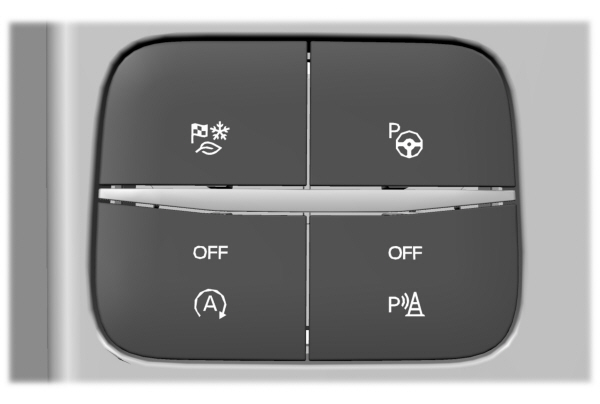
To select drive modes, use the console mounted control.
SELECTING A DRIVE MODE
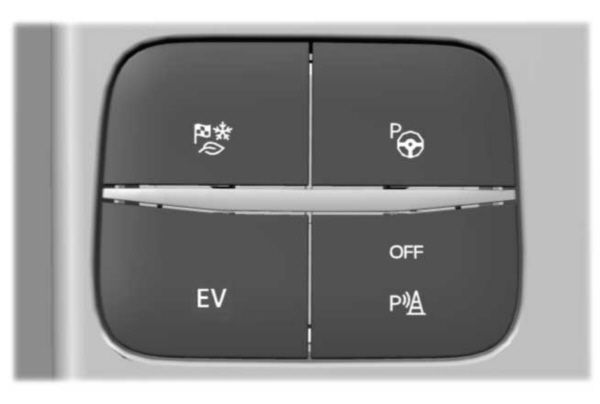
To select drive modes, use the console mounted control.
Note: Drive mode changes may not be available when the ignition is off.
Note: Button icon shown may vary from your vehicle.
Note: Selected drive mode displays in the information cluster display.
Drive Modes
Deep Snow/Sand

Note: The intent of your all-wheel drive vehicle is not for off-road use. The all-wheel drive feature allows for driving on relatively level surfaces, obstruction free and similar to normal on-road driving conditions. Operating your vehicle in other conditions could lead to excessive stress that could result in damage not covered by the warranty.
Note: This mode is not intended for driving on snowy roads. For snowy roads use slippery mode.
Note: Using deep snow/sand mode on dry, hard surfaces could produce some vibration, driveline bind up, and potential excessive tire wear. This mode is for slippery and loose surfaces.
Eco
 For efficient driving. This mode helps deliver maximum fuel efficiency and helps to increase driving range. For efficient driving. This mode helps deliver maximum fuel efficiency and helps to increase driving range. |
Normal
 For everyday driving. This mode is a perfect balance of excitement, comfort and convenience. This is the default mode after each ignition cycle. For everyday driving. This mode is a perfect balance of excitement, comfort and convenience. This is the default mode after each ignition cycle. |
Slippery

Note: Using slippery mode on dry, hard surfaces could produce some vibration, driveline bind up, and potential excessive tire wear.
Sport

Note: Auto-start-stop is disabled when you select this mode.
Plug-In Hybrid Electric Vehicle Drive Modes
SELECTING A PLUG-IN HYBRID ELECTRIC VEHICLE DRIVE MODE
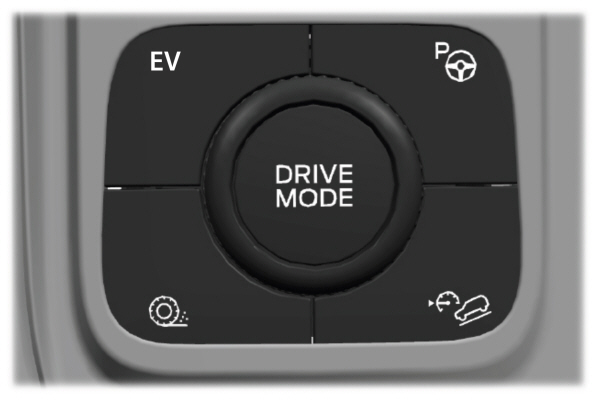
Your vehicle contains selectable electric vehicle (EV) modes. Press the button on the center console to change the mode.
Depending on your drive mode selection some EV modes may not be available. EV Now and EV Later modes are only available when you have electric-only driving range available.
AUTO EV
 This mode provides an automatic use of high voltage battery power during the drive, staying in electric mode when possible and running the engine when needed. This mode provides an automatic use of high voltage battery power during the drive, staying in electric mode when possible and running the engine when needed. |
EV Charge
 This mode uses your vehicle's engine to charge the high voltage battery versus plugging the vehicle into a utility grid. This mode uses your vehicle's engine to charge the high voltage battery versus plugging the vehicle into a utility grid.
The electric range gained through the EV Charge allows you to switch to Auto EV or EV Now for full electric operation later in your drive. The battery cannot completely charge to 100% when in EV Charge mode. This is to allow for full operation of the regenerative braking system. When the battery reaches its EV Charge limit, the vehicle remains in EV Charge mode and maintains that charge level, until you select another EV Mode, or until you switch your vehicle off. When you enable EV Charge, a white EV Charge icon appears in the information display. EV Charge resets to Auto EV when you switch off your vehicle. You may select EV Charge again during your next drive. |
EV Later
 In EV Later, your vehicle runs on the engine as needed and saves most of the available electric range for later use in Auto EV or EV Now mode. In EV Later, your vehicle runs on the engine as needed and saves most of the available electric range for later use in Auto EV or EV Now mode.
For example, your initial drive is at high speeds on open roads, but later your drive is at low speeds in an urban area where electric only driving is most efficient. In this case, you can select EV Later for the higher speed portion of your trip and then select Auto EV or EV Now for the urban portion. When you enable EV Later, a white EV Later icon appears in the information display. EV Later resets to Auto EV when you switch off your vehicle. You may select EV Later again during your next drive. When you select EV Later with the vehicle fully charged or near fully charged, some electric-only driving range is used to discharge the battery. This is to allow for full operation of the regenerative braking system. |
EV Now

Your vehicle could accelerate slower and the top speed could be lower than when in Auto EV mode.
You can enable your engine at any time by using one of the following methods:
- Press the OK button on the steering wheel when viewing the EV Now information on demand screen. Your vehicle enables the engine as needed and returns to EV Now mode when no longer needed.
- Fully press the accelerator pedal. A pop-up message appears. Press the OK button on the steering wheel to enable the engine. When the engine is no longer needed, your vehicle returns to EV Now. The message disappears if you release the accelerator pedal.
- Press the EV button. This exits EV Now mode and permits engine operation. To return to EV Now mode, select it again using the EV button.
Your vehicle could enter Engine Enabled mode if system conditions require it. A message displays if this occurs. This is a normal function of the system and your vehicle returns to EV Now mode when possible.
When you enable EV Now mode, a blue EV Now icon appears in the information display. If your vehicle is in Engine Enabled mode, the EV Now icon is amber. EV Now exits when your available electric range reaches zero.
Download Manual