Instrument Cluster Display
Using the Instrument Cluster Display Controls
 WARNING: Driving while distracted can result in loss of vehicle control, crash and injury. We strongly recommend that you use extreme caution when using any device that may take your focus off the road. Your primary responsibility is the safe operation of your vehicle. We recommend against the use of any hand-held device while driving and encourage the use of voice-operated systems when possible. Make sure you are aware of all applicable local laws that may affect the use of electronic devices while driving. WARNING: Driving while distracted can result in loss of vehicle control, crash and injury. We strongly recommend that you use extreme caution when using any device that may take your focus off the road. Your primary responsibility is the safe operation of your vehicle. We recommend against the use of any hand-held device while driving and encourage the use of voice-operated systems when possible. Make sure you are aware of all applicable local laws that may affect the use of electronic devices while driving. |
The controls are on the steering wheel.
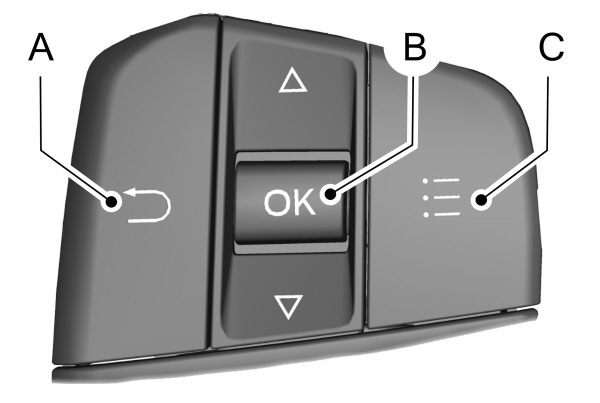
A Return button. Return button.B OK button.C Menu button. |
Return Button
Press to go back or exit a menu.
OK Button
Press to make a selection.
Toggle Buttons
Press the toggle up or down button to scroll through menu items.
Status Indicator
 Menu items with a check box indicate a feature's status. A check in the box indicates the feature is on, and unchecked indicates the feature is off. Menu items with a check box indicate a feature's status. A check in the box indicates the feature is on, and unchecked indicates the feature is off. |
INSTRUMENT CLUSTER DISPLAY MAIN MENU - VEHICLES WITH: 6.5 INCH INSTRUMENT CLUSTER DISPLAY SCREEN
| Menu Item |
|---|
|
Select Screens |
|
Audio |
|
Navigation |
|
Phone |
|
Settings |
|
Display Setup |
INSTRUMENT CLUSTER DISPLAY MAIN MENU - VEHICLES WITH: 4.2 INCH INSTRUMENT CLUSTER DISPLAY SCREEN
| Menu Item |
|---|
|
Trip 1 |
|
MyView |
|
Driver Assist. |
|
Navigation |
|
Audio |
|
Phone |
|
Settings |
INSTRUMENT CLUSTER DISPLAY MAIN MENU - VEHICLES WITH: 12.3 INCH INSTRUMENT CLUSTER DISPLAY SCREEN
Depending on your vehicle options, some menu items can appear different or not at all.
Note: For your safety, some features are speed-dependent and could be unavailable when your vehicle is above a certain speed.
| Menu Item |
|---|
|
Select Screens |
|
Phone |
|
Navigation |
|
Audio |
|
Settings |
|
Display Setup |
CUSTOMIZING THE INSTRUMENT CLUSTER DISPLAY - VEHICLES WITH: 4.2 INCH INSTRUMENT CLUSTER DISPLAY SCREEN
- Using the information display controls on the steering wheel, select MyView.
- Press the menu button.
- Select a screen.
- Press the OK button.
CUSTOMIZING THE INSTRUMENT CLUSTER DISPLAY - VEHICLES WITH: 6.5 INCH INSTRUMENT CLUSTER DISPLAY SCREEN/12.3 INCH INSTRUMENT CLUSTER DISPLAY SCREEN
Adding Screens Using Select Screens
- Select Select Screens.
- Use the controls on the steering wheel to highlight a screen to add.
- Press the OK button.
Note: The amount of screens you can add is limited, if the selected screen does not appear you must deselect screens from the select screens menu.
|
Select Screens |
|---|
|
Calm Screen |
|
Fuel Economy |
|
Trip 1 |
|
Trip 2 |
|
This Trip |
|
Traffic Signs |
|
EV Coach |
|
Electric Efficiency |
|
Eco Behavior |
|
Tire Pressure |
|
Intelligent 4WD |
|
Off-Road |
|
Trailer Light Check |
|
Seatbelts |
|
Average Speed |
|
Auto Startstop |
Note: Some options may appear slightly different or not at all if items are optional.
Configuring Gauges
- Select Display Setup.
- Select a setting.
CHANGING THE INSTRUMENT CLUSTER DISPLAY LANGUAGE - VEHICLES WITH: 4.2 INCH INSTRUMENT CLUSTER DISPLAY SCREEN
You can change the language using the instrument cluster display.
- Select Settings and press the menu button.
- Select Display.
- Select Language.
- Select a language.
CHANGING THE INSTRUMENT CLUSTER DISPLAY LANGUAGE - VEHICLES WITH: 6.5 INCH INSTRUMENT CLUSTER DISPLAY SCREEN/12.3 INCH INSTRUMENT CLUSTER DISPLAY SCREEN
You can change the language using the touchscreen.
- Press General.
- Press Language.
- Select a language.
Note: Available languages vary by region.
CHANGING THE MEASUREMENT UNIT - VEHICLES WITH: 4.2 INCH INSTRUMENT CLUSTER DISPLAY SCREEN
You can change the measurement unit using the instrument cluster display.
- Select Settings and press the menu button.
- Select Display.
- Select Measurement Unit.
- Select a measurement unit.
CHANGING THE MEASUREMENT UNIT - VEHICLES WITH: 6.5 INCH INSTRUMENT CLUSTER DISPLAY SCREEN/12.3 INCH INSTRUMENT CLUSTER DISPLAY SCREEN
You can change the measurement unit using the touchscreen.
- Press General.
- Press Measurement Units.
- Select a measurement unit.
CHANGING THE TEMPERATURE UNIT - VEHICLES WITH: 4.2 INCH INSTRUMENT CLUSTER DISPLAY SCREEN
You can change the temperature unit using the instrument cluster display.
- Select Settings and press the menu button.
- Select Display.
- Select Temperature Unit.
- Select a temperature unit.
CHANGING THE TEMPERATURE UNIT - VEHICLES WITH: 6.5 INCH INSTRUMENT CLUSTER DISPLAY SCREEN/12.3 INCH INSTRUMENT CLUSTER DISPLAY SCREEN
You can change the temperature unit using the touchscreen.
- Press General.
- Press Temperature Units.
- Select a temperature unit.
CHANGING THE TIRE PRESSURE UNIT - VEHICLES WITH: 4.2 INCH INSTRUMENT CLUSTER DISPLAY SCREEN
You can change the tire pressure unit using the instrument cluster display.
- Select Settings and press the menu button.
- Select Display.
- Select Tire Pressure.
- Select a tire pressure unit.
CHANGING THE TIRE PRESSURE UNIT - VEHICLES WITH: 6.5 INCH INSTRUMENT CLUSTER DISPLAY SCREEN/12.3 INCH INSTRUMENT CLUSTER DISPLAY SCREEN
You can change the tire pressure unit using the touchscreen.
- Press General.
- Press Tire Pressure Units.
- Select a pressure unit.
FUEL ECONOMY DISPLAY
An instant fuel economy gauge is provided along with average fuel economy. Average fuel economy is continuously averaged since the last reset.
When the gasoline engine is off, the instant fuel economy gauge is replaced with an electric driving message.
Note: Press and hold the OK button on the controls on the steering wheel to reset your average fuel economy.
Note: Fuel economy display is a selectable screen.See Customizing the Instrument Cluster Display - Vehicles With: 8 Inch Instrument Cluster Display Screen .
See Customizing the Instrument Cluster Display - Vehicles With: 12.3 Inch Instrument Cluster Display Screen, Argentina/Canada/Mexico/United States of America .
FUEL ECONOMY DISPLAY - PLUG-IN HYBRID ELECTRIC VEHICLE (PHEV)
This display comes with an instant fuel economy gauge, along with the average fuel economy. The gauge continuously averages the fuel economy since your last reset.
For plug-in hybrid vehicles, the system includes both the electric only and the hybrid operation in the calculation. More electric only driving results in a greater average fuel economy.
When the gasoline engine is off, changes from the instant fuel economy gauge to an electric driving message.
Note: Press and hold the OK button on the controls on the steering wheel to reset your average fuel economy.
Note: Fuel economy display is a selectable screen. See Customizing the Instrument Cluster Display - Vehicles With: 8 Inch Instrument Cluster Display Screen .
See Customizing the Instrument Cluster Display - Vehicles With: 12.3 Inch Instrument Cluster Display Screen, Argentina/Canada/Mexico/United States of America .
Fuel Economy Display - Gasoline
An instant fuel economy gauge is provided along with average fuel economy. Average fuel economy is continuously averaged since the last reset.
Note: Press and hold the OK button on the controls on the steering wheel to reset your average fuel economy.
EV COACH - HYBRID ELECTRIC VEHICLE (HEV)/PLUG-IN HYBRID ELECTRIC VEHICLE (PHEV)
EV coach can help you get the most out of your vehicle's electric driving capabilities.
Note: EV coach is a selectable screen. See Customizing the Instrument Cluster Display - Vehicles With: 6.5 Inch Instrument Cluster Display Screen/12.3 Inch Instrument Cluster Display Screen.
When you are accelerating or maintaining speed you see a blue or white solid bar indicating vehicle power. You may also see a blue rectangular box which shows the power level at which the engine turns on.
- When the power level is within the box, the color of the bar is blue. This means you are in electric operation and the engine is off.
- When the power level is outside of the box, the color of the bar is white. This means you are in hybrid operation with a combination of the electric motor and the engine providing vehicle power.
When you are decelerating with either your foot off the accelerator pedal or on the brake pedal, a green or white solid bar displays indicating the power being used to slow down your vehicle. You may also see a green rectangular box which shows the amount of power that can be recaptured by the regenerative braking system and returned to the high voltage battery.
- When the power level is within the box, the color of the bar is green. This means that the regenerative braking system is being used to efficiently slow your vehicle down and return the maximum percentage of energy to the high voltage battery.
- When the power level is outside of the box, the color of the bar is white. This means both the regenerative braking system and conventional braking system are being used.
WHAT IS ELECTRIC EFFICIENCY - PLUG-IN HYBRID ELECTRIC VEHICLE (PHEV)
This screen shows your average driving distance per kilowatt-hour of electricity used on your plug-in hybrid vehicle. The value is calculated only when your available electric range is being used and the gasoline engine is off.
Distance per full charge is also shown. This is an estimate of the electric range you would have if you plugged in and fully charged your vehicle right now. The higher your electric efficiency, the higher your distance per full charge.
Your electric efficiency is affected by your driving style and route, climate control use, outside temperature and other factors. Best efficiency is achieved with mild to moderate acceleration and braking, moderate speeds and low climate control usage.
Note: Electric efficiency is a selectable screen. See Customizing the Instrument Cluster Display - Vehicles With: 6.5 Inch Instrument Cluster Display Screen/12.3 Inch Instrument Cluster Display Screen.
WHAT IS BRAKE COACH - HYBRID ELECTRIC VEHICLE (HEV)/PLUG-IN HYBRID ELECTRIC VEHICLE (PHEV)
The brake coach appears after your vehicle has come to a stop. It coaches you to brake in a manner that maximizes the amount of energy returned through the regenerative braking system.
The percent displayed indicates the regenerative braking efficiency, with 100% representing the maximum amount of energy recovered.
Note: While regenerative braking works in all drive modes, brake coach display may not be available in all drive modes.
You can switch brake coach on or off in the settings menu. See Instrument Cluster Display Main Menu .
WHAT IS THE TRIP SUMMARY - HYBRID ELECTRIC VEHICLE (HEV)/PLUG-IN HYBRID ELECTRIC VEHICLE (PHEV)
The trip summary displays upon shutting off your vehicle. The values are cumulative since you last started your vehicle.
The information shown is the same as the This Trip screen.
VEHICLE CHARGING STATUS - PLUG-IN HYBRID ELECTRIC VEHICLE (PHEV)
The vehicle charge status displays when you switch off your vehicle and when you switch on your vehicle when plugged in. Charging status includes the charge start or charge end time as appropriate. You can modify your charge settings through the touchscreen.
Download Manual