Liftgate - Vehicles With: Power Liftgate
Liftgate Precautions
 WARNING: Make sure all persons are clear of the power liftgate area before opening or closing the liftgate. WARNING: It is extremely dangerous to ride in a cargo area, inside or outside of a vehicle. In a crash, people riding in these areas are more likely to be seriously injured or killed. Do not allow people to ride in any area of your vehicle that is not equipped with seats and seatbelts. Make sure everyone in your vehicle is in a seat and properly using a seatbelt. Failure to follow this warning could result in serious personal injury or death. WARNING: Make sure that you fully close the liftgate to prevent exhaust fumes from entering your vehicle. If you are unable to fully close the liftgate, open the air vents or the windows to allow fresh air to enter your vehicle. Failure to follow this instruction could result in personal injury or death. WARNING: Keep keys out of reach of children. Do not allow children to operate or play near an open or moving power liftgate. You should supervise the operation of the power liftgate at all times. WARNING: Make sure all persons are clear of the power liftgate area before opening or closing the liftgate. WARNING: It is extremely dangerous to ride in a cargo area, inside or outside of a vehicle. In a crash, people riding in these areas are more likely to be seriously injured or killed. Do not allow people to ride in any area of your vehicle that is not equipped with seats and seatbelts. Make sure everyone in your vehicle is in a seat and properly using a seatbelt. Failure to follow this warning could result in serious personal injury or death. WARNING: Make sure that you fully close the liftgate to prevent exhaust fumes from entering your vehicle. If you are unable to fully close the liftgate, open the air vents or the windows to allow fresh air to enter your vehicle. Failure to follow this instruction could result in personal injury or death. WARNING: Keep keys out of reach of children. Do not allow children to operate or play near an open or moving power liftgate. You should supervise the operation of the power liftgate at all times. |
Opening the Liftgate From Inside Your Vehicle

Note: Make sure that you shift the transmission into park (P) for automatic transmission or completely stop the vehicle for manual transmission.
Note: Be careful when opening or closing the liftgate in a garage or other enclosed area to avoid damaging the liftgate.
Note: Do not hang anything, for example a bike rack, from the glass or liftgate.This could damage the liftgate and its components.
Note: Do not leave the liftgate open when you are driving.This could damage the liftgate and its components.
Opening the Liftgate From Outside Your Vehicle
- Unlock the liftgate with the remote control or power door unlock control.If a passive key is within 3 ft (1 m) of the liftgate, the liftgate unlocks when you press the liftgate release button.
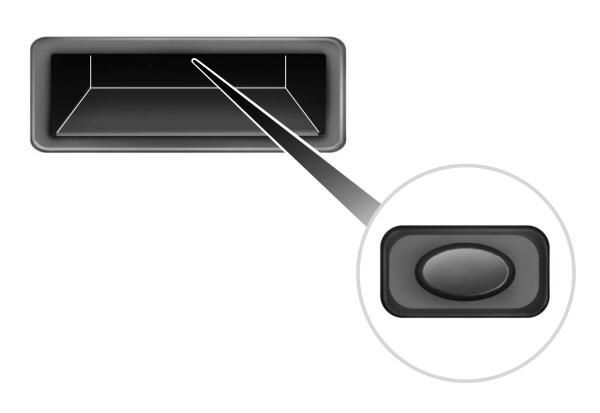
- Press and release the liftgate control button.
Note: Allow the power system to open the liftgate. Manually pushing or pulling the liftgate may activate the system’s obstacle detection feature and stop the power operation or reverse its direction, replicate a strut failure, or damage mechanical components.
Note: Be careful when opening or closing the liftgate in a garage or other enclosed area to avoid damaging the liftgate.
Note: Do not hang anything, for example a bike rack, from the glass or liftgate.This could damage the liftgate and its components.
Note: Do not leave the liftgate open while driving.This could damage the liftgate and its components.
Switching the Power Liftgate On or Off
You can switch the power liftgate on or off through the vehicle settings on your touchscreen.
- Press Settings.
- Press Vehicle Settings.
- Press Power Liftgate.
- Select your option.
When switched off, the liftgate only unlatches and will not power open or close.
Opening the Liftgate Using the Remote Control

Note: Be careful when opening or closing the liftgate in a garage or other enclosed area to avoid damaging the liftgate.
Note: Do not hang anything, for example a bike rack, from the glass or liftgate. This could damage the liftgate and its components.
Note: Do not leave the liftgate open while driving. This could damage the liftgate and its components.
Opening the Hands-Free Liftgate
Make sure you have the passive key within 3 ft (1 m) of the liftgate.
- Stand behind your vehicle, and face the liftgate.
- Move your foot, in a single-kick motion, without pausing, under and away from the rear bumper detection area.
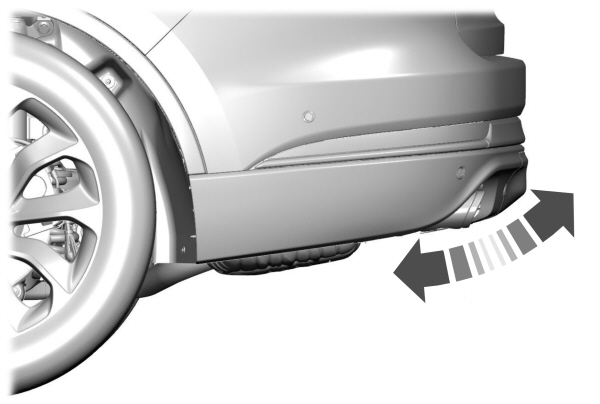
- The liftgate opens.
Avoid the following actions when using the hands-free opening feature:
- Making physical contact with the bumper.
- Holding your foot under the bumper.
- Sweeping your foot from side to side, or kicking at an odd angle.
Detection Zones
Vehicles Without a Trailer Hitch
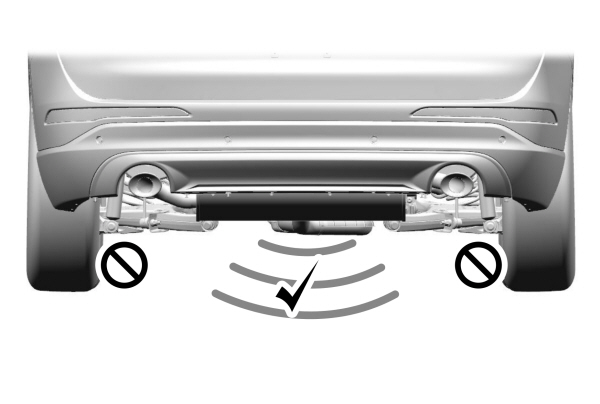
The detection area is in the center of the rear bumper.
Vehicles With a Trailer Hitch
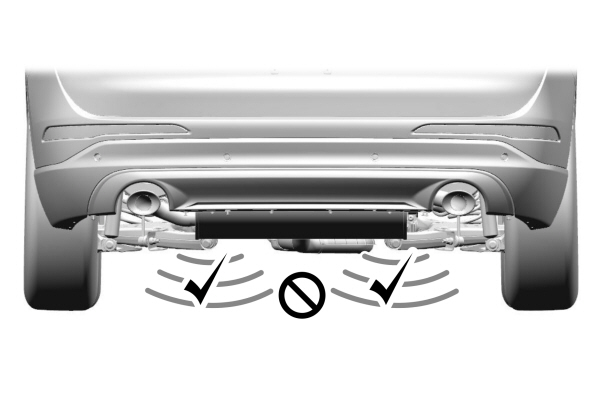
The detection area is on the left-hand side and right-hand side of the hitch, between the exhaust and the hitch.
Note: Allow the power system to open the liftgate. Manually pushing or pulling the liftgate may activate the system’s obstacle detection feature and stop the power operation or reverse its direction, replicate a strut failure, or damage mechanical components.
Note: Any physical actions that mimic a kicking motion such as splashing water, trailer chains or vacuum hoses may cause the hands-free liftgate to activate. Switch the power liftgate off through your vehicle settings or keep the passive key away from the rear bumper detection area.
Setting the Liftgate Opening Height
- Open the liftgate.
- Stop the liftgate movement by pressing the control button on the liftgate when it reaches the desired height.
Note: Once the liftgate stops moving, you can manually move it to the desired height.
- Press and hold the control button on the liftgate until a tone sounds, indicating programming is complete.
Note: You can only use the liftgate control button to program the height.
Note: You cannot program the height if the liftgate position is too low.
- The power liftgate now opens at the programmed height. To change the programmed height, repeat the steps.
Note: You can fully open the liftgate by manually pushing it upward to the maximum open position if it opens in a lower position.
Note: The system recalls the new programmed height until you reprogram it, even if you disconnect the battery.
Closing the Liftgate From Inside Your Vehicle
| WARNING: Make sure all persons are clear of the power liftgate area before opening or closing the liftgate. |
Note: Make sure that you shift the transmission into park (P) for automatic transmission or completely stop the vehicle for manual transmission.
Note: Make sure that you close the liftgate before operating or moving your vehicle, especially in an enclosure like a garage or a parking structure.This could damage the liftgate and its components.
Note: Make sure the area behind your vehicle is free from obstruction and that there is enough room for you to operate the liftgate.Objects too close to your vehicle, for example a wall, garage door or another vehicle may come into contact with the moving liftgate.This could damage the liftgate and its components.
Note: Make sure that you fully close the liftgate to prevent cargo from falling out.
Closing the Liftgate From Outside Your Vehicle
| WARNING: Make sure all persons are clear of the power liftgate area before opening or closing the liftgate. |
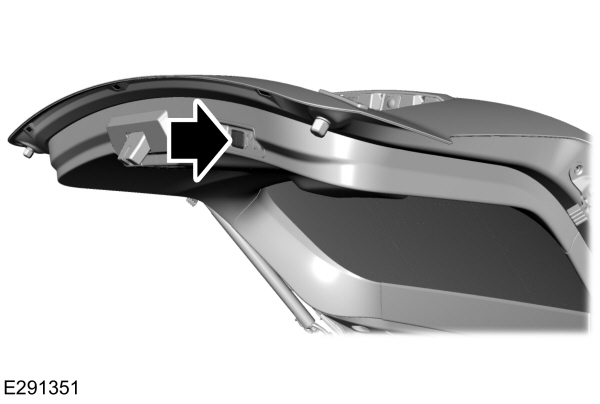
Press and release the liftgate button.
Note: Make sure that you close the liftgate before operating or moving your vehicle, especially in an enclosure, like a garage or a parking structure.This could damage the liftgate and its components.
Note: Make sure the area behind your vehicle is free from obstruction and that there is enough room for you to operate the liftgate. Objects too close to your vehicle, for example a wall, garage door or another vehicle may come into contact with the moving liftgateThis could damage the liftgate and its components.
Note: Make sure you fully close the liftgate to prevent cargo from falling out.
Closing the Liftgate Using the Remote Control
| WARNING: Make sure all persons are clear of the power liftgate area before opening or closing the liftgate. |
Note: Make sure that you close the liftgate before operating or moving your vehicle, especially in an enclosure like a garage or a parking structure.This could damage the liftgate and its components.
Note: Make sure the area behind your vehicle is free from obstruction and that there is enough room for you to operate the liftgate.This could damage the liftgate and its components.
Note: Make sure that you fully close the liftgate to prevent cargo from falling out.
Closing the Hands-Free Liftgate
Make sure you have the remote control within 3 ft (1 m) of the liftgate.
- Stand behind your vehicle, and face the liftgate.
- Move your foot, in a single-kick motion, without pausing, under and away from the rear bumper detection area.
- The liftgate closes.
Avoid the following actions when using the hands-free opening feature:
- Making physical contact with the bumper.
- Holding your foot under the bumper.
- Sweeping your foot from side to side, or kicking at an odd angle.
Detection Zones
Vehicles Without a Trailer Hitch
The detection area is in the center of the rear bumper.
Vehicles With a Trailer Hitch
The detection area is on the left-hand side and right-hand side of the hitch, between the exhaust and the hitch.
Note: Allow the power system to close the liftgate. Manually pushing the liftgate may activate the system’s obstacle detection feature and stop the power operation or reverse its direction, replicate a strut failure, or damage mechanical components.
Stopping the Liftgate Movement
Note: Do not apply sudden excessive force to the liftgate while it is in motion.This could damage the power liftgate and its components.
Note: Selections will vary depending on region or options.
You can stop the liftgate movement by doing any of the following:
- Pressing the liftgate control button on the liftgate.
- Pressing the liftgate control button inside the vehicle.
- Pressing the liftgate button on the remote control twice.
- Pressing the liftgate button on an authorized device.
- Moving your foot under and away from the center rear bumper in a single-kick motion.
Liftgate Obstacle Detection
Closing the Liftgate
The system stops when it detects an obstacle. A tone sounds and the system reverses to open.Once you remove the obstacle, you can power close the liftgate.
Note: To prevent accidental obstacle detection, let the power liftgate close completely before you enter your vehicle.
Opening the Liftgate
The system stops when it detects an obstacle and a tone sounds. Once you remove the obstacle, you can continue to operate the liftgate.
Warning Lamps
 Illuminates when the liftgate is not completely closed. Illuminates when the liftgate is not completely closed. |
Information Messages
| Message | Action | |
|---|---|---|
|
Liftgate Ajar |
The liftgate is not completely closed. Close the liftgate. | |
Frequently Asked Questions
Why won't my power liftgate function?
- It can happen in freezing conditions or when parking on downhill slopes.
- Make sure the power liftgate is enabled in the vehicle settings menu.
- Make sure the transmission is in park (P), ensure nothing is obstructing the liftgate path and there is not excessive weight on the liftgate.
- If there are continued issues, the battery voltage may be low or there may be other system issues. See an authorized dealer.
Download Manual