Brakes
Electric Brake Boost
When a shift to 2 m is completed successfully while in P (Park), the parking brake will engage. To resume driving, shift the
transmission to the desired gear and manually release the parking brake or press the accelerator pedal to begin driving. See Electric Parking Brake 0 240.
If equipped, use 4 n, AUTO, or 4 m to provide additional traction when parking on a steep grade with poor traction such as ice, snow, mud, or gravel.
Shifting Into 4 n
A DIC message displays to indicate that the 4x4 transfer case has been requested to shift to the new desired state.
Once the 4x4 shift has completed, the DIC message disappears, the 4x4 graphic stops flashing and the current setting is indicated.
If vehicle speed is higher when shift request occurs, a DIC message displays. Reduce vehicle speed.
If the transmission is not in N (Neutral) when shift request occurs, a DIC message displays. The vehicle will allow 20 seconds for the shift to occur. After this time, a graphic in the instrument cluster will indicate that the transfer case is in 4 n.
If the transmission is not shifted into
N (Neutral) or the vehicle has not slowed to 5 km/h (3 mph) within 20 seconds, the transfer case will remain in its original state. This will be indicated in the instrument cluster.
With the vehicle moving less than 5 km/h (3 mph) and the transmission in N (Neutral), attempt the shift again.
Shifting Out of 4 n
remain flashing until the shift request has completed. A DIC message displays to indicate the state of the request.
Once the 4x4 shift has completed, the DIC message disappears, the 4x4 graphic stops flashing, and the current setting is indicated.
If vehicle speed is higher when shift request occurs, a DIC message displays. Reduce vehicle speed.
If the transmission is not in N (Neutral) when shift request occurs, DIC messages will display. The vehicle will allow 20 seconds for this shift to occur. After this time, a graphic in the instrument cluster will indicate that the transfer case is in 4 n.
If the transmission is not shifted into
N (Neutral) or the vehicle has not slowed to 5 km/h (3 mph) within 20 seconds, the transfer case will remain in its original state. This will be indicated in the instrument cluster.
With the vehicle moving less than 5 km/h (3 mph), and the transmission in N (Neutral), attempt the shift again.
Shifting Into N (Neutral)
To shift into N (Neutral):
If the parking brake and/or brake pedal is not applied within 20 seconds, the transfer case will remain in the original state.
N (Neutral) or the vehicle has not slowed to 5 km/h (3 mph) within 20 seconds, the transfer case will remain in its original state. This will be indicated in the instrument cluster.
Shifting Out of N (Neutral)
To shift out of N (Neutral):
0 226 or
Ignition Positions (Key Access) 0 224.
Single Speed Transfer Case
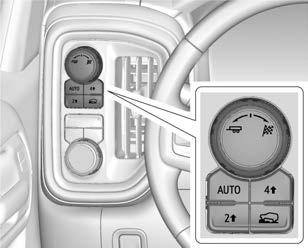
If equipped, the transfer case controls are used to shift into and out of four-wheel drive.
To shift the transfer case, press the desired button. The graphic in the instrument cluster will flash while a shift is in progress. The graphic displayed will change to indicate the setting requested.
When the shift is complete the graphic will stop flashing. The DIC message turns off once the shift is complete. If the transfer case cannot complete a shift request, it will go back to its last chosen setting.
The settings are:
2 m (Two-Wheel Drive High) : Use for driving on most streets and highways. The front axle is not engaged. This setting provides the best fuel economy.
4 m (Four-Wheel Drive High) : Use this setting when extra traction is needed, such as when driving on snowy or icy roads, when off-roading, or when plowing snow.
AUTO (Automatic Four-Wheel Drive)
Use when road surface conditions are variable. When driving in AUTO, the front axle is engaged, and the vehicle's power is sent to the front and rear wheels automatically based on driving conditions. This setting provides slightly lower fuel economy than 2 m.
Shifts between 2 m, 4 m, and AUTO
Any of these shifts can be made at normal driving speed.
The actual 4x4 shift request is only made after the button is released. The 4x4 graphic will remain flashing until the shift request has completed. A DIC message displays.
Once the 4x4 shift has completed, the DIC message disappears, the 4x4 graphic stops flashing, and the current setting is indicated.
The actual 4x4 shift request is only made after the button is released. The 4x4 graphic will remain flashing until the shift request has completed.
A DIC message displays. Once the 4x4 shift has completed, the DIC message disappears, the 4x4 graphic stops flashing, and the current setting is indicated.
The Antilock Brake System (ABS) helps prevent a braking skid and maintain steering while braking hard.
ABS performs a system check when the vehicle is first driven. A momentary motor or clicking noise may be heard while this test is going on, and the brake pedal may move slightly. This is normal.

If there is a problem with ABS, this warning light stays on. See Antilock Brake System (ABS) Warning Light 0 114.
ABS does not change the time needed to get a foot on the brake pedal and does not always decrease stopping distance. If you get too close to the vehicle ahead, there will not be enough time to apply the brakes if that vehicle suddenly slows or stops. Always leave enough room ahead to stop, even with ABS.
Do not pump the brakes. Just hold the brake pedal down firmly. Hearing or feeling ABS operate is normal.
ABS allows steering and braking at the same time. In many emergencies, steering can help even more than braking.
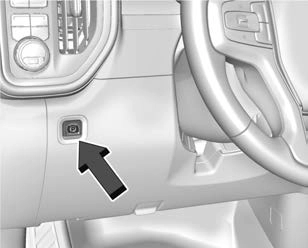
The Electric Parking Brake (EPB) can always be applied, even if the vehicle is off. In case of insufficient electrical power, the EPB cannot be applied or released. To prevent draining the battery, avoid unnecessary repeated cycles of the EPB.
The system has a red parking brake status light and an amber service parking brake warning light. See Electric Parking Brake Light 0 113 and
Service Electric Parking Brake Light 0 113. There are also parking brake-related Driver Information Center (DIC) messages.
Before leaving the vehicle, check the red parking brake status light to ensure that the parking brake is applied.
To apply the EPB:
The red parking brake status light will flash and then stay on once the EPB is fully applied. If the red parking brake status light flashes continuously, then the EPB is only partially applied or there is a problem with the EPB. A DIC message will display. Release the EPB and try to apply it again. If the light does not come on, or keeps flashing, have the vehicle serviced. Do not drive the vehicle if the red parking brake status light is flashing. See your dealer.
If the amber service parking brake warning light is on, press the EPB switch. Continue to hold the switch until the red parking brake status light remains on. If the amber service parking brake warning light is on, see your dealer.
If the EPB is applied while the vehicle is moving, the vehicle will decelerate as long as the switch is pressed. If the switch is pressed until the vehicle comes to a stop, the EPB will remain applied.
The vehicle may automatically apply the EPB in some situations when the vehicle is not moving. This is normal, and is done to periodically check the correct operation of the EPB system, or at the request of other safety functions that utilize the EPB.
If the EPB fails to apply, block the rear wheels to prevent vehicle movement.
To release the EPB:
The EPB is released when the red parking brake status light is off.
If the amber service parking brake warning light is on, release the EPB by pressing and holding the EPB switch. Continue to hold the switch until the red parking brake status light is off. If either light stays on after release is attempted, see your dealer.
If you are towing a trailer and parking on a hill, see Driving Characteristics and Towing Tips 0 268.
The EPB will automatically release if the vehicle is running, placed into gear, and an attempt is made to drive away. Avoid rapid acceleration when the EPB is applied, to preserve parking brake lining life.
Brake Assist detects rapid brake pedal applications due to emergency braking situations and provides additional braking to activate the Antilock Brake System (ABS) if the brake pedal is not pushed hard enough to activate ABS normally. Minor noise, brake pedal pulsation, and/or pedal movement during this time may occur. Continue to
apply the brake pedal as the driving situation dictates. Brake Assist disengages when the brake pedal is released.
When the vehicle is stopped on a grade, Hill Start Assist (HSA) prevents the vehicle from rolling in an unintended direction during the transition from brake pedal release to accelerator pedal apply. The brakes release when the accelerator pedal is applied. If the accelerator pedal is not applied within a few minutes, the Electric Parking Brake will apply. The brakes may also release under other conditions. Do not rely on HSA to hold the vehicle.
HSA is available when the vehicle is facing uphill in a forward gear, or when facing downhill in R (Reverse). The vehicle must come to a complete stop on a grade for HSA to activate.
Download Manual