Performance and Maintenance
Traction Control System (TCS)
The traction control system limits wheel spin. The system turns on automatically every time the vehicle is started.
• To turn off traction control, press and release  in front of the shift lever.
  illuminates and the appropriate DIC message is displayed. See DIC Warnings and Messages.
• Press and release the button again to turn on traction control.
For more information, see Traction Control System (TCS).
StabiliTrak®
The vehicle may have the StabiliTrak system that assists with directional control of the vehicle in difficult driving conditions. The system turns on automatically every time the vehicle is started. The system cannot be turned off.
For more information, see StabiliTrak® System.
Tire Pressure Monitor
This vehicle may have a Tire Pressure Monitor System (TPMS).

The Tire Pressure Monitor alerts you when a significant reduction in pressure occurs in one or more of the vehicle’s tires by illuminating the low tire pressure warning light on the instrument cluster.
The warning light will remain on until the tire pressure is corrected. The proper tire pressures for your vehicle are listed on the Tire and Loading Information label located on the driver side center pillar (B pillar). See Loading the Vehicle.
You may notice during cooler conditions that the low tire pressure warning light will appear when the vehicle is first started and then turn off as you drive. This may be an early indicator that your tire pressures are getting low and the tires need to be inflated to the proper pressure.
Note: The Tire Pressure Monitor can alert you about low tire pressure, but it does not replace normal monthly tire maintenance. It is the driver’s responsibility to maintain correct tire pressures.
See Tire Pressure Monitor System and Tire Pressure Monitor Operation.
Tire Sealant and Compressor Kit
This vehicle may come with a jack and spare tire or a tire sealant and compressor kit. The kit can be used to seal small punctures in the tread area of the tire.
See Tire Sealant and Compressor Kit for complete operating information.
Engine Oil Life System
The engine oil life system calculates engine oil life based on vehicle use and displays a DIC message when it is necessary to change the engine oil and filter. The oil life system should be reset to 100% only following an oil change.
Resetting the Oil Life System
1. Display the OIL LIFE REMAINING on the DIC.
2. Press and hold the SET/RESET button on the DIC for more than five seconds. The oil life will change to 100%.
See Engine Oil Life System.
Fuel E85 (85% Ethanol)
If the vehicle has the 3.9L V6 engine (VIN Code M), you can use either unleaded gasoline or ethanol fuel containing up to 85% ethanol (E85). See Fuel. In all other engines, use only the unleaded gasoline described under Gasoline Octane.
Vehicles that have the 3.9L V6 engine (VIN Code M) have a green fuel cap and can use 85% ethanol fuel (E85). See Fuel E85 (85% Ethanol).
Driving for Better Fuel Economy
Driving habits can affect fuel mileage. Here are some driving tips to get the best fuel economy possible.
• Avoid fast starts and accelerate smoothly.
• Brake gradually and avoid abrupt stops.
• Avoid idling the engine for long periods of time.
• When road and weather conditions are appropriate, use cruise control, if equipped.
• Always follow posted speed limits or drive more slowly when conditions require.
• Keep vehicle tires properly inflated.
• Combine several trips into a single trip.
• Replace the vehicle’s tires with the same TPC Spec number molded into the tire’s sidewall near the size.
• Follow recommended scheduled maintenance.
Roadside Assistance Program
U.S.: 1-800-252-1112
TTY Users: 1-888-889-2438
Canada: 1-800-268-6800
As the owner of a new Buick, you are automatically enrolled in the Roadside Assistance program. This program provides technically trained advisors who are available 24 hours a day, 365 days a year, minor repair information or towing arrangements.
Roadside Assistance and OnStar
If you have a current OnStar subscription, press the OnStar button and the current GPS location will be sent to an OnStar Advisor who will assess your problem, contact Roadside Assistance, and relay exact location to get you the help you need.
Online Owner Center
The Online Owner Center is a complimentary service that includes online service reminders, vehicle maintenance tips, online owner manual, special privileges and more.
Sign up today at: www.gmownercenter.com/buick (U.S.) or www.gm.ca (Canada).
OnStar®
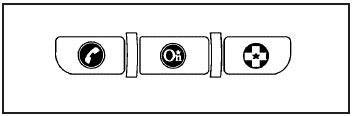
OnStar® uses several innovative technologies and live advisors to provide a wide range of safety, security, navigation, diagnostics, and calling services.
Automatic Crash Response
In a crash, built in sensors can automatically alert an OnStar advisor who is immediately connected to the vehicle to see if you need help.
How OnStar Service Works
 : This blue button connects you to a specially trained OnStar advisor to verify your account information and to answer questions.
 : Push this red emergency button to get priority help from specially trained OnStar emergency advisors.
 : Push this button for hands-free, voice-activated calling and to give voice commands for turn-by-turn navigation.
Crisis Assist, Stolen Vehicle Assistance, Vehicle Diagnostics, Remote Door Unlock, Roadside Assistance, Turn-by-Turn Navigation and Hands-Free Calling are available on most vehicles. Not all OnStar services are available on all vehicles. For more information see the OnStar Owner’s Guide or visit www.onstar.com (U.S.) or www.onstar.ca (Canada), contact OnStar at 1-888-4-ONSTAR (1-888-466-7827) or TTY 1-877-248-2080, or press to speak with an OnStar advisor 24 hours a day, 7 days a week.
For a full description of OnStar services and system limitations, see the OnStar Owner’s Guide in the glove box.
OnStar service is subject to the OnStar terms and conditions included in the OnStar Subscriber Information.
OnStar service cannot work unless the vehicle is in a place where OnStar has an agreement with a wireless service provider for service in that area. OnStar service also cannot work unless the vehicle is in a place where the wireless service provider OnStar has hired for that area has coverage, network capacity and reception when the service is needed, and technology that is compatible with the OnStar service. Not all services are available everywhere, particularly in remote or enclosed areas, or at all times.
The OnStar system can record and transmit vehicle information. This information is automatically sent to an OnStar call center when is pressed, is pressed, or if the airbags or ACR system deploy. This information usually includes the vehicle’s GPS location and, in the event of a crash, additional information regarding the crash that the vehicle was involved in (e.g. the direction from which the vehicle was hit). When the virtual advisor feature of OnStar hands-free calling is used, the vehicle also sends OnStar the vehicle’s GPS location so they can provide services where it is located.
Location information about the vehicle is only available if the GPS satellite signals are unobstructed and available.
The vehicle must have a working electrical system, including adequate battery power, for the OnStar equipment to operate. There are other problems OnStar cannot control that may prevent OnStar from providing OnStar service at any particular time or place. Some examples are damage to important parts of the vehicle in a crash, hills, tall buildings, tunnels, weather or wireless phone network congestion.
OnStar Steering Wheel Controls
This vehicle may have a Talk/Mute button that can be used to interact with OnStar hands-free calling. See Audio Steering Wheel Controls for more information.
On some vehicles, the mute button can be used to dial numbers into voice mail systems, or to dial phone extensions. See the OnStar Owner’s Guide for more information.
Your Responsibility
Increase the volume of the radio if the OnStar advisor cannot be heard.
If the light next to the OnStar buttons is red, the system may not be functioning properly. Press and request a vehicle diagnostic. If the light appears clear (no light is appearing), your OnStar subscription has expired and all services have been deactivated. Press to confirm that the OnStar equipment is active.
Download Manual