Audio Steering Wheel Controls
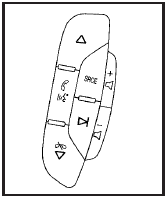
Vehicles with audio steering wheel controls could differ depending on the vehicle’s options. Some audio controls can be adjusted at the steering wheel.
 (Next): Press to go to the next radio station stored as a favorite, or the next track if a CD/DVD is playing.
 (Previous/End): Press to go to the previous radio station stored as a favorite, the next track if a CD/DVD is playing, to reject an incoming call, or end a current call.
 (Mute/Push to Talk): Press to silence the vehicle speakers only. Press again to turn the sound on.
For vehicles with Bluetooth or OnStar® systems press and hold for longer than two seconds to interact with those systems. See Bluetooth® or the OnStar Owner’s Guide for more information.
SRCE (Source): Press to switch between the radio (AM, FM, XM), CD, and for vehicles with, DVD, front auxiliary, and rear auxiliary.
For vehicles with the navigation system, press and hold this button for longer than two seconds to initiate voice recognition. See “Voice Recognition” in the Navigation System manual for more information.
 (Volume): Press to increase or to decrease the radio volume.
 (Seek): Press to go to the next radio station while in AM, FM, or XM™. Press to go to the next track or chapter while sourced to the CD or DVD slot. Press the if multiple discs are loaded to go to the next disc while sourced to a CD player.
Radio Reception
Frequency interference and static can occur during normal radio reception if items such as cell phone chargers, vehicle convenience accessories, and external electronic devices are plugged into the accessory power outlet. If there is interference or static, unplug the item from the accessory power outlet.
AM
The range for most AM stations is greater than for FM, especially at night. The longer range can cause station frequencies to interfere with each other. For better radio reception, most AM radio stations boost the power levels during the day, and then reduce these levels during the night. Static can also occur when things like storms and power lines interfere with radio reception. When this happens, try reducing the treble on the radio.
FM Stereo
FM signals only reach about 10 to 40 miles (16 to 65 km).
Although the radio has a built-in electronic circuit that automatically works to reduce interference, some static can occur, especially around tall buildings or hills, causing the sound to fade in and out.
XM™ Satellite Radio Service
XM Satellite Radio Service gives digital radio reception from coast-to-coast in the 48 contiguous United States, and in Canada. Just as with FM, tall buildings or hills can interfere with satellite radio signals, causing the sound to fade in and out. In addition, traveling or standing under heavy foliage, bridges, garages, or tunnels may cause loss of the XM signal for a period of time.
Cellular Phone Usage
Cellular phone usage may cause interference with the vehicle’s radio. This interference may occur when making or receiving phone calls, charging the phone’s battery, or simply having the phone on. This interference causes an increased level of static while listening to the radio. If static is received while listening to the radio, unplug the cellular phone and turn it off.
Backglass Antenna
The AM-FM antenna is integrated with the rear window defogger, located in the rear window. Make sure that the inside surface of the rear window is not scratched and that the lines on the glass are not damaged. If the inside surface is damaged, it could interfere with radio reception. For proper radio reception, the antenna connector needs to be properly attached to the post on the glass.
If a cellular telephone antenna needs to be attached to the glass, make sure that the grid lines for the AM-FM antenna are not damaged. There is enough space between the grid lines to attach a cellular telephone antenna without interfering with radio reception.
Notice: Using a razor blade or sharp object to clear the inside rear window can damage the rear window antenna and/or the rear window defogger.
Repairs would not be covered by the vehicle warranty. Do not clear the inside rear window with sharp objects.
Notice: Do not apply aftermarket glass tinting with metallic film. The metallic film in some tinting materials will interfere with or distort the incoming radio reception. Any damage caused to your backglass antenna due to metallic tinting materials will not be covered by the vehicle warranty.
XM™ Satellite Radio Antenna System
The XM Satellite Radio antenna is located on the roof of the vehicle. Keep the antenna clear of obstructions for clear radio reception.
If the vehicle has a sunroof, the performance of the XM system may be affected if the sunroof is open.
Download Manual