Climate Controls
Climate Control System
The heating, cooling, and ventilation for the vehicle can be controlled with this system.
For vehicles with the remote start feature, when activated, the climate control system heats or cools the inside of the vehicle with the settings used before the vehicle was turned off. The heated seats, if the vehicle has them, and the rear window defogger will also be turned on when it is cold outside. The cooled seat setting is not activated during a remote start. Normal operation of the system will return after the key is turned to the ON/RUN position. See Remote Keyless Entry (RKE) System Operation for more information.
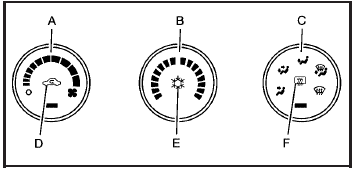
A. Fan Control
B. Temperature Control
C. Air Delivery Mode Control
D. Recirculation
E. Air Conditioning
F. Rear Window Defogger
Operation
 (Off): Turns the climate control system off. Outside air still enters the vehicle and is directed to the floor. The airflow direction and temperature can be adjusted.
Temperature Control: Turn clockwise or counterclockwise to increase or decrease the temperature.
 (Fan Control): Turn clockwise or counterclockwise to increase or decrease the fan speed. The fan speed is temporarily reduced between the transition to a new mode. The fan will resume when the new mode is complete.
If the airflow seems low when the fan speed is at the highest setting, the passenger compartment air filter may need to be replaced. For more information, see Passenger Compartment Air Filter and Scheduled Maintenance.
Air Delivery Mode Control: Turn clockwise or counterclockwise to change the direction of the airflow in the vehicle.
To change the current mode, select one of the following:
 (Vent): Air is directed to the instrument panel outlets.
 (Bi-Level): Air is divided between the instrument panel outlets and the floor outlets. Slightly cooler air is directed to the instrument panel outlets and warmer air is directed to the floor outlets.
 (Floor): Air is directed to the floor outlets, with some air directed to the windshield and side window outlets.
If recirculation is selected while in this mode, it stays on for three minutes to reduce windshield fogging.
 (Floor/Defog): This clears the windows of fog or moisture. Air is directed to the windshield and side window outlets and to the floor outlets. The system runs the air conditioning compressor unless the outside temperature is near or below freezing.
 (Defrost): This mode clears the windshield of fog or frost more quickly. Air is directed to the windshield and side window outlets. The system runs the air conditioning compressor unless the outside temperature is near or below freezing.
 (Air Conditioning): Press to turn the air conditioning system on or off. An indicator light below the button comes on to show that this mode is on. Air conditioning can be selected in any mode as long as the fan knob is not in the off position.
On hot days during the vehicle’s initial start-up, open the windows to let hot inside air escape; then close them. This helps to reduce the time it takes for the vehicle to cool down. It also helps the system to operate more efficiently.
For quicker cool down on hot days, do the following:
1. Select .
2. Select  .
.
3. Select .
4. Select the coolest temperature.
5. Select the highest fan speed.
The air-conditioning system removes moisture from the air, so a small amount of water might drip under the vehicle while idling or after turning off the engine. This is normal.
(Recirculation): Press to turn the recirculation mode on. An indicator light below the button comes on to show that this mode is on. This mode recirculates and helps to quickly cool the air inside the vehicle. It can be used to prevent outside air and odors from entering the vehicle. This mode cannot be selected while in the defog or defrost modes. If you try to select the recirculation mode, the indicator light flashes three times and turns off.
Operation in this mode during periods of high humidity and cool outside temperatures may result in increased window fogging. If window fogging is experienced, select the defrost mode.
Rear Window Defogger
The rear window defogger uses a warming grid to remove fog from the rear window.
 (Rear Window Defogger): Press to turn the rear window defogger on or off. An indicator light below the button comes on to show that the rear window defogger is on. Be sure to clear as much snow from the rear window as possible.
The rear window defogger only works when the ignition is in ON/RUN. The rear window defogger stays on for about 20 minutes after the button is pressed if traveling at slow speeds. At higher vehicle speeds, the rear defogger may stay on continuously. If turned on again, the defogger only runs for about 10 minutes before turning off. The defogger can be turned off by pressing the button again, by turning the ignition to ACC/ACCESSORY or ON/RUN, or by turning off the engine.
If the vehicle has heated outside rearview mirrors, the mirrors heat to help clear fog or frost from the surface of the mirror when the rear window defogger is on. See Outside Heated Mirrors for more information.
Notice: Do not use anything sharp on the inside of the rear window. If you do, you could cut or damage the warming grid, and the repairs would not be covered by the vehicle warranty. Do not attach a temporary vehicle license, tape, a decal or anything similar to the defogger grid.
Dual Automatic Climate Control System
The heating, cooling, and ventilation for the vehicle can be controlled with this system.
For vehicles with the remote start feature and it is activated, the climate control system heats or cools the inside of the vehicle, with the settings used before the vehicle was turned off. The heated seats, if the vehicle has them, and the rear window defogger will be turned on by the climate control system when it is cold outside. The cooled seat setting is not activated during a remote start. Normal operation of the system will return after the key is turned to the ON/RUN position. See Remote Keyless Entry (RKE) System Operation for more information.
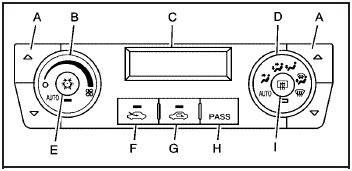
A. Driver and Passenger Temperature Controls
B. Fan Control
C. Display
D. Air Delivery Mode Control
E. Air Conditioning
F. Outside Air
G. Recirculation
H. PASS
I. Rear Window Defogger
Automatic Operation
AUTO (Automatic Fan): When AUTO is selected on the fan control, the system automatically adjusts the fan speed. If the OnStar® system is activated when this position is selected, the fan speed will lower.
AUTO (Automatic Mode)
1. Turn the fan control to AUTO.
2. Turn the mode control to AUTO.
3. Adjust the temperature to a comfortable setting between 68°F (21°C) and 78°F (26°C).
Choosing the coldest or warmest temperature setting will not cause the system to heat or cool any faster. In cold weather, the system starts at reduced fan speeds to avoid blowing cold air into the vehicle until warmer air is available. The system will start out blowing air to the floor, but may change modes automatically as the vehicle warms up to maintain the chosen temperature setting.
The length of time needed to warm the interior depends on the outside temperature.
4. Wait a few minutes for the system to automatically regulate. Then adjust the temperature as necessary to find your comfort setting.
Do not cover the solar sensor located in the center of the instrument panel, near the windshield. For more information on the solar sensor, see “Sensors” later in this section.
After the vehicle is started, the display shows the interior temperature settings.
When the ENG/MET (English/metric) button on the Driver Information Center (DIC) is pressed, the display shows readings in Fahrenheit or Celsius. Use the ENG/MET button to toggle between the readings.
AUTO (Automatic Air Conditioning): If AUTO is selected on the fan or mode control, the system automatically controls the air conditioning compressor.
The A/C compressor runs automatically even at cool outside temperatures in order to dehumidify the air. The A/C indicator light is lit when the system is operating automatically. Press the A/C button on the fan control to turn off the A/C. To clear windows better in defog or defrost modes, the A/C compressor runs automatically in damp cool conditions.
 (Auto Recirculation): If AUTO is selected on either the fan or mode control, the system automatically controls the supply of fresh outside air or recirculates the interior air to cool the car faster. The indicator light on the recirculation button will light whenever the system switches to recirculation. You may force outside air by pressing the outside air button. The next time AUTO fan or mode is selected, it will reset back to AUTO operation.
Manual Operation
 (Off): Turns the climate control system off. Outside air still enters the vehicle and is directed to the floor.
The airflow direction and temperature can be adjusted.
If the temperature is adjusted while the system is off, the display will light to show the current settings.
 (Driver Temperature Controls): Press these buttons next to the fan control to increase or decrease the temperature inside the vehicle.
(Passenger Temperature Controls): Press these buttons next to the mode control to increase or decrease the temperature for the front passenger. If the passenger climate control system is off, pressing one of these buttons turns it on.
 (Fan Control): Turn clockwise or counterclockwise to increase or decrease the fan speed. Turning this control completely counterclockwise turns on the automatic fan operation.
If the airflow seems low when the fan speed is at the highest setting, the passenger compartment air filter may need to be replaced. For more information, see Passenger Compartment Air Filter and Scheduled Maintenance.
Air Delivery Mode Control: Turn clockwise or counterclockwise to change the direction of the airflow in the vehicle.
To change the current mode, select one of the following:
 (Vent): Air is directed to the instrument panel outlets.
 (Bi-Level): Air is divided between the instrument panel outlets and the floor outlets. In automatic operation, cooler air is directed to the upper outlets and warmer air to the floor outlets.
 (Floor): Air is directed to the floor outlets, with some air directed to the windshield and side window outlets.
If recirculation is selected while in this mode, it stays on for three minutes to reduce windshield fogging.
 (Floor/Defog): This mode clears the windows of fog or moisture. Air is directed to the floor outlets, with some air directed to the windshield and side window outlets. The system turns off recirculation and runs the air-conditioning compressor unless the outside temperature is at or below freezing. The recirculation mode cannot be selected while in the floor/defog mode.
 (Defrost): This mode removes fog or frost from the windshield more quickly. Air is directed to the windshield and the side window outlets. The system automatically turns off recirculation and runs the air-conditioning compressor, unless the outside temperature is at or below freezing. Recirculation cannot be selected while in the defrost mode.
 (Air Conditioning): Press to turn the air conditioning system on or off and override the automatic system.
An indicator light below the button comes on to show that this mode is on.
The air conditioning system removes moisture from the air, so a small amount of water might drip under the vehicle while idling or after turning off the engine. This is normal.
 (Outside Air): Press to let outside air enter the vehicle. An indicator light comes on to show this mode is on. Pressing
  cancels this mode.
(Recirculation): Press to turn the recirculation mode on. An indicator light below the button comes on to show that this mode is on. This mode recirculates and helps to quickly cool the air inside the vehicle. It can be used to prevent outside air and odors from entering the vehicle. This mode cannot be selected while in the defog or defrost modes. If you try to select the recirculation mode, the indicator light flashes three times and turns off.
Operation in this mode during periods of high humidity and cool outside temperatures may result in increased window fogging. If window fogging is experienced, select the defrost mode.
PASS (Passenger Climate Control): Press to turn the passenger climate control systems on or off.
When the passenger climate control system is on, the passenger temperature setting is displayed.
If the PASS button is pressed to turn the passenger temperature setting off, the driver temperature setting controls the temperature for the entire vehicle.
Sensors
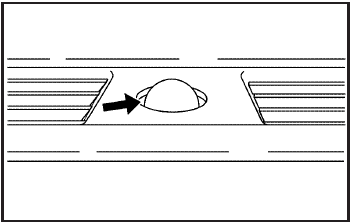
The solar sensor, located in the defrost grille, in the middle of the instrument panel, monitors the solar radiation. Do not cover the solar sensor or the system will not work properly.
There is also an interior temperature sensor located next to the steering wheel that measures the temperature of the air inside the vehicle.
There is also an exterior temperature sensor located behind the front grille. This sensor reads the outside air temperature and helps maintain the temperature inside the vehicle. Any cover on the front of the vehicle could cause a false temperature reading to display.
In order to prevent false temperature readings at startup, the displayed temperature will not change until the following occurs:
• Vehicle speed is above 10 mph (16 km/h) for five minutes.
• Vehicle speed is above 32 mph (51 km/h) for two and a half minutes.
The climate control system uses the information from these sensors to maintain your comfort setting by adjusting the outlet temperature, fan speed, and the air delivery mode. The system may also supply cooler air to the side of the vehicle facing the sun. The recirculation mode will also be used as needed to maintain cool outlet temperatures.
Rear Window Defogger
The rear window defogger uses a warming grid to remove fog or frost from the rear window.
 (Rear Defogger): Press to turn the rear window defogger on or off. An indicator light below the button comes on to show that the rear window defogger is on.
Be sure to clear as much snow from the rear window as possible.
The rear window defogger only works when the ignition is in ON/RUN. The rear window defogger stays on for about 20 minutes after the button is pressed if the vehicle is traveling at slower vehicle speeds. At higher vehicle speeds the rear window defogger may stay on continuously. If turned on again, the defogger only runs for about 10 minutes before turning off.
The defogger can be turned off by pressing the button again, by turning the ignition to ACC/ACCESSORY or ON/RUN, or by turning off the engine.
The heated outside rearview mirrors will heat to help clear fog or frost from the surface of the mirror when the rear window defogger is on. See Outside Heated Mirrors for more information.
Notice: Do not use a razor blade or sharp object to clear the inside rear window. Do not adhere anything to the defogger grid lines in the rear glass. These actions may damage the rear defogger. Repairs would not be covered by your warranty.
Outlet Adjustment
Use the levers, located in the middle of the front outlets, to change the direction of the airflow. Use the thumbwheel located between the outlets to turn them on and off.
If the vehicle has rear seat outlets, adjust the direction of the airflow using the lever in the center of each outlet.
Operation Tips
• Clear away any ice, snow, or leaves from the air inlets at the base of the windshield that could block the flow of air into the vehicle.
• Use of non-GM approved hood deflectors can adversely affect the performance of the system.
• Keep the path under the front seats clear of objects to help circulate the air inside the vehicle better.
Passenger Compartment Air Filter
Outside air is routed through a passenger compartment air filter before entering the vehicle. This filter removes certain particles from the air, including pollen and dust particles. The filter should be replaced as part of routine scheduled maintenance. See Scheduled Maintenance for when to replace the filter.
The access panel for the passenger compartment air filter is located under the hood near the windshield, on the passenger’s side of the vehicle.
To access the passenger compartment air filter, do the following:
1. Press the tabs back and left to remove the cover.
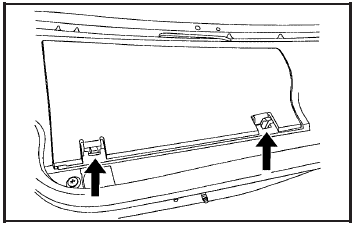
2. Insert a tool behind the push pin located on the inboard side of the air filter compartment to carefully pry the pin out.
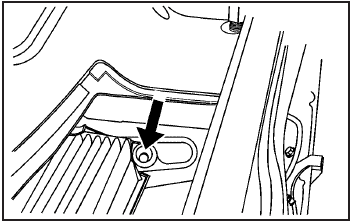
3. To remove the air filter, insert a tool between the air filter and the compartment wall on the outboard side of the vehicle. Then, push in to flatten the pin holding the air filter in place. Gently remove the air filter and any loose debris that may be inside the air filter compartment.
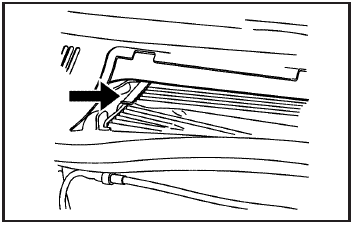
4. Insert the new air filter by pushing until you hear a click. Reinstall the push pin and snap the cover into place.
Download Manual