Front Seats
Manual Seats
WARNING:
You can lose control of the vehicle if you try to adjust a manual driver’s seat while the vehicle is moving. The sudden movement could startle and confuse you, or make you push a pedal when you do not want to. Adjust the driver’s seat only when the vehicle is not moving.
If the vehicle has a manual seat, it can be moved forward or rearward.
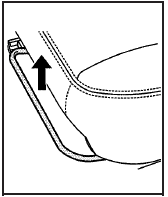
1. Lift the bar to unlock the seat.
2. Slide the seat to the desired position and release the bar.
Try to move the seat with your body to be sure the seat is locked in place.
Power Seats
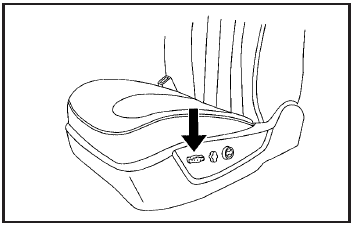
To adjust a power seat, do any of the following:
• Move the seat forward or rearward by sliding the control forward or rearward.
• Raise or lower the front part of the seat cushion by moving the front of the control up or down.
• Raise or lower the rear part of the seat cushion by moving the rear of the control up or down.
• Raise or lower the entire seat by moving the entire control up or down.
On vehicles with power reclining seatbacks, see “Power Reclining Seatbacks” under Reclining Seatbacks.
Power Lumbar
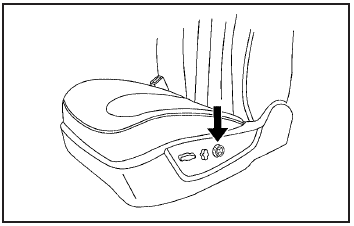
On vehicles with power lumbar, the control is located on the outboard side of the front seats.
For vehicles with a two-way lumbar control, press the control top or bottom to increase or decrease support in the lower seatback.
On vehicles with a four-way lumbar control, press the control forward or rearward to increase or decrease support in the lower seatback. Press the top or bottom of the control to raise or lower the support in the seatback.
The lumbar support may need to be re-adjusted when changing the seating position.
Heated Seats
Your vehicle may have heated front seats. To operate the heated seats, the ignition must be on.
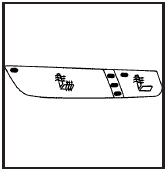
Driver’s Side Buttons shown
The buttons are located on the front doors.
 (Heated Seat Cushion and Seatback): Press this button to turn on the heated seat cushion and seatback.
 (Heated Seatback): Press this button to turn on the heated seatback.
When either button is pressed, an indicator light on that button shows that the feature is on.
There are three temperature settings for each feature.
A column of three lights next to the buttons will display which setting the feature is in: high, medium or low.
Three lights indicate the highest setting, two lights indicate medium and one light indicates the lowest setting.
When you press a button, the feature will turn on at the highest setting. Each time you press the button, the feature will decrease one temperature setting.
To turn the feature off, keep pressing the button until the display lights turn off.
If your vehicle has remote vehicle start and is started using the RKE transmitter, the front heated seats will be turned on to the high setting if it is cold outside. See “Remote Vehicle Start” under Remote Keyless Entry (RKE) System Operation. When the key is inserted into the ignition and the ignition is turned on, the heated seat feature will turn off. To turn the heated seat feature back on, press the desired button.
Heated and Ventilated Seats
On vehicles with heated and ventilated seats, the ignition must be on to use the feature.
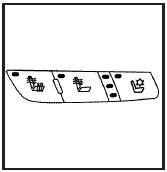
Driver’s Side Buttons shown
The buttons are located on the front doors.
 (Heated Seat Cushion and Seatback): Press this button to heat the seat cushion and seatback.
 (Heated Seatback): Press this button to heat the seatback.
 (Ventilated Seat Cushion and Seatback): Press this button to cool the seat cushion and seatback.
Press each button to turn on the desired feature. A light on that button will display indicating which feature is on.
There are three temperature settings for each feature.
A column of three lights next to the buttons will display which setting the feature is in: high, medium or low. Three lights indicate the highest setting, two lights indicate medium and one light indicates the lowest setting.
When you press a button, the feature will turn on at the highest setting. Each time you press the button, the feature will decrease one temperature setting.
To turn the feature off, keep pressing the button until the display lights turn off.
If your vehicle has remote vehicle start and is started using the remote keyless entry transmitter, the front heated seats will be turned on to the high setting if it is cold outside. See “Remote Vehicle Start” under Remote Keyless Entry (RKE) System Operation. When the key is inserted into the ignition and the ignition is turned on, the heated seat feature will turn off. To turn the heated seat feature back on, press the desired button.
Memory Seat and Mirrors
On vehicles with the memory feature the buttons are located on the driver’s door.
1: Saves the seating position for driver 1.
2: Saves the seating position for driver 2.
 : Recalls the easy exit position.
For more programming information, see DIC Vehicle Customization.
To save your positions in memory:
1. Adjust the driver’s seat, including the seatback recliner and lumbar, and both outside mirrors to your preferred position.
2. Press and hold button 1 until two beeps sound to let you know that the position has been stored.
3. Repeat the procedure for a second driver using button 2.
The vehicle must be in P (Park) to recall your memory positions.
Press and release either button to recall the stored setting. Each time a memory button is pressed, a single beep sounds.
If you use the remote keyless entry transmitter to enter your vehicle and the remote recall memory feature is on, automatic seat and mirror movement occurs.
To stop recall movement of the memory feature, press one of the power seat controls, memory buttons, or power mirror buttons.
If something has blocked the driver’s seat while recalling a memory position, the driver’s seat recall may stop working. If this happens, press the control for the area that is not recalling for two seconds, after the obstruction is removed. Try recalling the memory position again by pressing the appropriate memory button. If the memory position is still not recalling, see your dealer/retailer for service.
Easy Exit Seat
 : With the vehicle in P (Park), press to recall the exit position.
You will hear a single beep and the driver’s seat moves back.
Reclining Seatbacks
Manual Reclining Seatbacks
WARNING:
You can lose control of the vehicle if you try to adjust a manual driver’s seat while the vehicle is moving. The sudden movement could startle and confuse you, or make you push a pedal when you do not want to. Adjust the driver’s seat only when the vehicle is not moving.
WARNING:
If either seatback is not locked, it could move forward in a sudden stop or crash. That could cause injury to the person sitting there. Always push and pull on the seatbacks to be sure they are locked.
If the seats have manual reclining seatbacks, the lever used to operate them is located on the outboard side of the seats.
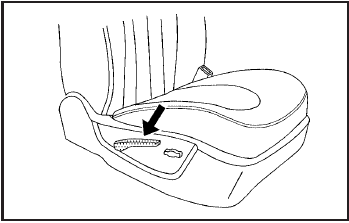
To recline the seatback, do the following:
1. Lift the recline lever.
2. Move the seatback to the desired position, then release the lever to lock the seatback in place.
3. Push and pull on the seatback to make sure it is locked.
To return the seatback to an upright position, do the following:
1. Lift the lever fully without applying pressure to the seatback and the seatback will return to the upright position.
2. Push and pull on the seatback to make sure it is locked.
Power Reclining Seatbacks
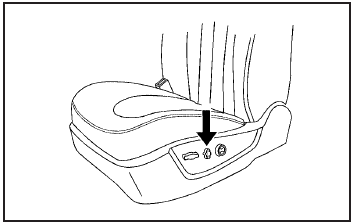
Driver’s Seat with Power Seat Control, Power Recline, and Power Lumbar shown
If the seats have power reclining seatbacks, the controls used to operate them are located on the outboard side of the seats.
• Tilt the top of the control rearward to recline the seatback.
• Tilt the top of the control forward to raise the seatback.
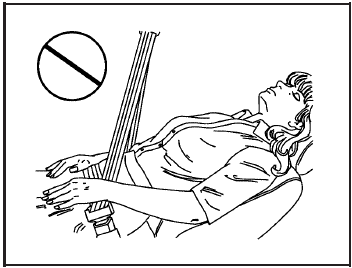
WARNING:
Sitting in a reclined position when your vehicle is in motion can be dangerous. Even if you buckle up, your safety belts cannot do their job when you are reclined like this.
The shoulder belt cannot do its job. In a crash, you could go into it, receiving neck or other injuries.
The lap belt cannot do its job either. In a crash the belt could go up over your abdomen. The belt forces would be there, not at your pelvic bones.
This could cause serious internal injuries.
For proper protection when the vehicle is in motion, have the seatback upright. Then sit well back in the seat and wear your safety belt properly.
Do not have the seatback reclined if your vehicle is moving.
Center Seat
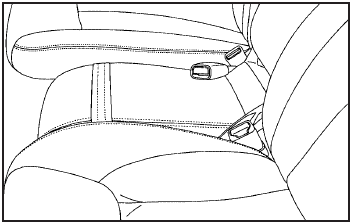
The vehicle may have a front center seat. This seat can be converted to a storage area by lowering the seatback. See Center Flex Storage Unit.
Rear Seats
Rear Seat Pass-Through Door
Your vehicle has a pass-through door that provides access to the trunk from the rear seats. See “Rear Seat Pass-Through Door” under Trunk.
Download Manual