Opening, closing and locking the doors
Front doors
Unlocking and locking the doors from the outside
Entry function (vehicles with a smart key system)
Carry the electronic key to enable this function.
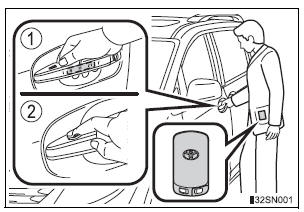
- Grip the driver’s door handle to unlock the door. Grip the passenger’s door handle to unlock all the doors.* Make sure to touch the sensor on the back of the handle.
The doors cannot be unlocked for 3 seconds after the doors are locked.
*: The door unlock settings can be changed.
- Touch the lock sensor (the indentation on the upper part of the door handle) to lock all the doors.
Check that the door is securely locked.
Wireless remote control
- Vehicles without a smart key system (type A)
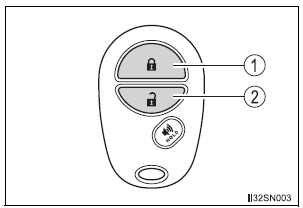
- Locks all doors
Check that the door is securely locked. - Unlocks all doors
Pressing the button unlocks the driver’s side doors. Pressing the button again within 3 seconds unlocks the other doors.
- Vehicles without a smart key system (type B)
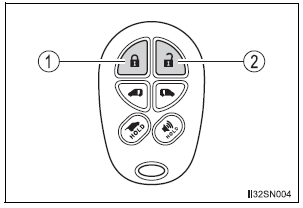
- Locks all doors
Check that the door is securely locked. - Unlocks all doors
Pressing the button unlocks the driver’s side doors. Pressing the button again within 3 seconds unlocks the other doors.
- Vehicles with a smart key system
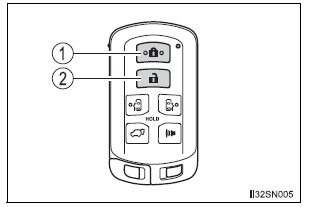
- Locks all doors
Check that the door is securely locked. - Unlocks all doors
Pressing the button unlocks the driver’s side doors. Pressing the button again within 3 seconds unlocks the other doors.
Key
- Vehicles without a smart key system
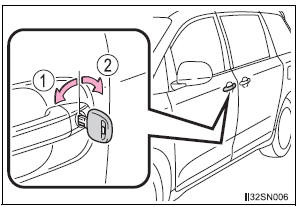
- Locks all the doors
- Unlocks all the doors
Turning the key unlocks the driver’s side doors. Turning the key again within 3 seconds unlocks the other doors.
- Vehicles with a smart key system
The doors can also be locked and unlocked with the mechanical key.
Operation signals
A buzzer sounds and the emergency flashers flash to indicate that the doors have been locked/unlocked. (Locked: Once; Unlocked: Twice)
Security feature
If a door is not opened within approximately 60 seconds after the vehicle is unlocked, the security feature automatically locks the vehicle again.
When the door cannot be locked by the lock sensor on the upper part of the front door handle
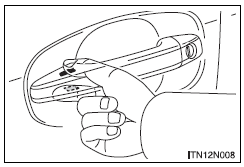
Touch both lock sensors on the upper and lower part of the front door handle simultaneously.
Door lock buzzer
If an attempt to lock the doors (except for power sliding doors or power back door) is made when a door is not fully closed, a buzzer sounds continuously.
Fully close the door to stop the buzzer, and lock the vehicle once more.
Alarm (if equipped)
Using the wireless remote control to lock the doors will set the alarm system.
If the smart key system or the wireless remote control does not operate properly
Vehicles with a smart key system: Use the mechanical key to lock and unlock the doors. Replace the key battery with a new one if it is depleted.
Unlocking and locking the doors from the inside
Door lock switch
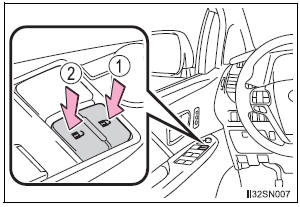
- Locks all the doors
- Unlocks all the doors
Inside lock button
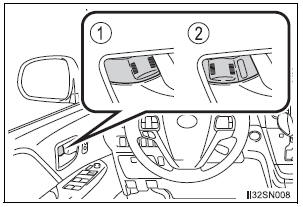
- Locks the door
- Unlocks the door
The front doors can be opened by pulling the inside handle even if the lock buttons are in the lock position.
Locking the front doors from the outside without a key
- Move the inside lock button to the lock position.
- Close the door.
- Vehicles without a smart key system The doors cannot be locked if either of the front doors is open and the key is in the engine switch.
- Vehicles with a smart key system The door cannot be locked if the engine switch is in ACCESSORY or IGNITION ON mode, or the electronic key is left inside the vehicle.
The key may not be detected correctly and the door may be locked.
Automatic door locking and unlocking systems
The following functions can be set or cancelled: For instructions on customizing, refer to
| Function | Operation |
| Shift position linked door locking function | Shifting the shift lever out of P locks all the doors |
| Shift position linked door unlocking function | Shifting the shift lever to P unlocks all the doors. |
| Speed linked door locking function | All the doors are locked when the vehicle speed is approximately 12 mph (20 km/h) or higher. |
| Driver’s door linked door unlocking function | Vehicles without a smart key system: All the doors are unlocked when the driver’s door is opened within approximately 45 seconds after turning the engine switch to “ACC” or “LOCK”.
Vehicles with a smart key system: All the doors are unlocked when the driver’s door is opened within approximately 45 seconds after turning the engine switch off. |
Setting and canceling the functions
To switch between set and canceled, follow the procedure below:
- Close all the doors and turn the engine switch to the “ON” position (vehicles without a smart key system) or IGNITION ON mode (vehicles with a smart key system). (Perform step 2 within 10 seconds.)
- Shift the shift lever to P or N, and press and hold the door lock switch (
 or
or
 ) for
) for
approximately 5 seconds and then release.The shift lever and switch positions corresponding to the desired function to be set are shown in the following table.
Use the same procedure to cancel the function.

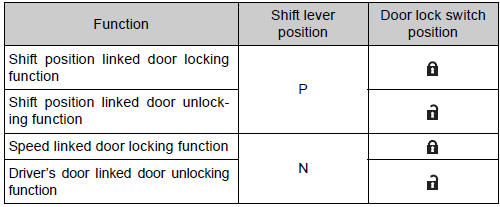
When the setting or canceling operation is complete, all the doors are locked and then unlocked.
Switching the door unlock function (vehicles with a smart key system)
It is possible to set which doors the entry function unlocks using the wireless remote control.
- Turn the engine switch off.
- When the indicator on the key surface is not on, press and hold
 ,
,
 ,
,
 ,
,
 or
or
 for about 5 seconds while
pressing and holding .
.
The setting changes each time an operation is performed, as shown below.
(When changing the setting continuously, release the buttons, wait for at least 5 seconds, and repeat step 2.)
|
Multi-information display |
Unlocking function |
Beep |
|
|
Holding the driver’s door handle unlocks only the driver’s door and driver side power sliding door. | Exterior: Beeps three times
Interior: Pings once |
| Holding the front passenger’s door handle or pulling either power sliding door handle unlocks all doors. | ||
|
|
Holding either front door handle or pulling either power sliding door handle unlocks all doors | Exterior: Beeps twice Interior: Pings once |


For vehicles equipped with an alarm, to prevent unintended triggering of the alarm, unlock the doors using the wireless remote control and open and close a door once after the settings have been changed. (If a door is not opened within 60 seconds after is pressed,
the doors will be locked again and the alarm will automatically be set.) In case that the alarm is triggered, immediately stop the alarm.
When all the doors are locked with the wireless remote control or key
The doors cannot be unlocked with the door lock switch.
The door lock switch can be reset by unlocking all the doors with the wireless remote control or key.
Using the mechanical key (vehicles with a smart key system)
The doors can also be locked and unlocked with the mechanical key.
Conditions affecting the operation of the smart key system or wireless remote control
- Vehicles without a smart key system
The wireless remote control function may not operate normally in the following situations:
- Near a TV tower, radio station, electric power plant, airport or other facility that generates strong radio waves
- When carrying a portable radio, cellular phone or other wireless communication devices
- When multiple wireless keys are in the vicinity
- When the wireless key is in contact with, or is covered by, a metallic object
- When a wireless key (that emits radio waves) is being used nearby
- When the wireless key has been left near an electrical appliance such as a personal computer
- If window tint with a metallic content or metallic objects is attached to the rear window
- Vehicles with AUTO ACCESS SEAT: If the wireless remote control of the AUTO ACCESS SEAT is operated simultaneously, the AUTO ACCESS SEAT may not operate properly.
For details, refer to “AUTO ACCESS SEAT OWNER’S MANUAL”.
- Vehicles with a smart key system The smart key system uses weak radio waves. In the following situations, the communication between the electronic key and the vehicle may be affected, preventing the smart key system and wireless remote control from operating properly. (Way of coping )
- When the electronic key battery is depleted
- Near a TV tower, electric power plant, gas station, radio station, large display, airport or other facility that generates strong radio waves or electrical noise
- When carrying a portable radio, cellular phone, cordless phone or other wireless communication devices
- When the electronic key is in contact with, or is covered by the following objects
- Cards to which aluminum foil is attached
- Cigarette boxes that have aluminum foil inside
- Metallic wallets or bags
- Coins
- Hand warmers made of metal
- Media such as CDs and DVDs
- When multiple electronic keys are in the vicinity
- When another wireless key (that emits radio waves) is being used nearby
- When carrying or using the electronic key together with the following devices that emit radio waves
- Another vehicle’s electronic key
- A wireless key that emits radio waves
- Personal computers or personal digital assistants (PDAs)
- Digital audio players
- Portable game systems
- If window tint with a metallic content or metallic objects are attached to the rear window
- Vehicles with AUTO ACCESS SEAT: If the wireless remote control of the AUTO ACCESS SEAT is operated simultaneously, the AUTO ACCESS SEAT may not operate properly.
For details, refer to “AUTO ACCESS SEAT OWNER’S MANUAL”.
Customization
Settings (e.g. unlocking function using a key) can be changed.
(Customizable features: )
| WARNING
To prevent an accident Observe the following precautions while driving the vehicle. Failing to do so may result in a door opening and an occupant falling out, resulting in death or serious injury.
|
Sliding doors
|
Locking/unlocking the sliding door from
Entry function (vehicles with a smart key system)
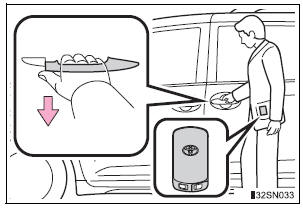
Carry the electronic key to enable this function.
Pull the handle to unlock all the doors.
There is no touch type sensor in slide door handle. You must pull the handle to activate the operation.
Wireless remote control
Locking/unlocking the sliding door from inside
Door lock switch
Inside lock knobs
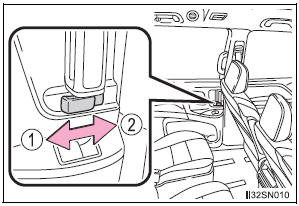
- Unlocks
- Locks
Opening/closing the sliding door
Sliding door handle
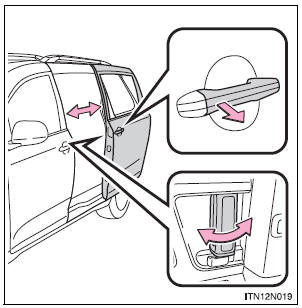
Open/close
Vehicles with power sliding doors: The sliding door will be automatically and completely opened and closed by the following.
- Pulling the outside handle.
- Sliding the inside handle forward to close or backward to open.
Power sliding door switches (vehicles with power sliding doors)
Press and hold the switch to open and close each sliding door.
- From front seats
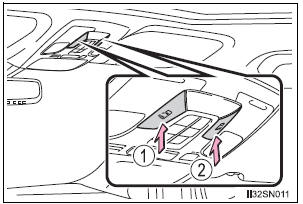
- From second seats

- Left side power sliding door
- Right side power sliding door
Pressing the switch again while the door is operating will cause the operation to reverse. However, the reverse operation cannot be performed for the first second after automatic operation starts, even if the switch is pressed and held again.
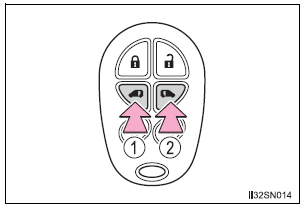
Wireless remote control (vehicles with power sliding doors)
Press and hold the switch to open/close the power sliding door.
- Vehicles without a smart key system
- Vehicles with a smart key system
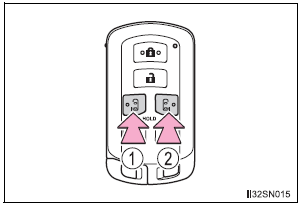
- Left side power sliding door
- Right side power sliding door
- Pressing the wireless remote control switch again while the power sliding door is operating will cause the operation to reverse. However, the reverse operation cannot be performed for the first second after automatic operation starts, even if the wireless remote control switch is pressed again.
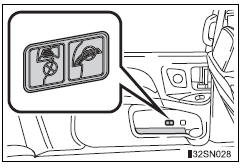
Canceling the power sliding door system (vehicles with power sliding doors)
Turn the main switch off to disable the power sliding door system.
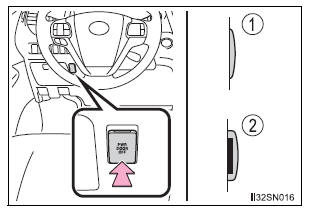
- Off
The sliding doors can only be opened and closed manually. - On*
The power sliding door can be opened and closed with the power sliding door switches for the front occupants or wireless remote control even if the sliding door childprotectors are locked.
*: Orange mark on the switch should be visible when the switch is on.
Locking the sliding doors from the outside without the wireless remote control
- Move the inside lock knob to the lock position.
- Close the sliding door.
Sliding door child-protector locks
The sliding door cannot be opened by the inside door handle and the second seat sliding door switch when the lock is set.
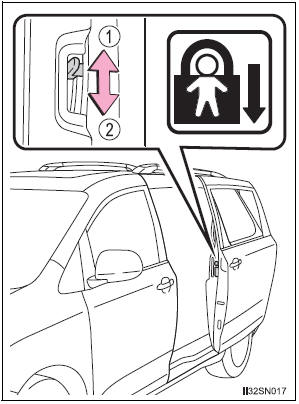
- Unlock
- Lock
These locks can be set to prevent children from opening the sliding doors. Push down on each sliding door switch to lock that sliding door.
The power sliding door can be operated when (vehicles with power sliding doors)
- Open operation: The shift lever is in P.
Close operation: The vehicle is stopped.
- The power sliding door system main switch is on.
- The power sliding door is unlocked. (Except for the wireless remote control operation or smart key system operation.)
- The sliding door child-protector lock is not set. (However, the switch for the front occupants and the outside handle still operate the power sliding door.)
Power sliding doors
- If the power sliding door outside handle is pulled while the power sliding door is opening or closing, the door will reverse the operation direction.
- During opening operation: Stroking the power sliding door handle forward will reverse the direction and start closing.
Stroking the handle backward will continue opening.
During closing operation: Stroking the power sliding door handle backward will reverse the direction and start opening.
Stroking the handle forward will continue closing.
- The power sliding doors can be opened/closed manually when the power sliding door function is canceled with the main switch.
- A buzzer sounds if you put the shift lever out of P with the engine switch in the “ON” position (vehicles without a smart key system) or IGNITION ON mode (vehicles with a smart key system) and the sliding door not completely closed.
- Vehicles with AUTO ACCESS SEAT: If the AUTO ACCESS SEAT has not been locked in place after being stowed, the right-hand sliding door will not close and a beep will sound twice.
For details, refer to “AUTO ACCESS SEAT OWNER’S MANUAL”.
- In an emergency, power slide door operation can be stopped by any of the following:
- Pulling the outside handle three consecutive times
- During opening operation, sliding the inside handle forward three consecutive times
- During closing operation, sliding the inside handle backward three consecutive times
- Pressing the power sliding door switch three consecutive times
- Pressing the power sliding door button on wireless remote control three consecutive times
After stopping, power sliding door brake function will be activated
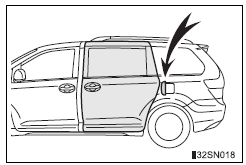
The situations in which the sliding door does not open completely
The left side sliding door does not open completely when the fuel filler door is opened.
Jam protection function (vehicles with power sliding doors)
- If anything obstructs the power sliding door while it is closing or opening, the power sliding door will automatically operate in the opposite direction.
- If the jam protection function operates during two consecutive operations, the power sliding door will be stopped at that position and the power sliding door system will be canceled.
Power sliding door brake function (vehicles with power sliding doors)
When the power sliding door detects an abnormality and stops operating, power sliding door brake function may be activated. When brake function is activated, door movement is restricted by the brake and motion may appear to be not smooth. This is not malfunction. Move the door to fully closed position to reset the system and normal power sliding door function will resume.
Sliding door closer (if equipped)
In the event that the sliding door is left slightly open, the sliding door closer will automatically close it to the fully closed position.
Power sliding door operation (vehicles with power sliding door)
Wireless remote control: Even if the door is locked, pressing and holding the sliding door buttons will unlock all doors and start open operation.
If the power sliding door is inoperative (vehicles with power sliding doors)
When the power sliding door detects an abnormality and stops opening and can not be completely closed manually, cancel the function as follows and close the door manually.
After that, have the vehicle inspected and repaired by your Toyota dealer.
- Remove the plug from the rear edge of the sliding door.
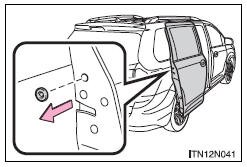
- Insert a key in the hole and push the mechanical cancel lever.
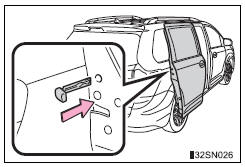
When the battery is disconnected (vehicles with power sliding doors) The power sliding door system must be initialized in order to ensure proper operation. To initialize it, close the sliding doors completely by hand.
Conditions affecting the operation of the smart key system or wireless remote control
Customization
Settings (e.g. opening and closing operation) can be changed.
| WARNING
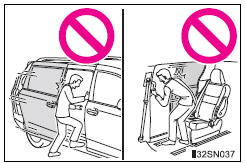
To prevent an accident Observe the following precautions while driving. Failure to do so may cause a door to open unexpectedly and an occupant to fall out of the vehicle, resulting in death or serious injury.
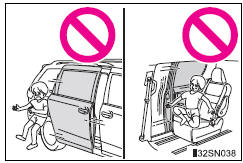
When children are in the vehicle Observe the following precautions. Failure to do so may result in death or serious injury
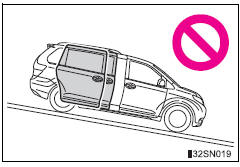
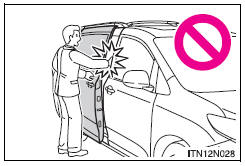
Operating the sliding doors Observe the following precautions. Failure to do so may cause parts of the body to be caught, resulting in death or serious injury.
Sliding door closer (if equipped)
Power sliding doors (vehicles with power sliding doors) Observe the following precautions when the power sliding door system is on. Failure to do so may cause death or serious injury.
Jam protection function (vehicles with power sliding doors) Observe the following precautions. Failure to do so may cause death or serious injury.
|
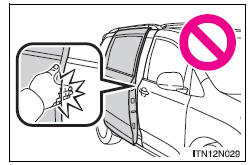
| NOTICE
Sliding door
Make sure magazines are not bent or protruding from the sliding door pockets. Do not insert anything too big so that the shape of the sliding door pockets is distorted. Such objects may obstruct the opening/closing of the sliding doors, damage the sliding door pockets or the vehicle body, and may result in a malfunction. To prevent damage to your vehicle
|
Back door
The back door can be locked/unlocked and opened/closed by the following procedures.
Locking and unlocking the back door
Entry function (vehicles with a smart key system)
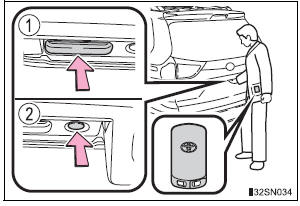
Carry the electronic key to enable this function.
- Press the unlock button to unlock all the doors.
The door cannot be unlocked for 3 seconds after the door is locked.
Lock the back door again when you leave the vehicle. The back door will not lock automatically after it has been opened and then closed.
- Press the lock button to lock all the doors.
Check that the door is securely locked.
Wireless remote control
Door lock switch
Opening/closing the back door from inside the vehicle (vehicles with power back door)
Press and hold the switch to open/ close the back door.
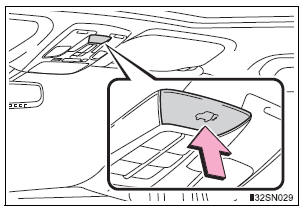
Pressing the switch again while the power back door is operating will cause the operation to reverse.
However, the reverse operation cannot be performed for the first second after automatic operation starts even if the switch is pressed again.
Opening the back door from outside the vehicle
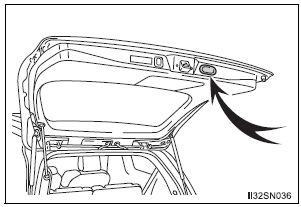
Back door opener
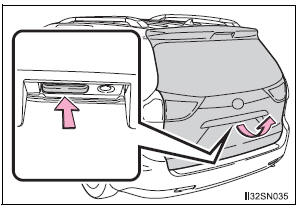
Raise the back door while pressing the back door opener to release the lock to open the back door.
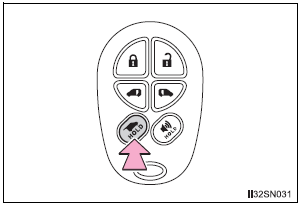
Wireless remote control (vehicles with power back door)
Press and hold the switch to open/close the power back door
- Vehicles without a smart key system
- Vehicles with a smart key system
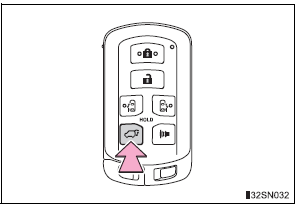
Pressing the switch again while the power back door is operating will cause the operation to reverse. However, the reverse operation cannot be performed for the first second after automatic operation starts, even if the wireless remote control switch is pressed again.
Power back door switch (if equipped)
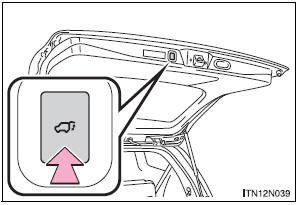
Press the switch to close the back door.
Pressing the switch again while the power back door is closing will cause it to open again.
However, the reverse operation cannot be performed for the first second after automatic operation starts even if the switch is pressed again.
When closing the back door
Lower the back door using the back door handle, and make sure to push the back door down from the outside to close it.
Canceling the power back door system (vehicles with power back door)
Turn the main switch off to disable the power back door system.
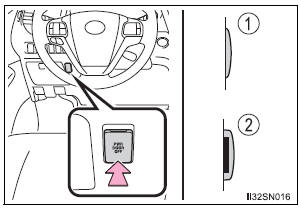
- Off
- On*
*: The orange line at the top of the switch indicates that the power back door system is on.
Luggage compartment light

The luggage compartment light turns on when the back door is opened with the luggage compartment light switch on.
- On
- Off
If the back door opener is inoperative
The back door can be operated from the inside

- Remove the inside panel.
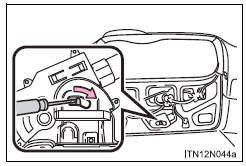
- Move the lever.
- Vehicles without power back door
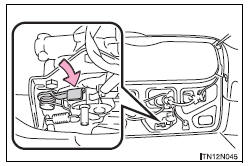
- Vehicles with power back door
The power back door can be operated when (vehicles with power back door)
- The shift lever is in P.
- The back door is unlocked.
Power back door operation (vehicles with power back door)
- A buzzer sounds and the emergency flashers flash twice to indicate that the back door is opening/closing.
- The back door can be opened and closed manually even when the power back door main switch is off.
Jam protection function (vehicles with power back door)
- If anything obstructs the power back door while it is closing or opening, the back door will automatically operate in the opposite direction.
- If the jam protection function operates during two consecutive closing operations, the back door will be stopped at that position.
Back door closer (if equipped)
In the event that the back door is left slightly open, the back door closer will automatically close it to the fully closed position.
When the battery is disconnected
- The back door will be automatically locked after the battery is reconnected.
- The power back door (if equipped) must be initialized in order to ensure proper operation.
- Unlock the back door with the wireless remote control or door lock switch.
- Close the back door completely by hand.
Conditions affecting the operation of the smart key system or wireless remote control
| WARNING
Observe the following precautions. Failure to do so may result in death or serious injury. Before driving
Important points while driving Never let anyone sit in the luggage compartment. In the event of sudden braking, sudden swerving or a collision, they are susceptible to death or serious injury. Operating the back door Observe the following precautions. Failure to do so may cause parts of the body to be caught, resulting in death or serious injury.
Back door closer (if equipped)
Power back door (vehicles with power back door) Observe the following precautions when operating the power back door. Failure to do so may cause death or serious injury.
Jam protection function (vehicles with power back door) Observe the following precautions. Failure to do so may cause death or serious injury.
|
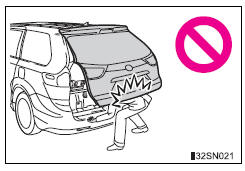
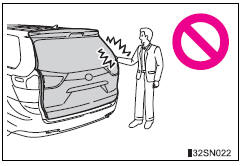
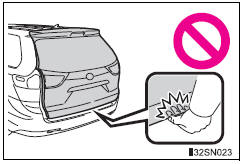
| NOTICE
Back door damper stays The back door is equipped with damper stays that hold the back door in place. Observe the following precautions. Failure to do so may cause damage to the back door damper stay, resulting in malfunction.
To prevent back door closer malfunction Do not apply excessive force to the back door while the back door closer is operating. To prevent damage to the power back door
|
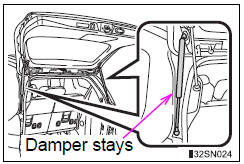
Smart key system
The following operations can be performed simply by carrying the electronic key on your person, for example in your pocket.
The driver should always carry the electronic key.
- Locks and unlocks the doors
- Front door handles
- Sliding door handles
- Back door
- Starts and stops the engine
Antenna location
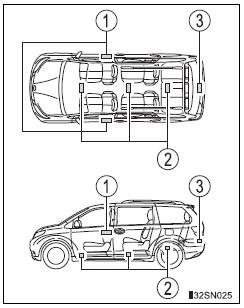
- Antennas outside cabin
- Antennas inside cabin
- Antenna outside luggage compartment
Effective range (areas within which the electronic key is detected)
 When locking or unlocking the
doors The system can be operated when the electronic key is within about 2.3 ft. (0.7 m) of either of the front outside door handles. (Only the doors detecting the key can be operated.)  When starting the engine or
changing engine switch modes
The system can be operated when the electronic key is inside the vehicle.
Alarms and warning indicators
An alarm sounds and warning messages are displayed on the multi-information display are used to protect against unexpected accidents or theft of the vehicle resulting from erroneous operation. When a warning message is displayed, take appropriate measures based on the displayed message.
When only an alarm sounds, circumstances and correction procedures are as follows.
|
Alarm |
Situation |
Correction procedure |
| Exterior alarm sounds once for 10 seconds | An attempt was made to lock the vehicle while a door is open | Close all of the doors and lock the doors again |
| Interior alarm pings continuously | The engine switch was turned to ACCESSORY mode while the driver’s door was open (or the driver’s door was opened while the engine switch was in ACCESSORY mode) | Turn the engine switch off and close the driver’s door |
Battery-saving function
In the following circumstances, the entry function is disabled in order to prevent the vehicle battery from discharging and the electronic key battery from discharging.
- When the entry function has not been used for 5 days or more
- When the electronic key has been left within approximately 6 ft. (2 m) of the vehicle for 10 minutes or more
- If the entry function has not been used for 14 days or more, the vehicle cannot be unlocked by a door other than the driver’s door. To unlock the vehicle, grip the driver’s door handle or use the wireless remote control or the mechanical key.
The system will resume operation when...
- The vehicle is locked using the lock sensor when carrying the electronic key on your person.
- The vehicle is locked/unlocked using the wireless remote control.
- The vehicle is locked/unlocked using the mechanical key.
Conditions affecting operation
Notes for the entry function
- Even when the electronic key is within the effective range (detection areas), the system may not operate properly in the following cases.
- The electronic key is too close to the window or outside door handle, near the ground, or in a high place when the doors are locked or unlocked.
- The electronic key is on the instrument panel, floor or in the glove box when the engine is started or engine switch modes are changed.
- Do not leave the electronic key on top of the instrument panel or near the door pockets when exiting the vehicle. Depending on the radio wave reception conditions, it may be detected by the antenna outside the cabin and the door will become lockable from the outside, possibly trapping the electronic key inside the vehicle.
- As long as the electronic key is within the effective range, the doors may be locked or unlocked by anyone. However, only the doors detecting the electronic key can be used to unlock the vehicle.
- The doors may unlock or lock if a large amount of water splashes on the door handle, such as in the rain or in a car wash when the electronic key is within the effective range. (The doors will automatically be locked after approximately 60 seconds if the doors are not opened and closed.)
- If the wireless remote control is used to lock the doors when the electronic key is near the vehicle, there is a possibility that the door may not be unlocked by the smart key system. (Use the wireless remote control to unlock the doors.)
- If power slide door is unable to operate due to prohibition by the power sliding door main switch, the door unlock and open operation will not be performed.
Note for locking the doors
- Touching the door lock sensor while wearing gloves may delay or prevent lock operation. Remove the gloves and touch the lock sensor again.
- When the lock operation is performed using the lock sensor, recognition signals will be shown up to two consecutive times. After this, no recognition signals will be given.
- If the door handle becomes wet while the electronic key is within the effective range, the door may lock and unlock repeatedly. Place the key in a position 6 ft. (2 m) or more separate from the vehicle while the vehicle is being washed. (Take care to ensure that the key is not stolen.)
- If the electronic key is inside the vehicle and a door handle becomes wet during a car wash, a message may be shown on the multi-information display and a buzzer will sound outside the vehicle. To turn off the alarm, lock all the doors.
- The lock sensor may not work properly if it comes into contact with ice, snow, mud, etc. Clean the lock sensor and attempt to operate it again, or use the lock sensor on the lower part of the door handle.
- Fingernails may scrape against the door during operation of the door handle.
Be careful not to injure fingernails or damage the surface of the door.
Notes for the unlocking function
- Gripping the front door handle when wearing a glove may not unlock or lock the door.
- A sudden approach to the effective range or door handle operation may prevent the doors from being unlocked. In this case, return the door handle to the original position and check that the doors have unlocked before pulling the door handle.
- If there is another electronic key in the detection area, it may take slightly longer to unlock the doors after one of the front door handles is gripped or one of sliding door handles is pulled.
When the vehicle is not driven for extended periods
- To prevent theft of the vehicle, do not leave the electronic key within 6 ft.
(2 m) of the vehicle.
- The smart key system can be deactivated in advance.
To operate the system properly
Make sure to carry the electronic key when operating the system. Do not get the electronic key too close to the vehicle when operating the system from the outside of the vehicle.
Depending on the position and holding condition of the electronic key, the key may not be detected correctly and the system may not operate properly. (The alarm may go off accidentally, or the door lock prevention may not operate.)
If the smart key system does not operate properly
- Locking and unlocking the doors: Use the mechanical key.
- Starting the engine
Certification for the smart key system
- For vehicles sold in the U.S.A.
FCC ID: HYQ14ADR FCC ID: HYQ14AEH FCC ID: HYQ13CZM FCC ID: HYQ13CZN FCC ID: NI4TMLF8-20
NOTE: This device complies with part 15 of the FCC Rules. Operation is subject to the following two conditions: (1) This device may not cause harmful interference, and (2) this device must accept any interference received, including interference that may cause undesired operation.
FCC WARNING: Changes or modifications not expressly approved by the party responsible for compliance could void the user’s authority to operate the equipment.
- For vehicles sold in Canada
NOTE: Operation is subject to the following two conditions: (1) this device may not cause interference, and (2) this device must accept any interference, including interference that may cause undesired operation of the device.
This device complies with Industry Canada licence-exempt RSS standard(s).
Operation is subject to the following two conditions: (1) this device may not cause interference, and (2) this device must accept any interference, including interference that may cause undesired operation of the device.
Customization
Settings (e.g. smart key system) can be changed.
(Customizable features: , 627)
If the smart key system has been deactivated in a customized setting
- Locking and unlocking the doors: Use the wireless remote control or mechanical key.
- Starting the engine and changing engine switch modes:
- Stopping the engine:
| WARNING
Caution regarding interference with electronic devices
Ask your Toyota dealer for details for disabling the entry function. |
Download Manual