Fuel consumption information
Fuel consumption information can be displayed on the audio system screen.
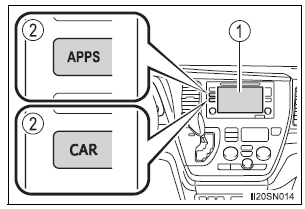
- Audio system screen
- “CAR” button (type A) “APPS” button (type B)
Trip information
- Type A
Press the “CAR” button.
- Type B
Press the “APPS” button, and then select “Eco” on the screen.
If the “Past Record” screen is displayed, select “Trip Information”.

- Reset the trip information data
- Previous fuel consumption per minute
- Current fuel consumption
- “Past Record” screen appears
- Cruising range
- Elapsed time
- Average vehicle speed
Average fuel consumption for the past 15 minutes is divided by color into past averages and averages attained since the engine switch was last turned to the “ON” position (vehicles without a smart key system) or IGNITION ON mode (vehicles with a smart key system). Use the displayed average fuel consumption as a reference.
These images are examples only, and may vary slightly from actual conditions.
Past record
- Type A
Press the “CAR” button.
- Type B
Press the “APPS” button, and then select “Eco” on the screen.
If the “Trip Information” screen is displayed, select “Past Record”.
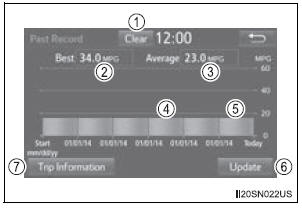
- Reset the past record data
- Best recorded fuel consumption
- Average fuel consumption (if equipped)
- Previous fuel consumption record
- Current fuel consumption
- Update the past record data
- “Trip Information” screen appears
The average fuel consumption history is divided by color into past averages and the average fuel consumption since the last updated.
Use the displayed average fuel consumption as a reference.
These images are examples only, and may vary slightly from actual conditions.
Updating the past record data
Update the average fuel consumption by selecting “Update” to measure the current fuel consumption again.
Also, the average fuel consumption displayed in the multi-information display will be reset at the same time.
Resetting the data
Selecting “Clear” on the “Trip Information” screen will reset the trip information data.
Selecting “Clear” on the “Past Record” screen will reset the past record data.
Cruising range
Displays the estimated maximum distance that can be driven with the quantity of fuel remaining.
This distance is computed based on your average fuel consumption.
As a result, the actual distance that can be driven may differ from that displayed.
Download Manual