Customization
Customizable features
Your vehicle includes a variety of electronic features that can be personalized to your preferences. The settings of these features can be changed using the multi-information display, the audio system screen or at your Toyota dealer.
Some function settings are changed simultaneously with other functions being customized. Contact your Toyota dealer for further details.
Customizing vehicle features
Changing using the audio system screen
- Audio system with “CAR” button
- Press the “SETUP” button.
- Select “Vehicle” on the “Setup” screen.
- Audio system with “APPS” button
- Press the “APPS” button.
- Select “Setup” on the “Apps” screen and select “Vehicle”.
Various setting can be changed. Refer to the list of settings that can be changed for details.
Changing using the multi-information display
- Vehicles with monochrome display
- Press the “DISP” switch to display the “SETTINGS” screen while the vehicle is stopped, and then press and hold the “DISP” switch to display the customize mode screen.
- Press the “DISP” switch and select the item, and then press and hold the “DISP” switch.
- Press the “DISP” switch and select the desired setting, and then press and hold the “DISP” switch.
To exit the customize mode, press the “DISP” switch to select the “EXIT”, and then press and hold the “DISP” switch.
- Vehicles with color display
- Use the meter control switches to select
 while the vehicle is
stopped, and then press the center button to display the customize mode screen. - Select the desired item, and then press the center button.
- Select the desired setting, and then press the center button.
To go back to the previous screen or exit the customize mode, press  .
.
Customizable features
- Settings that can be changed using the audio system screen
- Settings that can be changed using the multi-information display
- Settings that can be changed by your Toyota dealer
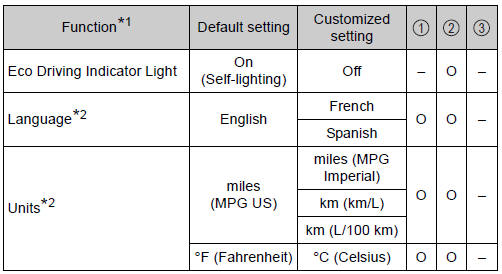
Definition of symbols: O = Available, – = Not available
Gauges, meters and multi-information display (, 93)
- Vehicles with monochrome display
- Vehicles with color display
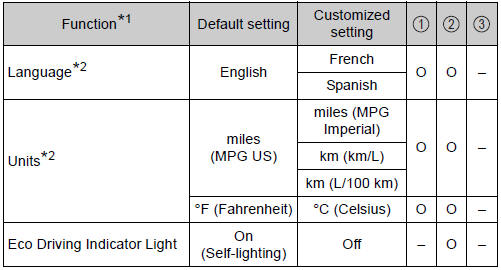
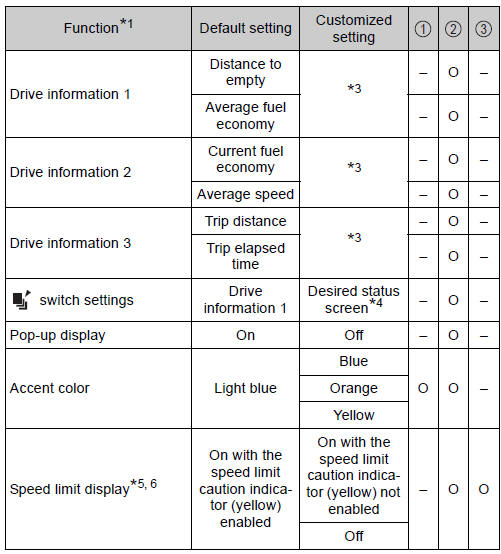
*1: For details about each function: , 97 *2: The default setting varies according to country.
*3: Customized items are the following items except for default setting items: average fuel economy, tank average fuel economy, trip average fuel economy, current fuel economy, distance to empty, trip distance, distance, trip elapsed time, elapsed time, trip average speed, average speed, blank.
*4: Some status screens cannot be registered (indicated on multi-information display).
*5: Speed limit display may not be available for some regions.
*6: If equipped
Door lock
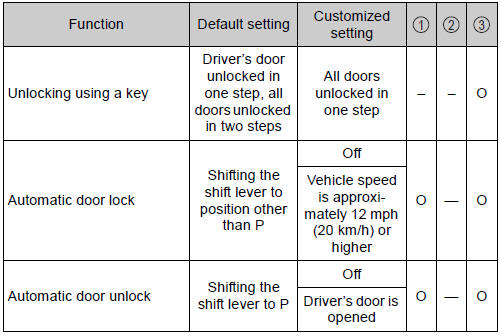
Smart key system* and wireless remote control
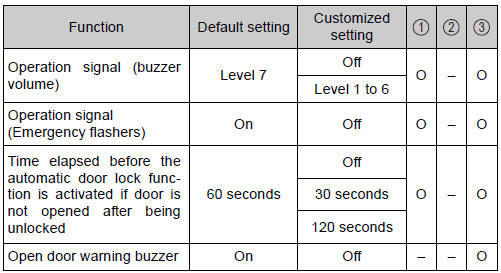
*: If equipped
Smart key system*
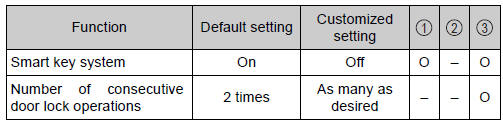
*: If equipped
Wireless remote control
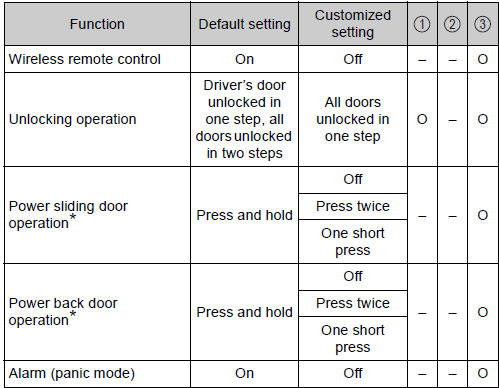
*: If equipped
Power sliding door*
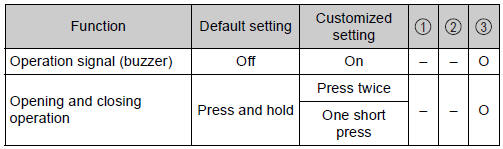
*: If equipped
Driving position memory*
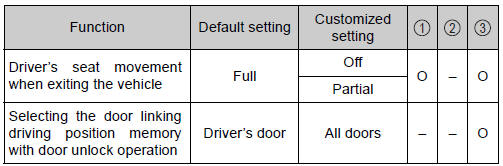
*: If equipped
Automatic light control system
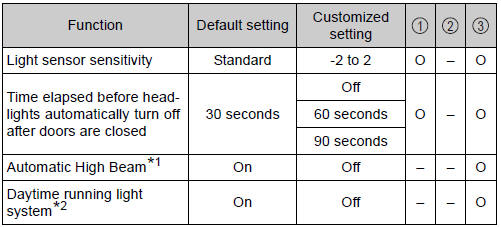
*1: If equipped
*2: U.S.A. only
Intuitive parking assist*1
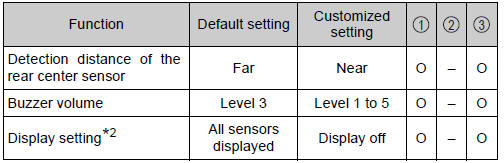
*1: If equipped
*2: When intuitive parking assist is operating.
Automatic air conditioning system

Illumination
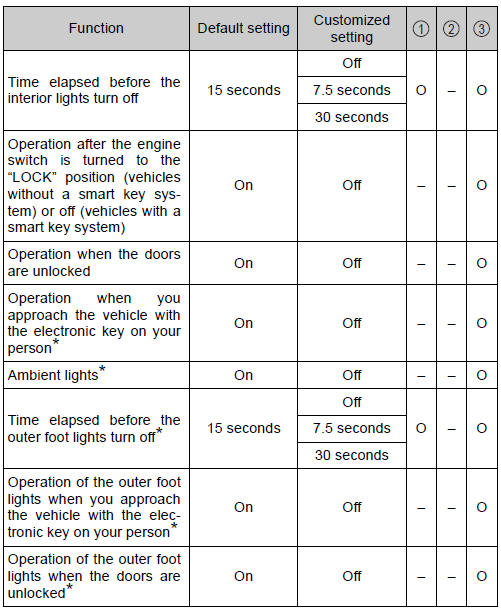
*: If equipped
Seat belt reminder

Vehicle customization
- When the speed-detecting automatic door lock and shift-linked automatic door lock are both on, the door lock operates as follows:
- When shifting the shift position to any position other than P, all the doors will be locked.
- If the vehicle is started with all the doors locked, the Speed linked door locking function would not operate.
- If the vehicle is started with any door unlocked, the Speed linked door locking function will operate.
- When the smart key system is off, the entry unlock function cannot be customized.
- When the doors remain closed after unlocking the doors and the timer activated automatic door lock function activates, signals will be generated in accordance with the operation buzzer volume and operational signal (Emergency flashers) function settings.
When customizing on the audio system screen
Stop the vehicle in a safe place, apply the parking brake, and shift the shift lever to P. Also, to prevent battery discharge, leave the engine running while customizing the features.
| WARNING
During customization As the engine needs to be running during customization, ensure that the vehicle is parked in a place with adequate ventilation. In a closed area such as a garage, exhaust gases including harmful carbon monoxide (CO) may collect and enter the vehicle. This may lead to death or a serious health hazard. |
| NOTICE
During customization To prevent battery discharge, ensure that the engine is running while customizing features. |
Initialization
Items to initialize
The following items must be initialized for normal system operation after such cases as the battery being reconnected, or maintenance being performed on the vehicle.
|
Item |
When to initialize |
| Power sliding door (if equipped) | After reconnecting or changing the battery |
| Power back door (if equipped) | After reconnecting or changing the battery |
| Message indicating maintenance is required (U.S.A. only) | After the maintenance is performed |
| Tire pressure warning system | When changing the tire size |
Download Manual