Cruise Control
When using cruise control, the vehicle can maintain a speed of about 40 km/h (25 mph) or more without keeping your foot on the accelerator. Cruise control does not work at speeds below 40 km/h (25 mph).
If equipped with a manual transmission, the cruise control will remain active when the gears are
shifted. The cruise is disengaged if the clutch is pressed for several seconds.
If the StabiliTrak/Electronic Stability Control (ESC) system begins to limit wheel spin while using cruise control, the cruise control automatically disengages. See Traction Control/Electronic Stability Control 0 194. When road conditions allow you to safely use it again, cruise control can be turned back on.
Cruise control will disengage if either TCS or StabiliTrak/ESC is turned off.
Cruise control is not available when using Competitive Driving Mode,
if equipped. See Competitive Driving Mode (SS, ZL1 and 1LE Models Only) 0 200.
If the brakes are applied, cruise control disengages.
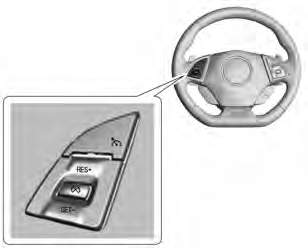
Cruise Control with Cancel Button
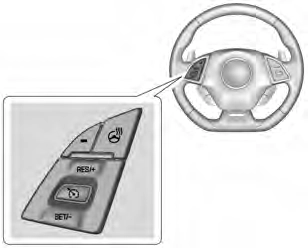
Cruise Control without Cancel Button
1 : Press to turn the system on and off. A white indicator appears in the instrument cluster when cruise is turned on.
* : If equipped, press to disengage cruise control without erasing the set speed from memory.
RES+ : If there is a set speed in memory, press briefly to resume to that speed or hold upward to accelerate. If cruise control is already active, use to increase vehicle speed.
SET− : Press briefly to set the speed and activate cruise control. If cruise control is already active, use to decrease speed.
Setting Cruise Control
If 1 is on when not in use, SET− or RES+ could get bumped and go into cruise when not desired. Keep 1 off when cruise control is not
being used.
The cruise control indicator on the instrument cluster turns green after cruise control has been set to the desired speed. See Instrument Cluster 0 98.
Resuming a Set Speed
If the cruise control is set at a desired speed and then the brakes are applied or * is pressed,
if equipped, the cruise control is disengaged without erasing the set speed from memory.
Once the vehicle speed reaches about 40 km/h (25 mph) or more, briefly press RES+. The vehicle returns to the previous set speed.
Increasing Speed While Using Cruise Control
If the cruise control system is already activated:
The speedometer reading can be displayed in either English or metric units. See “Options” under Instrument Cluster 0 98. The increment value used depends on the units displayed.
Reducing Speed While Using Cruise Control
If the cruise control system is already activated:
The speedometer reading can be displayed in either English or metric units. See “Options” under Instrument Cluster 0 98. The increment value used depends on the units displayed.
Passing Another Vehicle While Using Cruise Control
Use the accelerator pedal to increase the vehicle speed. When you take your foot off the pedal, the vehicle slows down to the previously set cruise control speed. While pressing the accelerator pedal or shortly following the release to
override cruise control, briefly pressing SET– will result in cruise control set to the current vehicle speed.
Using Cruise Control on Hills
How well the cruise control works on hills depends upon the vehicle speed, load, and the steepness of the hills. When going up steep hills, you might have to step on the accelerator pedal to maintain the vehicle speed. When going downhill, you might have to brake or shift to a lower gear to keep your speed down. If the brake pedal is applied, cruise control will disengage.
Ending Cruise Control
There are five ways to end cruise control:
Erasing Speed Memory
The cruise control set speed is erased from memory if 1 is pressed or if the vehicle is turned off.
Download Manual