Driving Information
Driving habits can affect fuel mileage. Here are some driving tips to get the best fuel economy possible.
Distraction comes in many forms and can take your focus from the task of driving. Exercise good judgment and do not let other activities divert your attention away from the road. Many local governments have enacted laws regarding driver distraction. Become familiar with the local laws in
your area.
To avoid distracted driving, keep your eyes on the road, keep your hands on the steering wheel, and focus your attention on driving.
Program all trip information into any navigation device prior to driving.
Refer to the infotainment manual for more information on using that system and the navigation system, if equipped, including pairing and using a cell phone.
Defensive driving means “always expect the unexpected.” The first step in driving defensively is to wear the seat belt. See Seat Belts 0 50.
Death and injury associated with drinking and driving is a global tragedy.
Braking, steering, and accelerating are important factors in helping to control a vehicle while driving.
Braking action involves perception time and reaction time. Deciding to push the brake pedal is perception time. Actually doing it is
reaction time.
Average driver reaction time is about three-quarters of a second. In that time, a vehicle moving at 100 km/h (60 mph) travels 20 m (66 ft), which could be a lot of distance in an emergency.
Helpful braking tips to keep in mind include:
of you.
If the engine ever stops while the vehicle is being driven, brake normally but do not pump the brakes. Doing so could make the pedal harder to push down. If the engine stops, there will be some power brake assist but it will be used when the brake is applied. Once the power assist is used up, it can take longer to stop and the brake pedal will be harder to push.
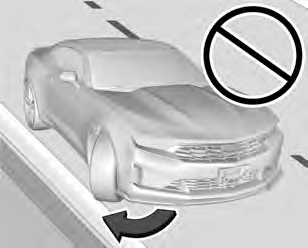
The vehicle has electric power steering. It does not have power steering fluid. Regular maintenance is not required.
If power steering assist is lost due to a system malfunction, the vehicle can be steered, but may require increased effort.
If the steering assist is used for an extended period of time while the vehicle is not moving, power assist may be reduced.
If the steering wheel is turned until it reaches the end of its travel and is held against that position for an extended period of time, power steering assist may be reduced.
Normal use of the power steering assist should return when the system cools down.
See your dealer if there is a problem.
a hand.
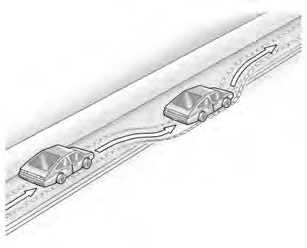
The vehicle's right wheels can drop off the edge of a road onto the shoulder while driving. Follow these tips:
There are three types of skids that correspond to the vehicle's three control systems:
Defensive drivers avoid most skids by taking reasonable care suited to existing conditions, and by not overdriving those conditions. But skids are always possible.
If the vehicle starts to slide, follow these suggestions:
. Try to avoid sudden steering, acceleration, or braking, including reducing vehicle speed by shifting to a lower gear. Any sudden changes could cause the tires to slide.
Remember: Antilock brakes help avoid only the braking skid.
If the vehicle is a Camaro High Performance model, see the additional items in the Camaro High Performance supplement.
Track events or competitive driving may affect the vehicle warranty. See the warranty manual before using the vehicle for racing or other competitive driving.
The Engine Sound Management setting (if equipped) should not be set to Stealth Mode during track events and competitive driving. See Driver Mode Control 0 196.
3.6L (LGX) V6 Engine
Change the engine oil to 0W-40 or 5W-40 that meets the dexos2 specification. If this oil is not available, the following oil can be used as an alternative: Valvoline SYNPOWER MST 5W-40.
For LS/LT 1LE, add 0.9 L (1.0 qt) of oil over the nominal fill level for a track event. After the competitive driving, remove the excess oil so that the level on the dipstick is not above the upper mark that shows the proper operating range.
During track usage, do not follow the Engine Oil Life System status. Change the engine oil after four hours of accumulative track usage.
Use premium unleaded gasoline with a posted octane rating of 93 at a track event. Unleaded gasoline with a posted octane rating of
91 may be used, but performance will be degraded.
Have the transmission fluid set to the track specific oil level prior to track usage. Transmission fluid should be changed after every 15 hours of track usage. Any transmission level set or change
should be performed at your dealer.
Manual transmission fluid should be changed after every 15 hours of track usage.
Axles must have 2 400 km (1,500 mi) before being used in track driving.
The rear axle fluid temperatures may be higher than when driving in severe conditions. Drain and refill with new fluid after the first racing or competitive driving event, and then after every 24 hours of racing or competitive driving. See Recommended Fluids and Lubricants 0 315.
For track events or competitive driving, it is recommended that the brake fluid be replaced with a high performance brake fluid that has a dry boiling point greater than 279 °C (534 °F). After conversion to the high performance brake fluid, follow the brake fluid service recommendations outlined by the fluid manufacturer. Do not use silicone or DOT-5 brake fluids.
To prepare the Camaro brake systems for track events and racing, complete the appropriate high performance brake burnishing procedure described below.
New brake pads must be burnished before racing or competitive driving.
When performed as instructed, this procedure will not damage the brakes. During the burnishing procedure, the brake pads will smoke and produce an odor. The braking force and pedal travel may increase. After the procedure is complete, the brake pads may appear white at the rotor contact.
Run this procedure in a safe manner and in compliance with all local and state ordinances/laws regarding motor vehicle operation. Run this procedure only on dry pavement.
Racing/Track Brake Burnishing Procedure
least 1 km (0.6 mi) between stops. Repeat until the brake pedal travel starts to increase. Depending on conditions, this should take no longer than 25 brake applications.
0.4 g. This is a medium brake application. Drive for at least 1 km (0.6 mi) between applications.
Before any racing event, remove the tire deflectors in the front of the vehicle, and replace the original deflector and splash shield with the tall deflector and small splash shield.
To install the tall deflector and small splash shield:
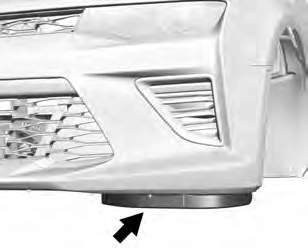
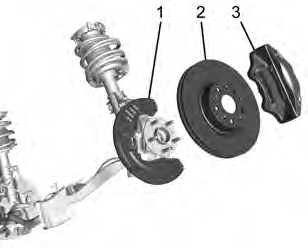
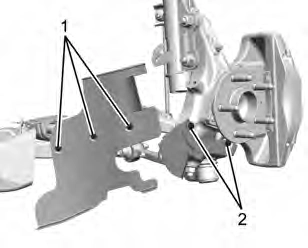
up, on the back tab. On the original deflector, the push pins are pushed from the top down.
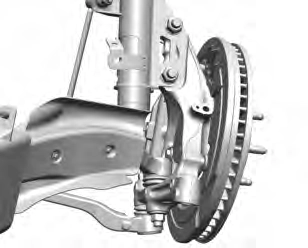
When installing new control arms, torque the three screws to 4.5 Y (40 lb inch).
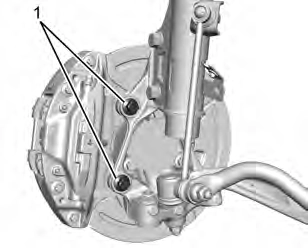
Goodwrench 12345493). Install the calipers with two screws (1) per corner. Torque the caliper bolts to 200 Y (148 lb ft).
Custom Launch Control allows the following parameters for Launch Control to be modified:
To adjust the Launch RPM, all of these conditions must be met:
N (Neutral).
For more information on Competitive Driving Mode, see Competitive Driving Mode (SS, ZL1 and 1LE Models Only) 0 200.
DIC menu. Use x to scroll
down to Options and
press SEL.
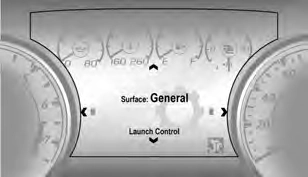
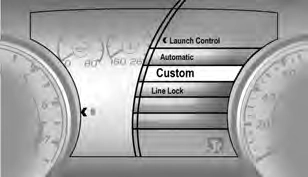
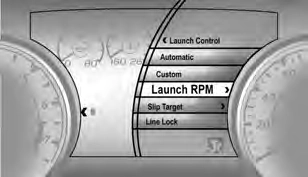
w or x:
1800–4000 RPM for manual transmissions and 1200–2400 for automatic.
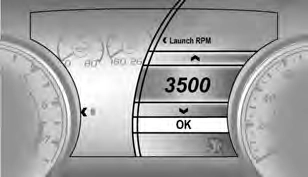
Manual Transmission
Automatic Transmission
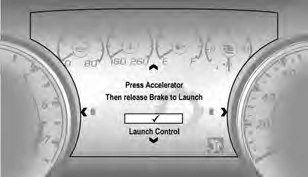
Line Lock allows for locking the front brakes independently of the rear brakes. This allows the rear tires to spin when the throttle is applied.
To enter Line Lock, all of these conditions must be met:
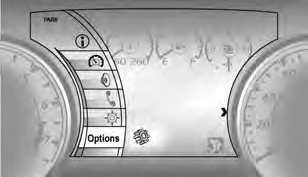
DIC menu. Use x to scroll
down to Options and
press SEL.
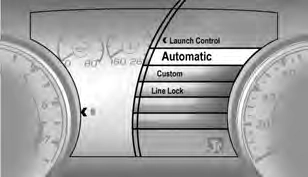
Select Automatic or Custom.
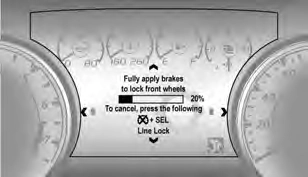
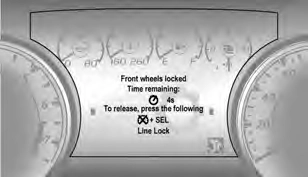
If the burnout is not completed in 15 seconds, torque will be reduced to idle, the parking brake will be
applied, Line Lock releases, and Custom Launch Control will be disabled.
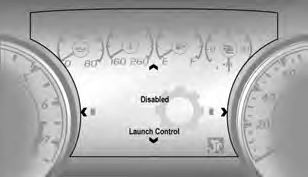
Ensure the parking brake is disengaged to re-enter Launch Control.
Rain and wet roads can reduce vehicle traction and affect your ability to stop and accelerate. Always drive slower in these types of driving conditions and avoid driving through large puddles and deep-standing or flowing water.
Hydroplaning is dangerous. Water can build up under the vehicle's tires so they actually ride on the water. This can happen if the road is
wet enough and you are going fast enough. When the vehicle is hydroplaning, it has little or no contact with the road.
There is no hard and fast rule about hydroplaning. The best advice is to slow down when the road is wet.
Besides slowing down, other wet weather driving tips include:
Driving on steep hills or through mountains is different than driving on flat or rolling terrain. Tips include:
Snow or ice between the tires and the road creates less traction or grip, so drive carefully. Wet ice can occur at about 0 °C (32 °F) when
freezing rain begins to fall. Avoid driving on wet ice or in freezing rain until roads can be treated.
For Slippery Road Driving:
See Antilock Brake System (ABS) 0 191.
The surface of a curve or an overpass can remain icy when the surrounding roads are clear. Avoid sudden steering maneuvers and braking while on ice.
. Turn off cruise control.
Stop the vehicle in a safe place and signal for help. Stay with the vehicle unless there is help nearby.
If possible, use Roadside Assistance. See Roadside Assistance Program 0 328. To get help and keep everyone in the vehicle safe:
If it takes time for help to arrive, when running the engine, push the accelerator pedal slightly so the engine runs faster than the idle speed. This keeps the battery charged to restart the vehicle and to signal for help with the headlamps.
Do this as little as possible, to save fuel.
Slowly and cautiously spin the wheels to free the vehicle when stuck in sand, mud, ice, or snow.
If stuck too severely for the traction system to free the vehicle, turn the traction system off and use the rocking method. See Traction Control/Electronic Stability Control 0 194.
To save fuel, run the engine for short periods to warm the vehicle and then shut the engine off and partially close the window. Moving about to keep warm also helps.
Turn the steering wheel left and right to clear the area around the front wheels. Turn off any traction system. Shift back and forth between R (Reverse) and a low forward gear, spinning the wheels as little as possible. To prevent transmission wear, wait until the wheels stop spinning before shifting gears. Release the accelerator pedal while shifting, and press lightly on the accelerator pedal when the transmission is in gear.
Slowly spinning the wheels in the forward and reverse directions causes a rocking motion that could free the vehicle. If that does not get the vehicle out after a few tries, it
might need to be towed out. If the vehicle does need to be towed out, see Towing the Vehicle 0 292.
Two labels on the vehicle may show how much weight it may properly carry: the Tire and Loading Information label and the Certification label.
Tire and Loading Information Label
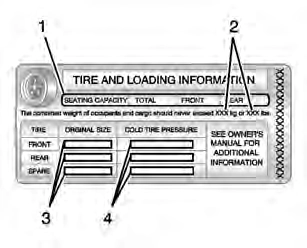
Label Example
The Tire and Loading Information label also shows the tire size of the original
equipment tires (3) and the recommended cold tire inflation pressures (4). For more information on tires and inflation see Tires 0 259 and
Tire Pressure 0 267.
There is also important loading information on the Certification label. It may show the Gross Vehicle Weight Rating (GVWR) and the Gross Axle Weight Rating (GAWR) for the front and rear axle. See “Certification Label” later in this section.
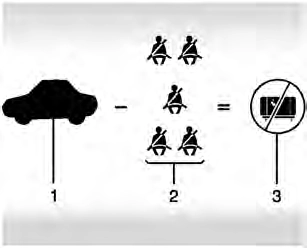
“Steps for Determining Correct Load Limit–
1400 lbs. and there will be five 150 lb passengers in your vehicle, the amount of available cargo and luggage load capacity is 650 lbs. (1400-750 (5 x 150) =
650 lbs.)
your vehicle. Consult this manual to determine how this reduces the available cargo and luggage load capacity of your vehicle.”
This vehicle is neither designed nor intended to tow a trailer.
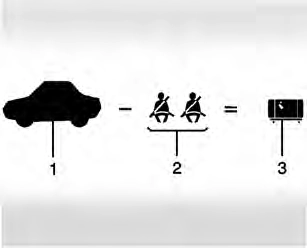
Example 1
× 2 = 136 kg (300 lbs).
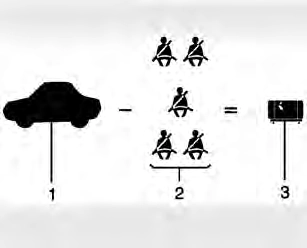
Example 2
× 5 = 340 kg (750 lbs).
= 113 kg (250 lbs).
Example 3
(200 lbs) × 5 = 453 kg (1,000 lbs).
= 0 kg (0 lbs).
Refer to the vehicle's Tire and Loading Information label for specific information about the vehicle's capacity weight and seating positions. The combined
weight of the driver, passengers, and cargo should never exceed the vehicle's capacity weight.
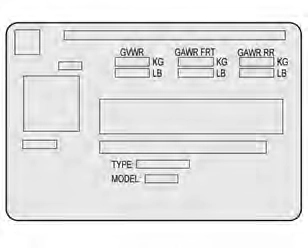 Certification Label
Label Example
the weight of the vehicle, all occupants, fuel, and cargo.
Download Manual