Controls
Steering Wheel Adjustment
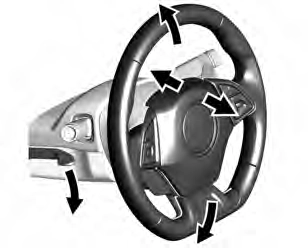
To adjust the tilt and telescoping steering wheel:
Do not adjust the steering wheel while driving.
Steering Wheel Controls
The infotainment system can be operated by using the steering wheel controls. See “Steering Wheel Controls” in the infotainment manual.
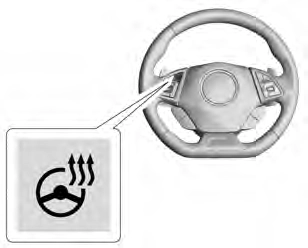
( : If equipped, press to turn the heated steering wheel on or off.
A light next to the button displays when the feature is turned on.
The steering wheel takes about three minutes to be fully heated.
Press a on the steering wheel pad to sound the horn.
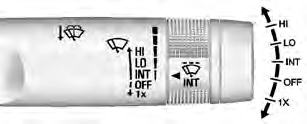
The windshield wiper/washer lever is on the right side of the steering column. With the ignition on or in ACC/ACCESSORY, move the windshield wiper lever to select the wiper speed.
HI : Use for fast wipes.
LO : Use for slow wipes.
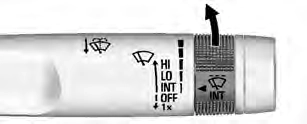
INT : Move the lever up to INT for intermittent wipes, then turn the x
INT band up for more frequent wipes or down for less frequent wipes.
OFF : Use to turn the wipers off.
1X : For a single wipe, briefly move the wiper lever down. For several wipes, hold the wiper lever down.
n L : Pull the windshield wiper lever toward you to spray windshield washer fluid and activate the wipers.
The wipers will continue until the lever is released or the maximum wash time is reached. When the windshield wiper lever is released, additional wipes may occur depending on how long the windshield washer had been
activated. See Washer Fluid 0 243 for information on filling the windshield washer fluid reservoir.
Clear snow and ice from the wiper blades and windshield before using them. If frozen to the windshield, carefully loosen or thaw them.
Damaged blades should be replaced. See Wiper Blade Replacement 0 248.
Heavy snow or ice can overload the wiper motor.
Wiper Parking
If the ignition is turned off while the wipers are on LO, HI, or INT, they will immediately stop.
If the windshield wiper lever is then moved to OFF before the driver door is opened or within 10 minutes, the wipers will restart and move to the base of the windshield.
If the ignition is turned off while the wipers are performing wipes due to windshield washing, the wipers continue to run until they reach the base of the windshield.
The vehicle has a compass display in the Driver Information Center (DIC). The compass receives its heading and other information from the Global Positioning System (GPS) antenna, StabiliTrak/ Electronic Stability Control (ESC), and vehicle speed information.
Avoid covering the GPS antenna, located on the roof, for long periods of time with objects that may interfere with the antenna's ability to receive a satellite signal. The compass system is designed to operate for a certain number of miles or degrees of turn before needing a signal from the GPS satellites. When the compass display shows CAL, drive the vehicle for a short distance in an open area where it can receive a GPS signal. The compass system will automatically determine when the GPS signal is restored and provide a heading again.
The time and date for the clock can be set using the infotainment system. See “Time/Date” in “System” under “Settings” in the infotainment manual.
The vehicle has an accessory power outlet on the center floor console in front of the cupholders. It can be used to plug in electrical equipment, such as a cell phone or an MP3 player.
The accessory power outlet does not work when the ignition is turned off and the driver door is opened. This helps to preserve the battery life of the vehicle.
Certain power accessory plugs may not be compatible with the accessory power outlet and could overload vehicle and adapter fuses. If a problem is experienced, see your dealer.
When adding electrical equipment, be sure to follow the proper installation instructions included with the equipment. See Add-On Electrical Equipment 0 218.
Wireless Charging
If equipped, the vehicle has wireless charging in the storage bin at the back of the floor console. The system operates at 145 kHz and wirelessly charges one Qi compatible smartphone. The power output of the system is capable of charging at a rate up to 1 amp (5W), as requested by the compatible smartphone. See Radio Frequency Statement 0 334.
The vehicle must be on, in ACC/ ACCESSORY, or Retained Accessory Power (RAP) must be active. The wireless charging feature may not correctly indicate charging when the vehicle is in RAP. See Retained Accessory Power (RAP) 0 179.
The operating temperature is −20 °C (−4 °F) to 60 °C (140 °F) for the charging system and 0 °C (32 °F) to 35 °C (95 °F) for the smartphone.
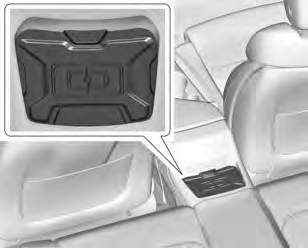
To charge a compatible smartphone:
To maximize the charge rate, ensure the smartphone is fully seated and centered in the holder with nothing under it.
A thick smartphone case may prevent the wireless charger from working, or may reduce the charging performance. See your dealer for additional information.
three seconds before placing/ aligning the smartphone on the pad again.
The smartphone may become warm during charging. This is normal. In warmer temperatures, the speed of charging may be reduced.
Software Acknowledgements
Certain Wireless Charging Module product from LG Electronics, Inc. ("LGE") contains the open source software detailed below. Refer to the indicated open source licenses (as are included following this notice) for the terms and conditions of their use.
OSS Notice Information
To obtain the source code that is contained in this product, please visit http://opensource.lge.com. In addition to the source code, all referred license terms, warranty disclaimers and copyright notices are available for download. LG Electronics will also provide open source code to you on CD-ROM for a charge covering the cost of
performing such distribution (such as the cost of media, shipping, and handling) upon email request to [email protected]. This offer is valid for three (3) years from the date on which you purchased the product.
Freescale-WCT library
Copyright (c) 2012-2014 Freescale Semiconductor, Inc.. All rights reserved.
derived from this software without specific prior written permission.
THIS SOFTWARE IS PROVIDED BY THE COPYRIGHT HOLDERS AND CONTRIBUTORS "AS IS" AND ANY EXPRESS OR IMPLIED WARRANTIES, INCLUDING, BUT NOT LIMITED TO, THE IMPLIED WARRANTIES OF MERCHANTABILITY AND FITNESS FOR A PARTICULAR PURPOSE ARE DISCLAIMED. IN NO EVENT SHALL THE COPYRIGHT HOLDER OR CONTRIBUTORS BE LIABLE FOR ANY DIRECT, INDIRECT, INCIDENTAL, SPECIAL, EXEMPLARY, OR CONSEQUENTIAL DAMAGES (INCLUDING, BUT NOT LIMITED TO, PROCUREMENT OF SUBSTITUTE GOODS OR SERVICES; LOSS OF USE, DATA, OR PROFITS; OR BUSINESS INTERRUPTION) HOWEVER CAUSED AND ON ANY THEORY OF LIABILITY, WHETHER IN CONTRACT, STRICT LIABILITY, OR TORT (INCLUDING NEGLIGENCE OR OTHERWISE)
ARISING IN ANY WAY OUT OF THE USE OF THIS SOFTWARE, EVEN IF ADVISED OF THE POSSIBILITY OF SUCH DAMAGE.
Download Manual