Making a Call
You can make calls by inputting any phone number, or by using the imported phonebook, call history, speed dial entries, or redial.
- Dialing a Number
- Using the Phonebook
- Storing Speed Dial Entries
- Using Speed Dial
Parent topic: Bluetooth® HandsFreeLink ®
■Dialing a Number
- Press PHONE.

- Select Dial.
- Select a number.
Use the keyboard on the On Demand Multi-Use Display™ for entering numbers.
- Select the green phone icon to call.
Parent topic: Making a Call
■Using the Phonebook
When your phone is paired, its entire phonebook can be automatically imported to the system if you select On for Automatic Phone Sync.
Using voice commands
- Press the Talk button.

- Say “Call” and the contact name. For example, “Call John Smith.”
Use the interface dial to make and enter selections.
- Press PHONE.

- Select Phonebook.
- Scroll through the list to find the name you want to call, then select the number to call.
Parent topic: Making a Call
■Storing Speed Dial Entries
Store up to 20 numbers for quick dialing. To store a speed dial number:
- Press the PHONE button.
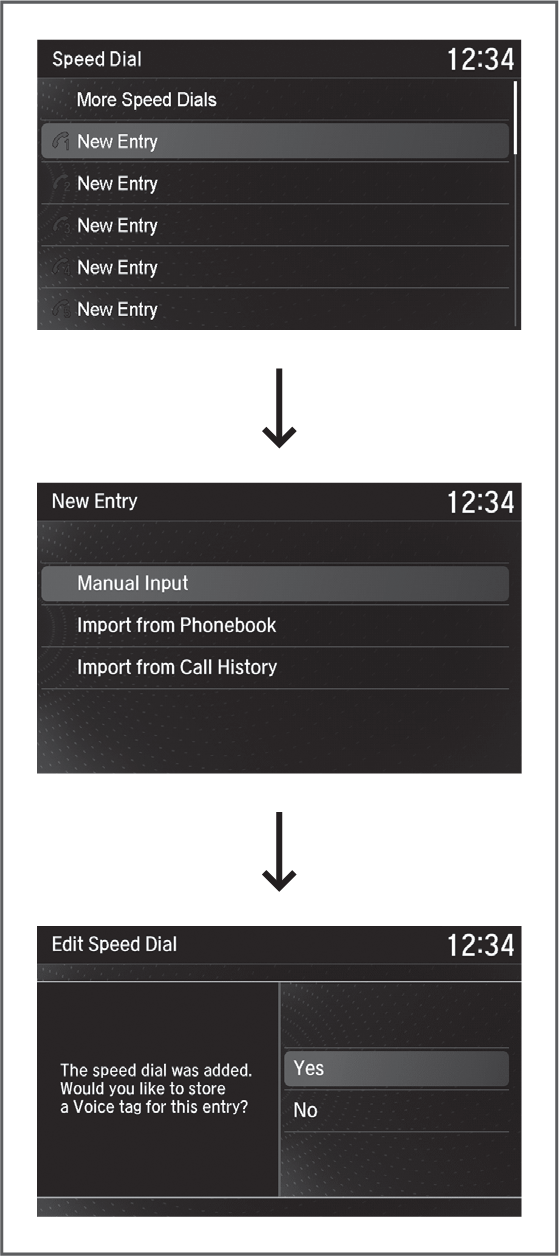
- Select Speed Dial.
- Select a place to choose a number from.
From Import from Call History:
Select a number from the call history.
From Manual Input:
Input the number manually.
From Import from Phonebook:
Select a number from the linked cell phone’s imported phonebook.
- When the speed dial is successfully stored rom Import from Call History or Import from Phonebook, you are asked to create a voice tag for the number. Select Yes or No.
- Using the Talk button, follow the prompts to store a voice tag for the speed dial entry.
Parent topic: Making a Call
■Using Speed Dial
Make calls quickly using stored speed dial entries or call history numbers.
- Press PHONE.

- Select Speed Dial.
- Select a number.
Parent topic: Making a Call
Download Manual