Smart Cruise Control (SCC) system
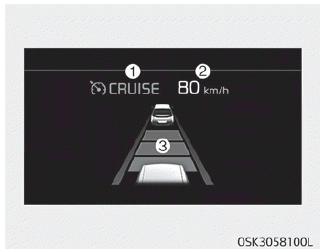
1. Cruise indicator
2. Set speed
3. Vehicle-to-vehicle distance
To see SCC screen on the LCD display on the cluster, select Assist mode ( ). For more informations, refer to “LCD display” on page 4-51.
Smart Cruise Control system allows you to program the vehicle to maintain constant speed and distance detecting the vehicle ahead without depressing the accelerator or brake pedal.
WARNING
For your safety, please read the owner's manual before using Smart Cruise Control system.
NOTICE
To activate Smart Cruise Control system, depress the brake pedal at least once after turning the engine start/stop button to the ON position or starting the vehicle. This is to check if the brake switch which is important part to cancel Smart Cruise Control system is in normal condition.
WARNING
- If Smart Cruise Control system is left on, (cruise indicator in the instrument cluster illuminated) Smart Cruise Control system can be activated unintentionally. Keep Smart Cruise Control system off (cruise indicator turn off) when the smart cruise control is not used.
- Use Smart Cruise Control system only when traveling on open highways in good weather.
- Do not use Smart Cruise Control system when it may not be safe to keep the car at a constant speed. For instance.
- Highway interchange and tollgate
- Road surrounded by abnormally multiple steel constructions (subway construction, steel tunnel, etc)
- Parking lot
- Lanes beside guard rail on a road
- Slippery road with rain, ice, or snow covered
- Abrupt curved road
- Steep hills
- Windy roads
- Off roads
- Roads under construction
- Rumble strip
- The sensing ability decreases if the level of front and rear vehicle is changed from the factory.
- When driving in heavy traffic or when traffic conditions make it difficult to drive at a constant speed
- When driving on rainy, icy, or snow-covered roads
- When driving with limited view (possibly due to bad weather, such as fog, snow, rain or sandstorm) - Pay particular attention to the driving conditions whenever using Smart Cruise Control system.
- Smart Cruise Control system is not a substitute for safe driving. It is the responsibility of the driver to always check the speed and distance of the vehicle ahead.
- Be careful when driving downhill using SCC.
- Limited visibility (rain, snow, smog, etc.)
- Cruise function should not be used when the vehicle is being towed to prevent any damage.
- Always set the vehicle speed under the speed limit in your country.
- Unexpected situations may lead to possible accidents. Pay attention continuously to road conditions and driving even when the smart cruise control system is being operated.
Smart Cruise Control switch
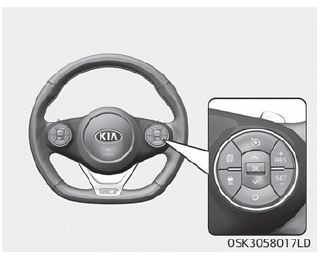
CRUISE: Turns cruise control system on or off.
RES+ : Resumes or increases cruise control speed.
SET- : Sets or decreases cruise control speed.
 : Sets vehicle-to-vehicle distance.
CANCEL: Cancels cruise control operation.
Smart Cruise Control speed
To set smart cruise control speed:
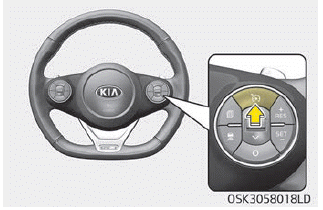
1. Press the CRUISE button, to turn the system on. The CRUISE indicator in the instrument cluster will illuminate.
2. Accelerate to the desired speed. Smart Cruise Control speed can be set as follows:
• 10 km/h (5mph) ~ 160 km/h
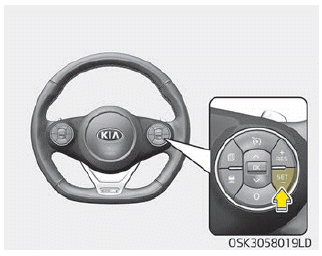
3. Push the button (SET-), and release it at the desired speed. The set speed and vehicle to vehicle distance on the LCD screen will illuminate.
4. Release the accelerator pedal. The desired speed will automatically be maintained.
If there is a vehicle in front of you, the speed may decrease to maintain the distance to the vehicle ahead.
On a steep grade, the vehicle may slow down or speed up slightly while going uphill or downhill.
Vehicle speed may decrease on an upward slope and increase on a ownward slope.
The speed is set to 30 km/h when the vehicle speed is 10~30km/h.
NOTICE
Vehicle speed may decrease on an upward slope and increase on a downward slope.
To increase Smart Cruise Control set speed
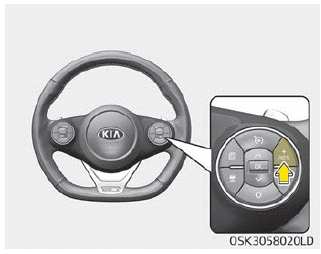
Follow either of these procedures:
- Push the button (RES+), and hold it. Your vehicle set speed will increase by 10 km/h (5 mph). Release the lever at the speed you want.
- Push the button (RES+), and release it immediately. The cruising speed will increase by 1.0 km/h (1.0 mph) each time you move the lever up (to RES+) in this manner.
- You can set the speed to 160 km/h (100 mph).
CAUTION
Check the driving condition before using the toggle switch. Driving speed sharply increases, when you push and hold the button (RES+).
To decrease Smart Cruise Control set speed:
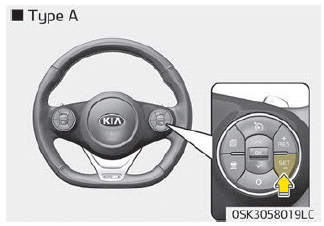
Follow either of these procedures:
- Push the button (SET-), and hold it. Your vehicle set speed will decrease by 10 km/h (5 mph). Release the button at the speed you want.
- Push the button (SET-), and release it immediately. The cruising speed will decrease by 1.0 km/h (1.0 mph) each time you push the button (SET-) in this manner.
- You can set the speed to 30 km/h (20 mph).
To temporarily accelerate with the cruise control on:
If you want to speed up temporarily when the cruise control is on, depress the accelerator pedal. Increased speed will not interfere with cruise control operation or change the set speed.
To return to the set speed, take your foot off the accelerator.
If you push the button (SET-) at increased speed, the increased cruising speed will be set again.
NOTICE
Be careful when accelerating temporarily, because the speed is not controlled automatically at this time even if there is a vehicle in front of you.
Smart Cruise Control will be temporarily canceled when:
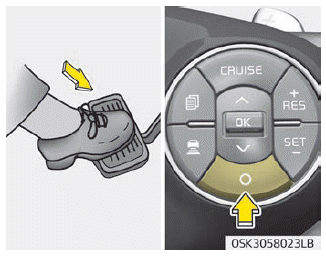
Cancelled manually
Smart Cruise Control is temporarily canceled when the brake pedal is depressed or the CANCEL button is pressed. Depress the brake pedal and press the CANCEL button at the same time, when the vehicle is at a standstill. The speed and vehicle to vehicle distance indicator on the cluster is disappeared and the CRUISE indicator is illuminated continuously.
Canceled automatically
- The driver's door is opened.
- The shift lever is shifted to N (Neutral), R (Reverse) or P (Paking).
- The EPB (electronic parking brake) is applied.
- The vehicle speed is over 170 km/h (110 mph)
- The ESC, ABS or TCS is operating.
- The ESC is turned off.
- The sensor or the cover is dirty or blocked with foreign matter.
- The accelerator pedal is continuously depressed for long time.
- The speed is in dangerous range.
- SCC system has malfunctioned.
- When activating the ISG mode.
- When the braking control is operated for Forward Collision-Avoidance Assist (FCA) system
- The vehicle is stopped for more than 5 minutes.
- The vehicle stops and goes repeatedly for a long period of time.
- The driver starts driving by pushing the button (RES+) or (SET-) or depressing the accelerator pedal, after the vehicle is stopped by Smart Cruise Control system with no other vehicle ahead.
- When the parking brake is locked.
- Vehicle has some problems.
Each of these actions will cancel the smart cruise control operation. (the set speed and vehicle to vehicle distance on the LCD display will go off.) In a condition the smart cruise control is canceled automatically, Smart Cruise Control will not resume even though the RES+ or SET- Button is pushed.
CAUTION
If Smart Cruise Control is canceled by other than the reasons mentioned, have the system checked by a professional workshop. Kia recommends to visit an authorized Kia dealer/service partner.
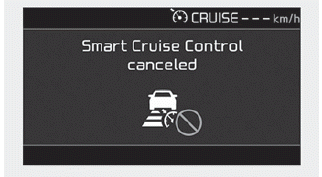
CAUTION
If the system is automatically canceled, the warning chime will sound and a message will appear for a few seconds.
You must adjust the vehicle speed by depressing the accelerator or brake pedal according to the road condition ahead and driving condition.
Always check the road conditions. Do not rely on the warning chime.
To resume cruise control set speed:
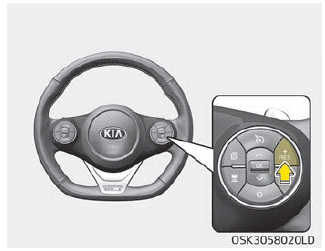
If any method other than the CRUISE button was used to cancel cruising speed and the system is still activated, the cruising speed will automatically resume when you push the button (RES +).
If you push the button (RES+), the speed will resume to the recently set speed. However, if vehicle speed drops below 10 km/h (5mph), it will not resume.
NOTICE
To reduce the risk of an accident, always check the road conditions when reactivating the smart cruise control using the RES+ lever to ensure the road conditions permit safe use of the cruise control.
To turn cruise control off:
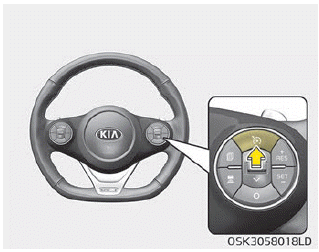
Press the CRUISE button. (the CRUISE indicator in the instrument cluster will go off).
When Smart Cruise Control system is not needed, press the [CRUISE] switch and deactivate the system.
Smart Cruise Control vehicle-tovehicle distance setting
To set vehicle-to-vehicle distance:
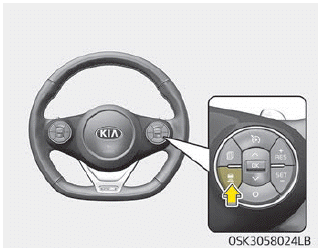
This function allows you to program the vehicle to maintain relative distance to the vehicle ahead without depressing the accelerator pedal or brake pedal. The vehicle to vehicle distance will automatically activate when Smart Cruise Control system is on.
Select the appropriate distance according to road conditions and vehicle speed.
Each time the button is pressed, the vehicle to vehicle distance changes as follows:
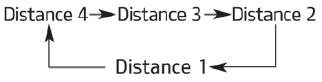
For example, if you drive at 90 km/h (56 mph), the distance maintain as follows;
Distance 4 - approximately 52.5 m
Distance 3 - approximately 40 m
Distance 2 - approximately 32.5 m
Distance 1 - approximately 25 m
NOTICE
The distance is set to the last set distance when the system is used for the first time after starting the vehicle.
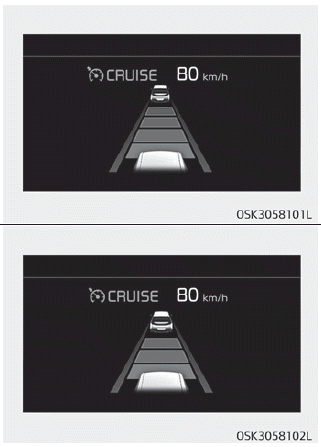
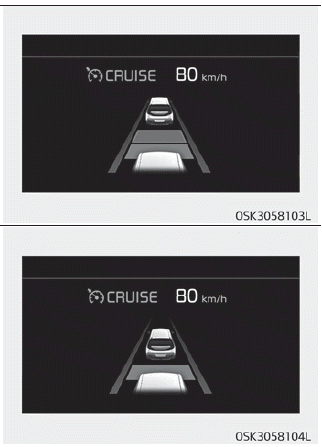
- The vehicle will maintain the set speed, when the lane ahead is clear.
- The vehicle will slow down or speed up to maintain the selected distance, when there is a vehicle ahead of you in the lane. (A vehicle will appear in front of your vehicle in the LCD display only when there is an actual vehicle in front of you)
- If the vehicle ahead speeds up, your vehicle will travel at a steady cruising speed after accelerating to the selected speed.
- If distance from the front vehicle has been changed due to accelerating or decelerating of front vehicle, the distance on the LCD may be changed.
WARNING
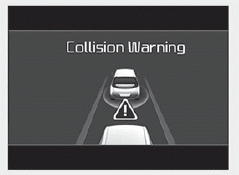
When using Smart Cruise Control System:
- The warning message appears and warning chime sounds if the vehicle is unable to maintain the selected distance from the vehicle ahead.
- If the warning message appears and warning chime sounds, depress the brake pedal to actively adjust the vehicle speed, and the distance to the vehicle ahead.
- Even if the warning message does not appear and warning chime does not sound, always pay attention to the driving conditions to prevent dangerous situations from occurring.
- Playing the vehicle audio system at high volume may offset the system warning sounds.
CAUTION
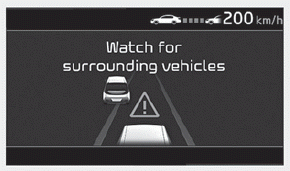
If the vehicle ahead (vehicle speed: less than 30km/h) disappears to the next lane, the warning chime will sound and a message will appear. Adjust your vehicle speed for vehicles or objects that can suddenly appear in front of you by depressing the brake pedal according to the road condition ahead and driving condition.
Radar to detect distance to the vehicle ahead
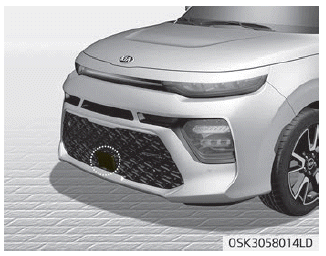
The sensor detects the distance to the vehicle ahead.
If the sensor is covered with dirt or other foreign matter, the vehicle to vehicle distance control may not operate correctly.
Always keep the area in front of the sensor clean.
Radar check message
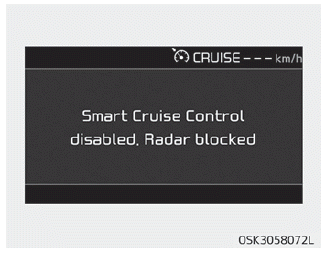
If the radar or cover is dirty or obscured with foreign matter such as snow, this message will appear and it will disappear after for a while.
In this case, the system may not function temporarily, but it does not indicate a malfunction of the smart cruise control System. Clean the radar or cover by using a soft cloth and it will operate normally.
Smart Cruise Control system may not properly activate, if the radar is totally contaminated, or if any substance is not detected after turning ON the vehicle (e.g. in an open terrain).
Smart Cruise Control system malfunction message
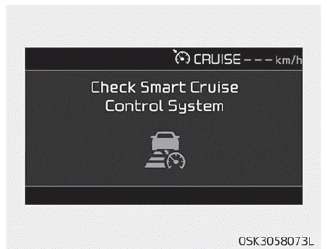
The message will appear when the vehicle to vehicle distance control system is not functioning normally.
In this case, have the system checked by a professional workshop. Kia recommends to visit an authorized Kia dealer/ service partner.
CAUTION
- Do not install accessories around the sensor and do not replace the bumper by yourself. It may interfere with the sensor performance.
- Always keep the sensor and bumper clean.
- To prevent sensor cover damage from occurring, wash the car with a soft cloth.
- Do not damage the sensor or sensor area by a strong impact. If the sensor moves slightly off position, Smart Cruise Control system will not operate correctly without any warning or indicator from the cluster. If this occurs, have the system checked by a professional workshop. Kia recommends to visit an authorized Kia dealer/service partner.
- Use only a genuine Kia sensor cover for your vehicle. Do not paint anything on the sensor cover.
To adjust the sensitivity of Smart Cruise Control system
The sensitivity of vehicle speed when following the front vehicle to maintain the set distance can be adjusted. Go to the User Settings Mode (Driver Assistance) and select SCC Reaction. You may select one of the three stages you prefer.
• Slow:
Vehicle speed following the front vehicle to maintain the set distance is slower than normal speed.
• Normal:
Vehicle speed following the front vehicle to maintain the set distance is normal.
• Fast:
Vehicle speed following the front vehicle to maintain the set distance is faster than normal speed.
NOTICE
The last selected mode remains In the system.
To convert to cruise control mode
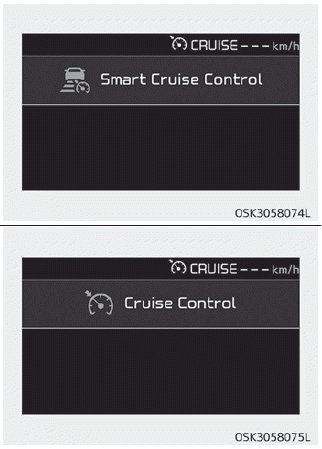
The driver may choose to only use the cruise control mode (speed control function) by doing as follows:
1. Turn the smart cruise control system on (the cruise indicator light will be on but the system will not be activated).
2. Push the distance to distance switch for more than 2 seconds.
3. Choose between "smart cruise control (SCC) mode" and "Cruise control (CC) mode".
When the system is canceled using the CRUISE button or the CRUISE button is used after the vehicle is turned on, the Smart Cruise Control mode will turn on.
WARNING
When using the cruise control mode, you must manually access the distance to other vehicles as the system will not automatically brake to slow down for other vehicles.
Limitations of the system
Smart Cruise Control system may have limits to its ability to detect distance to the vehicle ahead due to road and traffic conditions.
On curves
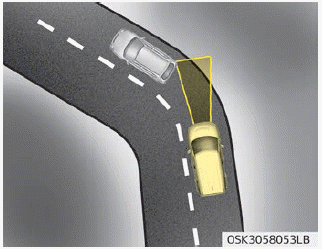
- On curves, Smart Cruise Control system may not detect a moving vehicle in your lane, and then your vehicle could accelerate to the set speed. Also, the vehicle speed will rapidly down when the vehicle ahead is recognized suddenly.
- Select the appropriate set speed on curves and adjust your vehicle speed by depressing the accelerator or brake pedal according to the road condition ahead and driving condition.
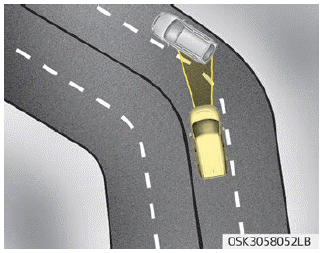
- Your vehicle speed can be reduced due to a vehicle in the adjacent lane. Adjust your vehicle speed by depressing the brake pedal according to the road condition ahead and driving condition. Apply the accelerator pedal and select the appropriate set speed. Check to be sure that the road conditions permit safe operation of Smart Cruise Control system.
On inclines
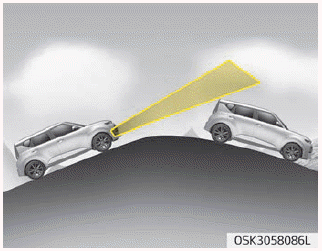
- During uphill or downhill driving, Smart Cruise Control system may not detect a moving vehicle in your lane, and cause your vehicle to accelerate to the set speed. Also, the vehicle speed will rapidly down when the vehicle ahead is recognized suddenly.
- Select the appropriate set speed on inclines and adjust your vehicle speed by depressing the accelerator or brake pedal according to the road condition ahead and driving condition.
Lane changing
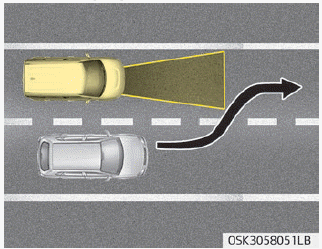
- A vehicle which moves into your lane from an adjacent lane cannot be recognized by the sensor until it is in the sensor's detection range.
- The sensor may not detect immediately when a vehicle cuts in suddenly. Always pay attention to the traffic, road and driving conditions.
- If a vehicle which moves into your lane is slower than your vehicle, your speed may decrease to maintain the distance to the vehicle ahead.
- If a vehicle which moves into your lane is faster than your vehicle, your vehicle will accelerate to the selected speed.
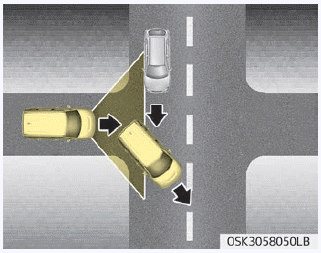
- Your vehicle may accelerate when a vehicle ahead of you disappears.
- When you are warned that the vehicle ahead of you is not detected, drive with caution.
Vehicle recognition
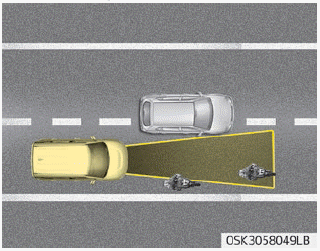
Some vehicles ahead in your lane cannot be recognized by the sensor as follows:
- Narrow vehicles such as motorcycles or bicycles
- Vehicles offset to one side
- Slow-moving vehicles or sudden-decelerating vehicles
- Stopped vehicles
- Vehicles with small rear profile such as trailers with no loads
A vehicle ahead cannot be recognized correctly by the sensor if any of following occurs:
- When the vehicle is pointing upwards due to overloading in the trunk(tailgate)
- While making turns by steering
- When driving to one side of the lane
- When driving on narrow lanes or on curves
Adjust your vehicle speed by depressing the brake pedal according to the road condition ahead and driving condition.
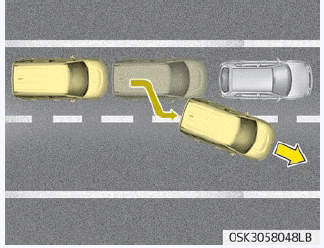
• When vehicles are at a standstill and the vehicle in front of you changes to the next lane, be careful when your vehicle starts to move because it may not recognize the stopped vehicle in front of you.
In this case, you must maintain a safe braking distance, and if necessary, depress the brake pedal to reduce your driving speed in order to maintain a safe distance.
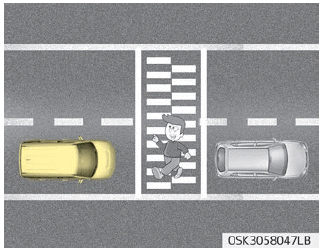
• Always look out for pedestrians when your vehicle is maintaining a distance with the vehicle ahead.
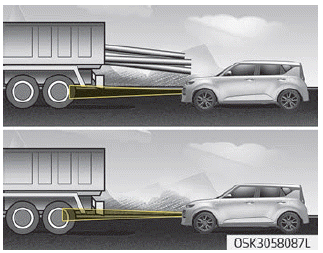
• Always be cautious for vehicles with higher height or vehicles carrying loads that sticks out to the back of the vehicle.
WARNING
- Smart Cruise Control system cannot guarantee the stop for every emergency situation. If an emergency stop is necessary, you must apply the brakes.
- Keep a safe distance according to road conditions and vehicle speed. If the vehicle to vehicle distance is too close during a high-speed driving, a serious collision may result.
- Smart Cruise Control system cannot recognize a stopped vehicle, pedestrians or an oncoming vehicle. Always look ahead cautiously to prevent unexpected and sudden situations from occurring.
- SCC system may have difficulty in maintaining the correct distance or speed, if the vehicle is driving on a steep incline or towing a trailer.
- When other vehicles are changing lanes in front of you frequently, Smart Cruise Control system may not operate appropriately. Always look ahead cautiously to prevent unexpected and sudden situations from occurring.
- Smart Cruise Control system is not a substitute for safe driving practices but a convenience function only. It is the responsibility of the driver to always check the speed and the distance to the vehicle ahead.
- Always be aware of the selected speed and vehicle to vehicle distance.
- Always maintain sufficient braking distance and decelerate your vehicle by applying the brakes if necessary.
- As Smart Cruise Control system may not recognize complex driving situations, always pay attention to driving conditions and control your vehicle speed.
- For safe operation, carefully read and follow the instructions in this manual before use.
- After a vehicle start, please stop for several seconds. If system initialization is not completed, SCC does not normally operate.
- After a vehicle start, if any objects are not detected or the sensor cover is obscured with foreign substances, there is a possibility that SCC system may not work.
- Below conditions are not allowed: over baggage loading in a trunk(tailgate), suspension remodeling, tire replacement with unauthorized tires or tires with different worn-out and pressure levels.
- Do not use Smart Cruise Control system when towing a trailer.
CAUTION
Smart Cruise Control system may not operate temporarily due to electrical interference.
Download Manual