Interior features
Cigarette lighter
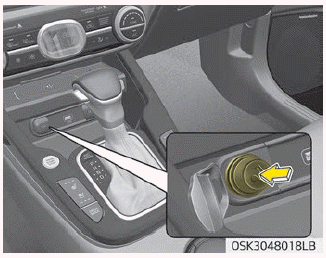
For the cigarette lighter to work, the ignition switch must be in the ACC position or the ON position.
To use the cigarette lighter, push it all the way into its socket. When the element has heated, the lighter will pop out to the “ready” position.
Kia recommends to use parts for replacement from an authorized Kia dealer/ service partner.
WARNING
- Do not hold the lighter in after it is already heated because it will overheat.
- If the lighter does not pop out within 30 seconds, remove it to prevent overheating.
- Do not insert foreign objects into the socket of the cigarette lighter. It may damage the cigarette lighter.
CAUTION
The use of plug-in accessories (shavers, hand-held vacuums, and coffee pots, etc.) may damage the socket or cause electrical failure.
Ashtray
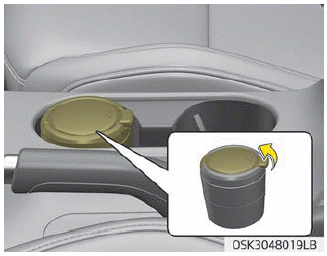
To use the ashtray, open the cover.
To clean or empty the ashtray, pull it out.
Use the ashtray by leaning it to the cup holder right beside.
WARNING
Ashtray use
- Do not use the vehicle’s ashtrays as waste receptacles.
- Putting lit cigarettes or matches in an ashtray with other combustible materials may cause a fire.
Cup holder
WARNING
Hot liquids
- Do not place uncovered cups with hot liquid in the cup holder while the vehicle is in motion. If the hot liquid spills, you burn yourself. Such a burn to the driver could lead to loss of control of the vehicle.
- To reduce the risk of personal injury in the event of sudden stop or collision, do not place uncovered or unsecured bottles, glasses, cans, etc., in the cup holder while the vehicle is in motion.
WARNING
Keep cans or bottles out of direct sun light and do not put them in a vehicle that is heated up. It may explode.
NOTICE
- Keep your drinks sealed while driving to prevent spilling your drink. If liquid spills, it may get into the vehicle's electrical/electronic system and damage electrical/ electronic parts.
- When cleaning spilled liquids, do not dry the cup holder at high temperature. This may damage the cup holder.
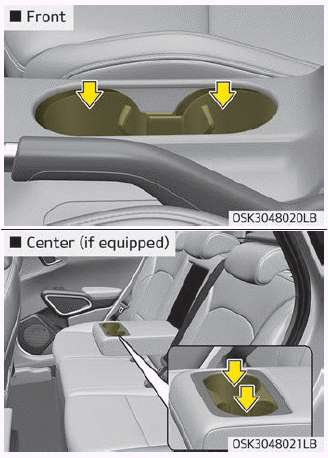
Cups or small beverage cans may be placed in the cup holders.
Sunvisor
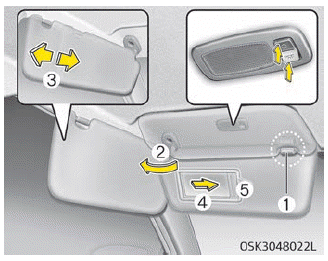
Use the sunvisor to shield direct light through the front or side windows.
To use the sunvisor, pull it downward.
To use the sunvisor for the side window, pull it downward, unsnap it from the bracket (1) and swing it to the side (2).
To use the vanity mirror, pull down the visor and slide the mirror cover (4). Adjust the sunvisor extension forward or backward (3).
The ticket holder (5) is provided for holding a tollgate ticket. (if equipped)
CAUTION
Vanity mirror lamp
If you use the vanity mirror lamp, turn off the lamp before returning the sunvisor to its original position, otherwise it could result in battery discharge and possible sunvisor damage.
Seat warmer
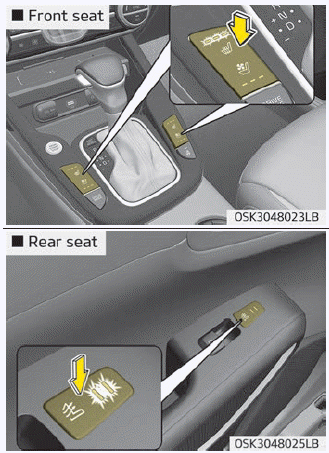
The seat warmer is provided to warm the front seats during cold weather. With the ignition switch in the ON position, push either of the switches to warm the driver's seat or the front passenger's seat.
During mild weather or under conditions where the operation of the seat warmer is not needed, keep the switches in the "OFF" position.
Temperature control (Manual)
• Each time you press the switch, the temperature setting of the seat will change as follows :
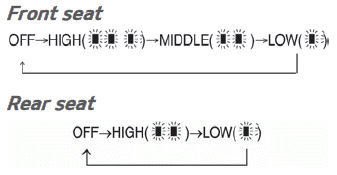
• The seat warmer defaults to the OFF position whenever the ignition switch is turned on.
Temperature control (Automatic)
The seat warmer starts to automatically control the seat temperature in order to prevent low-temperature burns after being manually turned ON.
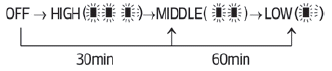
You may manually press the button to increase the seat temperature. However, it soon returns to the automatic mode again.
- When pressing the switch for more than 1.5 seconds with the seat warmer operating, the seat warmer will turn OFF.
- The seat warmer defaults to the OFF position whenever the Engine Start/ Stop button is in the ON position.
NOTICE
With the seat warmer switch in the ON position, the heating system in the seat turns off or on automatically depending on the seat temperature.
CAUTION
- When cleaning the seats, do not use an organic solvent such as paint thinner, benzene, alcohol and gasoline. Doing so may damage the surface of the heater or seats.
- To prevent overheating the seat warmer, do not place anything on the seats that insulates against heat, such as blankets, cushions or seat covers while the seat warmer is in operation.
- Do not place heavy or sharp objects on seats equipped with seat warmers. Damage to the seat warming components could occur.
- Do not change the seat cover. It may damage the seat warmer or airventilation system.
WARNING
Seat warmer burns
Passengers should use extreme caution when using seat warmers due to the possibility of excess heating cause burns even at low temperatures, especially if used for long periods of time. In particular, the driver must exercise extreme care for the following types of passengers:
1. Infants, children, elderly or handicapped persons, or hospital outpatients
2. Persons with sensitive skin or those that burn easily
3. Fatigued individuals
4. Intoxicated individuals
5. Individuals taking medication that can cause drowsiness or sleepiness (sleeping pills, cold tablets, etc.)
Seat cooler (Air ventilation seat)
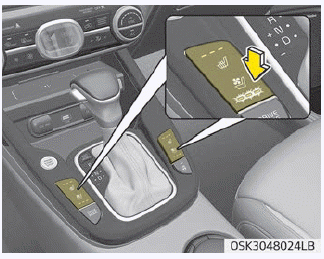
The temperature setting of the seat changes according to the switch position.
• If you want to warm your seat cushion, press the switch (red color). • If you want to cool your seat cushion, press the switch (blue color). • Each time you press the button, the airflow will change as follows: • The seat warmer (with air ventilation) defaults to the OFF position whenever the ignition switch is turned on.
CAUTION
When cleaning the seats, do not use an organic solvent such as paint thinner, benzene, alcohol and gasoline. Doing so may damage the surface of the heater or seats.
Power outlet
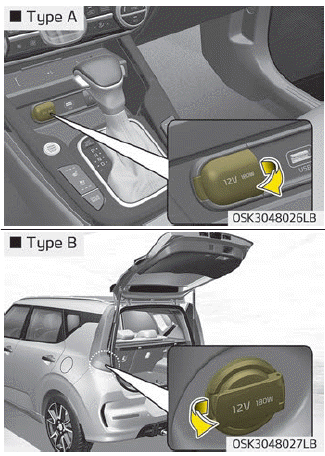
The power outlet is designed to provide power for mobile telephones or other devices designed to operate with vehicle electrical systems. The devices should draw less than 10 amps with the engine running.
CAUTION
- Use the power outlet only when the engine is running and remove the accessory plug after use. Using the accessory plug for prolonged periods of time with the engine off could cause the battery to discharge.
- Only use 12V electric accessories which are less than 10A in electric capacity.
- Adjust the air-conditioner or heater to the lowest operating level when using the power outlet.
- Close the cover when not in use.
- Some electronic devices can cause electronic interference when plugged into a vehicle’s power outlet. These devices may cause excessive audio static and malfunctions in other electronic systems or devices used in your vehicle.
- Using electrical products which exceed the limited capacity might cause heating to the power outlet and wiring that could lead to an electrical breakdown.
- Always make sure the electrical part is firmly plugged into the power outlet. Incomplete plugging may cause electrical breakdown.
- Electrical products with a built-in battery might cause current flow, which could lead to malfunction of the electric/electronic device in your vehicle. Only use electrical products which include reverse current prevention.
WARNING
Do not put a finger or a foreign element (pin, etc.) into a power outlet and do not touch with a wet hand. You may get an electric shock.
USB charger
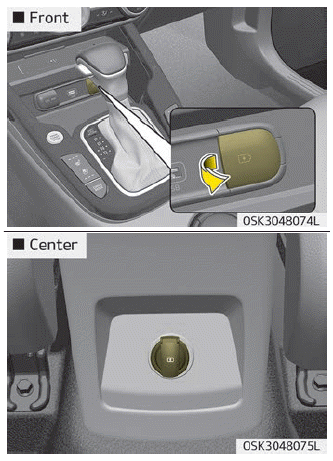
The USB car charger allows drivers to charge their digital devices like smartphone, and PC tablets. Connect the cable to the USB port, charging will begin.
The USB car charger is available with either the ACC state or the ignition on. But we recommend you to connect the USB port and digital devices with the engine starting. See the display screen of the device to check its charging process completion. Your smartphone or table PC could get heated up while charging. This is no reason to worry, as it doesn’t impact life or functions of the device. For the safety reason, charging can be stopped if the battery gets heated up to a certain point of temperature that the devices can be negatively affected. Charging some digital devices is not available or requires special dedicated adapters if their charging methods don’t fit the way the USB car charger works. Quick Charge 2.0 is available on the smartphone or the table PC equipped with fast charging capabilities. The applicable is as follows: (https://www.qualcomm.com/documents/ quick-charge-device-list) The smartphone or PC tablet without fast charging is charged at a regular speed.
Rated output:
Digital devices with fast charging : - 9.0 V, 1.67 A
Digital devices with normal charging : - 5.0 V, 2.1 A
CAUTION
- Used the USB car charger with the ignition on. Otherwise, Vehicle battery can be discharged.
- Use the official USB cable of the manufacturer of the digital device to be charged.
- Make sure that any foreign object, drinks, and water do not come into contact with the USB car charger. Water or foreign object can damage the USB charger.
- Do not use the device those current consumption exceeds 2.1A.
- Do not connect an electrical device that generates excessive electromagnetic noise to the USB car port. If you do so, noise can be caused or vehicle electronic devices can be interrupted while audio or AV is on.
- If the charger is connected incorrectly, it can cause serious damage on the devices. Please note that damages due to incorrect usage are not covered by warranty service.
Wireless smart phone charging system
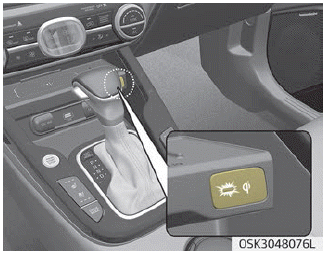
A wireless smart phone charging system located in front of the center console.
Firmly close all doors, and turn the ignition to ACC or IGN ON. To start wireless charging, place the smart phone equipped with wireless charging function on the wireless charging pad.
For best wireless charging results, place the smart phone on the center of the charging pad.
The wireless charging system is designed for one smart phone equipped with QI per single usage only. Please refer to the smart phone accessory cover or the smart phone manufacturer homepage to check whether your smart phone supports QI function.
WARNING
If any metallic object such as coins is located between the wireless charging system and the smart phone, the charging may be disrupted. Also, the metallic object may heat up.
Wireless smart phone charging
1. Remove any object on the smart phone charging pad including the smart key. If there is any foreign object on the pad other than a smart phone, the wireless charging function may not operate properly.
2. Place the smart phone on the center of the wireless charging pad.
3. The indicator light will change to orange once the wireless charging begins. After the charging is complete, the orange light will change to green.
4. You can choose to turn the wireless charging function to either ON or OFF by selecting the USM on the instrument cluster. (Please refer to “Instrument cluster” on page 4-45 for details).
If the wireless charging does not work, gently move your smart phone around the pad until the charging indicator light turns yellow. Depending on the smart phone, the charging indicator light may not turn green even after the charging is complete.
If the wireless charging is not functioning properly, the orange light will blink and flash for ten seconds then turn off. In such cases, remove the smart phone from the pad and replace it on the pad again, or double check the charging status.
If you leave the smart phone on the charging pad when the vehicle ignition is in OFF, the vehicle will alert you through warning messages and sound (applicable for vehicles with voice guidance function) after the ‘Good bye’ function on the instrument cluster ends.
NOTICE
For some manufacturers' cellular phones, the system may not warn you even though the cellular phone is left on the wireless charging unit. This is due to the particular characteristic of the cellular phone and not a malfunction of the wireless charging.
CAUTION
- When the interior temperature of the wireless charging system rises above a set temperature, the wireless charging will cease to function. After the interior temperature drops below the threshold, the wireless charging function will resume.
- If there is any metallic object between the smart phone and the wireless charging pad, immediately remove the smart phone. Remove the metallic object after it has completely cooled down.
- The wireless charging may not function properly when there is a heavy accessory cover on the smart phone.
- The wireless charging will stop when using the wireless smart key search function to prevent radio wave disruption.
- The wireless charging will stop when the smart key is moved out of the vehicle with the ignition in ON.
- The wireless charging will stop when any of the doors is opened (applicable for vehicles equipped with smart keys).
- The wireless charging will stop when the vehicle is turned OFF.
- The wireless charging will stop when the smart phone is not in complete contact with the wireless charging pad.
- Items equipped with magnetic components such as credit card, telephone card, bankbook, any transportation ticket and such may become damaged during wireless charging.
- Place the smart phone on the center of the charge pad for best results. The smart phone may not charge when placed near the rim of the charging pad. When the smart phone does get charged, it may heat up excessively.
- For smart phones without builtin wireless charging system, an appropriate accessory has to be equipped.
- Smart phones of some manufacturers may display messages on weak current. This is due to the particular characteristic of the smart phone and does not imply a malfunction on wireless charging function.
- The indicator light of some manufacturers’ smart phones may still be yellow after the smart phone is fully charged. This is due to the particular characteristic of the smart phone and not a malfunction of the wireless charging.
- When any smart phone without a wireless charging function or a metallic object is placed on the charging pad, a small noise may sound.This small sound is due to the vehicle discerning compatibility of the object placed on the charging pad. It does not affect your vehicle or the smart phone in any way.
- The wireless cellular phone charging system may not support certain cellular phones, which are not verified for the Qi specification ( ).
- For certain cellular phones with their own protection, the wireless charging speed may decrease and the wireless charging may stop.
Clothes hanger
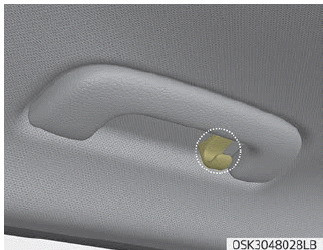
To use the hanger, pull down the upper portion of hanger.
CAUTION
Do not hang heavy clothes, since those may damage the hook.
WARNING
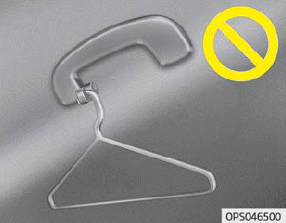
Do not hang other objects such as hangers or hard objects except clothes. Also, do not put heavy, sharp or breakable objects in the clothe pockets. In an accident or when the curtain air bag is inflated, it may cause vehicle damage or personal injury.
Floor mat anchor(s)
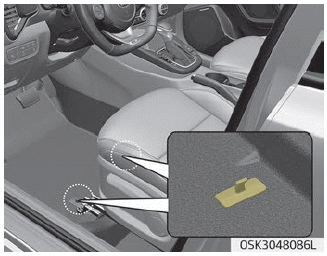
When using a floor mat on the front floor carpet, make sure it attaches to the floor mat anchor(s) in your vehicle. This keeps the floor mat from sliding forward.
When installing floor mat
1. Align fixing structure (hook) of floor carpet and hook ring of floor mat.
2. Insert the floor mat hook ring to the hook of floor carpet.
3. When inserting, first, push under part of the hook ring of floor mat matching with the hook of floor carpet, and push upper part of hook ring, so that hook ring can be properly inserted.
When uninstalling floor mat
Grab the front part of the floor mat and pull the floor mat upward.
WARNING
The following must be observed when installing ANY floor mat to the vehicle.
- Ensure that the floor mats are securely attached to the vehicle's floor mat anchor(s) before driving the vehicle.
- Do not use ANY floor mat that cannot be firmly attached to the vehicle's floor mat anchors.
- Do not stack floor mats on top of one another (e.g. all-weather rubber mat on top of a carpeted floor mat). Only a single floor mat should be installed in each position.
- When uninstalling floor mat, be sure to uninstall it with designated direction described with arrow at the previous picture. If different direction of force is applied to the hook, the hook can be broken.
IMPORTANT - Your vehicle was manufactured with driver's side floor mat anchors that are designed to securely hold the floor mat in place. To avoid any interference with pedal operation, Kia recommends that only the Kia floor mat designed for use in your vehicle be installed.
Cargo area cover
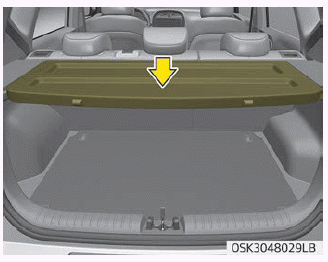
Use the cargo area cover to hide items stored in the cargo area.
Removal and installation
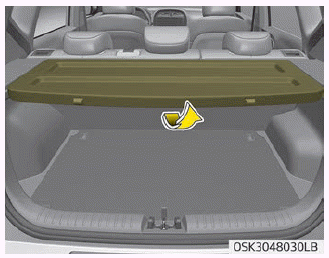
To remove the cargo area cover:
1. Fold the cargo area cover up in half.
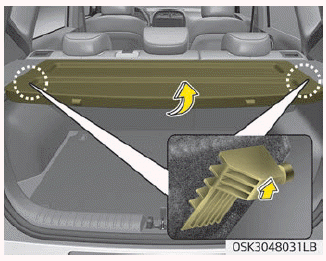
2. Firmly hold the folded part of the cover and lift it up.
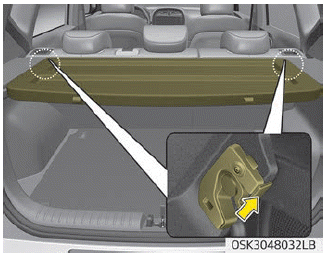
3. While lifting the cover up, hold the area near the front slots. Then, pull up the cover at approximately 45° angle.
WARNING
Folded cover may block the rear view. Put the folded cover in the appropriate position.
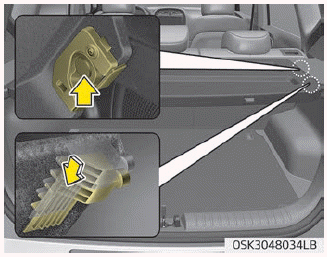
To install the cargo area cover:
To use the cargo area cover, insert the 4 edges into the slots.
WARNING
Do not place objects on the cargo area cover. Such objects may be thrown about inside the vehicle and possibly injure vehicle occupants during an accident or when braking.
CAUTION
Since the cargo area cover may be damaged or malformed, do not put luggage on it when it is used.
Download Manual