Lighting
Battery saver function
- The purpose of this feature is to prevent the battery from being discharged. The system automatically turns off the parking lights when the driver removes the ignition key (smart key: turns off the engine) and opens the driver-side door.
- With this feature, the parking lights will be turned off automatically if the driver parks on the side of road at night.
If necessary, to keep the lights on when the ignition key is removed, (smart key: turns off the engine) perform the following:
1. Open the driver-side door.
2. Turn the parking lights OFF and ON again using the light switch on the steering column.
Headlight escort function
The headlights (and/or taillights) will remain on for approximately 5 minutes after the ignition key is removed when the engine is turned off. However, if the driver’s door is opened and closed, the headlights are turned off after 15 seconds.
The headlights can be turned off by pressing the lock button on the transmitter (or smart key) twice or turning off the light switch from the headlight or Auto light position.
CAUTION
If the driver gets out of the vehicle through other doors (except driver's door), the battery saver function does not operate and the headlight escort function does not turn off automatically. Therefore, It causes the battery to be discharged. In this case, make sure to turn off the lamp before getting out of the vehicle.
Headlight welcome function
When the headlight switch is in the ON or AUTO position and all doors (and tailgate) are closed and locked, if you press the door unlock button on the transmitter (or smart key), the headlights will come on for about 15 seconds.
If the headlight switch is in the AUTO position, the function can only operate at night.
At this time, if you press the door unlock button again or door lock button on the transmitter (or smart key), the headlights will turn off immediately.
❈ Traffic Change (For Europe) The low beam light distribution is asymmetric. If you go abroad to a country with opposite traffic direction, this asymmetric part will dazzle oncoming car driver. To prevent dazzle, ECE regulation demand several technical solutions (ex. automatic change system, adhesive sheet, down aiming). This headlamps are designed not to dazzle opposite drivers. So, you need not change your headlamps in a country with opposite traffic direction.
Lighting control
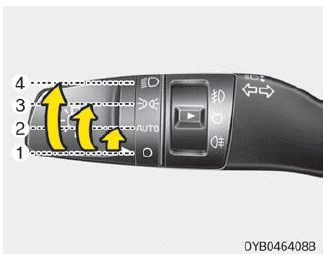
The light switch has a Headlight and a Parking light position.
To operate the lights, turn the knob at the end of the control lever to one of the following positions:
1. Off position
2. Auto light position (if equipped)
3. Parking light position
4. Headlight position
Parking light position

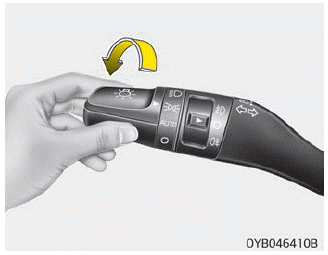
When the light switch is in the parking light position (2nd position), the tail position, license and instrument panel lights will turn ON.
Headlight position

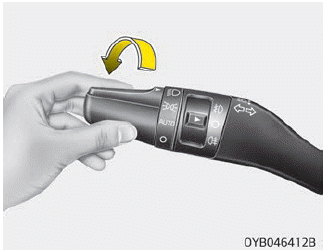
When the light switch is in the headlight position (3rd position), the head, tail, position, license and instrument panel lights are ON.
NOTICE
The ignition switch must be in the ON position to turn on the headlights.
Auto light position
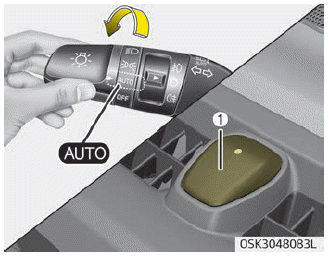
When the light switch is in the AUTO light position, the taillights and headlights will be turned ON or OFF automatically depending on the amount of light outside the vehicle.
CAUTION
- Never place anything over sensor (1) located on the instrument panel, this will ensure better autolight system control.
- Don’t clean the sensor using a window cleaner, the cleanser may leave a light film which could interfere with sensor operation.
- If your vehicle has window tint or other types of metallic coating on the front windshield, the Auto light system may not work properly.
High beam operation
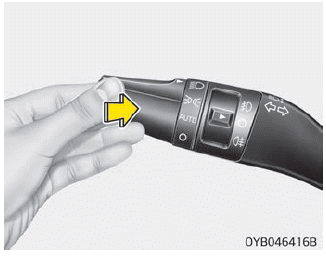
To turn on the high beam headlights, push the lever away from you. Pull it back for low beams.
The high beam indicator will light when the headlight high beams are switched on. To prevent the battery from being discharged, do not leave the lights on for a prolonged time while the engine is not running.
WARNING
Do not use high beam when there are other vehicles. Using high beam could obstruct the other driver's vision.
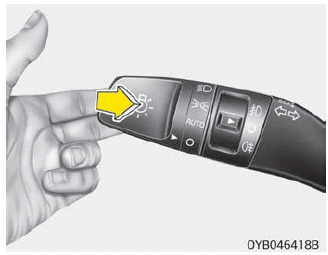
To flash the headlights, pull the lever towards you. It will return to the normal (low beam) position when released. The headlight switch does not need to be on to use this flashing feature.
Turn signals and lane change signals
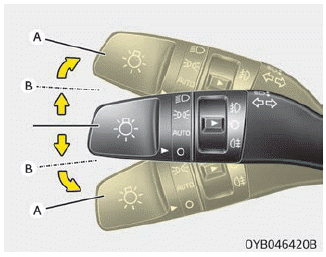
The ignition switch must be on for the turn signals to function. To turn on the turn signals, move the lever up or down (A).
The green arrow indicators on the instrument panel indicate which turn signal is operating. They will selfcancel after a turn is completed.
If the indicator continues to flash after a turn, manually return the lever to the off position.
To signal a lane change, move the turn signal lever slightly and hold it in position (B). The lever will return to the off position when released.
If an indicator stays on and does not flash or if it flashes abnormally, one of the turn signal bulbs may be burned out and will require replacement.
One-touch lane change function
To activate an one-touch lane change function, move the turn signal lever slightly and then release it. The lane change signals will blink 3 times.
NOTICE
If an indicator flash is abnormally quick or slow, a bulb may be burned out or have a poor electrical connection in the circuit.
Front fog light
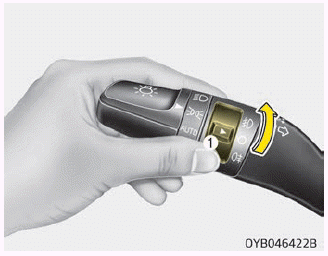
Fog lights are used to provide improved visibility when visibility is poor due to fog, rain or snow, etc. The fog lights will turn on when the fog light switch (1) is turned on after the parklight is turned on.
To turn off the fog lights, turn the fog light switch (1) to the ON position.
CAUTION
When in operation, the fog lights consume large amounts of vehicle electrical power. Only use the fog lights when visibility is poor.
Rear fog light
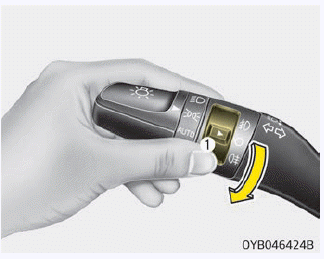
To turn the rear fog lights on, turn the rear fog light switch (1) to the on position when the headlight is turned on. Also, the rear fog lights turn on when the rear fog light switch is turned on after the front fog light switch (if equipped) is turned on and the headlight switch is in the parklight position.
To turn the rear fog lights off, turn the rear fog light switch to the on position again.
NOTICE
Rear fog light is only on the driver’s side (if equipped).
Daytime Running Lights, Headlight leveling device
Daytime Running Lights
The Daytime Running Lights (DRL) can make it easier for others to see the front of your vehicle during the day. DRL can be helpful in many different driving conditions, and it is especially helpful after dawn and before sunset. The DRL system turns OFF when:
1. The headlight switch is ON.
2. The engine is OFF.
3. The front fog light is ON.
4. Engaging the parking brake.
Headlight leveling device
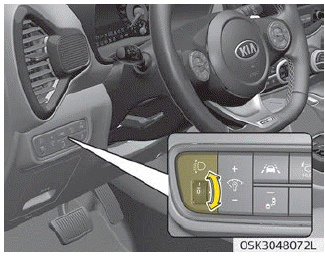
To adjust the headlight beam level according to the number of the passengers and loading weight in the luggage area, turn the beam leveling switch.
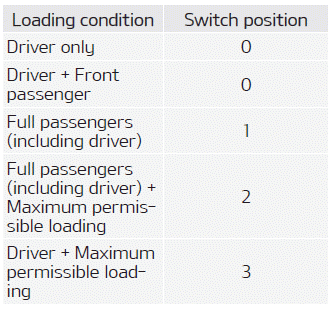
The higher the number of the switch position, the lower the headlight beam level. Always keep the headlight beam at the proper leveling position, or headlights may dazzle other road users.
Listed below are the examples of proper switch settings. For loading conditions other than those listed below, adjust the switch position so that the beam level may be the nearest as the condition obtained according to the list.
High Beam Assist (HBA) system
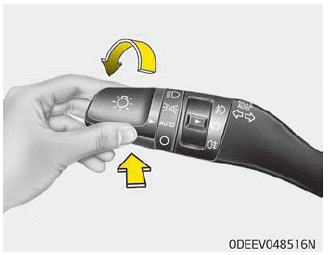
High Beam Assist is a system that automatically adjusts the headlamp range (switches between high beam and low beam) according to the brightness of other vehicles and road conditions.
Operation condition
1. Place the light switch in the AUTO position.
2. Turn on the high beam by pushing the lever away from you.
3. The High Beam Assist ( ) indicator will illuminate.
4. High Beam Assist will turn on when vehicle speed is above 40 km/h (25 mph).
5. The details of operation with the light switch while the High Beam Assist is on are below.
1. If the light switch is pushed away, High Beam Assist will turn off and the high beam will be on continuously.
2. If the light switch is pulled towards you when the high beam is off, the high beam will be on without cancellation of the High Beam Assist. (When you take your hands off the switch the lever will move to the middle and the high beam will turn off.)
3. If the light switch is pulled towards you when the high beam is on by High Beam Assist, the low beam will be on and High Beam Assist will turn off.
4. If the light switch is turned to the headlamp position ( ) from AUTO position, High Beam Assist will turn off and the low beam will be on continuously
When High Beam Assist is operating, the high beam switches to low beam in the below conditions.
- When the headlamp is detected from the on-coming vehicle.
- When the tail lamp is detected from the front vehicle.
- When headlamp/tail lamp of bicycle/ motorcycle is detected.
- When the surrounding is so bright that high beams are not needed.
- When streetlights or other lights are detected.
- When the light switch is not in the AUTO position.
- When High Beam Assist is off.
- When vehicle speed is below 30 km/h (19 mph).
Warning light and message
When High Beam Assist is not working properly, a warning message (“Check High Beam Assist (HBA) system”) will come on for a few second. After the message disappears, the master warning light ( ) will illuminate.
Have the system checked by a professional workshop. Kia recommends to visit an authorized Kia dealer/service partner.
CAUTION
The driver must be cautious in the below situations as the system may not operate in the following conditions
- When the light from on-coming or front vehicle is poor
- When the light from the oncoming or front vehicle is not detected because of lamp damage, or because it is hidden from sight, etc
- When the lamp of the on-coming or front vehicle is covered with dust, snow or water.
- When the front vehicle’s headlamps are off but the fog lamps on and etc. - When external conditions intervene
- When there is a a lamp that has a similar shape as a vehicle’s lamps.
- When the headlamp is not repaired or replaced at an authorized dealer.
- When headlamp aiming is not properly adjusted.
- When driving on a narrow curved road, rough road, downhill or uphill.
- When only part of the vehicle in front is visible on a crossroad or curved road.
- When there is a traffic light, reflecting sign, flashing sign or mirror ahead.
- When there is a temporary reflector or flash ahead (construction area).
- When the road conditions are bad such as being wet, iced or covered with snow.
- When a vehicle suddenly appears from a curve.
- When the vehicle is tilted from a flat tire or being towed.
- When LKA (Lane Keeping Assist) system failure indicator (yellow) illuminates (if equipped) and etc. - When front visibility is poor
- When the lamp of the on-coming or front vehicle is covered with dust, snow or water.
- When the light from the oncoming or front vehicle is not detected because of exhaust fume, smoke, fog, snow, etc.
- When the front window is covered with foreign matters.
- When it is hard to see because of fog, heavy rain or snow and etc.
- Do not disassemble a front view camera temporarily for tinted window or attaching any types of coatings and accessories. If you disassemble the camera and assemble it again, have the system checked by a professional workshop. Kia recommends to visit an authorized Kia dealer/ service partner and have the system checked to need a calibration.
- When you replace or reinstall the windshield glass, or front view camera, have the system checked by a professional workshop. Kia recommends to visit an authorized Kia dealer/ service partner.
- Be careful that water doesn’t get into High Beam Assist unit and do not remove or damage related parts of High Beam Assist system.
- Do not place objects on the crash pad that reflect light such as mirrors, white paper, etc.The system may not be able to function if sunlight is reflected.
- At times, High Beam Assist may not operate due to system limitations. The system is for your convenience only. It is the responsibility of the driver for safe driving practices and always check the road conditions for your safety.
- When the system does not operate normally, change the lamp position manually between the high beam and low beam.
Download Manual