Smart Cruise Control
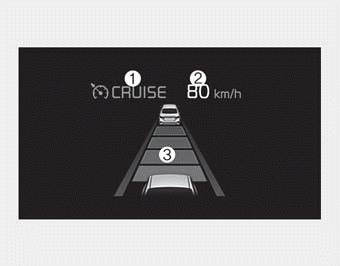
➀ Cruise indicator
➁ Set speed
➂ Vehicle-to-vehicle distance
The smart cruise control system allows you to program the vehicle to maintain a constant speed and predetermined distance to the vehicle ahead without depressing the accelerator or brake pedal.
WARNING
For your safety, please read the owner's manual before using the smart cruise control system.
✽ NOTICE
To activate smart cruise control, depress the brake pedal at least once after turning the ignition switch to the ON position or starting the engine. This is to check if the brake switch, which is important in canceling in smart cruise control, is operating normally.
WARNING
The Smart Cruise Control system (SCC) is deactivated when driving under the speed of 10 km/h (6.0 mph). In this case, the SCC will be unable to maintain the distance entered by the driver. It is the driver's responsibility to depress the brake to maintain a safe distance from the vehicle the driver is approaching.
WARNING - Smart cruise control system Limitations
The smart cruise control system is a supplemental system and is not a substitute for safe driving practices. It is the responsibility of the driver to always check the speed and distance to the vehicle ahead.
WARNING
- If the smart cruise control system is left on, (cruise indicator in the instrument cluster illuminated) the smart cruise control can be activated unintentionally. Keep the smart cruise control system off (cruise indicator off) when the smart cruise control system is not in use to avoid setting a speed which the driver is not aware of.
- Use the smart cruise control system only when traveling on open highways in good weather.
- Do not use the smart cruise control when it may not be safe to keep the car at a constant speed. For instance, in the following situations or environments:
- Highway interchange and tollgate
- Road surrounded by multiple steel constructions (subway construction, steel tunnel, etc)
- Parking lot
- Lanes beside guard rails on a road
- Slippery road with rain, ice, or snow
- Abrupt curved road
- Steep hills
- Windy road
- Off roads
- Roads under construction
- Roads which have rumble strips
- When driving near crash barriers
- When driving on a sharp curve
- When the vehicle sensing ability decreases due to vehicle modification resulting level difference of the vehicle's front and rear
- When driving in heavy traffic or when traffic conditions make it difficult to drive at a constant speed
- Limited visibility (rain, snow, smog, etc.) - Pay particular attention to driving conditions whenever using the smart cruise control system.
- Be careful when driving downhill using the SCC.
- Cruise function should not be used when the vehicle is being towed to prevent any damage.
- Always set the vehicle speed under the applicable and lawful speed limit.
- Always pay continuous attention to road and driving conditions even when the smart cruise control system is being operated.
- The smart cruise control system cannot recognize a stopped vehicle, pedestrians or an oncoming vehicle. Always look ahead cautiously in order to react to unexpected and sudden situations.
Smart cruise control switch
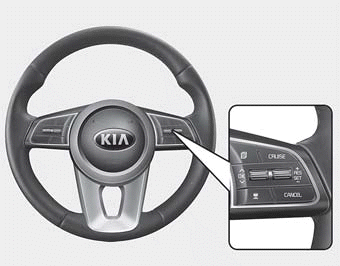
CANCEL : Cancels cruise control operation.
CRUISE : Turns cruise control system on or off.
RES + : Resumes or increases cruise control speed.
SET - : Sets or decreases cruise control speed.
 : Sets vehicle-to-vehicle distance.
Smart Cruise Control speed
To set Smart Cruise Control Speed :
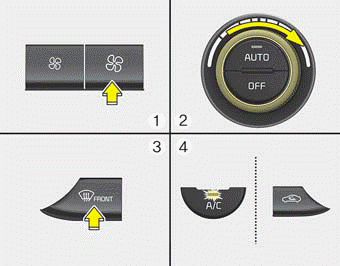
1. Press the CRUISE button to turn the system on. The CRUISE indicator in the instrument cluster will illuminate.
2. Accelerate to the desired speed.
The smart cruise control speed can be set as follows:
• 30 km/h (20 mph) ~ 180 km/h (110 mph)
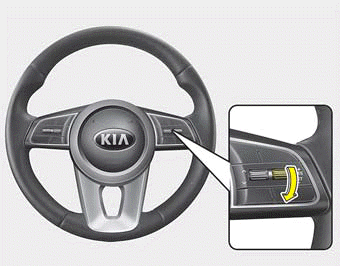
3. Move the lever down (to SET-), and release it at the desired speed. The set speed and vehicle to vehicle distance on the LCD screen will illuminate.
4. Release the accelerator pedal. The desired speed will automatically be maintained.
If there is a vehicle in front of you, the speed may decrease to maintain the distance to the vehicle ahead.
On a steep grade, the vehicle may slow down or speed up slightly while going uphill or downhill.
Vehicle speed may decrease on an upward slope and increase on a ownward slope.
The speed will be set to 30 km/h (20 mph) when there is a vehicle ahead and your vehicle speed is 10 km/h (6 mph) ~ 30 km/h (20 mph).
To increase cruise control set speed
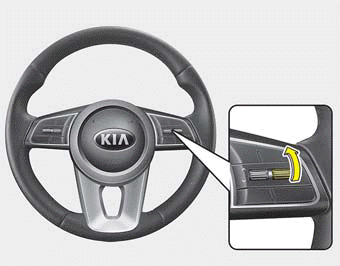
Follow either of these procedures:
- Move the lever up (to RES+), and hold it. Your vehicle set speed will increase by 10 km/h (5 mph). Release the lever at the speed you want.
- Move the lever up (to RES+), and release it immediately. The cruising speed will increase by 1.0 km/h (1.0 mph) each time you move the lever up (to RES+) in this manner.
- You can set the speed to a maximum of 180 km/h (110 mph). However, all speed limit laws must be followed.
CAUTION
Check the driving condition before using the toggle switch. Driving speed sharply increases when you push up and hold the toggle switch.
To decrease the cruise control set speed
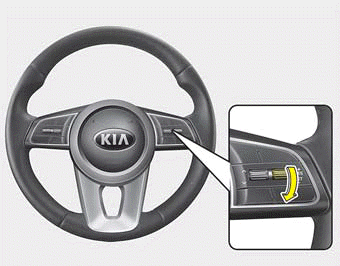
Follow either of these procedures:
- Move the lever down (to SET-), and hold it. Your vehicle set speed will decrease by 10 km/h (5 mph). Release the lever at the speed you want.
- Move the lever down (to SET-), and release it immediately. The cruising speed will decrease by 1.0 km/h (1.0 mph) each time you move the lever down (to SET-) in this manner.
- You can set the speed to 30 km/h (20 mph).
To temporarily accelerate with the cruise control on:
If you want to speed up temporarily when the cruise control is on, depress the accelerator pedal. Increased speed will not interfere with cruise control operation or change the set speed.
To return to the set speed, take your foot off the accelerator.
If you move the lever down (to SET-) at increased speed, the cruising speed will be set again.
✽ NOTICE
Be careful when accelerating temporarily, because the speed is not controlled automatically at this time even if there is a vehicle in front of you.
Smart cruise control will be temporarily canceled when
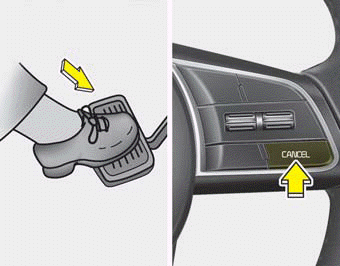
Cancelled manually
The smart cruise control is temporarily canceled when the brake pedal is depressed or the CANCEL button is pressed. Depress the brake pedal and press the CANCEL button at the same time when the vehicle is at a standstill. The speed and vehicle to vehicle distance indicator on the cluster will disappear and the CRUISE indicator will be illuminated continuously.
Cancelled automatically
- The driver's door is opened.
- The shift lever is shifted to N (Neutral), R (Reverse) or P (Paking).
- The EPB (electronic parking brake) is applied.
- The vehicle speed is over 180 km/h (110 mph)
- The ESC, ABS or TCS is operating.
- The ESC is turned off.
- The sensor or the cover is dirty or blocked with foreign matter.
- When the vehicle is stopped for over 5 minutes.
- The driver starts driving by pushing the toggle switch up (RES+)/down (SET-) or depressing the accelerator pedal, after stopping the vehicle with a vehicle stopped far away in front.
- Engine rpm is in the red zone.
- The accelerator pedal is continuously depressed for a long time.
- The engine speed is in a dangerous range.
- The SCC system has malfunctioned.
- When the braking control is operated for Forward Collision-Avoidance Assist(FCA).
- The vehicle is stopped for more than 5 minutes.
- The driver starts driving by pushing the toggle switch up (RES+)/down (SET-) or depressing the accelerator pedal, after the vehicle is stopped by the Smart Cruise Control system with no other vehicle ahead.
- The vehicle stops and goes repeatedly for a long period of time.
- When the parking brake is locked.
- Engine has some problems.
Each of these actions will cancel the smart cruise control operation. (the set speed and vehicle to vehicle distance on the LCD display will go off.) If the smart cruise control is cancelled automatically, the smart cruise control will not resume even though the RES+ or SET-lever is moved.
✽ NOTICE
If the smart cruise control is cancelled by other than the reasons mentioned, take your vehicle to an authorized Kia dealer and have the system checked.
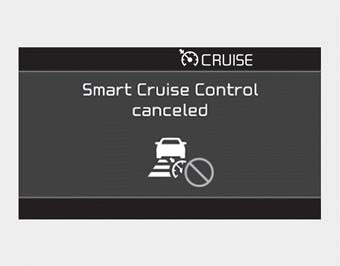
✽ NOTICE
If the system is automatically cancelled, the warning chime will sound and a message will appear for a few seconds.
You must adjust the vehicle speed by depressing the accelerator or brake pedal according to the road and driving conditions ahead. Always check the road conditions. Do not rely on the warning chime.
To resume cruise control set speed
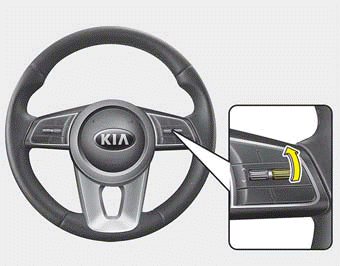
Reset
If any method other than the “RES+” or “SET-“ lever was used to cancel cruising speed and the system is still activated, the cruising speed will automatically resume when you push the lever up (RES+) or down (SET-).
If you push the lever up (RES+), the speed will resume to the recently set speed. However, if vehicle speed is between 10 km/h (6 mph) and 30 km/h (20 mph), it will resume when there is a vehicle in front of your vehicle.
WARNING
To reduce the risk of an accident, always check the road conditions when reactivating the smart cruise control using the RES+ lever to ensure the road conditions permit safe use of the cruise control.
To turn cruise control off
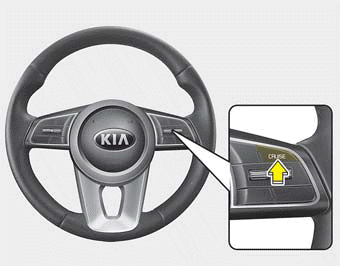
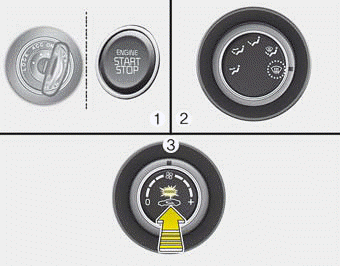
Press the CRUISE button. (the CRUISE indicator in the instrument cluster will go off).
When the Smart Cruise Control System is not needed, press the [CRUISE] switch and deactivate the system.
• Press the CRUISE button (The CRUISE indicator light will go off.).
Vehicle to vehicle distance setting
To set vehicle to vehicle distance:
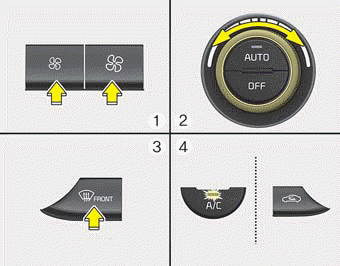
This function allows you to program the vehicle to maintain a relative distance to the vehicle ahead without depressing the accelerator pedal or brake pedal.
The vehicle to vehicle distance will automatically activate when the smart cruise control system is on. Select the appropriate distance according to road conditions and vehicle speed.
Each time the button is pressed, the vehicle to vehicle distance changes as follows:
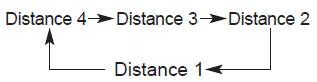
For example, if you drive at 90 km/h (56 mph), the distance maintained is as follows:
Distance 4 - approximately 52.5 m (172 ft)
Distance 3 - approximately 40 m (131 ft)
Distance 2 - approximately 32.5 m (107 ft)
Distance 1 - approximately 25 m (82ft)
✽ NOTICE
The distance is set to the last set distance when the system was used after starting the engine.
When the lane ahead is clear :
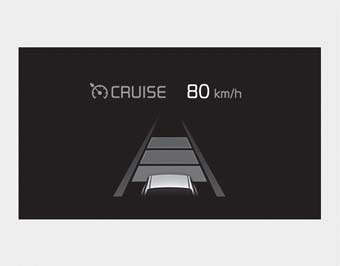
The vehicle speed will maintain the set speed.
WARNING - Following Distance
- To avoid collisions, always be aware of the selected speed and vehicle to vehicle distance settings when activating your smart cruise control system.
- Always maintain sufficient braking distance and decelerate your vehicle by applying the brakes if necessary.
When there is a vehicle ahead of you in your lane :
- The vehicle will maintain the set speed when the lane ahead is clear.
- The vehicle will slow down or speed up to maintain the selected distance when there is a vehicle ahead of you in the lane. (A vehicle will appear in front of your vehicle in the LCD display only when there is an actual vehicle in front of you)
- If the vehicle ahead speeds up, your vehicle will travel at a steady cruising speed after accelerating to the selected speed.
CAUTION
- The warning chime sounds and LCD display blinks if it is hard to maintain the selected distance to the vehicle ahead.
- If the warning chime sounds, actively adjust the vehicle speed by depressing the brake pedal according to the road condition ahead and driving conditions.
- Even if the warning chime is not activated, always pay attention to the driving conditions to prevent dangerous situations from occurring.
- Be alert to road conditions as the radio and outside sounds or conditions could interrupt a warning sound.
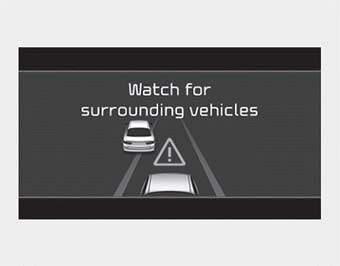
If the vehicle ahead (vehicle speed: less than 30 km/h (20 mph) disappears to the next lane, the warning chime will sound and a message will appear. Adjust your vehicle speed for vehicles or objects that can suddenly appear in front of you by depressing the brake pedal according to the road and driving conditions ahead.
Radar to detect distance to the vehicle ahead
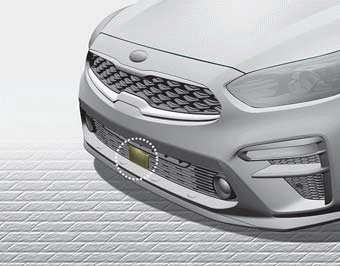
The sensor detects the distance to the vehicle ahead.
If the sensor is covered with dirt or other foreign matter, the vehicle to vehicle distance control may not operate correctly.
Always keep the area in front of the sensor clean.
Warning message
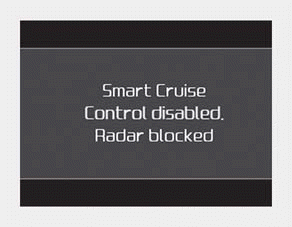
■ Type A
■ Type B
When the sensor lens cover is blocked with dirt, snow, or debris, the Smart Cruise Control System operation may stop temporarily. If this occurs, a warning message will appear on the LCD display. Remove any dirt, snow, or debris and clean the radar sensor lens cover before operating the Smart Cruise Control System. The Smart Cruise Control system may not properly activate, if the radar is totally contaminated, or if any object or vehicle is not detected after turning ON the engine (e.g. in an open terrain).
SCC (smart cruise control) malfunction message
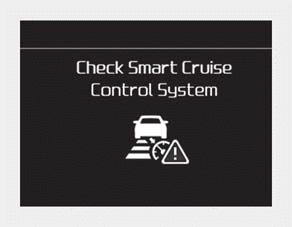
■ Type A
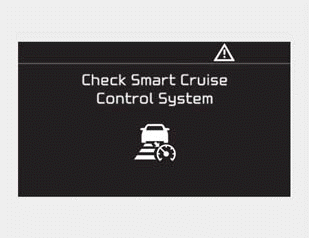
■ Type B
The message will appear when the vehicle to vehicle distance control system is not functioning normally.
In this situation, take your vehicle to an authorized Kia dealer and have the system checked.
CAUTION
- Do not install accessories around the sensor and do not replace the bumper by yourself. It may interfere with sensor performance.
- Always keep the sensor and bumper clean. • Use only a soft cloth to wash the vehicle. Do not spray pressurized water directly on the sensor or sensor cover.
- Be careful not to apply unnecessary force on the radar sensor or sensor cover. If the sensor is forcibly moved out of proper alignment, the Smart Cruise Control System may not operate correctly. In this situation, a warning message may not be displayed. Have the vehicle inspected by an authorized Kia dealer.
- Do not damage the sensor or sensor area by a strong impact. If the sensor moves slightly off position, the smart cruise control system will not operate correctly without any warning or indicator from the cluster. If this occurs, take your vehicle to an authorized Kia dealer and have the system checked.
- Use only a genuine Kia sensor cover for your vehicle. Do not paint anything on the sensor cover.
- If the front bumper becomes damaged in the area around the radar sensor, the Smart Cruise Control System may not operate properly.
To adjust the sensitivity of smart cruise control
The sensitivity of vehicle speed when following the front vehicle to maintain the set distance can be adjusted. Go to the User Settings Mode (Driver Assistance) and SCC Reaction. You may select one of following three stages:
• Slow:
Vehicle speed to the vehicle ahead to maintain the set distance is slower than normal speed.
• Normal:
Vehicle speed to the vehicle ahead to maintain the set distance is normal
• Fast:
Vehicle speed to the vehicle ahead to maintain the set distance is faster than normal speed.
✽ NOTICE
The last selected mode remains in the system.
To convert to cruise control mode
The sensitivity of vehicle speed when following the front vehicle to maintain the set distance can be adjusted. Go to the User Settings Mode (Driver Assistance) and SCC Reaction. You may select one of following three stages:
• Slow:
Vehicle speed to the vehicle ahead to maintain the set distance is slower than normal speed.
• Normal:
Vehicle speed to the vehicle ahead to maintain the set distance is normal
• Fast:
Vehicle speed to the vehicle ahead to maintain the set distance is faster than normal speed.
✽ NOTICE
The last selected mode remains in the system.
Limitations of the system
The smart cruise control system may have limits to its ability to detect distance to the vehicle ahead due to road and traffic conditions.
On curves
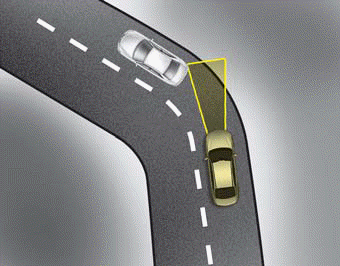
- On curves, the smart cruise control system may not immediately detect a moving vehicle in your lane, and then your vehicle could accelerate to the set speed. Also, the vehicle speed will rapidly decrease when the vehicle ahead is suddenly recognized.
- Select the appropriate set speed on curves and adjust your vehicle speed by depressing the accelerator or brake pedal according to the road and driving conditions ahead.
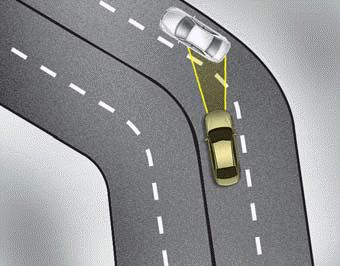
• Your vehicle speed can be reduced due to a vehicle in the adjacent lane. Adjust your vehicle speed by depressing the brake pedal according to the road and driving conditions ahead. Apply the accelerator pedal and select the appropriate set speed. Check to be sure that the road conditions permit safe operation of the smart cruise control.
On inclines, Lane changing
On inclines
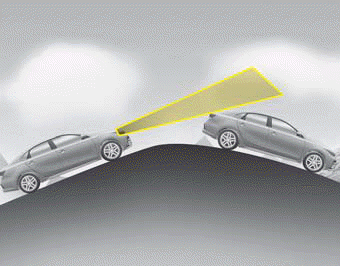
- During uphill or downhill driving, the smart cruise control system may not immediately detect a moving vehicle in your lane, and may cause your vehicle to accelerate to the set speed. Also, the vehicle speed may rapidly decrease when the vehicle ahead is suddenly recognized.
- Select the appropriate set speed on inclines and adjust your vehicle speed by depressing the accelerator or brake pedal according to the road and driving conditions ahead.
Lane changing
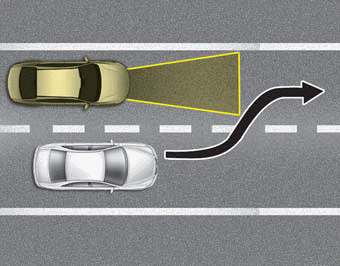
- A vehicle which moves into your lane from an adjacent lane cannot be recognized by the sensor until it is in the sensor's detection range.
- The sensor may not immediately detect when a vehicle cuts in suddenly. Always pay attention to the traffic, road and driving conditions.
- If a vehicle which moves into your lane is slower than your vehicle, your speed may decrease to maintain the distance to the vehicle ahead.
• If a vehicle which moves into your lane is faster than your vehicle, your vehicle will accelerate to the selected speed.
- Your vehicle may accelerate when a vehicle ahead of you moves out of the sensor's range and is not detected.
- When you are warned that the vehicle ahead of you is not detected, drive with caution.
Vehicle recognition
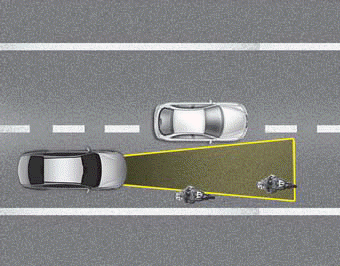
Some of the following vehicles ahead in your lane may not be recognized by the sensor:
- Narrow vehicles such as motorcycles or bicycles
- Vehicles offset to one side
- Slow-moving vehicles or suddenly decelerating vehicles
- Stopped vehicles
- Vehicles with small rear profiles such as trailers with no loads
A vehicle ahead may not be recognized correctly by the sensor when any of the following occurs:
- When the vehicle is pointing upwards due to overloading in the trunk(tailgate)
- While making turns
- When driving to one side of the lane
- When driving on narrow lanes or on curves
Adjust your vehicle speed by depressing the brake pedal according to the road and driving conditions ahead.
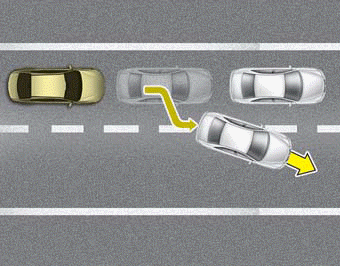
• When vehicles are at a standstill and the vehicle in front of you changes to the next lane, be careful when your vehicle starts to move because it may not immediately recognize the stopped vehicle in front of you.
In this situation you must maintain a safe braking distance, and if necessary, depress the brake pedal to reduce your driving speed in order to maintain a safe distance.
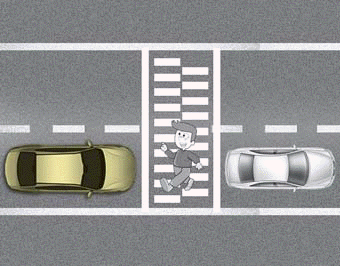
• Always look out for pedestrians when your vehicle is maintaining a distance with the vehicle ahead.
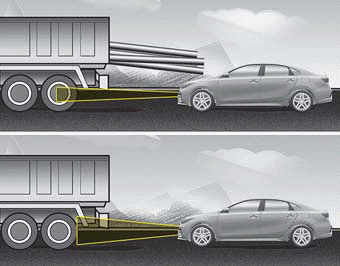
• Always be cautious when approaching vehicles that are taller with higher clearance, or vehicles carrying loads that stick out of the back of the vehicle.
WARNING - Inclines and towing
Do not use the smart cruise control system on steep inclines or when towing another vehicle or trailer since such extreme loading can interfere with your vehicle's ability to maintain the selected speed.
WARNING
When using the Smart Cruise Control, take the following precautions:
- If an emergency stop is necessary, you must apply the brakes. The smart cruise control system may not be able to completely stop the vehicle or avoid a collision in every situation.
- Keep a safe distance according to road conditions and vehicle speed. If the vehicle to vehicle distance is too close during high-speed driving, a serious collision may result.
- Always maintain sufficient braking distance and decelerate your vehicle by applying the brakes if necessary.
- The Smart Cruise Control system may not recognize a stopped vehicle, pedestrians or an oncoming vehicle. Always look ahead cautiously in order to react to unexpected and sudden situations.
- Vehicles moving in front of you making frequent lane changes may cause a delay in the system's reaction or may cause the system to react to a vehicle actually in an adjacent lane. Always drive cautiously in order to react to unexpected and sudden situations.
- Always be aware of the selected speed and vehicle to vehicle distance. The driver should not solely rely on the system but always pay attention to driving conditions and control vehicle speed.
- The Smart Cruise Control system may not recognize complex driving situations, so always pay attention to driving conditions and control your vehicle speed.
- For safe operation, carefully read and follow the instructions in this manual before use.
CAUTION
The smart cruise control system may not operate temporarily due to electrical interference.
✽ NOTICE
The Smart Cruise Control System may not operate properly due to:
- Electrical interference.
- Modifying the suspension.
- Differences of tire abrasion or tire pressure.
- Installing different type of tires.
Download Manual