Interior features
Cup holder
WARNING - Hot liquids
Do not place uncovered cups with hot liquid in the cup holder while the vehicle is in motion. If the hot liquid spills, you may burn yourself. Such a burn to the driver could lead to loss of control of the vehicle.
CAUTION
Keep your drinks sealed while driving to prevent spilling your drink. If liquid spills, it may get into the vehicle's electrical/electronic system and damage electrical/ electronic parts.
✽ NOTICE
When cleaning spilled liquids, do not use heat to dry the cup holders. This may damage the cup holder.
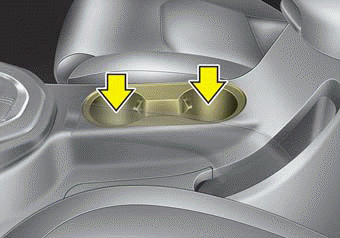
■ Front seat
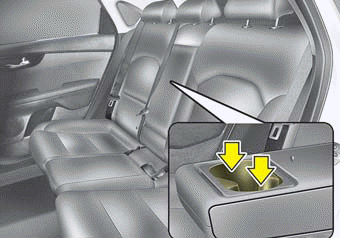
■ Rear seat
Seat warmer
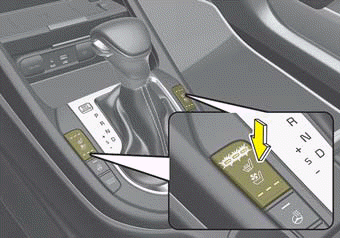
■ Front seat
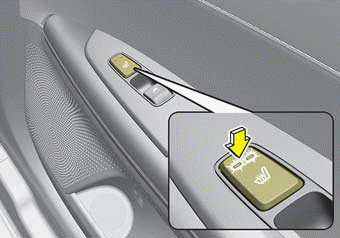
■ Rear seat
The seat warmer is provided to warm the front seats during cold weather. With the ignition switch in the ON position, push either of the switches to warm the driver's seat or the front passenger's seat.
During mild weather or under conditions where the operation of the seat warmer is not needed, keep the switches in the "OFF" position.
►Temperature control (Manual)
Each time you press the switch, the temperature setting of the seat will change as follows :
■ Front seat

■ Rear seat
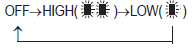
• The seat warmer defaults to the OFF position whenever the ignition switch is turned on.
►Temperature control(Automatic)
The seat warmer starts to automatically control the seat temperature in order to prevent low-temperature burns after being manually turned ON.
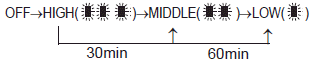
You may manually press the button to increase the seat temperature. However, it soon returns to the automatic mode again.
- When pressing the switch for more than 1.5 seconds with the seat warmer operating, the seat warmer will turn OFF.
- The seat warmer defaults to the OFF position whenever the Engine Start/Stop button is in the ON position.
✽ NOTICE
With the seat warmer switch in the ON position, the heating system in the seat turns off or on automatically depending on the seat temperature.
WARNING - Seat warmer burns
The seat warmer may cause burns, even at low temperatures, if used over a long period of time. Never allow passengers who may not be able to take care of themselves to be exposed to the risk of seat heater burns. These include:
1. Infants, children, elderly or disabled persons, or hospital outpatients
2. Persons with sensitive skin or those that burn easily
3. Fatigued individuals
4. Intoxicated individuals
5. Individuals taking medication that can cause drowsiness or sleepiness (sleeping pills, cold tablets, etc.)
Air ventilation seat
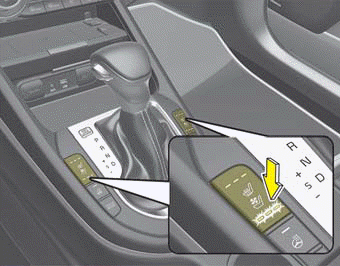
The temperature setting of the seat changes according to the switch position.
- If you want to ventilate your seat cushion, press the switch (blue color).
- Each time you press the button, the airflow will change as follows:

- The seat warmer (with air ventilation) defaults to the OFF position whenever the ignition switch is turned on.
CAUTION - Seat damage
- When cleaning the seats, do not use an organic solvent such as paint thinner, benzene, alcohol and gasoline. Doing so may damage the air ventilation seat.
- Do not place heavy or sharp objects on the seat. Those things may damage the air ventilation seat.
- Be careful not to spill liquid such as water or beverages on the seat. If you spill some liquid, wipe the seat with a dry towel. Before using the air ventilation seat, dry the seat completely.
Sunvisor
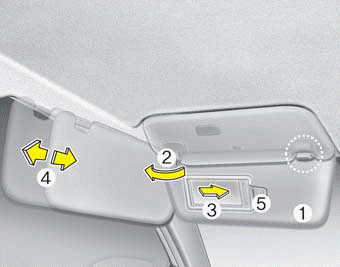
Use the sunvisor to shield direct light through the front or side windows.
To use the sunvisor, pull it downward. To use the sunvisor for the side window, pull it downward, unsnap it from the bracket (1) and swing it to the side (2).
To use the vanity mirror, pull down the visor and slide the mirror cover (3).
Adjust the sunvisor extension forward or backward (4) (if equipped).
The ticket holder (5) is provided for holding a tollgate ticket.
* The actual sunvisor lamp in the vehicle may differ from the illustration.
CAUTION - Vanity mirror lamp
If you use the vanity mirror lamp, turn off the lamp before returning the sunvisor to its original position, otherwise it could result in battery discharge and possible sunvisor damage.
CAUTION - Ticket holder
- Do not put too many tickets between a ticket holder and a sunvisor. It could result in deformation or damage to the ticket holder.
- Do not put a plastic card such as credit cards in the ticket holder. It could result in deformation of the plastic card.
CAUTION
Do not put several tickets in the ticket holder at one time. This could cause damage to the ticket holder.
Sliding armrest
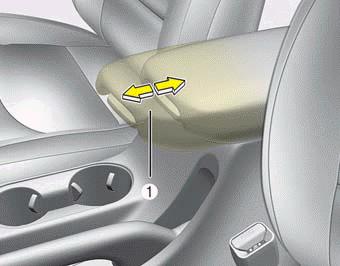
To move forward
Grab the front portion of the armrest, then press up the lever (1) and pull it forward
To move rearward
Push the armrest rearward with your palm.
WARNING
Do not grab the front portion of the armrest (1) when moving the armrest rearward. It may pinch your fingers.
Power outlet
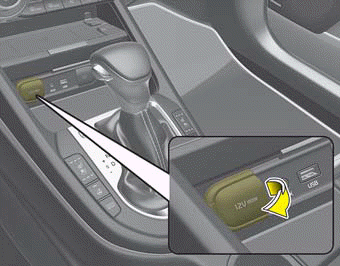
The power outlet is designed to provide power for mobile telephones or other devices designed to operate with vehicle electrical systems. The devices should draw less than 10 amps with the engine running.
- Use the power outlet only when the engine is running and remove the accessory plug after use. Using the accessory plug for prolonged periods of time with the engine off could cause the battery to discharge.
- Only use 12V electric accessories which are less than 10A in electric capacity.
- Close the cover when not in use.
- Some electronic devices can cause electronic interference when plugged into a vehicle’s power outlet. These devices may cause excessive audio static and malfunctions in other electronic systems or devices used in your vehicle.
- Push the plug in as far as it will go. If good contact is not made, the plug may overheat and the fuse may open.
- Plug in battery equipped electronic devices with reverse current protection. Otherwise, the current from the battery may flow into the vehicle’s electrical/electronic system and cause system malfunction.
WARNING - Electric shock
Do not put a finger or a foreign object (pen, etc.) into a power outlet and do not touch with a wet hand. You may receive an electric shock.
USB charger
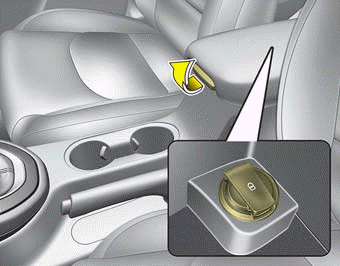
The USB car charger allows drivers to charge their digital devices their digital devices such as smartphones and tablets. Connect the device to the USB port using a manufacturer certified cable to begin charging.
Power is supplied to the USB car charger in either the ACC state or with the ignition on. In order to prevent battery discharge, only connect digital devices to the USB port with the ignition on. Use the display screen of the connected device to check its charging progress. Your smartphone or tablet may heat up while charging.
This does not impact life or function of the device. For safety reasons, charging will stop if the battery heats up to temperatures that will negatively affect the device. Not all devices are supported by the USB charger and may require additional adapters.
CAUTION
- Use the USB car charger with the ignition on. Otherwise, vehicle battery discharge may occur.
- Use a manufacturer certified USB cable compatible with the digital device to be charged..
- Make sure that any foreign object, drinks, and water do not come into contact with the USB car charger.Water or foreign objects can damage the USB charger..
- Do not connect devices with current consumption exceeding 2.1A..
- Do not connect devices that generate excessive electromagnetic noise. Doing so may interrupt the vehicle audio/AV electronic devices.
- Ensure the devices are correctly connected, failing to do so may cause serious damage to the device. Please note that damages due to incorrect usage are not covered by warranty service.
Wireless smart phone charging system
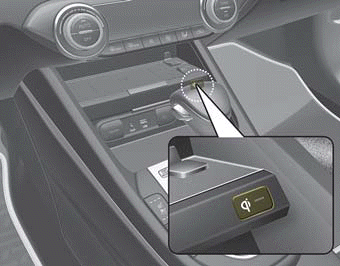
The wireless smart phone charging system is located in front of the center console.
Firmly close all doors, and turn the ignition to ACC or IGN ON. To start wireless charging, place the smart phone equipped with wireless charging function on the wireless charging pad.
For best wireless charging results, place the smart phone on the center of the charging pad.
The wireless charging system is designed for single usage with smart phones equipped with QI. Please refer to the smart phone accessory cover or the smart phone manufacturer homepage to check whether your smart phone supports QI function.
WARNING
If any metallic object such as a coin is located between the wireless charging system and the smart phone, the charging may be disrupted. Also, the metallic object may heat up and potentially damage the charging system.
WARNING - Distracted driving
Driving while distracted can result in a loss of vehicle control that may lead to an accident, severe personal injury, and death. The driver’s primary responsibility is in the safe and legal operation of a vehicle, and use of any handheld devices, other equipment, or vehicle systems which take the driver’s eyes, attention and focus away from the safe operation of a vehicle or which are not permissible by law should never be used during operation of the vehicle.
Wireless smart phone charging
1. Remove any object on the smart phone charging pad including the smart key. If there is any foreign object on the pad other than a smart phone, the wireless charging function may not operate properly.
2. Place the smart phone on the center of the wireless charging pad.
3. The indicator light will change to orange once the wireless charging begins. After the charging is complete, the orange light will change to green.
4.You can choose to turn the wireless charging function to either ON or OFF by selecting the USM on the instrument cluster. (Please refer to “Instrument Cluster” for details).
If the wireless charging does not work, gently move your smart phone around the pad until the charging indicator light turns yellow. Depending on the smart phone, the charging indicator light may not turn green even after the charging is complete.
If the wireless charging is not functioning properly, the orange light will blink and flash for ten seconds, then turn off. If that occurs, remove the smart phone from the pad and replace it on the pad again, or double check the charging status.
If you leave the smart phone on the charging pad when the vehicle ignition is in OFF, the vehicle will alert you through warning messages and sound (applicable for vehicles with voice guidance function) after the ‘Good bye’ function on the instrument cluster ends.
✽ NOTICE
- When the internal temperature of the wireless charging system rises above a set temperature, the wireless charging will cease to function. After the internal temperature drops below the threshold, the wireless charging function will resume.
- If there is any metallic object between the smart phone and the wireless charging pad, immediately remove the smart phone. Remove the metallic object after it has completely cooled down.
- The wireless charging may not function properly when there is a heavy accessory cover on the smart phone.
- The wireless charging will stop when using the wireless smart key search function; preventing radio wave disruption.
- The wireless charging will stop when the smart key is moved out of the vehicle with the ignition in ON.
- The wireless charging will stop when any of the doors are opened (applicable for vehicles equipped with smart keys).
- The wireless charging will stop when the vehicle is turned OFF.
- The wireless charging will stop when the smart phone is not in complete contact with the wireless charging pad.
- Items equipped with magnetic components such as: credit cards, telephone cards, bankbooks, transportation tickets etc, may become damaged during wireless charging.
- Place the smart phone on the center of the charge pad for best results. The smart phone may not charge when placed near the rim of the charging pad. If the smart phone is not charging, it may heat up excessively.
- For smart phones without built-in wireless charging system, an appropriate accessory has to be equipped in order to use the vehicle's wireless charging system.
- Smart phones of some manufacturers may display messages on weak current. This is due to the particular characteristic of the smart phone and does not imply a malfunction of the wireless charging system.
- The indicator light of some manufacturers’ smart phones may still be yellow after the smart phone is fully charged. This is due to the particular characteristic of the smart phone and not a malfunction of the wireless charging system.
- When any smart phone without wireless charging capabilities or a metallic object is placed on the charging pad, a small noise may be heard. This sound is due to the vehicle discerning compatibility of the object placed on the charging pad. It does not affect your vehicle or the smart phone in any way.
Clothes hanger
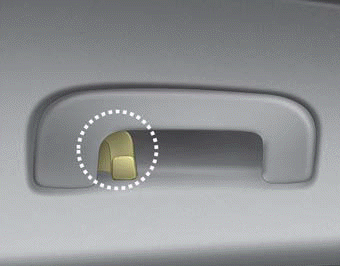
The clothes hanger is located on the roof of the rear seats.
CAUTION - Hanging clothing
Do not hang heavy clothes, since they may damage the hook.
WARNING
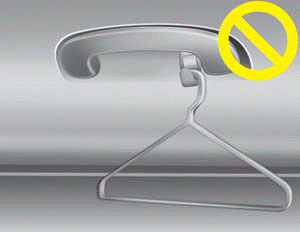
Do not hang other objects such as hangers or hard objects except clothes. Also, do not put heavy, sharp or breakable objects in the clothing pockets. In an accident or when the curtain air bag is inflated, it may cause vehicle damage or personal injury.
Floor mat anchor (s)
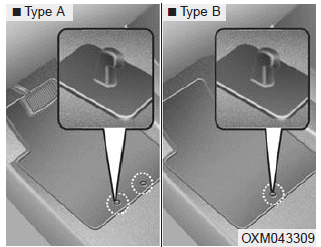
When using a floor mat on the front floor carpet, make sure it attaches to the floor mat anchor(s) in your vehicle. This keeps the floor mat from sliding forward.
WARNING - After market floor mat
Do not install aftermarket floor mats that are not capable of being securely attached to the vehicle's floor mat anchors. Unsecured floor mats can interfere with pedal operation.
CAUTION
- Ensure to remove any protective film attached to the carpet before attaching a floor mat to the front floor carpet. Otherwise, the floor mat may move freely on the protective film and it could result in unintentional braking or accelerating.
- Since the volatile organic compound may be continuously generated from various kinds of protective film attached for the protection of the interior material, be sure to remove it.
The following must be observed when installing ANY floor mat to the vehicle.
- Ensure that the floor mats are securely attached to the vehicle's floor mat anchor(s) before driving the vehicle.
- Do not use ANY floor mat that cannot be firmly attached to the vehicle's floor mat anchors.
- Do not stack floor mats on top of one another (e.g. all-weather rubber mat on top of a carpeted floor mat). Only a single floor mat should be installed in each position.
✽ NOTICE
Your vehicle was manufactured with driver's side floor mat anchors that are designed to securely hold the floor mat in place. To avoid any interference with pedal operation, Kia recommends that only the Kia floor mat designed for use in your vehicle be installed.
Download Manual