LCD windows
Over view
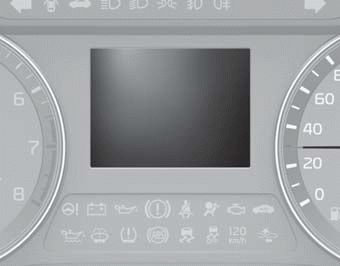
LCD windows show the following various information to drivers.
- Trip information
- LCD modes
- Warning messages
Trip information (Trip computer)
The trip computer is a microcomputer- controlled driver information system that displays information related to driving.
✽ NOTICE
Some driving information stored in the trip computer (for example Average Fuel Economy) resets if the battery is disconnected.
Distance to empty
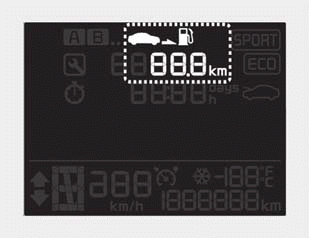
■ Type A
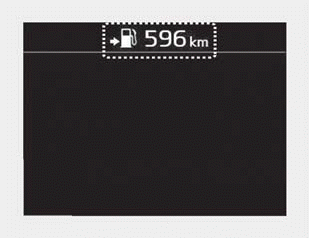
■ Type B
• The distance to empty is the estimated distance the vehicle can be driven with the remaining fuel.
- Distance range: 1 ~ 9,9999 km or 1 ~ 9,999 mi.
• If the estimated distance is below 1 km (1 mi.), the trip computer will display “---” as distance to empty.
✽ NOTICE
- If the vehicle is not on level ground or the battery power has been interrupted, the distance to empty function may not operate correctly.
- The distance to empty may differ from the actual driving distance as it is an estimate of the available driving distance.
- The trip computer may not register additional fuel if less than 6 liters (1.6 gallons) of fuel are added to the vehicle.
- The fuel economy and distance to empty may vary significantly based on driving conditions, driving habits, and condition of the vehicle.
Trip Modes
- For type A cluster
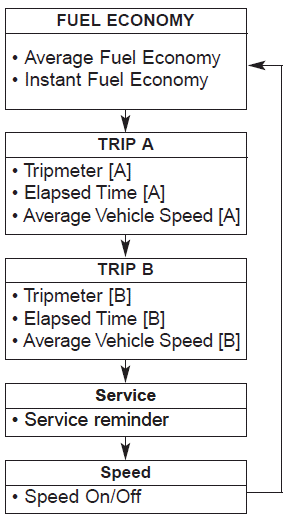
To change the trip mode, press the TRIP button.
- For type B, C cluster
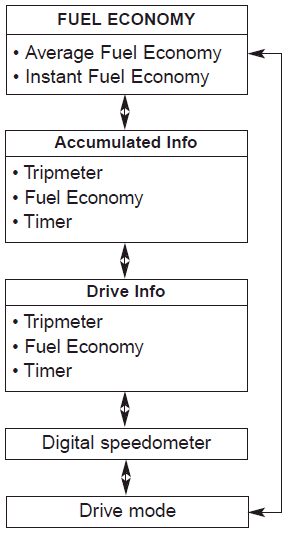
To change the trip mode, scroll the MOVE scroll switch ( / ) or press the TRIP button in the trip computer mode.
Trip A/B (For type A cluster)
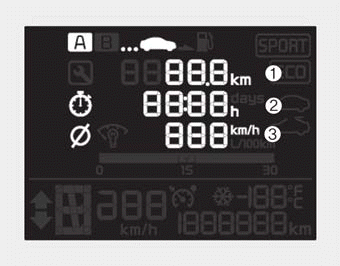
Tripmeter (1)
- The tripmeter is the total driving distance since the last tripmeter reset.
- Distance range : 0 ~ 1599999 km or 0 ~ 999999 mi. - To reset the tripmeter, press the RESET button on the steering wheel for more than 1 second when the tripmeter is displayed.
- 4 hours after the ignition is turned off, the tripmeter will be reset automatically.
Elapsed Time (2)
- The elapsed time is the total driving time since the last elapsed time reset.
- Time range (hh:mm) : 00:00 ~ 99:59 - To reset the elapsed time, press the RESET button on the steering wheel for more than 1 second when the elapsed time is displayed.
✽ NOTICE
Even if the vehicle is not in motion, the elapsed time keeps going while the engine is running.
Average Vehicle Speed (3)
- The average vehicle speed is calculated by the total driving distance and driving time since the last average vehicle speed reset.
- Speed range : 0 ~ 250 km/h or MPH - To reset the average vehicle speed, press the RESET button on the steering wheel for more than 1 second when the average vehicle speed is displayed.
✽ NOTICE
- The average vehicle speed is not displayed if the driving distance is less than 300 meters (0.2 miles) or the driving time is less than 10 seconds since the ignition switch is turned to ON.
- Even if the vehicle is not in motion, the average vehicle speed keeps going while the engine is running.
Fuel Economy
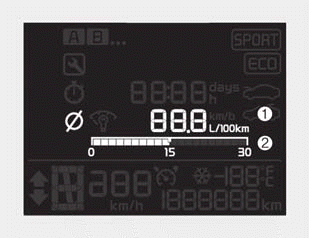
■ Type A
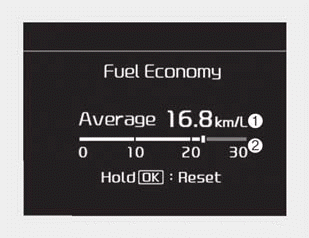
■ Type B
Average Fuel Economy (1)
- The average fuel economy is calculated by the total driving distance and fuel consumption since the last average fuel economy reset.
- Fuel economy range: 0 ~ 99.9 km/L, L/100 km or MPG - The average fuel economy can be reset both manually and automatically.
✽ NOTICE
Fuel economy may vary significantly based on driving conditions, driving habits, and condition of the vehicle.
Manual reset
To clear the average fuel economy manually, press the RESET or OK button on the steering wheel for more than 1 second when the average fuel economy is displayed.
Automatic reset (For type B, C cluster)
To make the average fuel economy be reset automatically whenever refueling, select the “Fuel economy auto reset” mode in the User Setting menu of the LCD Windows (Refer to “LCD Windows”).
- OFF - You may set to default manually by using the trip switch reset button.
- After ignition - The vehicle will automatically set to default once 4 hours pass after the Ignition is in OFF.
- After refueling - After refueling more than 6 liters (1.6 gallons) and driving over 1 km/h (1 mph), the vehicle will reset to default automatically.
- 4 hours after the ignition is turned off, the tripmeter will be reset automatically.
✽ NOTICE
The average fuel economy is not displayed for more accurate calculation if the vehicle does not drive more than 10 seconds or 50 meters (0.03 miles) since the ignition switch or Engine Start/Stop button is turned to ON.
Instant Fuel Economy (2)
• This mode displays the instant fuel economy during the last few seconds when the vehicle speed is more than 10km/h (6.2 MPH).
- Fuel economy range: 0.0 ~ 30 km/L , L/100km or 0.0 ~ 50.0 MPG
CAUTION
Avoid driving with an extremely low fuel level (with the fuel level below “E” or with the fuel warning light on). Running out of fuel could cause the engine to misfire, damaging the catalytic converter (if equipped).
Accumulated driving information mode (For type B, C cluster)
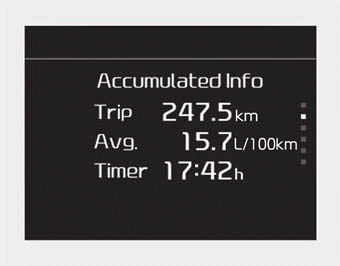
Displays accumulated information starting from a mileage/fuel efficiency/ time default point.
- Accumulated information is calculated after the vehicle has run for more than 300 meters (0.18 miles).
- If you press the “OK” button for more than 1 second after the Cumulative Information is displayed, the information will be reset.
- If the engine is running, even when the vehicle is not in motion, the information will be accumulated.
One time driving information mode (For type B, C cluster)
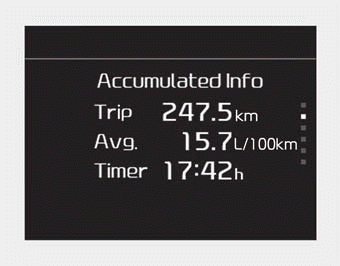
The vehicle will display Driving Information once per once per each ignition cycle.
- Fuel efficiency is calculated after the vehicle has run for more than 300 meters (0.18 miles).
- The Driving Information will be reset 4 hours after the ignition has been turned off. So, if the vehicle ignition is turned on within 4 hours, the information will not be reset.
- If you press the "OK" button for more than 1 second after the Driving Information is displayed, the information will be reset.
- If the engine is running, the information will be accumulated even when the vehicle is not in motion.
Digital speedometer
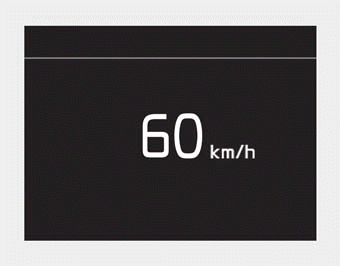
This mode displays the current speed of the vehicle.
LCD Modes (For type B, C cluster)
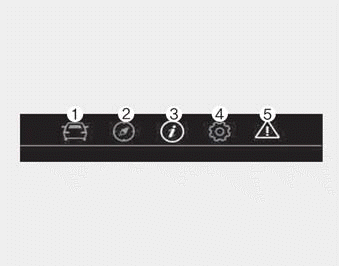
(1) Trip Computer mode
This mode displays driving information like the tripmeter, fuel economy, and so on.
❈ For more details, refer to “Trip Computer” in this chapter.
(2) Turn By Turn mode(if equipped) This mode displays “turn by turn” instructions from the navigation system.
(3) Assist mode
-  : This mode displays the state of tire pressure.
(4) User Setting mode
On this mode, you can change the settings of the doors, lamps and so on.
(5) Master warning mode
This mode informs of warning messages related to the below functions.
- Blind-Spot Collision Warning (BCW) malfunction (if equipped)
- Blind-Spot Collision Warning (BCW) radar blind (if equipped)
- Cruise Control system malfunction (if equipped)
- Lamp malfunction
- LED head lamp malfunction (if equipped)
- Engine oil shortage
❈ For controlling the LCD modes, refer to “LCD window Control” in this chapter.
Service Mode
Service in
It calculates and displays (in mileage or days) when you need a scheduled maintenance service.
If the remaining mileage or time reaches 1,500 km (900 mi.) or 30 days, a “Service in” message is displayed for several seconds each time you set the ignition switch or Engine Start/Stop Button to the ON position.
Service required
If you do not have your vehicle serviced according to the already inputted service interval, a “Service required” message is displayed for several seconds each time you set the ignition switch or Engine Start/Stop Button to the ON position.
To reset the service interval to the mileage and days you inputted before:
• Press the RESET or OK button for more than 1 second.
✽ NOTICE
If any of the following conditions occurs, the mileage and days may be incorrect.
- The battery cable is disconnected.
- The battery is discharged.
User Settings Mode (For type B, C cluster)
On this mode, you can change setting of the doors, lamps, and so on.
WARNING
Do not adjust the User Setting while driving.You may lose your steering control and cause severe personal injury or accidents.
Shift to P to edit settings/Engage parking brake to edit settings
A warning message appears if you try to adjust the User Settings while driving.
- Dual clutch transmission/Intelligent variable transmission
For your safety, change the User Settings after parking the vehicle, applying the parking brake and moving the shift lever to P (Park).
- Manual transmission
For your safety, change the User Settings after engaging the parking brake.
Driver Assistance(if equipped)
- Lane Safety (if equipped) :
- Lane Departure Warning : To activate the lane departure warning function.
- Standard LKA (Lane Keeping Assist) : To activate the standard LKA mode.
- Active LKA : To activate the active LKA mode.
❈For more details, refer to the “LKA (Lane Keeping Assist)” section in Chapter 5.
- Driver Attention Warning : Choose the alert stage (Off/Normal/High stage) of the Driver Attention Warning.
- Forward Collision-Avoidance Assist (FCA, if equipped) :
- To activate or deactivate the FCA system.
❈For more details, refer to the “Forward Collision-Avoidance Assist (FCA)” section in Chapter 5.
- Forward Collision Warning (FCW, if equipped)
- Choose the sensitivity of the forward collision warning. (Late/Normal/Early)
❈For more details, refer to the “Forward Collision Warning (FCW)” section in Chapter 5.
- Blind Spot Collision Warning Sound (if equipped)
- If this item is checked, the blind spot collision warning sound function will be activated.
❈For more details, refer to the “Blindspot Collision Warning” section in Chapter 5.
Door
• Automatically Lock :
- Enable on Speed : All doors will be automatically locked when the vehicle speed exceeds 15 km/h (9.3 mph).
- Enable on Shift : All doors will be automatically locked if the intelligent variable transmission shift lever is shifted from the P (Park) position to the R (Reverse), N (Neutral), or D (Drive) position.
• Automatically Unlock :
- Disable : The auto door unlock operation will be canceled.
- On key out : All doors will be automatically unlocked when the Engine Star/Stop Button or ignition switch is set to the OFF position.
- On Shift to P : All doors will be automatically unlocked if the intelligent variable transmission shift lever is shifted to the P (Park) position.
• Smart trunk (if equipped)
- If this item is checked, the smart trunk function will be activated.
❈For more details, refer to the “Smart trunk” section in this chapter.
• Two Press Unlock (if equipped)
- If this item is checked, the two press unlock function will be activated. (Only the driver’s door will unlock when the unlock button is pressed once and all doors will unlock when the same button is pressed again within 4 seconds.)
• Horn Feedback (if equipped)
- Off:
The Horn feedback operation will be deactivated.
- On:
After locking the door by pressing the lock button on the transmitter, if you press the lock button again within 4 seconds, the warning sound will operate once to indicate that all doors are locked.
Lights
• One Touch Turn Signal
- Off : The one touch turn signal function will be deactivated.
- 3, 5, 7 Flashes : The lane change signals will blink 3, 5, or 7 times when the turn signal lever is moved slightly.
❈For more details, refer to the “Light” section in this chapter.
• Head Lamp Delay
- If this item is checked, the head lamp delay function will be activated.
Sound
- Volume for Parking Distance Warning (if equipped)
- Adjust the Parking distance warning volume. (Level 1 ~ 3)
❈For more details, refer to the “Parking distance warning System” section in this chapter.
- Welcome Sound (if equipped) : - If this itemis is checked, the welcome sound function will be activated.
Convenience
- Welcome Mirror/Light (if equipped) :
- If this item is checked, the welcome Mirror/light function will be activated. - Wireless Charging System (if equipped) :
- If this item is checked, the wireless charging system function will be activated. - Wiper/Light Display (if equipped) :
- If this item is checked, the Wiper/Light Display will be activated. - Gear position pop-up (if equipped) : To activate or deactivate the gear position pop-up. When activated, the gear position will be displayed in the cluster LCD display.
- Icy road warning (if equipped) : If this item is checked, the Icy road warning display will be activated.
Service interval
• Enable Service Interval
To activate or deactivate the service interval function.
• Adjust Interval
To adjust the interval by mileage and time period.
• Reset
To reset the service interval function.
Other Features
- Fuel Economy Auto Reset
- Off : The average fuel economy will not reset automatically whenever refueling.
- After Ignition : When the engine has been OFF for 4 hours or longer, the average fuel economy will reset automatically.
- After Refueling : The average fuel economy will reset automatically after adding 6 liters (1.6 gallons) of fuel or more and after driving speed exceeds 1 km/h (1.6 mph). - Fuel Economy Unit
- Choose the fuel economy unit. (US gallon/UK gallon) - Temperature Unit
- Choose the temperature unit. (°C,°F) - Tire Pressure Unit (if equipped)
- Choose the tire pressure unit. (psi, kPa, bar)
Language
Choose the language
Reset
You can reset the menus in the User Settings Mode. All menus in the User Settings Mode are initialized, except language and service interval.
Warning messages
Warning messages appear on the LCD to warn the driver. It is located in the center of the instrument cluster.
The warning message may appear differently depending on the type of instrument cluster and some may not show the warning message at all.
The warning message is shown in either symbol, symbol and text, or text type only. You can choose the preferred language by selecting the User setting menu in LCD mode.
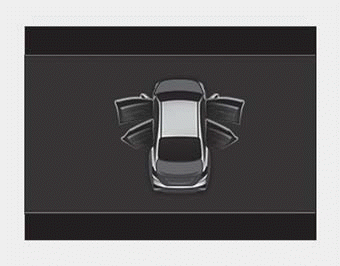
Door, hood, trunk open
• This warning is displayed indicating which door, the hood, the trunk is open.
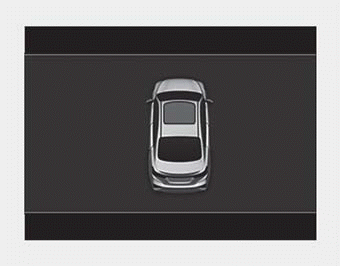
Sunroof Open (if equipped)
• This warning is displayed if you turn off the engine when the sunroof is open.
Engine has overheated
This warning message illuminates when the engine coolant temperature is above 120°C (248°F). This means that the engine is overheated and may be damaged.
❈If your vehicle is overheated, refer to the “Overheating” section in Chapter 6.
Shift to P (for smart key system)
- This warning message illuminates if you try to turn off the engine without the shift lever in the P (Park) position.
- In this situation, the Engine Start/Stop Button turns to the ACC position (If you press the Engine Start/Stop Button once more, it will turn to the ON position).
Low Key Battery (for smart key system)
• This warning message illuminates if the battery of the smart key is discharged when the Engine Start/Stop Button changes to the OFF position.
Press START button while turn steering (for smart key system)
- This warning message illuminates if the steering wheel does not unlock normally when the Engine Start/Stop Button is pressed.
- It means that you should press the Engine Start/Stop Button while turning the steering wheel right and left.
Steering wheel unlocked (for smart key system)
• This warning message illuminates if the steering wheel does not lock when the Engine Start/Stop Button changes to the OFF position.
Check Steering Wheel Lock System (for smart key system)
• This warning message illuminates if the steering wheel does not lock normally when the Engine Start/Stop Button changes to the OFF position.
Check power steering (if equipped)
• This warning message illuminates when there is a malfunction with EPS.
Press brake pedal to start engine (for smart key system)
- This warning message illuminates if the Engine Start/Stop Button is pressed repeatedly without depressing the brake pedal.
- It means that you should depress the brake pedal to start the engine.
Press clutch pedal to start engine (for smart key system and manual transmission)
- This warning message illuminates if the Engine Start/Stop Button is pressed repeatedly without depressing the clutch pedal.
- It means that you should depress the clutch pedal to start the engine
Key not in vehicle (for smart key system)
- This warning message illuminates if the smart key is not in the vehicle when you press the Engine Start/Stop Button.
- It means that you should always have the smart key with you.
Key not detected (for smart key system)
- This warning message illuminates if the smart key is not detected when you press the Engine Start/Stop Button.
Check high beam assist system (if equipped)
- This warning message illuminates if there is a malfunction (burnedout bulb or circuit malfunction) with the headlamp. In this case, have your vehicle inspected by an authorized Kia dealer.
Press START button again (for smart key system)
- This warning message illuminates if there is a problem with the Engine Start/Stop button system.
- In this situation, you may be able to start the engine by pressing the Engine Start/Stop Button once more.
- If the warning illuminates each time you press the Engine Start/Stop Button, have your vehicle inspected by an authorized Kia dealer.
Press START button with smart key (for smart key system)
- This warning message illuminates if you press the Engine Start/Stop Button while the warning message “Key not detected” is illuminating.
- In this situation, the immobilizer indicator light blinks.
Check fuse “BRAKE SWITCH” (for smart key system)
- This warning message illuminates if the brake switch fuse is disconnected.
- It means that you should replace the fuse with a new one. If that is not possible, you can start the engine by pressing the Engine Start/Stop Button for 10 seconds in the ACC position.
Shift to P or N to start engine (for smart key system)
- This warning message illuminates if you try to start the engine with the shift lever not in the P (Park) or N (Neutral) position.
✽ NOTICE
You can start the engine with the shift lever in the N (Neutral) position. But, for your safety, we recommend that you start the engine with the shift lever in the P (Park) position.
Check Forward Collision Avoidance Assist system (if equipped)
- This warning message illuminates if there is a malfunction with the Forward Collision Avoidance Assist (FCA) system. In this situation, have your vehicle inspected by an authorized Kia dealer.
❈For more details, refer to the “Forward Collision-Avoidance Assist (FCA) system” section in Chapter 5.
Icy Road Warning
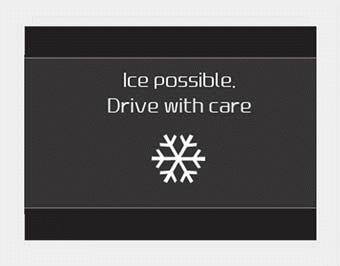
This warning is to warn the driver the road may be icy.
When the following conditions occur, the warning light (including Outside Temperature Gauge) blinks 5 times and then illuminates, and also a warning chime sounds once.
- The temperature on the Outside Temperature Gauge is below approximately 4°C (40°F).
✽ NOTICE
If the icy road warning appears while driving, you should drive more attentively and refrain from speeding, rapid acceleration, sudden braking, and sharp turns.
Download Manual