Drive Systems
If equipped, four-wheel drive engages the front axle for extra traction.
Read the appropriate section for transfer case operation before using.
Driving on clean, dry pavement in 4 m or 4
n may:
An engagement noise and bump is normal when shifting between 4 n and 4 m or N (Neutral), with the engine running.
Shifting into 4 n will turn Traction Control and StabiliTrak/Electronic Stability Control (ESC) off. See Traction Control/Electronic Stability Control 0 247.
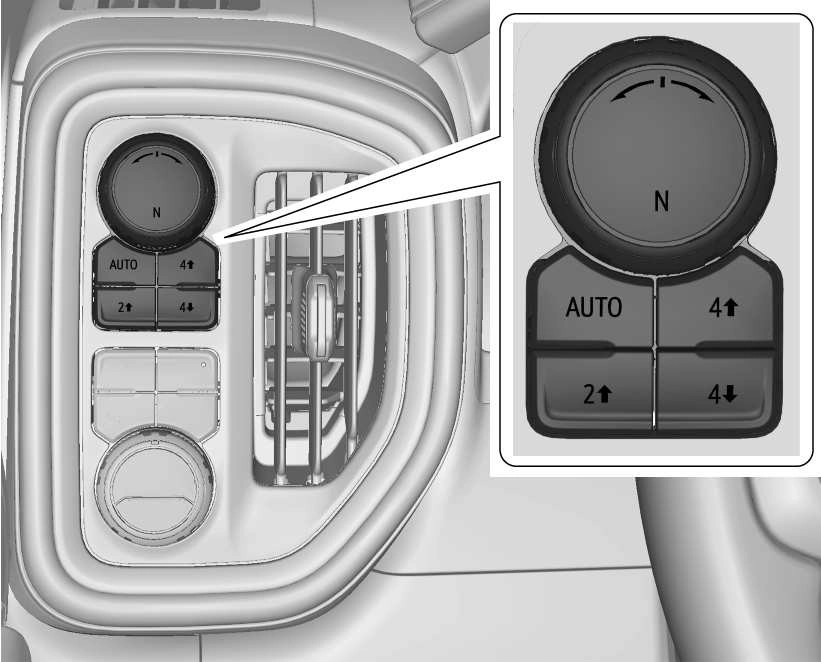 Two-Speed Transfer Case
If equipped, the transfer case controls are used to shift into and out of four-wheel drive.
To shift the transfer case, press the desired button. The graphic in the instrument cluster will flash while a shift is in progress. The graphic displayed will change to indicate the setting requested.
When the shift is complete the graphic will stop flashing. The DIC message turns off once the shift is complete. If the transfer case cannot complete a shift request, it will go back to its last chosen setting.
The settings are:
N (Neutral) : Use only when the vehicle needs to be towed. See Recreational Vehicle Towing 0 392 or
Towing the Vehicle 0 392.
2 m (Two-Wheel Drive High) : Use for driving on most streets and highways. The front axle is not engaged. This setting provides the best fuel economy.
AUTO (Automatic Four-Wheel Drive) : Use when road surface conditions are variable. When driving in AUTO, the front axle is engaged, and the vehicle's power is sent to the front and rear wheels automatically
based on driving conditions. This setting provides slightly lower fuel economy than 2 m.
4 m (Four-Wheel Drive High) : Use this setting when extra traction is needed, such as when driving on snowy or icy roads, when off-roading, or when plowing snow.
4 n (Four-Wheel Drive Low) : This setting engages the front axle and delivers extra torque. Choose 4 n when driving off-road in deep sand, deep mud, or deep snow, and while climbing or descending steep hills. While driving in 4 n, keep vehicle speed below 72 km/h (45 mph).
Shifting into 4 n will turn Traction Control and StabiliTrak/ESC off. See Traction Control/ Electronic Stability Control 0 247.
Shifts between 2m, 4 m, and AUTO
Any of these shifts can be made at normal driving speed.
The actual 4x4 shift request is only made after the button is released. The 4x4 graphic will remain flashing until the shift request has completed. A DIC message displays to indicate that the 4x4 transfer case has been requested to shift to the new desired state.
Once the 4x4 shift has completed, the DIC message disappears, the 4x4 graphic stops flashing, and the current setting is indicated.
When a shift to 2 m is completed successfully while in P (Park), the parking brake will engage. To resume driving, shift the
transmission to the desired gear and manually release the parking brake or press the accelerator pedal to begin driving. See Electric Parking Brake 0 245.
If equipped, use 4 n, AUTO, or 4 m to provide additional traction when parking on a steep grade with poor traction such as ice, snow, mud, or gravel.
Shifting Into 4 n
A DIC message displays to indicate that the 4x4 transfer case has been requested to shift to the new desired state.
Once the 4x4 shift has completed, the DIC message disappears, the 4x4 graphic stops flashing and the current setting is indicated.
If vehicle speed is higher when shift request occurs, a DIC message displays. Reduce vehicle speed.
If the transmission is not in N (Neutral) when shift request occurs, a DIC message displays. The vehicle will allow 20 seconds for the shift to occur. After this time, a graphic in the instrument cluster will indicate that the transfer case is in 4 n.
If the transmission is not shifted into
N (Neutral) or the vehicle has not slowed to 5 km/h (3 mph) within 20 seconds, the transfer case will remain in its original state. This will be indicated in the instrument cluster.
With the vehicle moving less than 5 km/h (3 mph) and the transmission in N (Neutral), attempt the shift again.
Shifting Out of 4 n
remain flashing until the shift request has completed. A DIC message displays to indicate the state of the request.
Once the 4x4 shift has completed, the DIC message disappears, the 4x4 graphic stops flashing, and the current setting is indicated.
If vehicle speed is higher when shift request occurs, a DIC message displays. Reduce vehicle speed.
If the transmission is not in N (Neutral) when shift request occurs, DIC messages will display. The vehicle will allow 20 seconds for this shift to occur. After this time, a graphic in the instrument cluster will indicate that the transfer case is in 4 n.
If the transmission is not shifted into
N (Neutral) or the vehicle has not slowed to 5 km/h (3 mph) within 20 seconds, the transfer case will remain in its original state. This will be indicated in the instrument cluster.
With the vehicle moving less than 5 km/h (3 mph), and the transmission in N (Neutral), attempt the shift again.
Shifting Into N (Neutral)
To shift into N (Neutral):
If the parking brake and/or brake pedal is not applied within 20 seconds, the transfer case will remain in the original state.
N (Neutral) or the vehicle has not slowed to 5 km/h (3 mph) within 20 seconds, the transfer case will remain in its original state. This will be indicated in the instrument cluster.
Shifting Out of N (Neutral)
To shift out of N (Neutral):
0 229 or
Ignition Positions (Key Access) 0 228.
Single Speed Transfer Case
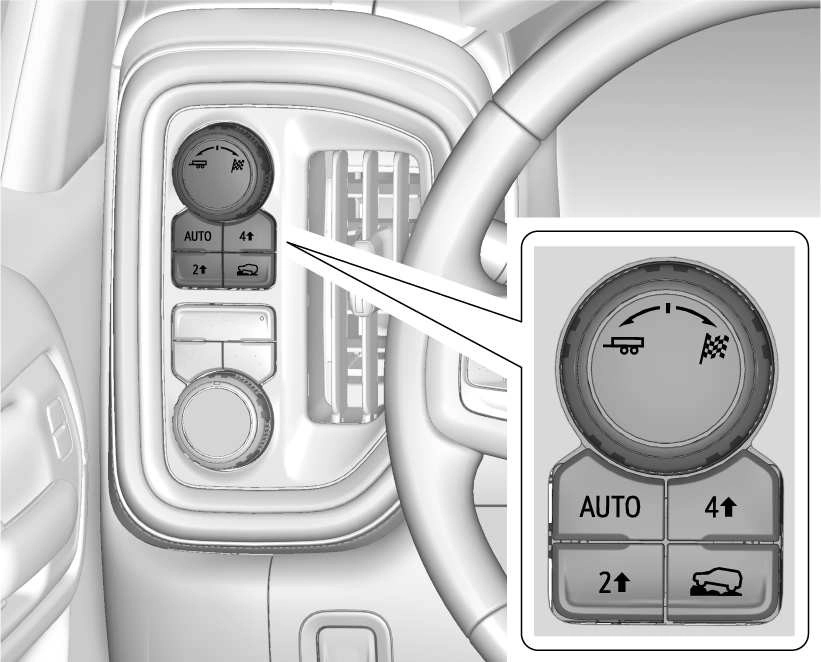
If equipped, the transfer case controls are used to shift into and out of four-wheel drive.
To shift the transfer case, press the desired button. The graphic in the instrument cluster will flash while a shift is in progress. The graphic displayed will change to indicate the setting requested.
When the shift is complete the graphic will stop flashing. The DIC message turns off once the shift is complete. If the transfer case cannot complete a shift request, it will go back to its last chosen setting.
The settings are:
2 m (Two-Wheel Drive High) : Use for driving on most streets and highways. The front axle is not engaged. This setting provides the best fuel economy.
4 m (Four-Wheel Drive High) : Use this setting when extra traction is needed, such as when driving on snowy or icy roads, when off-roading, or when plowing snow.
AUTO (Automatic Four-Wheel Drive)
Use when road surface conditions are variable. When driving in AUTO, the front axle is engaged, and the vehicle's power is sent to the front and rear wheels automatically based on driving conditions. This setting provides slightly lower fuel economy than 2 m.
Shifts between 2 m, 4 m, and AUTO
Any of these shifts can be made at normal driving speed.
The actual 4x4 shift request is only made after the button is released. The 4x4 graphic will remain flashing until the shift request has completed. A DIC message displays.
Once the 4x4 shift has completed, the DIC message disappears, the 4x4 graphic stops flashing, and the current setting is indicated.
The actual 4x4 shift request is only made after the button is released. The 4x4 graphic will remain flashing until the shift request has completed.
A DIC message displays. Once the 4x4 shift has completed, the DIC message disappears, the 4x4 graphic stops flashing, and the current setting is indicated.
Download Manual