Additional Storage Features
Standard and Long Box
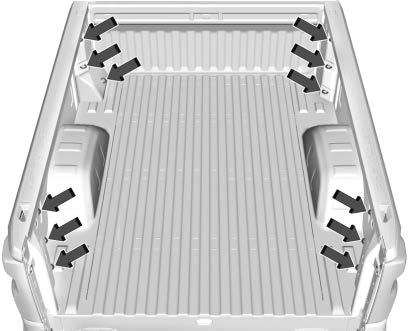
This vehicle is equipped with 12 fixed cargo tie-downs.
Any of the 12 locations inside the truck bed can be used. The maximum load per corner is 227 kg (500 lb).
CarbonPro Box
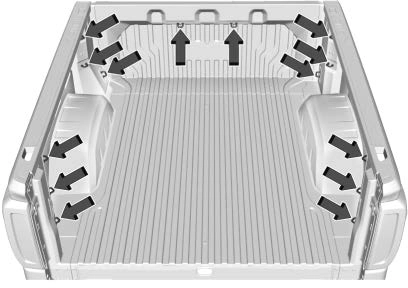
Accessory Tie-Downs
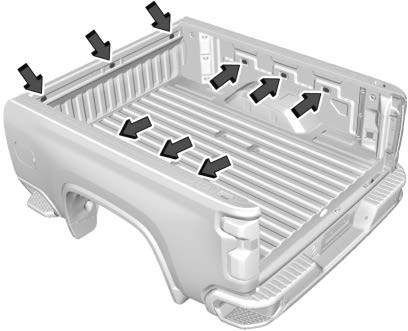
Additional Accessory Tie-Down Points
Any of the nine holes inside the truck bed can be used for tie-downs.
The maximum load is 113 kg (250 lb) per tie-down.
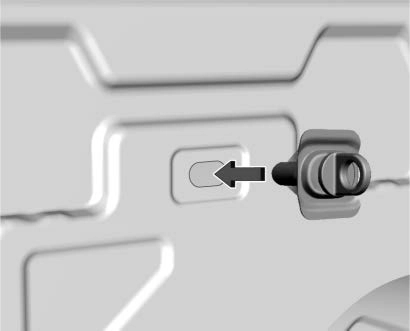
To install:
Insert a tie-down loop assembly until it is flush with the truck bed wall.
Turn the tie-down loop clockwise to tighten. The tie-down will be hard to turn until the toggle moves past the installation point on the toggle guide.
Fasten the tie-down firmly by hand only. Do not use tools.
To remove:
Remove the tie-down loop completely by turning counterclockwise while holding the backing plate against the truck
bed wall.
Pull the backing plate away from the truck bed wall until a click is heard. This locks the toggle into position on the toggle guide.
Push the backing plate against the truck bed wall. This allows the toggle nut
to spin.
Remove the backing plate, toggle guide, and toggle nut from the truck bed wall completely.
Reinstall the tie-down loop through the backing plate into the toggle nut for reuse.
Download Manual