Driver Alert
 WARNING:
You are responsible for controlling your vehicle at all times. The system is designed to be an aid and does not relieve you of your responsibility to drive with due care and attention. Failure to follow this instruction could result in the loss of control of your vehicle, personal injury or death.
WARNING:
The system may not function if the sensor is blocked.
WARNING:
Take regular rest breaks if you feel tired. Do not wait for the system to warn you.
WARNING:
Certain driving styles may result in the system warning you even if you are not feeling tired.
WARNING:
In cold and severe weather conditions the system may not function. Rain, snow and spray can all limit sensor performance.
WARNING:
The system will not operate if the sensor cannot track the road lane markings.
WARNING:
If damage occurs in the immediate area surrounding the sensor, have your vehicle checked as soon as possible.
WARNING:
The system may not correctly operate if your vehicle is fitted with a suspension kit not approved by us.
WARNING:
You are responsible for controlling your vehicle at all times. The system is designed to be an aid and does not relieve you of your responsibility to drive with due care and attention. Failure to follow this instruction could result in the loss of control of your vehicle, personal injury or death.
WARNING:
The system may not function if the sensor is blocked.
WARNING:
Take regular rest breaks if you feel tired. Do not wait for the system to warn you.
WARNING:
Certain driving styles may result in the system warning you even if you are not feeling tired.
WARNING:
In cold and severe weather conditions the system may not function. Rain, snow and spray can all limit sensor performance.
WARNING:
The system will not operate if the sensor cannot track the road lane markings.
WARNING:
If damage occurs in the immediate area surrounding the sensor, have your vehicle checked as soon as possible.
WARNING:
The system may not correctly operate if your vehicle is fitted with a suspension kit not approved by us. |
Note:
Keep the windshield free from obstructions. For example, bird droppings, insects and snow or ice.
Note:
If the camera is blocked or if the windshield is damaged, the system may not function.
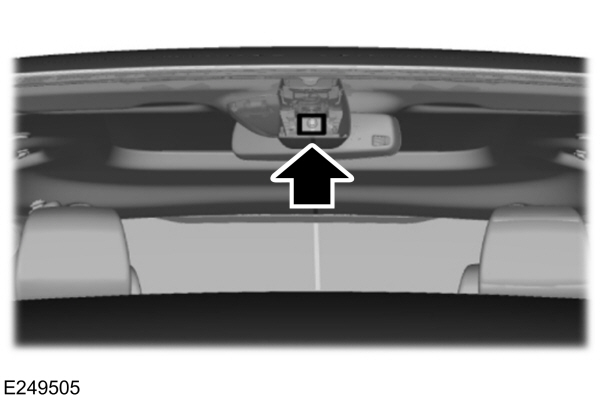
The system automatically monitors your driving behavior using various inputs including the front camera sensor.
If the system detects that your driving alertness is reduced below a certain threshold, the system will alert you using a tone and a message in the information display.
Using Driver Alert
Switching the system on and off
You may switch the system on or off through the information display.
When activated, the system will monitor your alertness level based upon your driving behavior in relation to the lane markings and other factors.
System Warnings
Note:
The system does not issue warnings below approximately
64 km/h.
The warning system is in two stages. At first the system issues a temporary warning that you need to take a rest. This message will only appear for a short time. If the system detects further reduction in driving alertness, another warning may be issued which will remain in the information display for a longer time. Press OK on the steering wheel control to clear the warning
System Display
When active the system will run automatically in the background and only issue a warning if required.
Note:
If the camera sensor cannot track the road lane markings or if your vehicle speed drops below approximately
64 km/h, the system does not issue warnings.
Resetting the System
You can reset the system by either:
- Switching the ignition off and on.
- Stopping the vehicle and then opening and closing the driver’s door.
Download Manual