Universal Remote System
See Radio Frequency Statement
0 471.
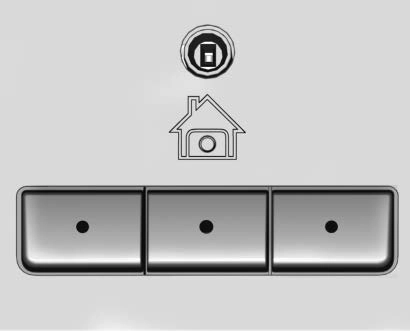
If equipped, these buttons are in the overhead console.
This system can replace up to three remote control transmitters used to activate devices such as garage door openers, security systems, and home automation devices. These
instructions refer to a garage door opener, but can be used for other devices.
Do not use the Universal Remote system with any garage door opener that does not have the stop and reverse feature. This includes any garage door opener model manufactured before April 1, 1982.
Read the instructions completely before programming the Universal Remote system. It may help to have another person assist with the programming process.
Keep the original hand-held transmitter for use in other vehicles as well as for future programming. Erase the programming when vehicle ownership is terminated.
See “Erasing Universal Remote System Buttons” later in this section.
To program a garage door opener, park outside directly in line with and facing the garage door opener receiver. Clear all people and objects near the garage door.
Make sure the hand-held transmitter has a new battery for quick and accurate transmission of the
radio-frequency signal.
For questions or programming help, see www.homelink.com/gm or call 1-800-355-3515.
Programming involves
time-sensitive actions, and may time out causing the procedure to be repeated.
To program up to three devices:
(1 to 3 in) away from the Universal Remote system buttons with the indicator light in view. The hand-held transmitter was supplied by the manufacturer of the garage door opener receiver.
system buttons to be used to operate the garage door. Do not release either button until the indicator light goes from a slow to a rapid flashing light. Then release both buttons.
Some garage door openers may require substitution of Step 2 with the procedure under “Radio Signals for Canada and Some Gate Operators” later in this section.
second button press may be required. For a second time, press and hold the newly programmed button for five seconds. If the light stays on or the garage door moves, programming is complete.
. If the indicator light blinks rapidly for two seconds, then changes to a solid light and the garage door does not move, continue with programming Steps 4–6.
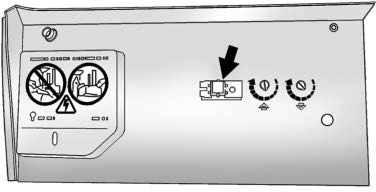
Learn or Smart Button
The name and color of the button may vary by manufacturer.
two seconds, then release it. Again, if the door does not move or the garage door lamp does not flash, press and hold the same button a third time for two seconds, then release it.
The Universal Remote system should now activate the garage door.
Repeat the process for programming the two remaining buttons.
For questions or programming help, see www.homelink.com/gm or call 1-800-355-3515.
Canadian radio-frequency laws and some U.S. gate operators require transmitter signals to time out or quit after several seconds of transmission. This may not be long enough for the Universal Remote system to pick up the signal during programming.
If the programming did not work, replace Step 2 under “Programming the Universal Remote System” with the following:
Press and hold the Universal Remote system button while pressing and releasing the
hand-held transmitter button every two seconds until the signal has been successfully accepted by the Universal Remote system. The Universal Remote system indicator
light will flash slowly at first and then rapidly. Proceed with Step 3 under “Programming the Universal Remote System” to complete.
Press and hold the appropriate Universal Remote system button for at least one-half second. The indicator light will come on while the signal is being transmitted.
Erase all programmed buttons when vehicle ownership is terminated.
To erase:
To reprogram any of the system buttons:
Download Manual