Vehicle Features
See the infotainment manual for information on the radio, audio players, phone, and voice or speech recognition. It also includes information on settings.
The infotainment system can be operated by using the steering wheel controls. See “Steering Wheel Controls” in the infotainment manual.
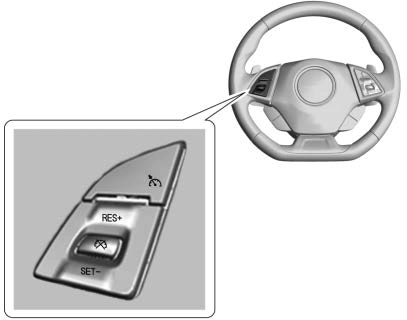
Cruise Control with Cancel Button
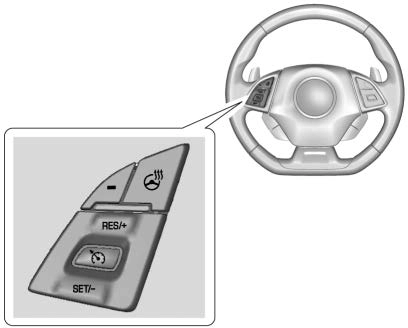
Cruise Control without Cancel Button
1 : Press to turn the system on and off. A white indicator appears in the instrument cluster when cruise is turned on.
* : If equipped, press to disengage cruise control without erasing the set speed from memory.
RES+ : If there is a set speed in memory, press briefly to resume to that speed or hold upward to accelerate. If cruise control is already active, use to increase vehicle speed.
SET− : Press briefly to set the speed and activate cruise control. If cruise control is already active, use to decrease speed.
See Cruise Control 0 217.
The DIC display is in the instrument cluster. It shows the status of many vehicle systems.
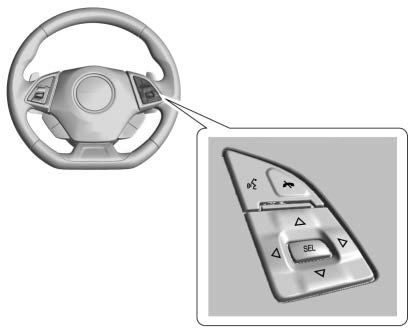
w or x : Press to move up or down in a list.
o or p : Press o to open application menus on the left. Press p to open interaction menus on the right.
SEL : Press to select a menu item. Press and hold to reset values on certain screens.
See Driver Information Center (DIC)
0 133.
If equipped, FCA may help avoid or reduce the harm caused by
front-end crashes. FCA provides a green indicator, V, when a vehicle is detected ahead. This indicator displays amber if you follow a vehicle much too closely. When approaching a vehicle ahead too quickly, FCA provides a red flashing alert on the windshield and rapidly beeps.
See Forward Collision Alert (FCA) System 0 224.
If equipped, the LCA system is a lane-changing aid that assists drivers with avoiding lane change crashes that occur with moving vehicles in the side blind zone (or spot) areas or with vehicles rapidly approaching these areas from behind. The LCA warning display will light up in the corresponding outside mirror and will flash if the turn signal is on. The Side Blind Zone Alert (SBZA) system is included as part of the LCA system.
See Side Blind Zone Alert (SBZA)
0 226 and Lane Change Alert (LCA)
0 226.
If equipped, RVC shows a view of the area behind the vehicle on the infotainment display when the vehicle is shifted into R (Reverse) to aid with parking and low-speed backing maneuvers.
See Assistance Systems for Parking or Backing 0 222.
If equipped, the RCTA system uses a triangle with an arrow on the infotainment display to warn of traffic behind your vehicle that may cross your vehicle's path while in R (Reverse). In addition, beeps will sound.
See Assistance Systems for Parking or Backing 0 222.
If equipped, Rear Park Assist (RPA) uses sensors on the rear bumper to assist with parking and avoiding objects while in R (Reverse).
It operates at speeds less than 8 km/h (5 mph). RPA may show a warning triangle on the infotainment display and/or a graphic on the instrument cluster to provide the object distance. In addition, multiple beeps may occur if very close to an object.
See Assistance Systems for Parking or Backing 0 222.
The vehicle has an accessory power outlet on the center floor console in front of the cupholders. It can be used to plug in electrical equipment, such as a cell phone or an MP3 player.
The accessory power outlet does not work when the ignition is turned off and the driver door is opened. This helps to preserve the battery life of the vehicle.
See Power Outlets 0 111.
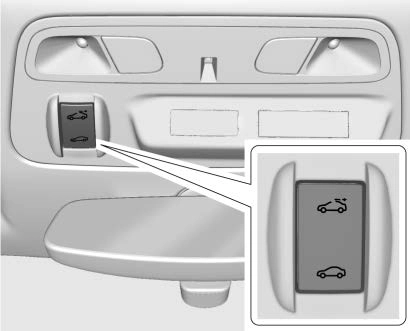
If equipped, the sunroof only operates when the ignition is on or in ACC/ACCESSORY, or when Retained Accessory Power (RAP) is active. See Retained Accessory Power (RAP) 0 195.
The sunroof switch is on the overhead console.
Express-Open : Press e to the second detent and release to express-open the sunroof. Press the switch again to stop the movement. Press and hold g to close the sunroof.
Open/Close (Manual Mode) : Press and hold e to open the sunroof. Press and hold g to close the sunroof. Release the switch to stop the movement.
Vent : Press and release e to vent the sunroof. Press and release
g to close the vent.
A deflector automatically raises when the sunroof is opened and retracts while the sunroof closes.
If the sunshade is closed, it opens automatically when the sunroof opens past the vented position.
The sunshade can be opened manually, but must be closed manually.
The sunroof glass panel cannot be opened or closed if the vehicle has an electrical failure.
The convertible top can be automatically opened and closed. For step-by-step instructions, see Convertible Top 0 53.
Download Manual