Automatic Transmission
The Driver Information Center (DIC) displays the current gear selected in the lower right corner. When Sport Mode is active, an S is displayed.
If Manual Mode is active, an M and the current gear selected is displayed next to the M.
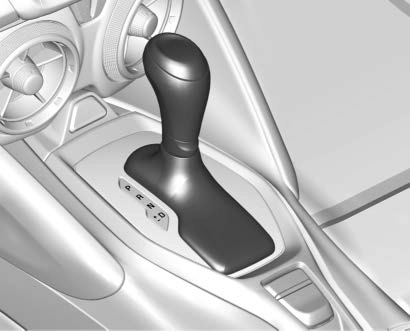
P : This position locks the drive wheels. Use P (Park) when starting the engine because the vehicle cannot move easily.
Make sure the shift lever is fully in P (Park) before starting the engine. The vehicle has an automatic transmission shift lock control system. The regular brake must be fully applied first and then the shift lever button must be pressed before shifting from P (Park) when the ignition is on. If you cannot shift out of P (Park), ease pressure on the shift lever, then push the shift lever
all the way into P (Park) as you maintain brake application. Then press the shift lever button and move the shift lever into another gear. See Shifting out of Park 0 196.
R : Use this gear to back up.
To rock the vehicle back and forth to get out of snow, ice, or sand without damaging the transmission, see If the Vehicle Is Stuck 0 186.
N : In this position, the engine does not connect with the wheels. To restart the engine when the vehicle is already moving, use
N (Neutral) only.
D : This position is for normal driving. If more power is needed for passing, press the accelerator pedal down.
Powertrain Braking
When driving on steep descents with the shift lever in D (Drive) where frequent braking is required, the transmission will shift down a gear to help hold vehicle speed and reduce brake wear. If the brake continues to be pressed, the transmission will downshift until 3 (Third) gear is reached.
If the brake is released for some time, the transmission will upshift a gear. If the road levels out and the accelerator pedal is pressed, the transmission will upshift until the appropriate gear is reached.
While driving in Sport Mode (L4, if equipped or V6, if equipped),
or Sport Mode and Track Mode (V8, if equipped), if Tap Shift has not been activated, the transmission determines when the vehicle is being driven in a competitive manner. The transmission may remain in a gear longer than it would in the normal driving mode based on throttle input and vehicle lateral acceleration. If there is a rapid reduction in throttle from a heavy throttle position at high rpm,
the transmission will maintain the current gear up to near redline rpm. While braking, the transmission will automatically downshift to the next lower gear keeping engine speed above approximately 3000 rpm.
If the vehicle is then driven for a short time at a steady speed, and without high cornering loads, the transmission will upshift one gear at a time until the highest available gear is reached. After shifting to the highest available gear, the transmission will return to normal Sport Mode shifting.
Manual Mode
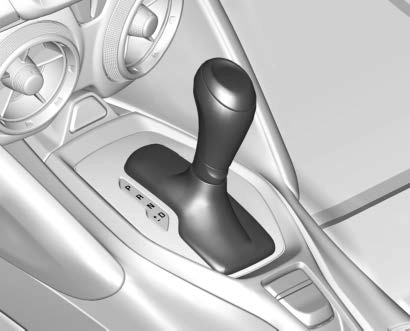
DSC allows shifting an automatic transmission similar to a manual transmission. To use the DSC feature:
While using the DSC feature, the vehicle will have firmer, quicker shifting. You can use this for sport driving or when climbing or
descending hills, to stay in gear longer, or to downshift for more power or engine braking.
The transmission will only allow you to shift into gears appropriate for the vehicle speed and engine revolutions per minute (rpm). The transmission will not automatically shift to the next lower gear if the engine rpm is too high, nor to the next higher gear when the maximum engine rpm is reached.
While in the DSC mode, the transmission will automatically downshift as the vehicle comes to a stop. This will allow for more power during take-off.
When accelerating the vehicle from a stop in snowy and icy conditions, you may want to shift into second gear. A higher gear allows the vehicle to gain more traction on slippery surfaces.
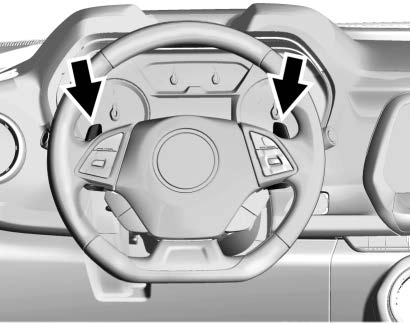
Tap Shift allows you to manually control the automatic transmission. To use Tap Shift, the shift lever must be in DSC mode. Vehicles with this feature have indicators on the steering wheel. The paddles are on the back of the steering wheel. Tap the left paddle (−) to downshift, and the right paddle (+) to upshift. The Driver Information Center (DIC) display indicates the gear the vehicle is in.
Holding the left paddle for an extended time will downshift the transmission to the lowest available gear.
While in Manual Mode, the transmission will prevent shifting to a lower gear if the engine speed is too high. If the tap down − (Minus) paddle is held while the vehicle slows down, the M in the DIC will flash, and the downshift will be allowed when vehicle speed is low enough. Continuing to hold the tap down − (Minus) paddle will not cause the transmission to continue downshifting. Each downshift must be requested separately by releasing and reapplying the tap down − (Minus) paddle.
Vehicles equipped with a Head-Up Display (HUD) may also have shift timing lights across the top of the display.
The rows of lights get closer together as the shift point gets closer. Shift the transmission before the lights come together in the display. Shift immediately if the lights are flashing.
See Head-Up Display (HUD) 0 137.
Temporary Tap Shift Mode allows brief entry into Tap Shift Mode while in D (Drive). Tapping either the upshift or downshift control will place the transmission in Tap Shift Mode. Exit Tap Shift Mode by holding the upshift control for
two seconds. The system will return to automatic shifting after
seven seconds of driving at a steady speed, or when the vehicle comes to a stop.
This may be used for sport driving or when climbing or descending hills, to stay in gear longer, or to downshift for more power or engine braking. The transmission will only allow you to shift into gears appropriate for the vehicle speed and engine revolutions per minute
(rpm). The transmission will not automatically shift to the next higher gear if the engine rpm is too high.
If shifting is prevented for any reason, the message SHIFT DENIED will appear in the DIC, indicating that the transmission has not shifted gears. While in the Tap Shift Mode, the transmission will not automatically downshift on hard acceleration.
When accelerating the vehicle from a stop in snowy and icy conditions, you may want to shift into 2 (Second) gear. A higher gear ratio allows you to gain more traction on slippery surfaces.
Download Manual