Setting the Clock
On vehicles with navigation, the time is automatically set using GPS signals.
On vehicles without navigation and if the Automatic Date & Time feature has been turned off, use the following steps to adjust the time in the clock display.
Models with One Display
- Press the SETUP button.
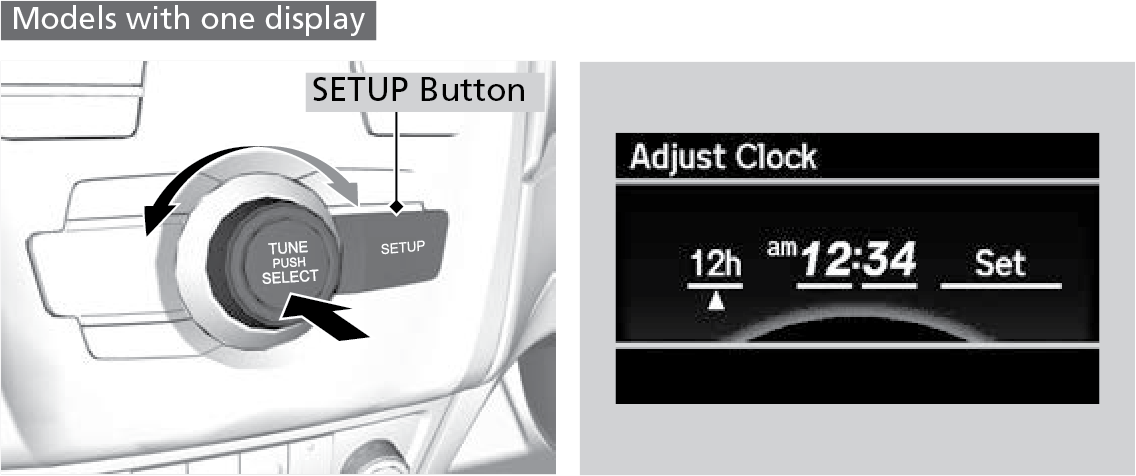
- Rotate the selector knob to select Adjust Clock on the screen.
- Press selector knob and Adjust Clock appears.
- Rotate selector knob to select the item you want to adjust (12/24 hour mode, hour, minute). Then press selector knob.
- Rotate selector knob to make the adjustment.
- Press selector knob to enter your selection. The display returns to Adjust Clock. Repeat steps 4 to 5 to adjust other items.
- To enter the selection, rotate selector knob and select Set, then press selector knob.
Models with Two Displays
- Press the SETTINGS button.
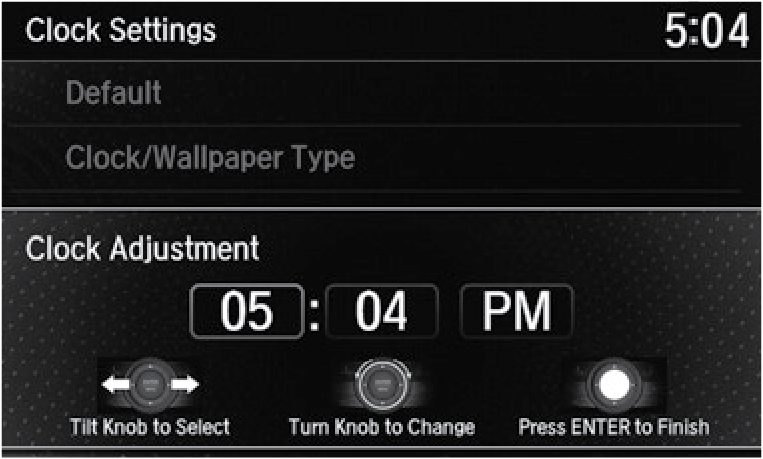
- Select Clock Settings.
- Select Clock Adjustment.
- Tilt the interface dial to choose the item you wish to change. Rotate the interface dial to change the value. Press the interface dial to exit the screen.
- Press the BACK button to exit out of the menus.
Parent topic: Vehicle Controls
Download Manual