Instrument cluster
|
|
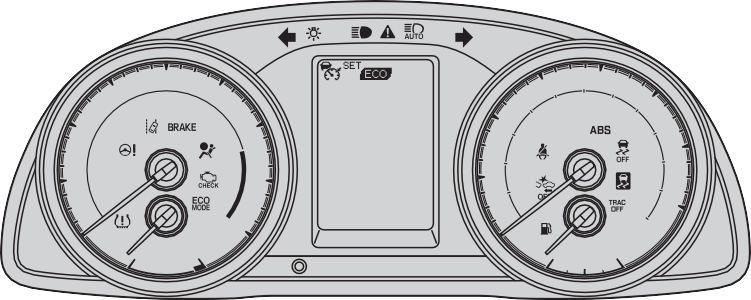

Vehicles with a color display
|
|
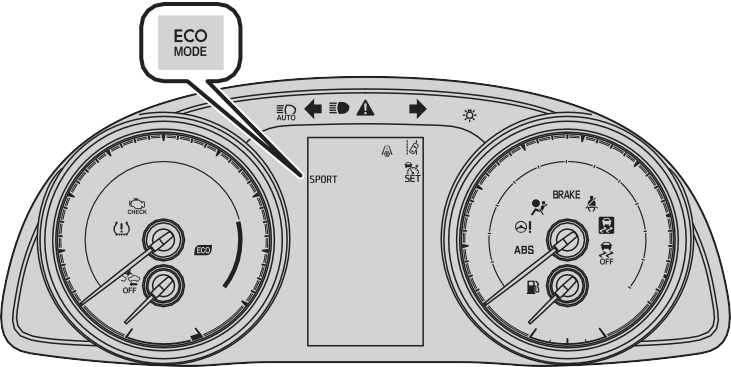
The units used on the meters and some indicators may differ depending on the target region.
2. Instrument cluster 73
*1
(U.S.A.)
*1
(Canada)
*1
(U.S.A.)
Brake system warning light (P. 480)
Brake system warning light (P. 480)
Malfunction indicator lamp (P. 480)
*1
Slip indicator (P. 481)
Low fuel level warning light (P. 481)
Driver’s and front pas- senger’s seat belt reminder light (P. 481)
 *1
*1
(Canada)
Malfunction indicator lamp (P. 480)
*3 Rear passengers’ seat belt reminder lights
(P. 481)
*1 SRS warning light (P. 480)
*1, 4 PCS warning light (P. 482)
 *1
*1
(U.S.A.)
*1
(Canada)
ABS warning light
(P. 481) (Orange)
*1
ABS warning light (P. 481)
LDA (Lane Departure Alert with steering con- trol) indicator (P. 482)
Master warning light (P. 481)
*1 Electric power steering system warning light (P. 481)
*1, 2 Tire pressure warning light (P. 482)
74 2. Instrument cluster
*1: These lights turn on when the engine switch is turned to the “ON” position (vehicles without a smart key system) or the engine switch is turned to IGNITION ON mode (vehicles with a smart key system), to indicate that a system check is being performed. They will turn off after the engine is started, or after a few seconds. There may be a malfunction in a system if a light does not come on, or turn off. Have the vehicle inspected by your Toyota dealer.
*2: If equipped
*3: This light illuminates on the center panel.
*4: The light flashes to indicate a malfunction.
2. Instrument cluster 75
*2
(U.S.A.)
*2
(Canada)
Turn signal indicator (P. 191)
Headlight indicator (P. 193)
Tail light indicator (P. 193)
Headlight high beam indicator (P. 195)
*1, 6
*2
Dynamic radar cruise control (vehicle-to-vehi- cle distance control mode) indicator
(P. 239)
Dynamic radar cruise control “SET”
indicator (P. 239, 243)
PCS warning light (P. 217)
LDA (Lane Departure Alert with steering con- trol) indicator (P. 230)
*1 Automatic High Beam indicator (P. 198)
“ECO MODE” indicator (P. 182)
 *2 Sport mode indicator (P. 185)
*1, 3
Slip indicator (P. 258)
*1, 2, 4 Eco Driving Indicator
Light (P. 99)
*1 VSC OFF indicator (P. 259)
*1, 2
“TRAC OFF” indicator (P. 258)
Dynamic radar cruise control (constant speed control mode) indicator (P. 243)
*1, 5
(U.S.A.)
*1, 5
(Canada)
“AIR BAG ON/OFF” indi-
cator (P. 47)
“AIR BAG ON/OFF” indi-
cator (P. 47)
76 2. Instrument cluster
*5
Security indicator
(P. 67, 69)
*2, 7
Low outside tempera- ture indicator (P. 86)
*1: These lights, except those shown on the multi-information display, turn on when the engine switch is turned to the “ON” position (vehicles without a smart key system) or the engine switch is turned to IGNITION ON mode (vehicles with a smart key system) to indicate that a system check is being performed. They will turn off after the engine is started, or after a few sec- onds. There may be a malfunction in a system if a light does not come on, or turn off. Have the vehicle inspected by your Toyota dealer.
*2: If equipped
*3: The light flashes to indicate that the system is operating.
*4: The light does not turn on when the system is disabled.
*5: This light illuminates on the center panel.
*6: The light turns on when the system is off.
*7: When the outside temperature is approximately 37”°F (3”°C) or lower, the indicator will flash 10 times, then stay on.
2. Instrument cluster 77
|
|
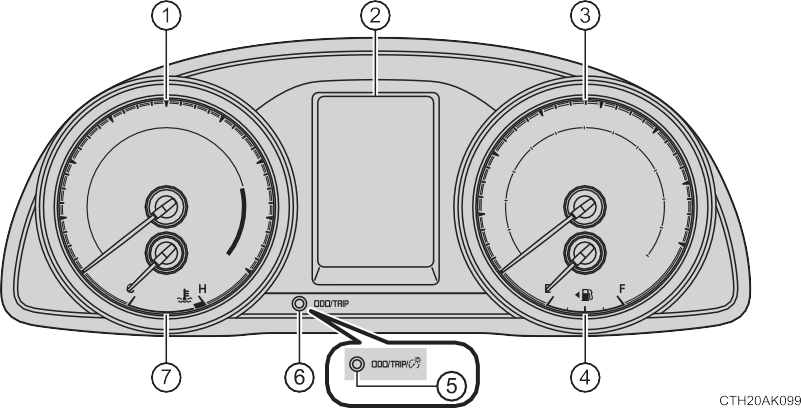
Displays the engine speed in revolutions per minute.
The multi-information display presents the driver with a variety of driving- related data including the current outside air temperature.
Display change button (for Canada)
Switches the trip information and instrument panel light control.
Switches the trip information.
Displays the engine coolant temperature.
78 2. Instrument cluster
(P. 99, 235)
Driving monitor (P. 81) Warning messages (P. 489)
Eco Driving Indicator Zone Dis- play* (P. 100)
Outside temperature display (P. 393)
Trip information (P. 80)
Shift position and gear position indicator* (P. 181, 184)
*: Vehicles with a continuously variable transmission
2. Instrument cluster 79
The brightness of the clock light can be adjusted regardless of whether the tail lights are on or off.
For U.S.A. Brighter Darker
For Canada
Press the display change button repeatedly to display the instru- ment panel lights control display. To adjust the brightness, press and hold the display change but- ton.
80 2. Instrument cluster
For U.S.A. For Canada
Displays the total distance the vehicle has been driven.
Displays the distance the vehicle has been driven since the meter was last reset. Trip meters A and B can be used to record and dis- play different distances independently.
Press and hold the display change button to reset.
2. Instrument cluster 81
Displays the average fuel consumption since the function was reset.
Use the displayed current fuel consumption as a reference.
82 2. Instrument cluster
When refueling, turn the engine switch off. If the vehicle is refueled with- out turning the engine switch off, the display may not be updated.
Displays the elapsed time since the engine was started.
Some settings can be changed. (Customizable features: P. 564)
P. 100
2. Instrument cluster 83
When customizing vehicle features, ensure that the vehicle is parked in a safe place with the shift the shift lever to P (continuously variable transmission) or N (manual transmission) and the parking brake set.
Press the “DISP” switch to dis- play the setting screen while the vehicle is stopped, and then press and hold the “DISP” switch to display the customize mode screen.
Press the “DISP” switch to select the item to be set, then press and hold the “DISP” switch.
Press the “DISP” switch to select the desired setting, and then press and hold the “DISP” switch.
To go back to the previous screen or exit the customize mode, press the “DISP” switch to select “EXIT”, and then press and hold the “DISP” switch.
84 2. Instrument cluster
Vehicles without a smart key system
The engine switch is in the “ON” position.
Vehicles with a smart key system
The engine switch is in IGNITION ON mode.
The following information data will be reset:
Small spots or light spots may appear on the display. This phenomenon is characteristic of liquid crystal displays, and there is no problem continuing to use the display.
In the following situations, the setting display will be suspended.
2. Instrument cluster 85
86 2. Instrument cluster
Displays the engine speed in revolutions per minute.
Presents the driver with a variety of driving-related data. Displays warning messages in case of a malfunction (P. 489) Outside temperature display
P. 393
Displays the currently selected the shift position and gear position.
P. 181, 184
Odometer and trip meter display/Instrument panel light control dis- play*
P. 87, 88
Displays the engine coolant temperature.
*: Canada only
2. Instrument cluster 87
Displays the total distance the vehicle has been driven.
Displays the distance the vehicle has been driven since the meter was last reset. Trip meters A and B can be used to record and dis- play different distances independently.
*: Press and hold the “TRIP” switch to reset.
88 2. Instrument cluster
The brightness of the clock light can be adjusted regardless of whether the tail lights are on or off.
For U.S.A. Brighter Darker
For Canada
Press the “TRIP” switch repeat- edly to display the instrument panel lights control display.
To adjust the brightness, press and hold the “TRIP” switch.
2. Instrument cluster 89
Vehicles without a smart key system The engine switch is in the “ON” position.
Vehicles with a smart key system
The engine switch is in IGNITION ON mode.
90 2. Instrument cluster
Displays the following infor- mation when an icon is selected. (P. 91)
Some of the information may be displayed automatically depending on the situation.
Drive information
Select to display various drive data. (P. 92)
Select to display the following navigation system-linked information.
Select to enable selection of an audio source or track on the meter using the meter control switches.
Select to display the dynamic radar cruise control or LDA (Lane Departure Alert with steering control) information, when the system is used. (P. 226, 235)
The display icon changes depending on the system used.
2. Instrument cluster 91
Select to display warning messages and measures to be taken if a malfunction is detected. (P. 489)
Select to change the meter display settings. (P. 93)
Press and hold: Resets
Returns to the previous screen
92 2. Instrument cluster
tively
Use the displayed average fuel consumption as a reference.
Displays the average vehicle speed since the function was reset and the engine was started, respectively
Displays the estimated maximum distance that can be driven with the quantity of fuel remaining and the distance driven after the engine was started, respectively.
When refueling, turn the engine switch off. If the vehicle is refueled with- out turning the engine switch off, the display may not be updated.
Displays the elapsed time since the function was reset and the engine was started, respectively
P. 100
P. 227
A blank screen is displayed
*1: Can be registered to Drive information 1 or 2. (P. 93)
*2: Resetting procedures:
2. Instrument cluster 93
Select an item and then set it with the center button.
P. 226
P. 227
P. 214
Select to change the language displayed on the multi-information display.
Select to change the unit of measure displayed on the multi-infor- mation display.
Select to select up to 2 items that will be displayed on a Drive information screen.
Select to activate/deactivate the Eco Driving Indicator Light. (P. 99)
Select to set the following pop-up displays, which may appear in some situations, on/off.
Select to change the accent colors on the screen, such as the cursor color.
94 2. Instrument cluster
Select to reset the message after the required maintenance is performed. (P. 415)
Registered or changed meter settings will be deleted or returned to their default setting.
In some situations, such as when a switch operation is performed, a pop-up display, such as the operating dynamic radar cruise control switch, will be temporarily displayed on the multi-information display.
The pop-up display function can be set on/off.
In the following situations, a setting display in which the settings can be changed through the meter control switches will automatically be turned off.
Small spots or light spots may appear on the display. This phenomenon is characteristic of liquid crystal displays, and there is no problem continuing to use the display.
2. Instrument cluster 95
96 2. Instrument cluster
Entune Audio
Press the “CAR” button.
If the “Past Record” screen is dis- played, select “Trip Information”.
Touch “Eco” on the “Apps”
screen.
If the “Past Record” screen is dis- played, select “Trip Information”.
2. Instrument cluster 97
Range
Previous fuel consumption per minute
Current fuel consumption
Reset the trip information data
“Past Record” screen appears Vehicles without a smart key system:
Average fuel consumption for the past 15 minutes is divided by color
into past averages and averages attained since the engine switch was last turned to the “ON” position. Use the displayed average fuel con- sumption as a reference.
Vehicles with a smart key system:
Average fuel consumption for the past 15 minutes is divided by color into past averages and averages attained since the engine switch was last turned to IGNITION ON mode. Use the displayed average fuel consumption as a reference.
This image is an example only.
98 2. Instrument cluster
Press the “CAR” button.
If the “Trip Information” screen is displayed, select “Past Record”.
Touch “Eco” on the “Apps” screen.
If the “Trip Information” screen is displayed, select “Past Record”.
Current fuel economy
Best recorded fuel econ- omy
Update the past record data
Reset the past record data
“Trip Information” screen appears Average recorded fuel economy
These images are examples only, and may vary slightly from actual conditions.
Selecting “Clear” on the “Trip Information” screen will reset the consumption data.
Selecting “Clear” on the “Past Record” screen will reset the past record data.
Selecting “Update” on the “Past Record” screen will update the past record data.
Displays the estimated maximum distance that can be driven with the quan- tity of fuel remaining.
This distance is computed based on your average fuel consumption.
As a result, the actual distance that can be driven may differ from that dis- played.
2. Instrument cluster 99
100 2. Instrument cluster
current Eco driving ratio based on acceleration.
Eco driving ratio based on acceleration
If the acceleration exceeds Zone of Eco driving, the right side of Eco Driving Indicator Zone Display blinks.
Vehicles with a monochrome display
P. 83
Vehicles with a color display
P. 93
Eco Driving Indicator will not operate in the following conditions:
*: If equipped
|
Operation of each component |
101 |
||
|
3 |
|||
|
3-1. Key information Keys 102 3-2. Opening, closing and locking the doors Doors 108 Trunk 117 Smart key system 122 3-3. Adjusting the seats Front seats 130 Rear seats 132 Head restraints 134 3-4. Adjusting the steering wheel and mirrors Steering wheel 137 Inside rear view mirror 139 Outside rear view mirrors 141 3-5. Opening and closing the windows Power windows 143 Moon roof 147 |