Battery
Check the battery as follows.
■ Battery exterior
Make sure that the battery terminals are not corroded and that there are no loose connections, cracks, or loose clamps.
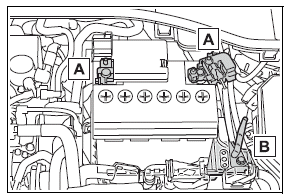
- Terminals
- Hold-down clamp
■Before recharging
When recharging, the battery produces hydrogen gas which is flammable and explosive. Therefore, observe the following precautions before recharging:
- If recharging with the battery installed on the vehicle, be sure to disconnect the ground cable.
- Make sure the charger is off when connecting and disconnecting the charger cables to the battery.
■After recharging/reconnecting the battery (vehicles with a smart key system)
- Unlocking the doors using the smart key system may not be possible immediately after reconnecting the battery. If this happens, use the wireless remote control or the mechanical key to lock/unlock the doors.
- Start the engine with the engine switch in ACC. The engine may not start with the engine switch turned off. However, the engine will operate normally from the second attempt.
- The engine switch mode is recorded by the vehicle. If the battery is reconnected, the vehicle will return the engine switch mode to the status it was in before the battery was disconnected. Make sure to turn off the engine before disconnecting the battery. Take extra care when connecting the battery if the engine switch mode prior to discharge is unknown.
If the system will not start even after multiple attempts, contact your Toyota dealer.
WARNING
■Chemicals in the battery
The battery contains poisonous and corrosive sulfuric acid and may produce hydrogen gas which is flammable and explosive. To reduce the risk of death or serious injury, take the following precautions while working on or near the battery:
- Do not cause sparks by touching the battery terminals with tools.
- Do not smoke or light a match near the battery.
- Avoid contact with eyes, skin and clothes.
- Never inhale or swallow electrolyte.
- Wear protective safety glasses when working near the battery.
- Keep children away from the battery.
■Where to safely charge the battery
Always charge the battery in an open area. Do not charge the battery in a garage or closed room where there is insufficient ventilation.
■Emergency measures regarding electrolyte
- If electrolyte gets in your eyes Flush your eyes with clean water for at least 15 minutes and get immediate medical attention. If possible, continue to apply water with a sponge or cloth while traveling to the nearest medical facility.
- If electrolyte gets on your skin Wash the affected area thoroughly.
If you feel pain or burning, get medical attention immediately.
- If electrolyte gets on your clothes It can soak through clothing on to your skin. Immediately take off the clothing and follow the procedure above if necessary.
- If you accidentally swallow electrolyte Drink a large quantity of water or milk. Get emergency medical attention immediately.
■When disconnecting the battery
Do not disconnect the negative (-) terminal on the body side. The disconnected negative (-) terminal may touch the positive (+) terminal, which may cause a short and result in death or serious injury.
NOTICE
■When recharging the battery
Never recharge the battery while the engine is running. Also, be sure all accessories are turned off.
Adding the washer fluid
Add washer fluid in the following situations:
- A washer does not work.
- The warning message appears on the multi-information display.
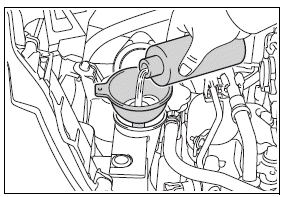
WARNING
■When adding washer fluid
Do not add washer fluid when the engine is hot or running as washer fluid contains alcohol and may catch fire if spilled on the engine, etc.
NOTICE
■Do not use any fluid other than washer fluid
Do not use soapy water or engine antifreeze instead of washer fluid.
Doing so may cause streaking on the vehicle's painted surfaces, as well as damaging the pump leading to problems of the washer fluid not spraying.
■Diluting washer fluid
Dilute washer fluid with water as necessary.
Refer to the freezing temperatures listed on the label of the washer fluid bottle.
Tires
Replace or rotate tires in accordance with maintenance schedules and treadwear.
Checking tires
Check if the treadwear indicators are showing on the tires.
Also check the tires for uneven wear, such as excessive wear on one side of the tread.
Check the spare tire condition and pressure if not rotated.
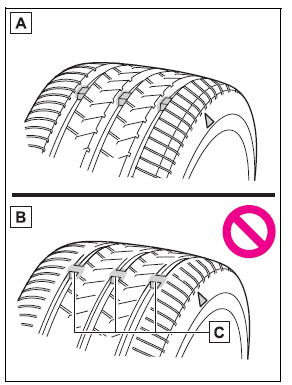
- New tread
- Worn tread
- Treadwear indicator
The location of treadwear indicators is shown by a "TWI" or ".gif) " mark, etc., molded into the sidewall of each tire.
" mark, etc., molded into the sidewall of each tire.
Replace the tires if the treadwear indicators are showing on a tire.
■When to replace your vehicle's tires
Tires should be replaced if:
- The treadwear indicators are showing on a tire
- You have tire damage such as cuts, splits, cracks deep enough to expose the fabric, and bulges indicating internal damage
- A tire goes flat repeatedly or cannot be properly repaired due to the size or location of a cut or other damage
If you are not sure, consult with your Toyota dealer.
■Tire life
Any tire over 6 years old must be checked by a qualified technician even if it has seldom or never been used or damage is not obvious.
■Maximum load of tire
Check that the maximum load of the replacement tire is greater than 1/2 of the Gross Axle Weight Ratings (GAWR) of either the front axle or the rear axle, whichever is greater.
For the GAWR, see the Certification Label.
For the maximum load of the tire, see the load limit at maximum cold tire inflation pressure mentioned on the sidewall of the tire.
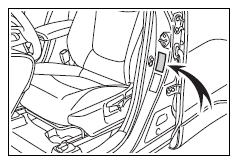
■Tire types
- Summer tires
Summer tires are high-speed performance tires best suited to highway driving under dry conditions. Since summer tires do not have the same traction performance as snow tires, summer tires are inadequate for driving on snow-covered or icy roads. For driving on snow-covered roads or icy roads, the use of snow tires is recommended. When installing snow tires, be sure to replace all four tires.
- All season tires
All season tires are designed to provide better traction in snow and to be adequate for driving in most winter conditions as well as for use year-round. All season tires, however, do not have adequate traction performance compared with snow tires in heavy or loose snow. Also, all season tires fall short in acceleration and handling performance compared with summer tires in highway driving.
- Snow tires
For driving on snow-covered roads or icy roads, we recommend using snow tires. If you need snow tires, select tires of the same size, construction and load capacity as the originally installed tires. Since your vehicle has radial tires as original equipment, make sure your snow tires also have radial construction.
Do not install studded tires without first checking local regulations for possible restrictions. Snow tires should be installed on all wheels.
■If the tread on snow tires wears down below 0.16 in. (4 mm)
The effectiveness of the tires as snow tires is lost.
■Checking the tire valves
When replacing the tires, check the tire valves for deformation, cracks, and other damage.
WARNING
■When inspecting or replacing tires
Observe the following precautions to prevent accidents.
Failure to do so may cause damage to parts of the drive train as well as dangerous handling characteristics, which may lead to an accident resulting in death or serious injury.
- Do not mix tires of different makes, models or tread patterns.
Also, do not mix tires of remarkably different treadwear.
- Do not use tire sizes other than those recommended by Toyota.
- Do not mix differently constructed tires (radial, bias-belted or bias-ply tires).
- Do not mix summer, all season and snow tires.
- Do not use tires that have been used on another vehicle.
Do not use tires if you do not know how they were used previously.
- Do not tow if your vehicle has a compact spare tire installed.
NOTICE
■If tire inflation pressure of each tire becomes low while driving
Do not continue driving, or your tires and/or wheels may be ruined.
■Driving on rough roads
Take particular care when driving on roads with loose surfaces or potholes.
These conditions may cause losses in tire inflation pressure, reducing the cushioning ability of the tires. In addition, driving on rough roads may cause damage to the tires themselves, as well as the vehicle's wheels and body.
Tire rotation
Rotate the tires in the order shown.
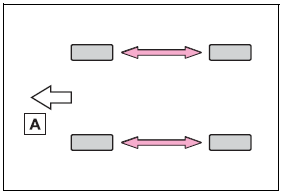
- Front
To equalize tire wear and extend tire life, Toyota recommends that tire rotation is carried out at the same interval as tire inspection.
Do not fail to initialize the tire pressure warning system after tire rotation.
Tire pressure warning system
Your vehicle is equipped with a tire pressure warning system that uses tire pressure warning valves and transmitters to detect low tire inflation pressure before serious problems arise.
The tire pressure warning system of this vehicle adopts a 2-type warning system.
- When "Adjust Pressure" is displayed (Normal Warning)
The tire pressure warning light comes on and a buzzer sounds when the tire inflation pressure becomes low due to natural air leakage or outside temperature.
- When "Immediately Check tire when Safe" is displayed (Emergency Warning)
The tire pressure warning light comes on and a buzzer sounds when the tire inflation pressure becomes low suddenly due to a blowout. However, the system may not be able to detect sudden tire ruptures (bursting, etc.).
The tire pressure detected by the tire pressure warning system can be displayed on the multi-information display.
The unit can be changed.
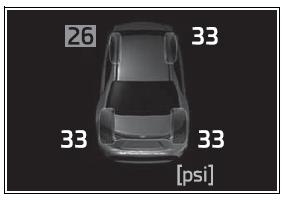
■ How to change the unit
4.2-inch display
1. Park the vehicle in a safe place and turn the engine switch off.
Changing the unit cannot be performed while the vehicle is moving.
2. Turn the engine switch to ON.
3. Select  of the multi-information display and then press
  .
.
4. Press .gif) or
or .gif) to select "Vehicle Settings" and then press and hold .
to select "Vehicle Settings" and then press and hold .
5. Press or to select "TPWS setting" and then press .
6. Press or to select "Pressure unit setting".
7. Press or to select the desired unit and then press .
7.0-inch display
1. Park the vehicle in a safe place and turn the engine switch off.
Changing the unit cannot be performed while the vehicle is moving.
2. Turn the engine switch to ON.
3. Select .gif) of the multi-information display and then press .
of the multi-information display and then press .
4. Press .gif) or
or .gif) to select "Vehicle Settings" and then press and hold .
to select "Vehicle Settings" and then press and hold .
5. Press or to select "TPWS setting" and then press .
6. Press or to select "Pressure unit setting".
7. Press or to select the desired unit and then press .
■Routine tire inflation pressure checks
The tire pressure warning system does not replace routine tire inflation pressure checks. Make sure to check tire inflation pressure as part of your routine of daily vehicle checks.
■Tire inflation pressure
- It may take a few minutes to display the tire inflation pressure after the engine switch is turned to ON. It may also take a few minutes to display the tire inflation pressure after inflation pressure has been adjusted.
- Tire inflation pressure changes with temperature.
The displayed values may also be different from the values measured using a tire pressure gauge.
■Situations in which the tire pressure warning system may not operate properly
- In the following cases, the tire pressure warning system may not operate properly.
- If non-genuine Toyota wheels are used.
- A tire has been replaced with a tire that is not an OE (Original Equipment) tire.
- A tire has been replaced with a tire that is not of the specified size.
- Tire chains, etc. are equipped.
- An auxiliary-supported run-flat tire is equipped.
- If a window tint that affects the radio wave signals is installed.
- If there is a lot of snow or ice on the vehicle, particularly around the wheels or wheel housings.
- If the tire inflation pressure is extremely higher than the specified level.
- If wheel without tire pressure warning valves and transmitters are used.
- If the ID code on the tire pressure warning valves and transmitters is not registered in the tire pressure warning computer.
- Performance may be affected in the following situations.
- Near a TV tower, electric power plant, gas station, radio station, large display, airport or other facility that generates strong radio waves or electrical noise
- When carrying a portable radio, cellular phone, cordless phone or other wireless communication device
- If tire position information is not correctly displayed due to the radio wave conditions, the display may be corrected by driving and changing the radio wave conditions.
- When the vehicle is parked, the time taken for the warning to start or go off could be extended.
- When tire inflation pressure declines rapidly for example when a tire has burst, the warning may not function.
■Warning performance of the tire pressure warning system
The warning of the tire pressure warning system will change in accordance with the conditions under which it was initialized. For this reason, the system may give a warning even if the tire pressure does not reach a low enough level, or if the pressure is higher than the pressure that was adjusted to when the system was initialized.
Installing tire pressure warning valves and transmitters
When replacing tires or wheels, tire pressure warning valves and transmitters must also be installed.
When new tire pressure warning valves and transmitters are installed, new ID codes must be registered in the tire pressure warning computer and the tire pressure warning system must be initialized.
■When replacing the tires and wheels
If the ID code of the tire pressure warning valve and transmitter is not registered, the tire pressure warning system will not work properly. After driving for about 20 minutes, the tire pressure warning light blinks for 1 minute and stays on to indicate a system malfunction.
NOTICE
■Repairing or replacing tires, wheels, tire pressure warning valves, transmitters and tire valve caps
- When removing or fitting the wheels, tires or the tire pressure warning valves and transmitters, contact your Toyota dealer as the tire pressure warning valves and transmitters may be damaged if not handled correctly.
- Make sure to install the tire valve caps. If the tire valve caps are not installed, water could enter the tire pressure warning valves and the tire pressure warning valves could be bound.
- When replacing tire valve caps, do not use tire valve caps other than those specified. The cap may become stuck.
■To avoid damage to the tire pressure warning valves and transmitters
When a tire is repaired with liquid sealants, the tire pressure warning valve and transmitter may not operate properly. If a liquid sealant is used, contact your Toyota dealer or other qualified service shop as soon as possible. Make sure to replace the tire pressure warning valve and transmitter when replacing the tire.
Initializing the tire pressure warning system
■ The tire pressure warning system must be initialized in the following circumstances:
- When rotating the tires.
- When changing the tire.
- After registering the ID codes.
- When changing between two registered wheel sets.
When the tire pressure warning system is initialized, the current tire inflation pressure is set as the benchmark pressure.
■ How to initialize the tire pressure warning system
1. Park the vehicle in a safe place and stop the engine for 20 minutes or more.
Initialization cannot be performed while the vehicle is moving.
2. Adjust the tire inflation pressure to the specified cold tire inflation pressure level.
Make sure to adjust the tire pressure to the specified cold tire inflation pressure level. The tire pressure warning system will operate based on this pressure level.
3. Start the engine.
4. 4.2-inch display meter: Press or of the meter control switch to select .gif) .
.
7-inch display meter: Press or of the meter control switch to select .
5. 4.2-inch display meter: Press or to select "Vehicle Settings" and then press and hold .
7-inch display meter: Press or to select "Vehicle Settings" and then press and hold .
6. 4.2-inch display meter: Press or to select "TPWS setting" and then press .
7-inch display meter: Press or to select "TPWS setting" and then press .
7. 4.2-inch display meter: Press or to select "Set Pressure". Then press and hold .
7-inch display meter: Press or to select "Set Pressure". Then press and hold .
After setting the tire inflation pressure, a message indicating that setting has been completed will be displayed on the multi-information display.
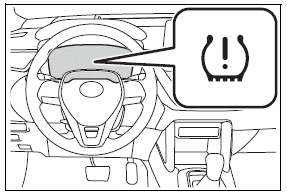
Also, "--" is displayed for inflation pressure of each tire on the multi-information display while the tire pressure warning system determines the position.
8. Drive straight (with occasional left and right turns) at approximately 25 mph (40 km/h) or more for approximately 10 to 30 minutes.
When initialization is complete, the inflation pressure of each tire will be displayed on the multi-information display.
Even if the vehicle is not driven at approximately 25 mph (40 km/h) or more, initialization can be completed by driving for a long time.
However, if initialization does not complete after driving for 1 hour or more, park the vehicle in a safe place for approximately 20 minutes and then drive the vehicle again.
■When initializing
- Initialization is performed while driving at a vehicle speed of approximately 25 mph (40 km/h) or more.
- Make sure to carry out initialization after adjusting the tire inflation pressure.
Also, make sure the tires are cold before carrying out initialization or tire inflation pressure adjustment.
- The tire pressure warning system can be initialized by yourself, but depending on the driving conditions and driving environment, initialization may take some time to complete.
■The initialization operation
- If you have accidentally turned the engine switch to OFF during initialization, it is not necessary to restart the initialization again as initialization will restart automatically when the engine switch has been turned to ON for the next time.
- If you accidentally perform initial ization when initialization is not necessary, adjust the tire inflation pressure to the specified level when the tires are cold, and conduct initialization again.
- While the position of each tire is being determined and the inflation pressures are not being displayed on the multi-information display, if the inflation pressure of a tire drops, the tire pressure warning light will come on.
■If the tire pressure warning system is not initialized properly
- In the following situations, initialization may take longer than usual to be completed or may not be possible. Normally, initialization completes within approximately 30 minutes.
- Vehicle is not driven at approximately 25 mph (40 km/h) or more
- Vehicle is driven on unpaved roads
- Vehicle is driven near other vehicles and system cannot recognize tire pressure warning valve and transmitters of your vehicle over those of other vehicles.
- If the vehicle is driven in heavy traffic or another situation where other vehicles are driven close by, it may take time for the system to recognize the tire pressure warning valve and transmitters of your vehicle over those of other vehicles.
- If initialization does not complete after driving for 1 hour or more, park the vehicle in a safe place for approximately 20 minutes and then drive the vehicle again.
- If the vehicle is reversed during initialization, the data up to that point is reset, so perform the initialization procedure again from the beginning.
- In the following situations, initialization will not be started or was not completed properly and the system will not operate properly.
Perform the initialization procedure again.
- If, when attempting to start initialization, the tire pressure warning light does not blink 3 times.
- If, when the vehicle has been driven for about 20 minutes after performing initialization, the tire pressure warning light blinks for approximately 1 minute and then illuminates.
- If the inflation pressure of each tire is still not displayed, have the vehicle inspected by your Toyota dealer.
WARNING
■When initializing the tire pressure warning system
Do not initializing tire inflation pressure without first adjusting the tire inflation pressure to the specified level. Otherwise, the tire pressure warning light may not come on even if the tire inflation pressure is low, or it may come on when the tire inflation pressure is actually normal.
Registering ID codes
Every tire pressure warning valve and transmitter has a unique ID code. When replacing a tire pressure warning valve and transmitter, it is necessary to register the ID code.
When registering the ID codes, perform the following procedure.
1. Park the vehicle in a safe place, wait for approximately 20 minutes, and then start the engine.
2. Select or of the multi-information display and then press .
3. 4.2-inch display meter: Press or to select "Vehicle Settings" and then press and hold .
7-inch display meter: Press or to select "Vehicle Settings" and then press and hold .
4. 4.2-inch display meter: Press or to select "TPWS setting" and then press .
7-inch display meter: Press or to select "TPWS setting" and then press .
5. 4.2-inch display meter: Press or to select "Tyre Set Switching" and then press .
7-inch display meter: Press or to select "Tyre Set Switching" and then press .
6. 4.2-inch display meter: Press or to select "Register New Valve / ID" and then press .
7-inch display meter: Press or to select "Register New Valve / ID" and then press .
7. 4.2-inch display meter: Press or to select "Tire Set 1" or "Tire Set 2".
Then press .
7-inch display meter: Press or to select "Tire Set 1" or "Tire Set 2". Then press .
The change wheel set mode is activated and registration is started.
Then a message will be displayed on the multi-information display.
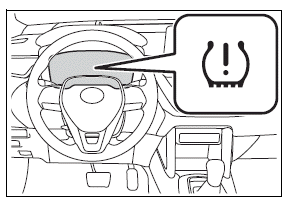
When registration is being performed, the tire pressure warning light will blink for approximately 1 minute then illuminate and "--" will be displayed for the inflation pressure of each tire on the multi-information display.
8. Drive straight (with occasional left and right turns) at approximately 25 mph (40 km/h) or more for approximately 10 to 30 minutes.
When registration is completed, the tire pressure warning light will go off and the inflation pressure of each tire will be displayed on the multi-information display.
Even if the vehicle is not driven at approximately 25 mph (40 km/h) or more, registration can be completed by driving for a long time.
However, if registration does not complete after driving for 1 hour or more, perform the procedure again from the beginning.
9. Initialize the tire pressure warning system.
■When registering ID codes
- ID code registration is performed while driving at a vehicle speed of approximately 25 mph (40 km/h) or more.
- Before performing ID code registration, make sure that no wheels with tire pressure warning valve and transmitters installed are near the vehicle.
- Make sure to initialize the tire pressure warning system after registering the ID codes. If the system is initialized before registering the ID codes, the initialized values will be invalid.
- ID codes can be registered by yourself, but depending on the driving conditions and driving environment, registration may take some time to complete.
- As the tires will be warm when registration is completed, make sure to allow the tires to cool before performing initialization.
■Canceling ID code registration
- To cancel ID code registration after it has been started, select "Identify Wheel" on the multi-information display and press and hold again.
- If ID code registration has been canceled, the tire pressure warning light will blink for approximately 1 minute when the engine switch is turned to ON and then illuminate. The tire pressure warning system will be operational when the tire pressure warning light turns off.
- If the warning light does not turn off even after several minutes have elapsed, ID code registration may not have been canceled correctly.
To cancel registration, perform the ID code registration start procedure again and then turn the engine switch off before driving.
■If ID codes are not registered properly
In the following situations, ID code registration may take longer than usual to be completed or may not be possible. Normally, registration completes within approximately 30 minutes.
- Vehicle is not parked for approximately 20 minutes or more before driving
- Vehicle is not driven at approximately 25 mph (40 km/h) or more
- Vehicle is driven on unpaved roads
- Vehicle is driven near other vehicles and system cannot recognize tire pressure warning valve and transmitters of your vehicle over those of other vehicles
- Wheel with tire pressure warning valve and transmitter installed is inside or near the vehicle
If registration does not complete after driving for 1 hour or more, perform the ID code registration procedure again from the beginning.
- If the vehicle is reversed during registration, the data up to that point is reset, so perform the registration procedure again from the beginning.
- In the following situations, ID code registration will not be started or was not completed properly and the system will not operate properly. Perform the ID code registration procedure again.
- If, when attempting to start ID code registration, the tire pressure warning light does not blink slowly 3 times.
- If, when the vehicle has been driven for about 20 minutes after performing ID code registration, the tire pressure warning light blinks for approximately 1 minute and then illuminates.
If the ID codes cannot be registered even when performing the above procedure, contact your Toyota dealer.
Selecting wheel set
Your vehicle is equipped with tire pressure warning system with the function to have ID codes registered for a second wheel set, for example a winter set. You can register a second wheel set by yourself or your Toyota dealer.
After registration of a second wheel set, either of these two wheel sets can be selected for usage with the tire pressure warning system.
■ Operating conditions for the function
- This function will perform the change of wheel set only if a second wheel set has been registered. If no second wheel set has been registered, no change will be made when selecting this function in the menu.
- Only a change between both registered wheel set is possible, mixing between these wheel sets is not supported.
■ How to change between wheel sets
1. Have the vehicle fitted with the preferred wheel set.
2. 4.2-inch display meter: Press or of the meter control switch to select .
7-inch display meter: Press or of the meter control switch to select .
3. 4.2-inch display meter: Press or to select "Vehicle Settings" and then press and hold .
7-inch display meter: Press or to select "Vehicle Settings" and then press and hold .
4. 4.2-inch display meter: Press or to select "TPWS setting" and then press .
7-inch display meter: Press or to select "TPWS setting" and then press .
5. 4.2-inch display meter: Press or to select "Tyre Set Switching" and then press .
7-inch display meter: Press or to select "Tyre Set Switching" and then press .
6. 4.2-inch display meter: Press or to select "Register New Valve / ID" and then press .
7-inch display meter: Press or to select "Register New Valve / ID" and then press .
7. 4.2-inch display meter: Press or to select "Tire Set 1" or "Tire Set 2".
Then press .
7-inch display meter: Press or to select "Tire Set 1" or "Tire Set 2". Then press .
Afterward, the tire pressure warning light turns on after flashing for 1 minute.
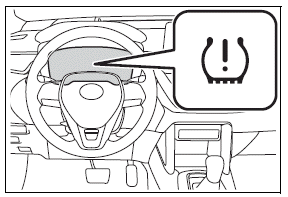
After 2 minutes, registration of a second wheel set is being performed.
The tire pressure warning light will turn off and "--" will be displayed for the inflation pressure of each tire on the multi-information display.
8. Initialize the tire pressure warning system. If the tire inflation pressure settings for the installed tires change, initialization operations are required, but if the tire inflation pressure settings are the same, initialization is not required.
9. Drive straight (with occasional left and right turns) at approximately 25 mph (40 km/h) or more for approximately 10 to 30 minutes.
Registration of a second wheel set is complete when the tire pressure warning light turns off and the inflation pressure of each tire is displayed on the multi-information display.
Tire inflation pressure
Checking the specified tire inflation pressure
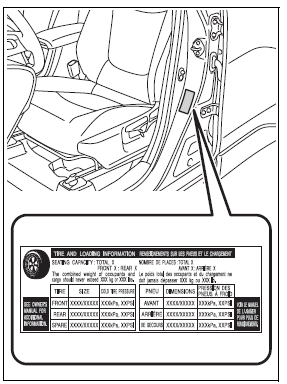
The recommended cold tire inflation pressure and tire size are displayed on the tire and loading information label.
Inspection and adjustment procedure
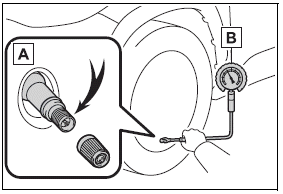
- Tire valve
- Tire pressure gauge
1. Remove the tire valve cap.
2. Press the tip of the tire pressure gauge onto the tire valve.
3. Read the pressure using the gauge gradations.
4. If the tire inflation pressure is not at the recommended level, adjust the pressure.
If you add too much air, press the center of the valve to deflate.
5. After completing the tire inflation pressure measurement and adjustment, apply soapy water to the valve and check for leakage.
6. Put the tire valve cap back on.
■Tire inflation pressure check interval
You should check tire inflation pressure every two weeks, or at least once a month. Do not forget to check the spare.
■Effects of incorrect tire inflation pressure
Driving with incorrect tire inflation pressure may result in the following:
- Reduced fuel economy
- Reduced driving comfort and poor handling
- Reduced tire life due to wear
- Reduced safety
- Damage to the drive train
If a tire needs frequent inflating, have it checked by your Toyota dealer.
■Instructions for checking tire inflation pressure
When checking tire inflation pressure, observe the following:
- Check only when the tires are cold.
If your vehicle has been parked for at least 3 hours or has not been driven for more than 1 mile or 1.5 km, you will get an accurate cold tire inflation pressure reading.
- Always use a tire pressure gauge.
It is difficult to judge if a tire is properly inflated based only on its appearance.
- It is normal for the tire inflation pressure to be higher after driving as heat is generated in the tire. Do not reduce tire inflation pressure after driving.
- Never exceed the vehicle capacity weight.
Passengers and luggage weight should be placed so that the vehicle is balanced.
WARNING
■Proper inflation is critical to save tire performance
Keep your tires properly inflated.
If the tires are not properly inflated, the following conditions may occur which could lead to an accident resulting in death or serious injury:
- Excessive wear
- Uneven wear
- Poor handling
- Possibility of blowouts resulting from overheated tires
- Air leaking from between tire and wheel
- Wheel deformation and/or tire damage
- Greater possibility of tire damage while driving (due to road hazards, expansion joints, sharp edges in the road, etc.)
NOTICE
■When inspecting and adjusting tire inflation pressure
Be sure to put the tire valve caps back on.
If a valve cap is not installed, dirt or moisture may get into the valve and cause an air leak, resulting in decreased tire inflation pressure.
Wheels
If a wheel is bent, cracked or heavily corroded, it should be replaced. Otherwise, the tire may separate from the wheel or cause a loss of handling control.
Wheel selection
When replacing wheels, care should be taken to ensure that they are equivalent to those removed in load capacity, diameter, rim width and inset*.
Replacement wheels are available at your Toyota dealer.
*: Conventionally referred to as offset.
Toyota does not recommend using the following:
- Wheels of different sizes or types
- Used wheels
- Bent wheels that have been straightened
■When replacing wheels
The wheels of your vehicle are equipped with tire pressure warning valves and transmitters that allow the tire pressure warning system to provide advance warning in the event of a loss in tire inflation pressure.
Whenever wheels are replaced, the tire pressure warning valves and transmitters must be installed.
WARNING
■When replacing wheels
- Do not use wheels that are a different size from those recommended in the Owner's Manual, as this may result in a loss of handling control.
- Never use an inner tube in a leaking wheel which is designed for a tubeless tire.
Doing so may result in an accident, causing death or serious injury.
■When installing the wheel nuts
- Be sure to install the wheel nuts with the tapered ends facing inward. Installing the nuts with the tapered ends facing outward can cause the wheel to break and eventually cause the wheel to come off while driving, which could lead to an accident resulting in death or serious injury.
- Never use oil or grease on the wheel bolts or wheel nuts.
Oil and grease may cause the wheel nuts to be excessively tightened, leading to bolt or disc wheel damage. In addition, the oil or grease can cause the wheel nuts to loosen and the wheel may fall off, causing an accident and resulting in death or serious injury. Remove any oil or grease from the wheel bolts or wheel nuts.
■Use of defective wheels prohibited
Do not use cracked or deformed wheels. Doing so could cause the tire to leak air during driving, possibly causing an accident.
NOTICE
■Replacing tire pressure warning valves and transmitters
- Because tire repair or replacement may affect the tire pressure warning valves and transmitters, make sure to have tires serviced by your Toyota dealer or other qualified service shop. In addition, make sure to purchase your tire pressure warning valves and transmitters at your Toyota dealer.
- Ensure that only genuine Toyota wheels are used on your vehicle.
Tire pressure warning valves and transmitters may not work properly with non-genuine wheels.
Aluminum wheel precautions (if equipped)
- Use only Toyota wheel nuts and wheel nut wrenches designed for use with your aluminum wheels.
- When rotating, repairing or changing your tires, check that the wheel nuts are still tight after driving 1000 miles (1600 km).
- Use only Toyota genuine balance weights or equivalent and a plastic or rubber hammer when balancing your wheels.
Air conditioning filter
The air conditioning filter must be changed regularly to maintain air conditioning efficiency.
Removing the air conditioning filter
1. Turn the engine switch off.
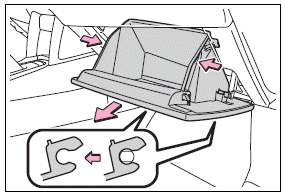
2. Open the glove box. Slide off the damper.
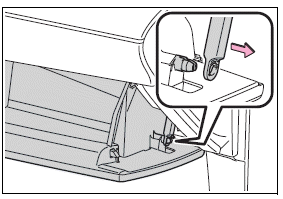
3. Push in the glove box on the vehicle's outer side to disconnect the claws. Then pull out the glove box and disconnect the lower claws.
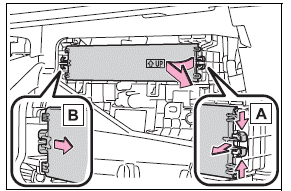
4. Unlock the filter cover (A), pull the filter cover out of the claws (B), and remove the filter cover.
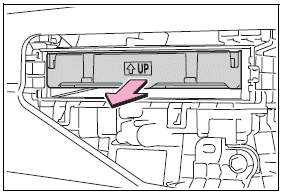
5. Remove the filter case.
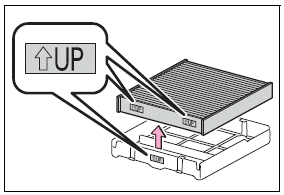
6. Remove the air conditioning filter from the filter case and replace it with a new one.
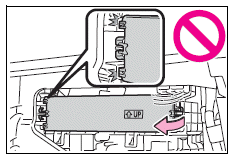
The ".gif) UP" marks shown on the filter and the filter case should be pointing up.
UP" marks shown on the filter and the filter case should be pointing up.
■Checking interval
Replace the air conditioning filter according to the maintenance schedule. In dusty areas or areas with heavy traffic flow, early replacement may be required. (For scheduled maintenance information, please refer to the "Scheduled Maintenance Guide" or "Owner's Manual Supplement".)
■If air flow from the vents decreases dramatically
The filter may be clogged. Check the filter and replace if necessary.
NOTICE
■When using the air conditioning system
Make sure that a filter is always installed.
Using the air conditioning system without a filter may cause damage to the system.
■To prevent damage to the filter cover
When moving the filter cover in the direction of arrow to release the fitting, pay attention not to apply excessive force to the claws. Otherwise, the claws may be damaged.
Wireless remote control/electronic key battery
Replace the battery with a new one if it is depleted.
As the key may be damaged if the following procedure is not performed properly, it is recommended that key battery replacement be performed by your Toyota dealer.
■If the key battery is depleted
The following symptoms may occur:
- The smart key system (if equipped) and wireless remote control will not function properly.
- The operational range will be reduced.
Items to prepare
- Flathead screwdriver
- Small flathead screwdriver
- Lithium battery CR2016 (vehicles without a smart key system) or CR2450 (vehicles with a smart key system)
■Use a CR2016 or CR2450 lithium battery
- Batteries can be purchased at your Toyota dealer, local electrical appliance shops or camera stores.
- Replace only with the same or equivalent type recommended by the manufacturer.
- Dispose of used batteries according to local laws.
Replacing the battery
Vehicles without a smart key system
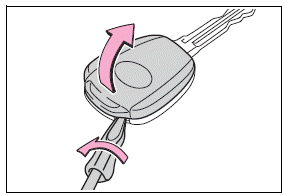
1. Remove the cover.
To prevent damage to the key, cover the tip of the flathead screwdriver with a rag.
2. Remove the module.
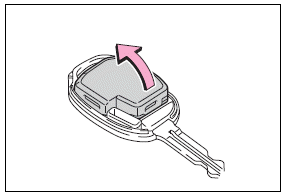
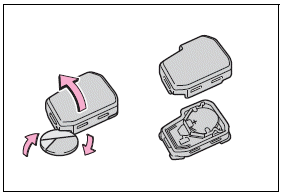
3. Open the case cover using a coin protected with tape etc.
and remove the depleted battery.
Insert a new battery with the "+" terminal facing up.
4. Install the cover.
Align the cover with the key and then press it straight into the key.
Make sure that the cover is securely installed without any gaps between it and the key.
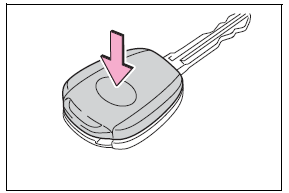
5. Operate the .gif) or
or .gif) switch and check that the doors can be locked/unlocked.
switch and check that the doors can be locked/unlocked.
Vehicles with a smart key system
1. Release the lock and remove the mechanical key.
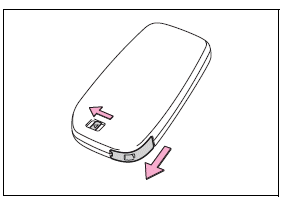
2. Remove the key cover.
To prevent damage to the key, cover the tip of the flathead screwdriver with a rag.
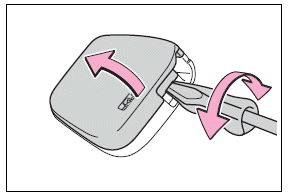
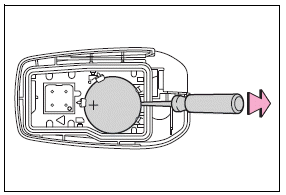
3. Remove the depleted battery using a small flathead screwdriver.
When removing the cover, the electronic key module may stick to the cover and the battery may not be visible. In this case, remove the electronic key module in order to remove the battery.
Insert a new battery with the "+" terminal facing up.
4. When installing the key cover and mechanical key, install by conducting step 2 and step 1 with the directions reversed.
5. Operate the or switch and check that the doors can be locked/unlocked.
WARNING
■Battery precautions
Observe the following precautions.
Failure to do so may result in death or serious injury.
- Do not swallow the battery.
Doing so may cause chemical burns.
- A coin battery or button battery is used in the key. If a battery is swallowed, it may cause severe chemical burns in as little as 2 hours and may result in death or serious injury.
- Keep away new and removed batteries from children.
- If the cover cannot be firmly closed, stop using the key and stow the key in the place where children cannot reach, and then contact your Toyota dealer.
- If you accidentally swallow a battery or put a battery into a part of your body, get emergency medical attention immediately.
■To prevent battery explosion or leakage of flammable liquid or gas
- Replace the battery with a new battery of the same type. If a wrong type of battery is used, it may explode.
- Do not expose batteries to extremely low pressure due to high altitude or extremely high temperatures.
- Do not burn, break or cut a battery.
NOTICE
■When replacing the battery
Use a flathead screwdriver of appropriate size. Applying excessive force may deform or damage the cover.
■For normal operation after replacing the battery
Observe the following precautions to prevent accidents:
- Always work with dry hands.
Moisture may cause the battery to rust.
- Do not touch or move any other component inside the remote control.
- Do not bend either of the battery terminals.
Checking and replacing fuses
If any of the electrical components do not operate, a fuse may have blown. If this happens, check and replace the fuses as necessary.
Checking and replacing fuses
1. Turn the engine switch off.
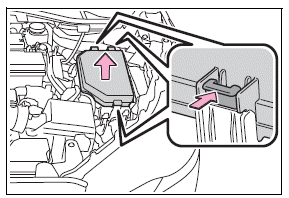
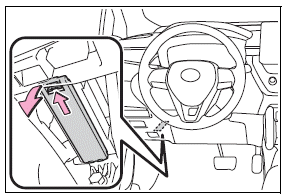
2. Open the fuse box cover.
Engine compartment
Push the tabs in and lift the lid off.
Under the driver's side instrument panel
Remove the lid.
Make sure to push the claw when removing/installing the lid.
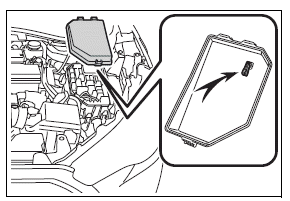
3. Remove the fuse with the pullout tool.
Only type A fuse can be removed using the pullout tool.
4. Check if the fuse is blown.
Replace the blown fuse with a new fuse of an appropriate amperage rating. The amperage rating can be found on the fuse box lid.
Type A
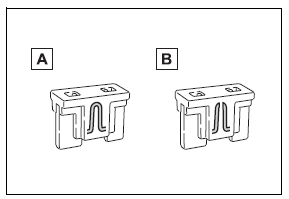
- Normal fuse
- Blown fuse
Type B
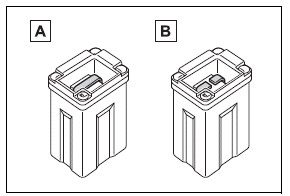
- Normal fuse
- Blown fuse
Type C
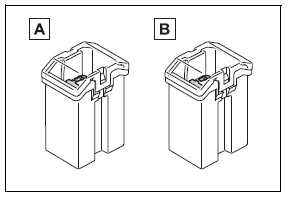
- Normal fuse
- Blown fuse
Type D
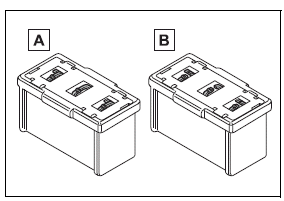
- Normal fuse
- Blown fuse
■After a fuse is replaced
- When installing the lid, make sure that the tab is installed securely.
- If the lights do not turn on even after the fuse has been replaced, a bulb may need replacement.
- If the replaced fuse blows again, have the vehicle inspected by your Toyota dealer.
■If there is an overload in a circuit
The fuses are designed to blow, protecting the wiring harness from damage.
WARNING
■To prevent system breakdowns and vehicle fire
Observe the following precautions.
Failure to do so may cause damage to the vehicle, and possibly a fire or injury.
- Never use a fuse of a higher amperage rating than that indicated, or use any other object in place of a fuse.
- Always use a genuine Toyota fuse or equivalent.
Never replace a fuse with a wire, even as a temporary fix.
- Do not modify the fuses or fuse boxes.
NOTICE
■Before replacing fuses
Have the cause of electrical overload determined and repaired by your Toyota dealer as soon as possible.
Headlight aim
Vertical movement adjusting bolts
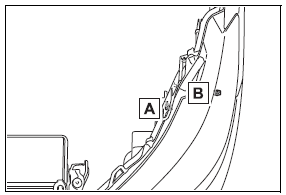
- Adjustment bolt A
- Adjustment bolt B
Before checking the headlight aim
- Make sure the vehicle has a full tank of gasoline and the area around the headlight is not deformed.
- Park the vehicle on level ground.
- Make sure the tire inflation pressure is at the specified level.
- Have someone sit in the driver's seat.
- Bounce the vehicle several times.
Adjusting the headlight aim
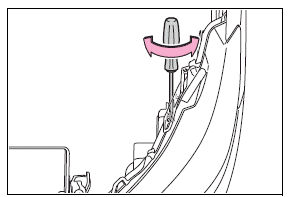
1. Using a Phillips-head screwdriver, turn bolt A in either direction.
Remember the turning direction and the number of turns.
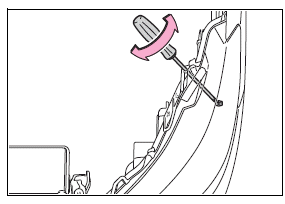
2. Turn bolt B the same number of turns and in the same direction as step 1.
If the headlight cannot be adjusted using this procedure, take the vehicle to your Toyota dealer to adjust the headlight aim.
Download Manual