Basic functions - Dynamic radar cruise control
.png)
- Constant speed cruising: When there are no vehicles ahead
The vehicle drives at the speed set by the driver.
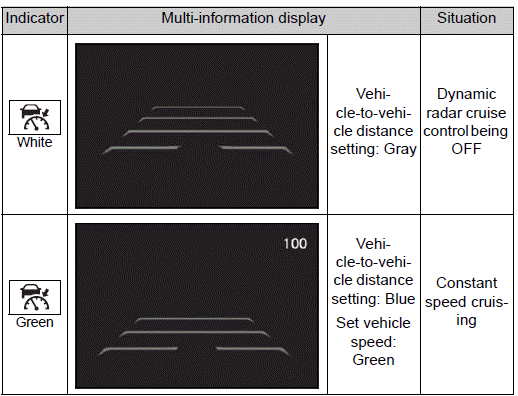
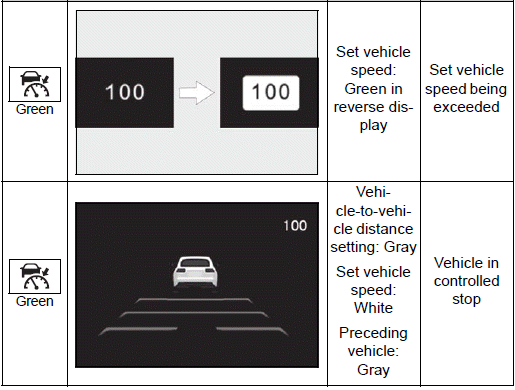
If the set vehicle speed is exceeded while driving down a hill, the set vehicle speed display will blink and a buzzer will sound.
- Deceleration and follow-up cruising: When a preceding vehicle driving slower than the set vehicle speed is detected
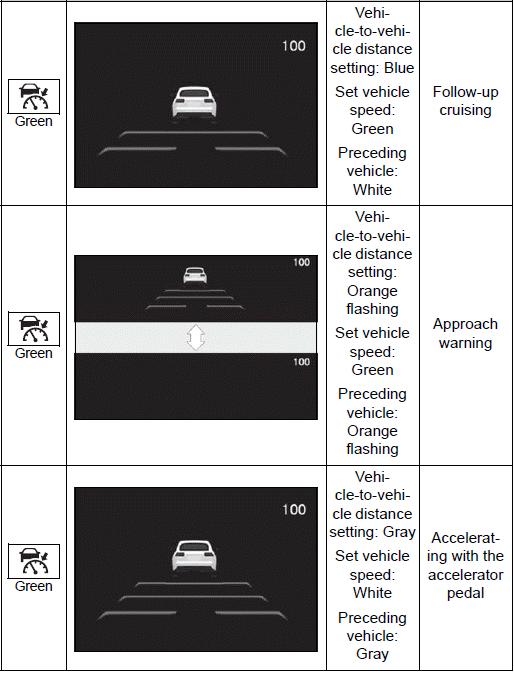
When a vehicle is detected driving ahead of your vehicle, the vehicle automatically decelerates and if a greater reduction in vehicle speed is necessary, the brakes are applied (the stop lights will come on at this time). The vehicle is controlled to maintain the vehicle-to-vehicle distance set by the driver, in accordance with changes in the speed of the preceding vehicle. If vehicle deceleration is not sufficient and the vehicle approaches the vehicle ahead, the approach warning will sound.
- Acceleration: When there are no longer any preceding vehicles driving slower than the set vehicle speed
The vehicle accelerates until the set vehicle speed is reached and then resumes constant speed cruising.
- Starting off: If a preceding vehicle stops, the vehicle will also stop (controlled stop). After the preceding vehicle starts off, pressing the "RES" switch or depressing the accelerator pedal will resume follow-up cruising (start off operation). If a start off operation is not performed, the controlled stop will continue.
System Components
■ Meter display
.png)
- Multi-information display
- Set vehicle speed
- Indicators
■ Switches
.png)
- Driving assist mode select switch
- Driving assist switch
- "+" switch / "RES" switch
- "-" switch
- Cancel switch
- Vehicle-to-vehicle distance switch
Using the dynamic radar cruise control
Setting the vehicle speed
1. Press the driving assist mode select switch to select dynamic radar cruise control.
The dynamic radar cruise control indicator will illuminate.
.png)
2. Using the accelerator pedal, accelerate or decelerate to the desired vehicle speed (approximately 20 mph [30 km/h] or more), and press the driving assist switch to set the set vehicle speed.
The set vehicle speed will be displayed on the multi-information display.
The vehicle speed at the moment the switch is released will be the set vehicle speed.
.png)
Adjusting the set vehicle speed
- Adjusting the set vehicle speed using the switches
To change the set vehicle speed, press the "+" switch or "-" switch until the desired speed is displayed.
.png)
- Increase set vehicle speed
- Decrease set vehicle speed
Short press adjustment: Press the switch Long press adjustment: Press and hold the switch until the desired set vehicle speed is reached.
The set vehicle speed will increase or decrease as follows:
For the U.S.A.
Short press adjustment: Increases or decreases by 1 mph (1.6 km/h) each time the switch is pressed
Long press adjustment: Increases or decreases in 1 mph (1.6 km/h) increments continuously while the switch is pressed and held
For Canada
Short press adjustment: By 1 km/h (0.6 mph) or 1 mph (1.6 km/h) each time the switch is pressed
Long press adjustment: Increases or decreases in 5 km/h (3.1 mph) or 5 mph (8 km/h) increments continuously while the switch is pressed and held
- Increasing the set vehicle speed using the accelerator pedal
1. Depress the accelerator pedal to accelerate the vehicle to the desired vehicle speed.
2. Press the "+" switch.
Canceling/resuming control
.png)
1. Press the cancel switch or driving assist switch to cancel control.
Control will also be canceled if the brake pedal is depressed.
(If the vehicle has been stopped by system control, depressing the brake pedal will not cancel control.)
2. Press the "RES" switch to resume control.
Changing the vehicle-to-vehicle distance
Each time the switch is pressed, the vehicle-to-vehicle distance setting will change as follows: If a preceding vehicle is detected, the preceding vehicle mark will be displayed.
.png)
.png)
The actual vehicle-to-vehicle distance varies in accordance with the vehicle speed. Also, when the vehicle is stopped by system control, it will be stopped at a certain distance from the preceding vehicle, depending on the situation, regardless of the setting.
■Operating conditions
- The shift lever is in D.
- The desired set speed can be set when the vehicle speed is approximately 20 mph (30 km/h) or more.
- If the vehicle speed is set while driving at below approximately 20 mph (30 km/h), the set vehicle speed will be approximately 20 mph (30 km/h).
- If the vehicle speed is set while driving at a speed that exceeds the system's upper limit, the set vehicle speed will be the system's upper limit.
■Accelerating after setting the vehicle speed
As with normal driving, acceleration can be performed by depressing the accelerator pedal. After accelerating, the vehicle will return to the set vehicle speed. However, while in vehicle-to-vehicle distance control mode, the vehicle speed may decrease to below the set vehicle speed in order to maintain the distance from the preceding vehicle.
■When the vehicle is stopped by system control during follow-up cruising
- When the "+RES" switch is pressed while the vehicle is stopped by system control, if the preceding vehicle starts off within approximately 3 seconds, follow- up cruising will resume.
- If the preceding vehicle starts off within approximately 3 seconds of the vehicle being stopped by system control, follow-up cruising will resume.
■Automatic cancellation of vehicle- to-vehicle distance control mode
In the following situations, vehicle- to-vehicle distance control mode will be canceled automatically:
- When the brake control or output restriction control of a driving support system operates (For example: Pre-Collision System, drive-start control)
- When the parking brake has been operated
- When the vehicle is stopped by system control on a steep incline
- When any of the following are detected while the vehicle is stopped by system control:
- The driver's seat belt is unfastened
- The driver's door is opened
- Approximately 3 minutes have elapsed since the vehicle was stopped
The parking brake may be actived automatically.
- Situations in which some or all of the functions of the system cannot operate
■Preceding vehicles that the sensor may not detect correctly
In the following situations, depending on the conditions, if the system cannot provide sufficient deceleration or acceleration is necessary, operate the brake pedal or accelerator pedal.
As the sensor may not be able to correctly detect these types of vehicles, the approach warning may not operate
- When a vehicle cuts in front of your vehicle or changes lanes away from your vehicle extremely slowly or quickly
- When changing lanes
- When a preceding vehicle is driving at a low speed
- When a vehicle is stopped in the same lane as the vehicle
- When a motorcycle is traveling in the same lane as the vehicle
■Conditions under which the system may not operate correctly In the following situations, operate the brake pedal (or accelerator pedal, depending on the situation) as necessary.
As the sensor may not be able to correctly detect a vehicle, the system may not operate properly.
- When a preceding vehicle brakes suddenly
- When changing lanes at low speeds, such as in a traffic jam
Approach warning
In situations where the vehicle approaches a preceding vehicle and the system cannot provide sufficient deceleration, such as if a vehicle cuts in front of the vehicle, a warning display will flash and a buzzer will sound to alert the driver. Depress the brake pedal to ensure appropriate vehicle-to-vehicle distance.
■ Warnings may not occur when
In the following situations, the warning may not operate even though the vehicle-to-vehicle distance is short.
- When the preceding vehicle is traveling at the same speed or faster than your vehicle
- When the preceding vehicle is traveling at an extremely low speed
- Immediately after the vehicle speed has been set
- When the accelerator pedal is depressed
Curve speed reduction function
When a curve is detected, the vehicle speed will begin being reduced. When the curve ends, the vehicle speed reduction will end.
Depending on the situation, the vehicle speed will then return to the set vehicle speed.
In situations where vehicle-to-vehicle distance control needs to operate, such as when a preceding vehicle cuts in front of your vehicle, the curve speed reduction function will be canceled.
.png)
■Situations in which the curve speed reduction function may not operate
In situations such as the following, the curve speed reduction function may not operate:
- When the vehicle is being driven around a gentle curve
- When the accelerator pedal is being depressed
- When the vehicle is being driven around an extremely short curve
Support for lane change
If your vehicle is being driven at approximately 50 mph (80 km/h) or more and a lane change to the passing lane is performed, when the turn signal lever is operated and the lane is changed, the vehicle will accelerate up to the set speed to assist in overtaking.
The system's recognition of which lane is the passing lane may be based solely on the location of the steering wheel in the vehicle (left-hand drive/right-hand drive). If the vehicle is driven in a location where the passing lane is on the opposite side of that where the vehicle was originally sold, the vehicle may accelerate when the turn signal lever is operated away from the passing lane. (e.g. The vehicle was manufactured for a right-hand traffic location, but is being driven in a left-hand traffic location. The vehicle may accelerate when the turn signal lever is operated to the right.) If your vehicle is being driven at approximately 50 mph (80 km/h) or more and the lane is changed to that with a vehicle traveling slower than your vehicle, when the turn signal lever is operated the vehicle will gradually decelerate to assist in changing lanes.
Changing Dynamic radar cruise control settings
- The settings of Dynamic radar cruise control can be changed through customize settings.
Display and system operation state
The operating state of Dynamic radar cruise control is indicated.
Cruise control
The vehicle can be driven at a set speed even if the accelerator pedal is not depressed.
Use the cruise control only on highways and expressways.
WARNING
■For safe use
- Driving safely is solely the responsibility of the driver.
Therefore, do not overly rely on this system. The driver is solely responsible for paying attention to the vehicle's surroundings and driving safely.
- Set the speed appropriately according to the speed limit, traffic flow, road conditions, weather conditions, etc. The driver is responsible for confirming the set speed.
■Situations in which cruise control should not be used
Do not use the cruise control in the following situations. As the system will not be able to provide appropriate control, using it may lead to an accident resulting in death or serious injury.
- On roads with sharp bends
- On winding roads
- On slippery roads, such as those covered with rain, ice or snow
- On steep downhills, or where there are sudden changes between sharp up and down gradients
Vehicle speed may exceed the set speed when driving down a steep hill.
- When it is necessary to disable the system
System Components
■ Meter display
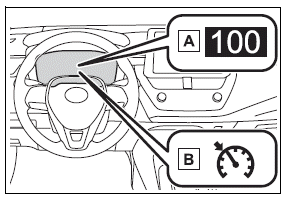
- Set vehicle speed
- Cruise control indicator
■ Switches
.png)
- Driving assist mode select switch
- Driving assist switch
- "+" switch / "RES" switch
- "-" switch
- Cancel switch
Using the cruise control
Setting the vehicle speed
1. Press the driving assist mode select switch to select cruise control.
The cruise control indicator will illuminate.
.png)
2. Using the accelerator pedal, accelerate to the desired vehicle speed (approximately 20 mph [30 km/h] or more), and press the driving assist switch to set the set vehicle speed.
The vehicle speed at the moment the switch is released will be the set vehicle speed.
.png)
Adjusting the set vehicle speed
- Adjusting the set vehicle speed using the switches
To change the set vehicle speed, press the "+" or "-" switch until the desired speed is displayed.
.png)
- Increase set vehicle speed
- Decrease set vehicle speed
The set vehicle speed will increase or decrease as follows: Fine adjustment: By 0.6 mph (1 km/h) or 1.6 km/h (1 mph) each time the switch is pressed Large adjustment: Increases continuously while the switch is pressed and held
- Increasing the set vehicle speed using the accelerator pedal
1. Depress the accelerator pedal to accelerate the vehicle to the desired vehicle speed.
2. Press the "+" switch.
Canceling/resuming control
.png)
- Press the cancel switch or driving assist switch to cancel control.
Control will also be canceled if the brake pedal is depressed.
- Press the "RES" switch to resume control.
■Automatic cancellation of the cruise control
In the following situations, the cruise control will be canceled automatically:
- When the vehicle speed drops approximately 10 mph (16 km/h) or more below the set vehicle speed
- When the vehicle speed drops below approximately 20 mph (30 km/h)
- When the brake control or output restriction control of a driving support system operates (For example: PCS, drive-start control)
- When the parking brake has been operated
- Situations in which some or all of the functions of the system cannot operate.
Display and system operation state
The operating state of cruise control is indicated.
.png)
Emergency Driving Stop System
The emergency driving stop system is a system which automatically decelerates and stops the vehicle within its lane if the driver becomes unable to continue driving the vehicle, such as if they have suffered a medical emergency, etc.
During LTA (Lane Tracing Assist) control, if the system does not detect driving operations, such as if the driver is not holding the steering wheel, and determines the driver is not responsive, the vehicle will be decelerated and stopped within its current lane to help avoid a collision or reduce the impact of a collision.
WARNING
■For safe use
- Driving safely is solely the responsibility of the driver. Pay careful attention to the surrounding conditions in order to ensure safe driving. The emergency driving stop system is designed to provide support in an emergency where it is difficult for the driver to continue driving, such as if they have had a medical emergency. It is not designed to support driving while drowsy or in poor physical health, or inattentive driving.
- Although the emergency driving stop system is designed to decelerate the vehicle within its lane to help avoid or help reduce the impact of a collision if the system determines that it is difficult for the driver to continue driving, its effectiveness may change according to various conditions. Therefore, it may not always be able to achieve the same level of performance.
Also, if the operating conditions are not met, this function will not operate.
- After the emergency driving stop system operates, if driving becomes possible again, immediately begin driving again or, if necessary, park the vehicle on the shoulder of the road and set a warning reflector and flare to warn other drivers of your stopped vehicle.
- After this system operates, passengers should attend to the driver as necessary and take appropriate hazard prevention measures, such as moving to a place where safety can be ensured, such as the shoulder of the road or behind a guardrail.
- This system detects the condition of the driver through the operation of the steering wheel.
This system may operate if the driver is aware but intentionally and continuously does not operate the vehicle. Also, the system may not operate if it cannot determine that the driver is not responsive, such as if they are leaning on the steering wheel.
Summary of the system
Operation of this system is separated into 4 control states.
Through control state "Warning phase 1" and "Warning phase 2", the system determines if the driver is aware and responsive while outputting a warning and controlling the vehicle speed. If the system determines the driver is not responsive, it will operate in control state "Deceleration stop phase" and "Stop hold phase" and decelerate and stop the vehicle. It will then operate continuously in "Stop hold phase".
■Operating conditions
This system operates when all of the following conditions are met:
- When the LTA is on
- When the vehicle speed is approximately 30 mph (50 km/h) or more
■Operation cancelation conditions
In the following situations, system operation will be canceled:
- When LTA control has been canceled (the LTA switch has been pressed, etc.)
- When the dynamic radar cruise control has been canceled
- When driver operations are detected (the steering wheel is held, the brake pedal, accelerator pedal, parking brake, hazard light switch, or turn signal lever is operated)
- When the driving assist switch is pressed while in the stop and hold phase
- When the engine switch has been turned from ON to off
- Situations in which some or all of the functions of the system cannot operate
■LTA control when operation is canceled
When emergency driving stop system operation is canceled, LTA control may also be canceled.
Warning phase 1
If driving operations are not detected after the hands off steering wheel warning operates, a buzzer will sound intermittently and a message will be displayed to warn the driver, and the system will judge if the driver is responsive or not. If driving operations, such as holding the steering wheel, are not performed within a certain amount of time, the system will enter warning phase 2.
Warning phase 2
After entering warning phase 2, a buzzer will sound in short intervals and a message will be displayed to warn the driver, and the vehicle will slowly decelerate.
If driving operations, such as holding the steering wheel, are not performed within a certain amount of time, the system will determine that the driver is not responsive and enter the deceleration stop phase.
The audio system will be muted until the driver becomes responsive.
When the vehicle is decelerating, the brake lights may illuminate, depending on the road conditions, etc.
Deceleration stop phase
After entering the deceleration stop phase, a buzzer will sound continuously and a message will be displayed to warn the driver, and the vehicle will slowly decelerate and stop. After the vehicle stops, the system will enter the stop and hold phase.
Stop hold phase
After the vehicle is stopped, the parking brake will be applied automatically. After entering the stop and hold phase, the buzzer will continue sounding continuously and the emergency flashers (hazard lights) will flash to warn other drivers of the emergency.
■Restricted functions after the operation is canceled
After shifting to the deceleration stop phase, the following functions will not be available until the engine is re-started even though the emergency driving stop system is canceled:
- LTA
Download Manual