Operating the lights and wipers
Headlight switch
The headlights can be operated manually or automatically.
Operating instructions
Turning the end of the lever turns on the lights as follows:
-
 The headlights, daytime running lights and all the lights listed below turn on and off automatically.
(When the engine switch is in IGNITION ON mode)
-
 The side marker, parking, tail, license plate, instrument panel lights, and daytime running lights turn on.
 -
 The headlights and all the lights listed above (except daytime running lights) turn on.
 -
 The daytime running lights turn off.
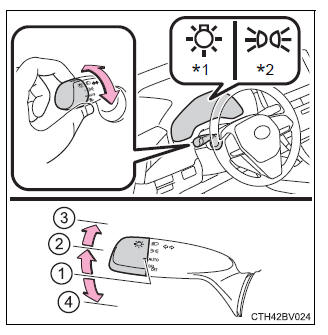
*1: For U.S.A.
*2: For Canada
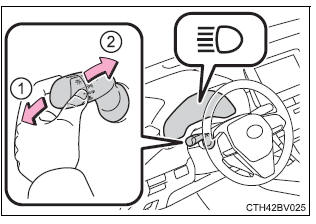
Turning on the high beam headlights
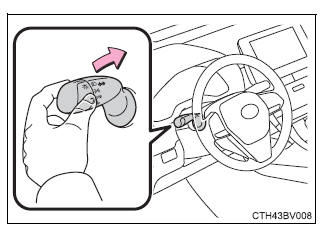
- With the headlights on, push the lever away from you to turn on the high beams.
Pull the lever toward you to the center position to turn the high beams off.
- Pull the lever toward you and release it to flash the high beams once.
You can flash the high beams with the headlights on or off.
Cornering lights (if equipped)
- When the steering wheel or turn signal lever is operated while the headlights are on (low beam), a cornering light will turn on and light up the direction of movement of the vehicle. The cornering lights are designed to ensure excellent visibility when making a turn at an intersection.
However, when vehicle speed is approximately 93 mph (150 km/h) or higher, the cornering lights will not turn on.
- When the shift lever is in R while the headlights are on (low beam), both cornering lights will turn on. This is designed to enhance visibility when parking.
■Daytime running light system
- Type A: The daytime running lights illuminate using the same lights as the low beam headlights and illuminate dimmer than the low beam headlights.
Type B: The daytime running lights illuminate using the same lights as the parking lights and illuminate brighter than the parking lights.
- To make your vehicle more visible to other drivers during daytime driving, the daytime running lights turn on automatically when all of the following conditions are met. (The daytime running lights are not designed for use at night.)
- The engine is running
- The parking brake is released
- The headlight switch is in the
 or
or  * position
*: When the surroundings are bright
The daytime running lights remain on after they illuminate, even if the parking brake is set again.
- For U.S.A.: Daytime running lights can be turned off by operating the switch.
- Compared to turning on the headlights, the daytime running light system offers greater durability and consumes less electricity, so it can help improve fuel economy.
■Cornering lights (if equipped) When the cornering lights are on for more than 30 minutes, they will turn off automatically.
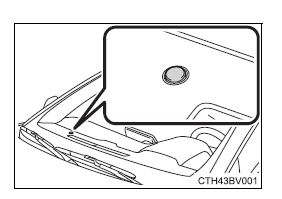
■Headlight control sensor The sensor may not function properly if an object is placed on the sensor, or anything that blocks the sensor is affixed to the windshield.
Doing so interferes with the sensor detecting the level of ambient light and may cause the automatic headlight system to malfunction.
■Automatic light off system
- When the headlights are on: The headlights and tail lights turn off 30 seconds after the engine switch is turned to ACCESSORY mode or turned off and a door is opened and closed. (The lights turn off immediately if
 on the key is pressed twice after all the doors are closed.)
 - When only the tail lights are on: The tail lights turn off automatically if the engine switch is turned to ACCESSORY mode or turned off and the driver's door is opened.
To turn the lights on again, turn the engine switch to IGNITION ON mode, or turn the light switch off once and then back to  or
or  .
.
If any of the doors or trunk lid is kept open, the lights automatically turn off after 20 minutes.
■Light reminder buzzer (except when the light switch is in ) A buzzer sounds when the engine switch is turned off or turned to ACCESSORY mode and the driver's door is opened while the lights are turned on.
■Windshield wiper linked headlight illumination When driving during daytime with the headlight switch turned to , if the windshield wipers are used, the headlights will turn on automatically after several seconds to help enhance the visibility of your vehicle.
■Battery-saving function
In the following conditions, the remaining lights will go off automatically after 20 minutes in order to prevent the vehicle battery from being discharged:
- The headlights and/or tail lights are on.
- The engine switch is in ACCESSORY mode or turned off.
This function will be canceled in any of the following situations:
- When the engine switch is turned to IGNITION ON mode.
- When the light switch is operated
- When a door or the trunk is opened or closed
■Welcome lighting If the headlight switch is turned to and the surrounding area is dark, unlocking the doors using the smart key system or wireless remote control will turn the parking lights and tail lights on automatically.
■Customization Some functions can be customized.
| NOTICE
■To prevent battery discharge Do not leave the lights on longer than necessary when the engine is not running. |
Automatic High Beam
|
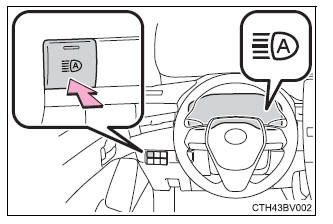
The Automatic High Beam uses a camera sensor located behind the upper portion of the windshield to assess the brightness of the lights of vehicles ahead, streetlights, etc., and automatically turns the high beams on or off as necessary.
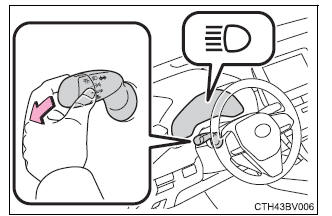
Activating the Automatic High Beam 1. Push the lever away from you with the headlight switch in the
2. Press the Automatic High Beam switch. The Automatic High Beam indicator will come on when the system is operating.
Turning the high beams on/off manually ■ Switching to the low beams Pull the lever to its original position. The Automatic High Beam indicator will turn off. Push the lever away from you to activate the Automatic High Beam system again.
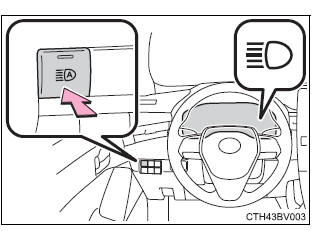
■ Switching to the high beams Press the Automatic High Beam switch. The Automatic High Beam indicator will turn off and the high beam indicator will turn on. Press the switch to activate the Automatic High Beam system again.
■Conditions to turn the high beams on/off automatically
■Camera sensor detection information
■Temporarily lowering sensor sensitivity The sensitivity of the sensor can be temporarily lowered. 1. Turn the engine switch off while the following conditions are met.
2. Turn the engine switch to the IGNITION ON mode. 3. Within 5 seconds after 2, repeat pulling the headlight switch lever to the original position then pushing it to the high beam position quickly 9 times, then leave the lever in high beam position. Automatic High Beam (headlights) may turn on even when the vehicle is stopped. |
Windshield wipers and washer
Operating the wiper lever
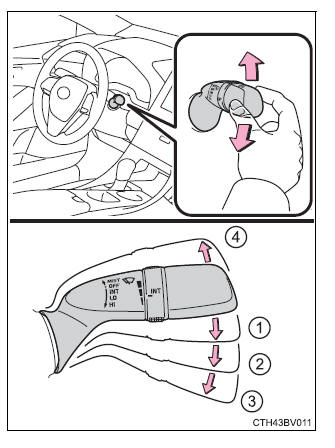
The wiper operation is selected by moving the lever as follows. When intermittent windshield wiper operation is selected, the wiper interval can be also adjusted.
-
 *1 or
*1 or  *2
*2
Intermittent windshield wiper operation
The intermittent windshield wiper operates more frequently as vehicle speed becomes higher. -
 *1 or
*1 or  *2
*2
Low speed windshield wiper operation -
 *1 or
*1 or  *2
*2
High speed windshield wiper operation -
 *1 or
*1 or  *2
*2
Temporary operation
*1: For U.S.A.
*2: For Canada
Wiper intervals can be adjusted when intermittent operation is selected.
- Increases the intermittent windshield wiper frequency
- Decreases the intermittent windshield wiper frequency
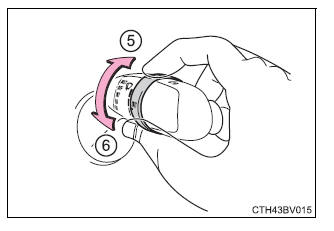
- Washer/wiper dual operation
Wipers will automatically operate a couple of times after the washer squirts.(After operating several times, the wipers operate once more time after a short delay to prevent dripping.
However, the dripping prevention does not operate while the vehicle is moving.)
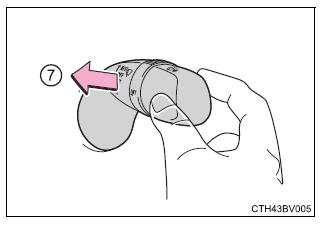
■The windshield wiper and washer can be operated when The engine switch is in IGNITION ON mode.
■If no windshield washer fluid sprays Check that the washer nozzles are not blocked if there is washer fluid in the windshield washer fluid reservoir.
■When stopping the engine in an emergency while driving If the windshield wipers are operating when the engine is stopped, the windshield wipers will operate in high speed operation. After the vehicle is stopped, operation will return to normal when the engine switch is turned to IGNITION ON mode, or operation will stop when the driver's door is opened.
| WARNING
■Caution regarding the use of washer fluid When it is cold, do not use the washer fluid until the windshield becomes warm. The fluid may freeze on the windshield and cause low visibility. This may lead to an accident, resulting in death or serious injury. |
| NOTICE
■When the windshield is dry Do not use the wipers, as they may damage the windshield. ■When the washer fluid tank is empty Damage to the washer fluid pump may be caused if the lever is pulled toward you and held continually. ■When a nozzle becomes blocked In this case, contact your Toyota dealer. Do not try to clear it with a pin or other object. The nozzle will be damaged. |
Changing the windshield wiper rest position/Lifting the windshield wipers
When the windshield wipers are not being used, they retract to below the hood. To enable the windshield wipers to be lifted when parking in cold conditions or when replacing a windshield wiper insert, change the rest position of the windshield wipers to the service position using the wiper lever.
■ Raising the wipers to the service position Within approximately 45 seconds of turning the engine switch off, move the wiper lever to the  *1 or
*1 or  *2 position and hold it for approximately 2 seconds or more.
The wipers will move to the service position.
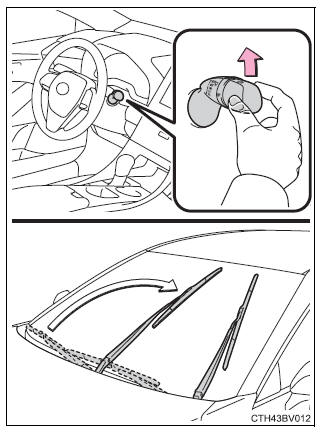
*1: For U.S.A.
*2: For Canada
■ Lifting the windshield wipers While holding the hook portion of the wiper arm, lift the windshield wiper from the windshield.
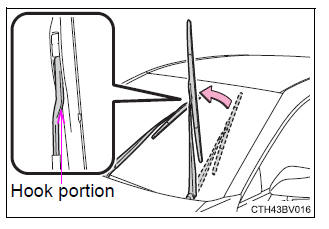
■Lowering the windshield wipers to the retracted position With the windshield wipers placed on the windshield, turn the engine switch to IGNITION ON mode and then move the wiper lever to an operating position.
When the wiper switch is turned off, the windshield wipers will stop at the retracted position.
| NOTICE
■When lifting the windshield wipers
|
Download Manual