Using the driving support systems
Toyota Safety Sense P
The Toyota Safety Sense P consists of the following drive assist systems and contributes to a safe and comfortable driving experience:
- PCS (Pre-Collision System)
- LDA (Lane Departure Alert with steering control)
- Automatic High Beam
- Dynamic radar cruise control with full-speed range
| WARNING
■Toyota Safety Sense P The Toyota Safety Sense P is designed to operate under the assumption that the driver will drive safely, and is designed to help reduce the impact to the occupants and the vehicle in the case of a collision or assist the driver in normal driving conditions. As there is a limit to the degree of recognition accuracy and control performance that this system can provide, do not overly rely on this system. The driver is always responsible for paying attention to the vehicle's surroundings and driving safely. |
Vehicle data recording
The pre-collision system is equipped with a sophisticated computer that will record certain data, such as:
- Accelerator status
- Brake status
- Vehicle speed
- Operation status of the pre-collision system functions
- Information (such as the distance and relative speed between your vehicle and the vehicle ahead or other objects)
- Images from the camera sensor (available only when the pre-collision braking function or the pre-collision brake assist function was operating)
The pre-collision system does not record conversations, sounds or images of the inside of the vehicle.
- Data usage
Toyota may use the data recorded in this computer to diagnose malfunctions, conduct research and development, and improve quality.Toyota will not disclose the recorded data to a third party except:
- With the consent of the vehicle owner or with the consent of the lessee if the vehicle is leased
- In response to an official request by the police, a court of law or a government agency
- For use by Toyota in a lawsuit
- For research purposes where the data is not tied to a specific vehicle or vehicle owner
- Recorded images can be erased using a specialized device.
The image recording function can be disabled. However, if the function is disabled, data from when the pre-collision system operates will not be available.
Sensors
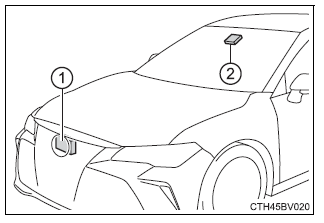
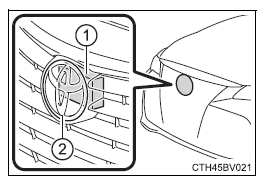
Two types of sensors, located behind the front grille and windshield, detect information necessary to operate the drive assist systems.
- Radar sensor
- Camera sensor
| WARNING
■To avoid malfunction of the radar sensor Observe the following precautions. Otherwise, the radar sensor may not operate properly, possibly leading to an accident resulting in death or serious injury.
|
| WARNING
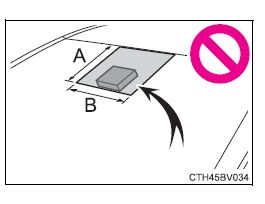
■To avoid malfunction of the camera sensor Observe the following precautions. Otherwise, the camera sensor may not operate properly, possibly leading to an accident resulting in death or serious injury.
|
PCS (Pre-Collision System)
The pre-collision system uses a radar sensor and camera sensor to detect vehicles and pedestrians in front of your vehicle.
When the system determines that the possibility of a frontal collision with a vehicle or pedestrian is high, a warning operates to urge the driver to take evasive action and the potential brake pressure is increased to help the driver avoid the collision. If the system determines that the possibility of a frontal collision with a vehicle or pedestrian is extremely high, the brakes are automatically applied to help avoid the collision or help reduce the impact of the collision. The pre-collision system can be disabled/enabled and the warning timing can be changed.
Pre-collision warning
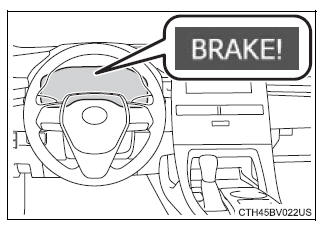
When the system determines that the possibility of a frontal collision is high, a buzzer will sound and a warning message will be displayed on the multi-information display to urge the driver to take evasive action.
Pre-collision brake assist
When the system determines that the possibility of a frontal collision is high, the system applies greater braking force in relation to how strongly the brake pedal is depressed.
Pre-collision braking
When the system determines that the possibility of a frontal collision is high, the system warns the driver. If the system determines that the possibility of a frontal collision is extremely high, the brakes are automatically applied to help avoid the collision or reduce the collision speed.
Suspension control (if equipped)
When the system determines that the possibility of a frontal collision is high, the Adaptive Variable Suspension System will control the damping force of the shock absorbers to help maintain an appropriate vehicle posture.
| WARNING
■Limitations of the pre-collision system
■Pre-collision braking
|
| WARNING
■When to disable the pre-collision system In the following situations, disable the system, as it may not operate properly, possibly leading to an accident resulting in death or serious injury:
|
Changing settings of the pre-collision system
■ Enabling/disabling the pre-collision system The pre-collision system can be enabled/disabled on  of the multi-information display.
The system is automatically enabled each time the engine switch is turned to IGNITION ON mode.
If the system is disabled, the PCS warning light will turn on and a message will be displayed on the multi-information display.
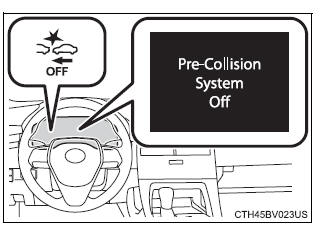
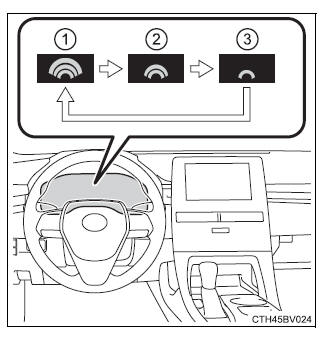
■ Changing the pre-collision warning timing The pre-collision warning timing can be changed on of the multi-information display.
The operation timing setting is retained when the engine switch is turned off.
- Far
The warning will begin to operate earlier than with the default timing. - Middle
This is the default setting. - Near
The warning will begin to operate later than with the default timing.
■Operational conditions The pre-collision system is enabled and the system determines that the possibility of a frontal collision with a vehicle or pedestrian is high.
Each function is operational at the following speeds:
- Pre-collision warning:
- Vehicle speed is between approximately 7 and 110 mph (10 and 180 km/h). (For detecting a pedestrian, vehicle speed is between approximately 7 and 50 mph [10 and 80 km/h].)
- The relative speed between your vehicle and the vehicle or pedestrian ahead is approximately 7 mph (10 km/h) or more.
- Pre-collision brake assist:
- Vehicle speed is between approximately 20 and 110 mph (30 and 180 km/h). (For detecting a pedestrian, vehicle speed is between approximately 20 and 50 mph [30 and 80 km/h].)
- The relative speed between your vehicle and the vehicle or pedestrian ahead is approximately 20 mph (30 km/h) or more.
- Pre-collision braking:
- Vehicle speed is between approximately 7 and 110 mph (10 and 180 km/h). (For detecting a pedestrian, vehicle speed is between approximately 7 and 50 mph [10 and 80 km/h].)
- The relative speed between your vehicle and the vehicle or pedestrian ahead is approximately 7 mph (10 km/h) or more.
The system may not operate in the following situations:
- If a battery terminal has been disconnected and reconnected and then the vehicle has not been driven for a certain amount of time
- If the shift lever is in R
- If VSC is disabled (only the pre-collision warning function will be operational)
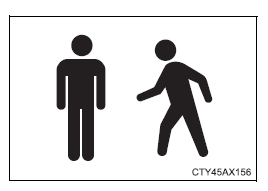
■Pedestrian detection function The pre-collision system detects pedestrians based on the size, profile, and motion of a detected object. However, a pedestrian may not be detected depending on the surrounding brightness and the motion, posture, and angle of the detected object, preventing the system from operating properly.
■Cancelation of the pre-collision braking If either of the following occur while the pre-collision braking function is operating, it will be canceled:
- The accelerator pedal is depressed strongly.
- The steering wheel is turned sharply or abruptly.
■Conditions under which the system may operate even if there is no possibility of a collision
- In some situations such as the following, the system may determine that there is a possibility of a frontal collision and operate.
- When passing a vehicle or pedestrian
- When changing lanes while overtaking a preceding vehicle
- When overtaking a preceding vehicle that is changing lanes
- When overtaking a preceding vehicle that is making a left/right turn
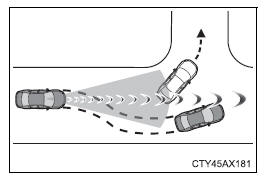
- When passing a vehicle in an oncoming lane that is stopped to make a right/left turn
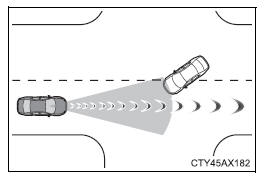
- When driving on a road where relative location to vehicle ahead in an adjacent lane may change, such as on a winding road
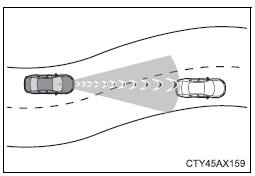
- When rapidly closing on a vehicle ahead
- If the front of the vehicle is raised or lowered, such as when the road surface is uneven or undulating
- When approaching objects on the roadside, such as guardrails, utility poles, trees, or walls
- When there is a vehicle, pedestrian, or object by the roadside at the entrance of a curve
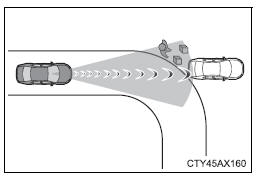
- When driving on a narrow path surrounded by a structure, such as in a tunnel or on an iron bridge
- When there is a metal object (manhole cover, steel plate, etc.), steps, or a protrusion on the road surface or roadside
- When a crossing pedestrian approaches very close to the vehicle
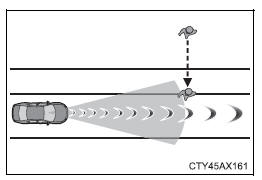
- When passing through a place with a low structure above the road (low ceiling, traffic sign, etc.)
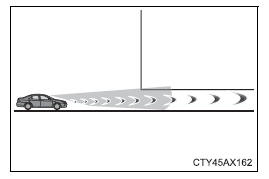
- When passing under an object (billboard, etc.) at the top of an uphill road
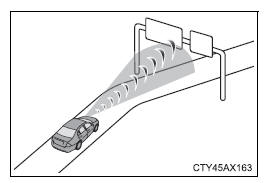
- When rapidly closing on an electric toll gate barrier, parking area barrier, or other barrier that opens and closes
- When using an automatic car wash
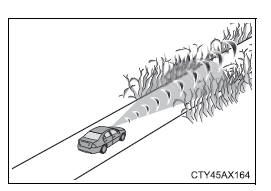
- When driving through or under objects that may contact the vehicle, such as thick grass, tree branches, or a banner
- When the vehicle is hit by water, snow, dust, etc. from a vehicle ahead
- When driving through steam or smoke
- When there are patterns or paint on the road or a wall that may be mistaken for a vehicle or pedestrian
- When driving near an object that reflects radio waves, such as a large truck or guardrail
- When driving near a TV tower, broadcasting station, electric power plant, or other location where strong radio waves or electrical noise may be present
■Situations in which the system may not operate properly
- In some situations such as the following, a vehicle may not be detected by the radar sensor and camera sensor, preventing the system from operating properly:
- If an oncoming vehicle is approaching your vehicle
- If a vehicle ahead is a motorcycle or bicycle
- When approaching the side or front of a vehicle
- If a preceding vehicle has a small rear end, such as an unloaded truck
- If a preceding vehicle has a low rear end, such as a low bed trailer
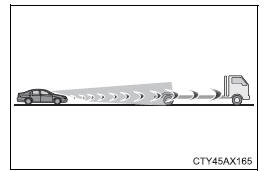
- If a vehicle ahead is carrying a load which protrudes past its rear bumper
- If a vehicle ahead has extremely high ground clearance
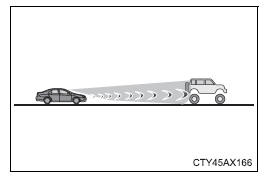
- If a vehicle ahead is irregularly shaped, such as a tractor or side car
- If the sun or other light is shining directly on a vehicle ahead
- If a vehicle cuts in front of your vehicle or emerges from beside a vehicle
- If a vehicle ahead makes an abrupt maneuver (such as sudden swerving, acceleration or deceleration)
- When suddenly cutting behind a preceding vehicle
- When a vehicle ahead is not directly in front of your vehicle
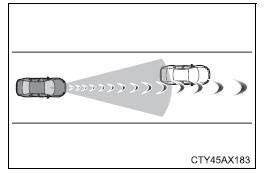
- When driving in inclement weather such as heavy rain, fog, snow or a sandstorm
- When the vehicle is hit by water, snow, dust, etc. from a vehicle ahead
- When driving through steam or smoke
- When driving in a place where the surrounding brightness changes suddenly, such as at the entrance or exit of a tunnel
- When a very bright light, such as the sun or the headlights of oncoming traffic, shines directly into the camera sensor
- When the surrounding area is dim, such as at dawn or dusk, or while at night or in a tunnel
- After the engine has started the vehicle has not been driven for a certain amount of time
- While making a left/right turn and for a few seconds after making a left/ right turn
- While driving on a curve and for a few seconds after driving on a curve
- If your vehicle is skidding
- If the front of the vehicle is raised or lowered
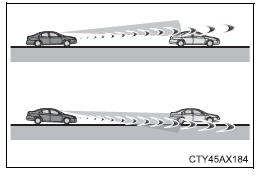
- If the wheels are misaligned
- If a wiper blade is blocking the camera sensor
- The vehicle is wobbling.
- The vehicle is being driven at extremely high speeds.
- When driving on a hill
- If the radar sensor or camera sensor is misaligned
- In some situations such as the following, sufficient braking force may not be obtained, preventing the system from performing properly:
- If the braking functions cannot operate to their full extent, such as when the brake parts are extremely cold, extremely hot, or wet
- If the vehicle is not properly maintained (brakes or tires are excessively worn, improper tire inflation pressure, etc.)
- When the vehicle is being driven on a gravel road or other slippery surface
- Some pedestrians such as the following may not be detected by the radar sensor and camera sensor, preventing the system from operating properly:
- Pedestrians shorter than approximately 3.2 ft. (1 m) or taller than approximately 6.5 ft. (2 m)
- Pedestrians wearing oversized clothing (a rain coat, long skirt, etc.), making their silhouette obscure
- Pedestrians who are carrying large baggage, holding an umbrella, etc., hiding part of their body
- Pedestrians who are bending forward or squatting
- Pedestrians who are pushing a stroller, wheelchair, bicycle or other vehicle
- Groups of pedestrians which are close together
- Pedestrians who are wearing white and look extremely bright
- Pedestrians in the dark, such as at night or while in a tunnel
- Pedestrians whose clothing appears to be nearly the same color or brightness as their surroundings
- Pedestrians near walls, fences, guardrails, or large objects
- Pedestrians who are on a metal object (manhole cover, steel plate, etc.) on the road
- Pedestrians who are walking fast
- Pedestrians who are changing speed abruptly
- Pedestrians running out from behind a vehicle or a large object
- Pedestrians who are extremely close to the side of the vehicle (outside rear view mirror, etc.)
■If the PCS warning light flashes or illuminates and a warning message is displayed on the multi-information display The pre-collision system may be temporarily unavailable or there may be a malfunction in the system.
- In the following situations, the warning light will turn off, the message will disappear and the system will become operational when normal operating conditions return:
- When the radar sensor or camera sensor or the area around either sensor is hot, such as in the sun
- When the radar sensor or camera sensor or the area around either sensor is cold, such as in an extremely cold environment
- When a front sensor is dirty or covered with snow, etc.
- When the part of the windshield in front of the camera sensor is fogged up or covered with condensation or ice (Defogging the windshield)
- If the camera sensor is obstructed, such as when the hood is open or a sticker is attached to the windshield near the camera sensor
- If the PCS warning light continues to flash or remains illuminated or the warning message does not disappear even though the vehicle has returned to normal, the system may be malfunctioning. Have the vehicle inspected by your Toyota dealer immediately.
■If VSC is disabled
- If VSC is disabled, the pre-collision brake assist and pre-collision braking functions are also disabled.
- The PCS warning light will turn on and "VSC Turned Off Pre-Collision Brake System Unavailable" will be displayed on the multi-information display.
LDA (Lane Departure Alert with steering control)
Summary of functions
When driving on highways and freeways with white (yellow) lines, this function alerts the driver when the vehicle might depart from its lane and provides assistance by operating the steering wheel to keep the vehicle in its lane.
The LDA system recognizes visible white (yellow) lines with the camera sensor on the upper portion of the windshield.
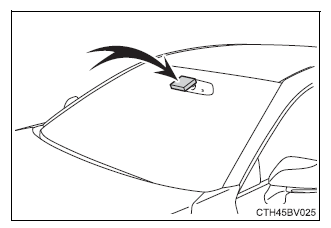
Functions included in LDA system
Lane departure alert function
When the system determines that the vehicle might depart from its lane, a warning is displayed on the multi-information display and the warning buzzer sounds to alert the driver.
When the warning buzzer sounds, check the surrounding road situation and carefully operate the steering wheel to move the vehicle back to the center of the lane.
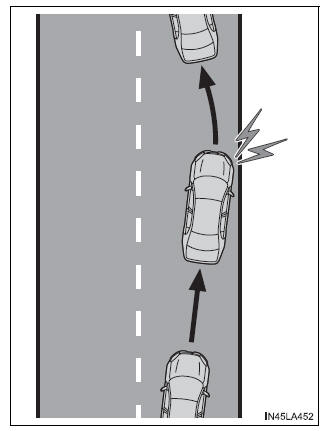
Steering control function
When the system determines that the vehicle might depart from its lane, the system provides assistance as necessary by operating the steering wheel in small amounts for a short period of time to keep the vehicle in its lane.
If the system detects that the steering wheel has not been operated for a fixed amount of time or the steering wheel is not being firmly gripped, a warning is displayed on the multi-information display and the function is temporarily canceled.
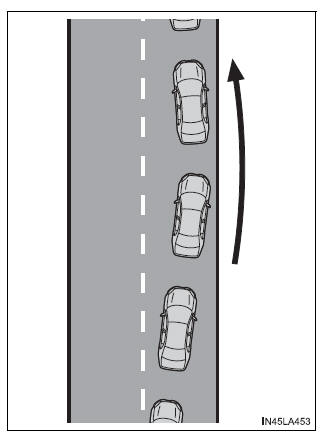
Vehicle sway warning function
When the vehicle is swaying or appears as if it may depart from its lane multiple times, the warning buzzer sounds and a message is displayed on the multi-information display to alert the driver.
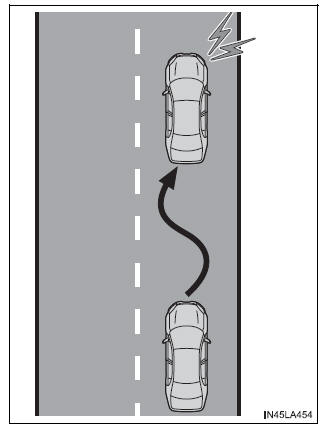
| WARNING
■Before using LDA system Do not rely solely upon the LDA system. The LDA system does not automatically drive the vehicle or reduce the amount of attention that must be paid to the area in front of the vehicle. The driver must always assume full responsibility for driving safely by paying careful attention to the surrounding conditions and operating the steering wheel to correct the path of the vehicle. Also, the driver must take adequate breaks when fatigued, such as from driving for a long period of time. Failure to perform appropriate driving operations and pay careful attention may lead to an accident, resulting in death or serious injury. ■To avoid operating LDA system by mistake When not using the LDA system, use the LDA switch to turn the system off. |
| WARNING
■Situations unsuitable for LDA system Do not use the LDA system in the following situations. The system may not operate properly and lead to an accident, resulting in death or serious injury.
■Preventing LDA system malfunctions and operations performed by mistake
|
Turning LDA system on
Press the LDA switch to turn the LDA system on.
The LDA indicator illuminates and a message is displayed on the multi-information display.
Press the LDA switch again to turn the LDA system off.
When the LDA system is turned on or off, operation of the LDA system continues in the same condition the next time the engine is started.
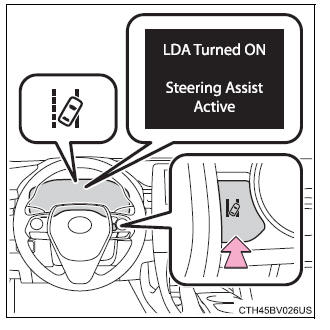
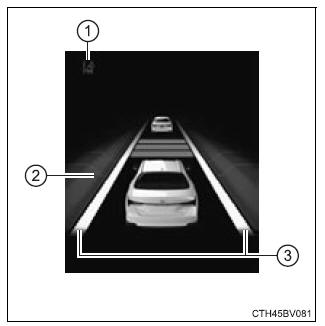
Indications on multi-information display
The illustration used is intended as an example, and may differ from the image that is actually displayed on the multi-information display.
- LDA indicator
The illumination condition of the indicator informs the driver of the system operation status.Illuminated in white: LDA system is operating.
Illuminated in green: Steering wheel assistance of the steering control function is operating.
Flashing in amber: Lane departure alert function is operating.
- Operation display of steering wheel operation support
Indicates that steering wheel assistance of the steering control function is operating. - Lane departure alert function display
Displayed when the multi-information display is switched to the driving assist system information screen.
Inside of displayed white lines is white
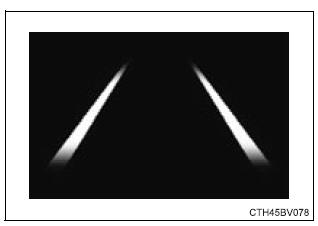
Indicates that the system is recognizing white (yellow) lines. When the vehicle departs from its lane, the white line displayed on the side the vehicle departs from flashes yellow.
Inside of displayed white lines is black
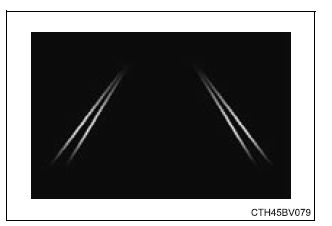
Indicates that the system is not able to recognize white (yellow) lines or is temporarily canceled.
■Operation conditions of each function
- Lane departure alert function
This function operates when all of the following conditions are met.- LDA is turned on.
- Vehicle speed is approximately 32 mph (50 km/h) or more.
- System recognizes white (yellow) lines.
- Width of traffic lane is approximately 9.8 ft. (3 m) or more.
- Turn signal lever is not operated.
- Vehicle is driven on a straight road or around a gentle curve with a radius of more than approximately 492 ft. (150 m).
- No system malfunctions are detected.
- Steering control function
This function operates when all of the following conditions are met in addition to the operation conditions for the lane departure alert function.- Setting for "Steering Assist" in of the multi-information display is set to "On".
- Vehicle is not accelerated or decelerated by a certain amount or more.
- Steering wheel is not operated with a steering force level suitable for changing lanes.
- ABS, VSC, TRAC and PCS are not operating.
- TRAC or VSC is not turned off.
- Hands off steering wheel warning is not displayed.
- Setting for "Steering Assist" in
- Vehicle sway warning function
This function operates when all of the following conditions are met.- Setting for "Sway Warning" in of the multi-information display is set to "On".
- Vehicle speed is approximately 32 mph (50 km/h) or more.
- Width of traffic lane is approximately 9.8 ft. (3 m) or more.
- No system malfunctions are detected.
- Setting for "Sway Warning" in
■Temporary cancellation of functions When the operation conditions are no longer met, a function may be temporarily canceled. However, when the operation conditions are met again, operation of the function is automatically restored.
■Steering control function Depending on the vehicle speed, lane departure situation, road conditions, etc., the driver may not feel the function is operating or the function may not operate at all.
■Lane departure alert function The warning buzzer may be difficult to hear due to external noise, audio playback, etc.
■Hands off steering wheel warning When the system determines that the driver has removed their hands from the steering wheel while the steering control function is operating, a warning message urging the driver to hold the steering wheel and the symbol shown in the illustration are displayed on the multi-information display
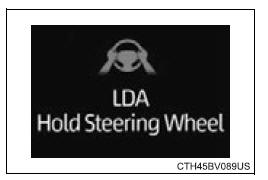
If the driver continues to keep their hands off of the steering wheel, a warning message and the symbol shown in the illustration are displayed on the multi-information display, and the function is temporarily canceled.
This warning also operates in the same way when the driver continuously operates the steering wheel only a small amount. Always keep your hands on the steering wheel when using this system, regardless of warnings.
Depending on the vehicle and road conditions, the warning may not operate.
■Vehicle sway warning function When the system determines that the vehicle is swaying while the vehicle sway warning function is operating, a buzzer sounds and a warning message urging the driver to rest and the symbol shown in the illustration are simultaneously displayed on the multi-information display.
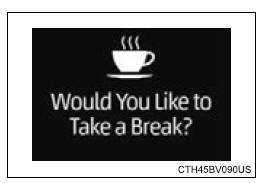
Depending on the vehicle and road conditions, the warning may not operate.
■White (yellow) lines are only on one side of road The LDA system will not operate for the side on which white (yellow) lines could not be recognized.
■Conditions in which functions may not operate properly In the following situations, the camera sensor may not detect white (yellow) lines and various functions may not operate normally.
- There are shadows on the road that run parallel with, or cover, the white (yellow) lines.
- The vehicle is driven in an area without white (yellow) lines, such as in front of a tollgate or checkpoint, or at an intersection, etc.
- The white (yellow) lines are cracked, "Botts' dots", "Raised pavement marker" or stones are present.
- The white (yellow) lines cannot be seen or are difficult to see due to sand, etc.
- The vehicle is driven on a road surface that is wet due to rain, puddles, etc.
- The traffic lines are yellow (which may be more difficult to recognize than lines that are white).
- The white (yellow) lines cross over a curb, etc.
- The vehicle is driven on a bright surface, such as concrete.
- The vehicle is driven on a surface that is bright due to reflected light, etc.
- The vehicle is driven in an area where the brightness changes suddenly, such as at the entrances and exits of tunnels, etc.
- Light from the headlights of an oncoming vehicle, the sun, etc. enters the camera.
- The vehicle is driven where the road diverges, merges, etc.
- The vehicle is driven on a slope.
- The vehicle is driven on a road which tilts left or right, or a winding road.
- The vehicle is driven on an unpaved or rough road.
- The vehicle is driven around a sharp curve.
- The traffic lane is excessively narrow or wide.
- The vehicle is extremely tilted due to carrying heavy luggage or having improper tire pressure.
- The distance to the preceding vehicle is extremely short.
- The vehicle is moving up and down a large amount due to road conditions during driving (poor roads or road seams).
- The headlight lenses are dirty and emit a faint amount of light at night, or the beam axis has deviated.
- The vehicle is struck by a crosswind.
- The vehicle has just changed lanes or crossed an intersection.
- Snow tires, etc. are equipped.
■Warning message If the following warning message is displayed on the multi-information display and the LDA indicator illuminates in amber, follow the appropriate troubleshooting procedure.
| Warning message | Details/Actions |
| "LDA Malfunction Visit Your Dealer" | The system may not be operating properly.
→ Have the vehicle inspected at your Toyota dealer. |
| "Front Camera Unavailable" | The operation conditions of the camera sensor (temperature, etc.) are not met.
→ When the operation conditions of the camera sensor (temperature, etc.) are met, the LDA system will become available. Turn the LDA system off, wait for a little while, and then turn the LDA system back on. |
| "LDA Unavailable" | The LDA system is temporarily canceled due to a malfunction in a sensor other than the camera sensor.
→ Turn the LDA system off and follow the appropriate troubleshooting procedures for the warning message. Afterward, drive the vehicle for a short time, and then turn the LDA system back on. |
| "LDA Unavailable Below Approx. 32MPH" | The LDA system cannot be used as the vehicle speed is less than approximately 32 mph (50 km/h).
→ Drive the vehicle at approximately 32 mph (50 km/h) or more. |
If a different warning message is displayed, follow the instructions displayed on the screen.
■Customization Some functions can be customized.
Dynamic radar cruise control swith full-speed range
Summary of functions
In vehicle-to-vehicle distance control mode, the vehicle automatically accelerates, decelerates and stops to match the speed changes of the preceding vehicle even if the accelerator pedal is not depressed. In constant speed control mode, the vehicle runs at a fixed speed.
Use the dynamic radar cruise control with full-speed range on freeways and highways.
- Vehicle-to-vehicle distance control mode
- Constant speed control mode
■ Meter display
- Display
- Set speed
- Indicators
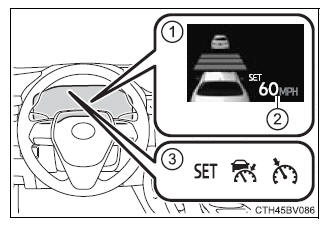
■ Operation switches
- Vehicle-to-vehicle distance switch
- "+ RES" switch
- Cruise control main switch
- Cancel switch
- "- SET" switch
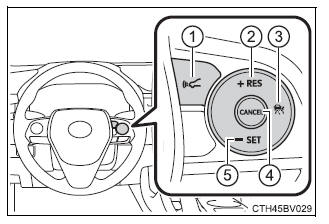
| WARNING
■Before using dynamic radar cruise control with full-speed range Driving safely is the sole responsibility of the driver. Do not rely solely on the system, and drive safely by always paying careful attention to your surroundings. The dynamic radar cruise control with full-speed range provides driving assistance to reduce the driver's burden. However, there are limitations to the assistance provided. Set the speed appropriately depending on the speed limit, traffic flow, road conditions, weather conditions, etc. The driver is responsible for checking the set speed. Even when the system is functioning normally, the condition of the preceding vehicle as detected by the system may differ from the condition observed by the driver. Therefore, the driver must always remain alert, assess the danger of each situation and drive safely. Relying on this system or assuming the system ensures safety while driving can lead to an accident, resulting in death or serious injury. ■Cautions regarding the driving assist systems Observe the following precautions, as there are limitations to the assistance provided by the system. Failure to do so may cause an accident resulting in death or serious injury.
|
| WARNING
■To avoid inadvertent dynamic radar cruise control with full-speed range activation Switch the dynamic radar cruise control with full-speed range off using the cruise control main switch when not in use. ■Situations unsuitable for dynamic radar cruise control with full-speed range Do not use dynamic radar cruise control with full-speed range in any of the following situations. Doing so may result in inappropriate speed control and could cause an accident resulting in death or serious injury.
|
Driving in vehicle-to-vehicle distance control mode
This mode employs a radar sensor to detect the presence of vehicles up to approximately 328 ft. (100 m) ahead, determines the current vehicle-to-vehicle following distance, and operates to maintain a suitable following distance from the vehicle ahead.
Note that vehicle-to-vehicle distance will close in when traveling on downhill slopes.
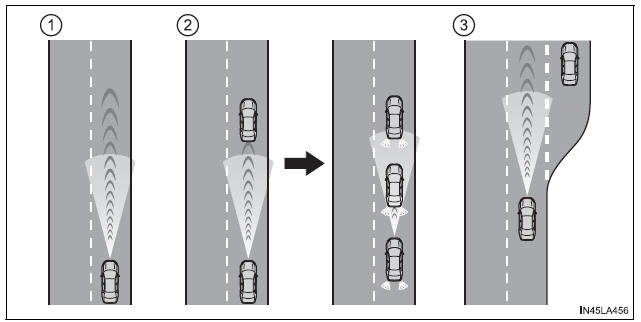
- Example of constant speed cruising
When there are no vehicles ahead
The vehicle travels at the speed set by the driver. The desired vehicle-to-vehicle distance can also be set by operating the vehicle-to-vehicle distance switch. - Example of deceleration cruising and follow-up cruising
When a preceding vehicle driving slower than the set speed appears
When a vehicle is detected running ahead of you, the system automatically decelerates your vehicle. When a greater reduction in vehicle speed is necessary, the system applies the brakes (the stop lights will come on at this time). The system will respond to changes in the speed of the vehicle ahead in order to maintain the vehicle-to-vehicle distance set by the driver.Approach warning warns you when the system cannot decelerate sufficiently to prevent your vehicle from closing in on the vehicle ahead.
When the vehicle ahead of you stops, your vehicle will also stop (vehicle is stopped by system control). After the vehicle ahead starts off, pressing the "+ RES" switch or depressing the accelerator pedal will resume follow-up cruising.
- Example of acceleration
When there are no longer any preceding vehicles driving slower than the set speed
The system accelerates until the set speed is reached. The system then returns to constant speed cruising
Setting the vehicle speed (vehicle-to-vehicle distance control mode)
1. Press the cruise control main switch to activate the cruise control.
Radar cruise control indicator will come on and a message will be displayed on the multi-information display.
Press the switch again to deactivate the cruise control.
If the cruise control main switch is pressed and held for 1.5 seconds or more, the system turns on in constant speed control mode.
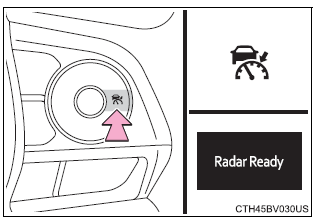
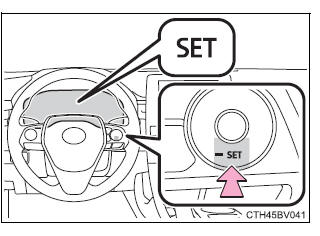
2. Accelerate or decelerate, with accelerator pedal operation, to the desired vehicle speed (at or above approximately 30 mph [50 km/h]) and press the "- SET" switch to set the speed.
Cruise control "SET" indicator will come on.
The vehicle speed at the moment the switch is released becomes the set speed.
If the switch is operated while the vehicle speed is below approximately 30 mph (50 km/h) and a preceding vehicle is present, the set speed will be adjusted to approximately 30 mph (50 km/h).
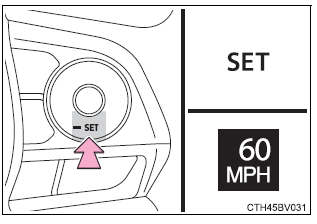
Adjusting the set speed
To change the set speed, operate the "+ RES" or "- SET" switch until the desired set speed is displayed.
- Increases the speed
(Except when the vehicle has been stopped by system control in vehicle- to-vehicle distance control mode) - Decreases the speed
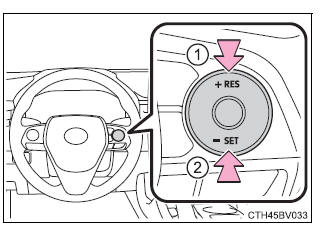
Fine adjustment: Press the switch.
Large adjustment: Press and hold the switch to change the speed, and release when the desired speed is reached.
In the vehicle-to-vehicle distance control mode, the set speed will be increased or decreased as follows:
For U.S. mainland and Hawaii
Fine adjustment: By 1 mph (1.6 km/h)*1 or 1 km/h (0.6 mph)*2 each time the switch is pressed
Large adjustment: Increases or decreases in 1 mph (1.6 km/h)*1 or 1 km/h (0.6 mph)*2 increments for as long as the switch is held
For Canada, Guam and Puerto Rico
Fine adjustment: By 1 mph (1.6 km/h)*1 or 1 km/h (0.6 mph)*2 each time the switch is pressed
Large adjustment: Increases or decreases in 5 mph (8 km/h)*1 or 5 km/h (3.1 mph)*2 increments for as long as the switch is held
In the constant speed control mode, the set speed will be increased or decreased as follows:
Fine adjustment: By 1 mph (1.6 km/h)*1 or 1 km/h (0.6 mph)*2 each time the switch is pressed
Large adjustment: The speed will continue to change while the switch is held.
*1: When the set speed is shown in "MPH"
*2: When the set speed is shown in "km/h"
Changing the vehicle-to-vehicle distance (vehicle-to-vehicle distance control mode)
Pressing the switch changes the vehicle-to-vehicle distance as follows:
- Long
- Medium
- Short
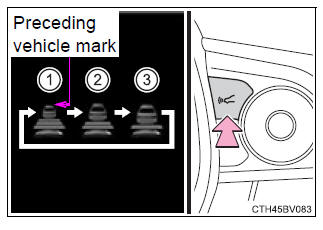
The vehicle-to-vehicle distance is set automatically to long mode when the engine switch is turned to IGNITION ON mode.
If a vehicle is running ahead of you, the preceding vehicle mark will also be displayed.
Vehicle-to-vehicle distance settings (vehicle-to-vehicle distance control mode)
Select a distance from the table below. Note that the distances shown correspond to a vehicle speed of 50 mph (80 km/h). Vehicle-to-vehicle distance increases/decreases in accordance with vehicle speed.
When the vehicle is stopped by system control, the vehicle stops at a certain vehicle-to-vehicle distance depending on the situation.
| Distance options | Vehicle-to-vehicle distance |
| Long | Approximately 160 ft. (50 m) |
| Medium | Approximately 130 ft. (40 m) |
| Short | Approximately 100 ft. (30 m) |
Resuming follow-up cruising when the vehicle has been stopped by system control (vehicle-to-vehicle distance control mode)
After the vehicle ahead of you starts off, press the "+ RES" switch.
Your vehicle will also resume follow- up cruising if the accelerator pedal is depressed after the vehicle ahead of you starts off.
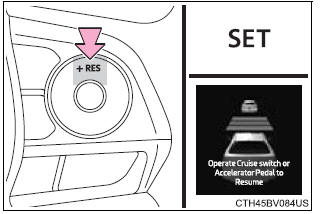
Canceling and resuming the speed control
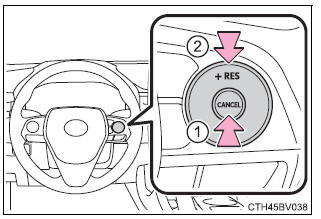
- Pressing the cancel switch cancels the speed control.
The speed control is also canceled when the brake pedal is depressed.
(When the vehicle has been stopped by system control, depressing the brake pedal does not cancel the setting.)
- Pressing the "+ RES" switch resumes the cruise control and returns vehicle speed to the set speed.
However, when a vehicle ahead is not detected, cruise control does not resume when the vehicle speed is approximately 25 mph (40 km/h) or less.
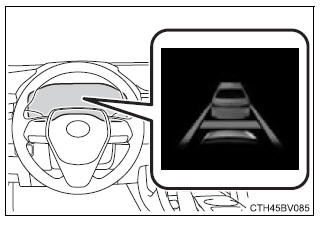
Approach warning (vehicle-to-vehicle distance control mode)
When your vehicle is too close to a vehicle ahead, and sufficient automatic deceleration via the cruise control is not possible, the display will flash and the buzzer will sound to alert the driver. An example of this would be if another driver cuts in front of you while you are following a vehicle.
Depress the brake pedal to ensure an appropriate vehicle-to-vehicle distance.
■ Warnings may not occur when In the following instances, warnings may not occur even when the vehicle-to-vehicle distance is small.
- When the speed of the preceding vehicle matches or exceeds your vehicle speed
- When the preceding vehicle is traveling at an extremely slow speed
- Immediately after the cruise control speed was set
- When depressing the accelerator pedal
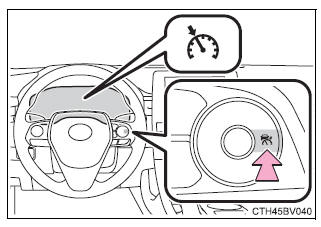
Selecting constant speed control mode
When constant speed control mode is selected, your vehicle will maintain a set speed without controlling the vehicle-to-vehicle distance.
Select this mode only when vehicle-to-vehicle distance control mode does not function correctly due to a dirty radar sensor, etc.
1. With the cruise control off, press and hold the cruise control main switch for 1.5 seconds or more.
Immediately after the switch is pressed, the radar cruise control indicator will come on. Afterwards, it switches to the cruise control indicator.
Switching to constant speed control mode is only possible when operating the switch with the cruise control off.
2. Accelerate or decelerate, with accelerator pedal operation, to the desired vehicle speed (at or above approximately 25 mph [40 km/h]) and press the "- SET" switch to set the speed.
Cruise control "SET" indicator will come on.
The vehicle speed at the moment the switch is released becomes the set speed.
■Dynamic radar cruise control with full-speed range can be set when
- The shift lever is in D or range 4 or higher of S has been selected.
- Range 4 or higher of D has been selected by using the paddle shift switch.
(vehicles with paddle shift switches)
- Vehicle speed is at or above approximately 30 mph (50 km/h). However, when a preceding vehicle is detected, the dynamic radar cruise control with full-speed range can be set even if the vehicle speed is below approximately 30 mph (50 km/h).
■Accelerating after setting the vehicle speed The vehicle can accelerate by operating the accelerator pedal. After accelerating, the set speed resumes. However, during vehicle-to-vehicle distance control mode, the vehicle speed may decrease below the set speed in order to maintain the distance to the preceding vehicle.
■When the vehicle stops while follow-up cruising
- Pressing the "+ RES" switch while the vehicle ahead stops will resume follow- up cruising if the vehicle ahead starts off within approximately 3 seconds after the switch is pressed.
- If the vehicle ahead starts off within 3 seconds after your vehicle stops, follow- up cruising will be resumed.
■Automatic cancelation of vehicle-to-vehicle distance control mode Vehicle-to-vehicle distance control mode is automatically canceled in the following situations.
- Actual vehicle speed falls at or below approximately 25 mph (40 km/h) when there are no vehicles ahead.
- The preceding vehicle leaves the lane when your vehicle is following at a vehicle speed at or below approximately 25 mph (40 km/h). Otherwise, the sensor can not properly detect the vehicle. ("Radar Cruise Control Unavailable" is displayed on the multi-information display)
- VSC is activated.
- TRAC is activated for a period of time.
- When the VSC or TRAC system is turned off.
- The sensor cannot detect correctly because it is covered in some way.
- Pre-collision braking is activated.
- The parking brake is operated.
- The vehicle is stopped by system control on a steep incline.
- The following are detected when the vehicle has been stopped by system control:
- The driver is not wearing a seat belt.
- The driver's door is opened.
- The vehicle has been stopped for about 3 minutes
If vehicle-to-vehicle distance control mode is automatically canceled for any other reason, there may be a malfunction in the system. Contact your Toyota dealer.
■Automatic cancelation of constant speed control mode
Constant speed control mode is automatically canceled in the following situations:
- Actual vehicle speed is more than approximately 10 mph (16 km/h) below the set vehicle speed.
- Actual vehicle speed falls below approximately 25 mph (40 km/h).
- VSC is activated.
- TRAC is activated for a period of time.
- When the VSC or TRAC system is turned off.
- Pre-collision braking is activated.
If constant speed control mode is automatically canceled for any other reason, there may be a malfunction in the system. Contact your Toyota dealer.
■Brake system operation sound If the brakes are applied automatically while the vehicle is in vehicle-to-vehicle distance control mode, a brake system operation sound may be heard.
This does not indicate a malfunction.
■Warning messages and buzzers for dynamic radar cruise control with full-speed range Warning messages and buzzers are used to indicate a system malfunction or to inform the driver of the need for caution while driving. If a warning message is shown on the multi-information display, read the message and follow the instructions.
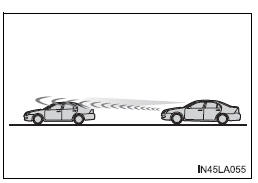
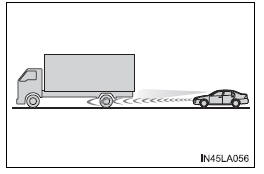
■When the sensor may not be correctly detecting the vehicle ahead In the case of the following and depending on the conditions, operate the brake pedal when deceleration of the system is insufficient or operate the accelerator pedal when acceleration is required.
As the sensor may not be able to correctly detect these types of vehicles, the approach warning may not be activated.
- Vehicles that cut in suddenly
- Vehicles traveling at low speeds
- Vehicles that are not moving in the same lane
- Vehicles with small rear ends (trailers with no load on board, etc.)
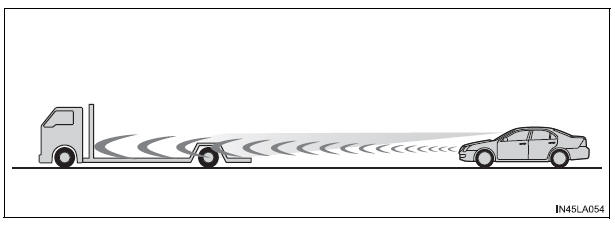
- Motorcycles traveling in the same lane
- When water or snow thrown up by the surrounding vehicles hinders the detecting of the sensor
- When your vehicle is pointing upwards (caused by a heavy load in the luggage compartment, etc.)
- Preceding vehicle has an extremely high ground clearance
■Conditions under which the vehicle-to-vehicle distance control mode may not function correctly In the case of the following conditions, operate the brake pedal (or accelerator pedal, depending on the situation) as necessary.
As the sensor may not be able to correctly detect vehicles ahead, the system may not operate properly
- When the road curves or when the lanes are narrow
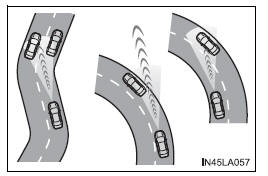
- When steering wheel operation or your position in the lane is unstable
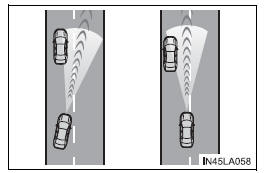
- When the vehicle ahead of you decelerates suddenly
- When driving on a road surrounded by a structure, such as in a tunnel or on a bridge
- While the vehicle speed is decreasing to the set speed after the vehicle accelerates by depressing the accelerator pedal
BSM (Blind Spot Monitor)
|
Summary of the Blind Spot Monitor The Blind Spot Monitor is a system that has 2 functions;
These functions use same sensors.
Turning the BSM function/RCTA function on/off 1. Press 2. Press 3. Press Each time ■The outside rear view mirror indicators visibility When under strong sunlight, the outside rear view mirror indicator may be difficult to see. ■RCTA buzzer hearing RCTA function may be difficult to hear over loud noises such as high audio volume. ■When "Blind Spot Monitor Unavailable" or "Rear Cross Traffic Alert Unavailable" are shown on the multi-information display Ice, snow, mud, etc., may be attached to the rear bumper around the sensors. The system should return to normal operation after removing the ice, snow, mud, etc., from the rear bumper. Additionally, the sensors may not operate normally when driving in extremely hot or cold environments. ■When there is a malfunction in the Blind Spot Monitor If a system malfunction is detected due to any of the following reasons, a warning message will be displayed:
|
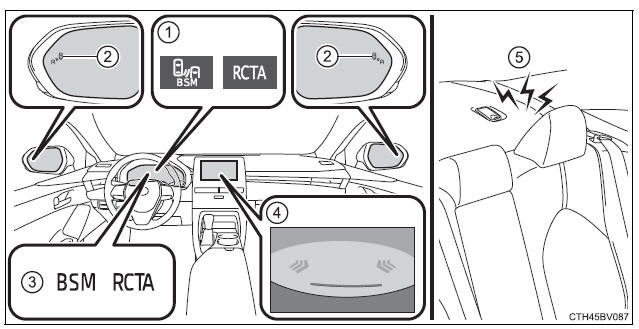
 or
or  .
.
BSM function
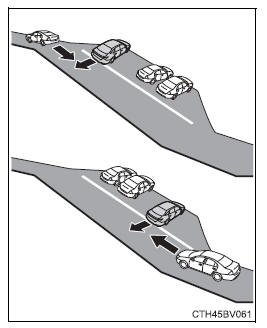
The BSM function uses radar sensors to detect vehicles that are traveling in an adjacent lane in the area that is usually not reflected in the outside rear view mirror (the blind spot), and advises the driver of the vehicles existence via the outside rear view mirror indicator.
BSM function detection areas
The areas that vehicles can be detected in are outlined below.
The range of the detection area extends to:
- Approximately 11.5 ft. (3.5 m) from the side of the vehicle
The first 1.6 ft. (0.5 m) from the side of the vehicle is not in the detection area - Approximately 9.8 ft. (3 m) from the rear bumper
- Approximately 3.3 ft. (1 m) forward of the rear bumper
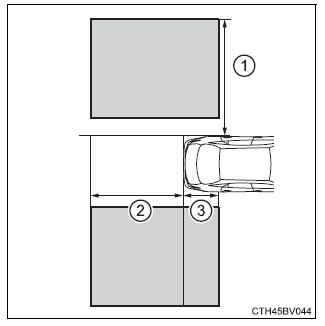
| WARNING
■Cautions regarding the use of the system The driver is solely responsible for safe driving. Always drive safely, taking care to observe your surroundings. The BSM function is a supplementary function which alerts the driver that a vehicle is present in the blind spot. Do not overly rely on the BSM function. The function cannot judge if it is safe to change lanes, therefore over reliance could cause an accident resulting in death or serious injury. According to conditions, the system may not function correctly. Therefore the driver's own visual confirmation of safety is necessary. |
■The BSM function is operational when
- The BSM function is turned on
- Vehicle speed is greater than approximately 10 mph (16 km/h).
■The BSM function will detect a vehicle when
- A vehicle in an adjacent lane overtakes your vehicle.
- You overtake a vehicle in adjacent lane slowly.
- Another vehicle enters the detection area when it changes lanes.
■Conditions under which the BSM function will not detect a vehicle The BSM function is not designed to detect the following types of vehicles and/or objects:
- Small motorcycles, bicycles, pedestrians, etc.*
- Vehicles traveling in the opposite direction
- Guardrails, walls, signs, parked vehicles and similar stationary objects*
- Following vehicles that are in the same lane*
- Vehicles driving 2 lanes across from your vehicle*
- Vehicles which are being overtaken rapidly by your vehicle
*: Depending on the conditions, detection of a vehicle and/or object may occur.
■Conditions under which the BSM function may not function correctly
- The BSM function may not detect vehicles correctly in the following conditions:
- When the sensor is misaligned due to a strong impact to the sensor or its surrounding area
- During bad weather such as heavy rain, fog, snow, etc.
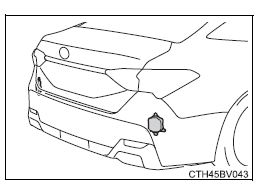
- When mud, snow, ice, a sticker, etc., is covering the sensor or surrounding area on the rear bumper
- When driving on a road surface that is wet due to rain, standing water, snow, etc.
- When there is a significant difference in speed between your vehicle and the vehicle that enters the detection area
- When a vehicle is in the detection area from a stop and remains in the detection area as your vehicle accelerates
- When driving up or down consecutive steep inclines, such as hills, a dip in the road, etc.
- When driving on roads with sharp bends, consecutive curves, or uneven surfaces
- When multiple vehicles approach with only a small gap between each vehicle
- When vehicle lanes are wide, and the vehicle in the next lane is too far away from your vehicle
- When the vehicle that enters the detection area is traveling at about the same speed as your vehicle
- When there is a significant difference in height between your vehicle and the vehicle that enters the detection area
- Immediately after the BSM function is turned on
- Instances of the BSM function unnecessarily detecting a vehicle and/or object may increase under the following conditions:
- When the sensor is misaligned due to a strong impact to the sensor or its surrounding area
- When there is only a short distance between your vehicle and a guardrail, wall, etc.
- When there is only a short distance between your vehicle and a following vehicle
- When vehicle lanes are narrow and a vehicle driving 2 lanes across from your vehicle enters the detection area
- When driving on roads with sharp bends, consecutive curves, or uneven surfaces
- When items such as a bicycle carrier are installed on the rear of the vehicle
RCTA function
|
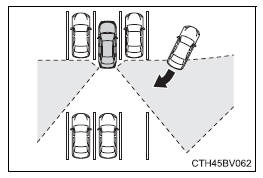
The RCTA functions when your vehicle is in reverse. It can detect other vehicles approaching from the right or left rear of the vehicle. It uses radar sensors to alert the driver of the other vehicle's existence through flashing the outside rear view mirror indicators and sounding a buzzer.
■ RCTA icon display When a vehicle approaching from the right or left at the rear of the vehicle is detected, the following will be displayed on the audio system screen.
RCTA function detection areas The areas that vehicles can be detected in are outlined below.
To give the driver a more consistent time to react, the buzzer can alert for faster vehicles from farther away. Example:
■The RCTA function is operational when
■Conditions under which the RCTA function will not detect a vehicle The RCTA function is not designed to detect the following types of vehicles and/or objects:
*: Depending on the conditions, detection of a vehicle and/or object may occur. ■Conditions under which the RCTA function may not function correctly
■Customization Some functions can be customized. |
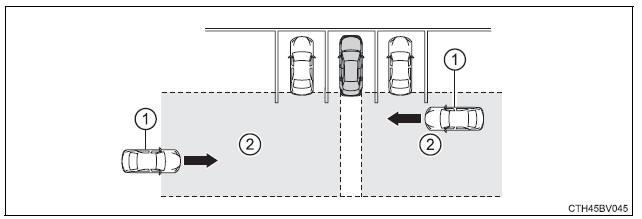
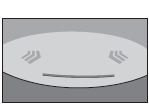
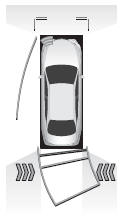
 The RCTA function is malfunctioning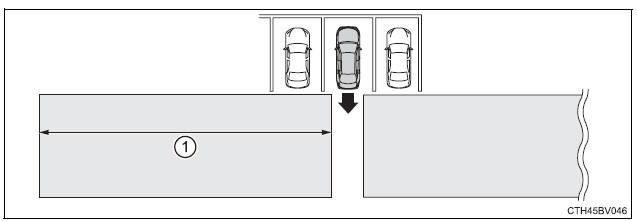
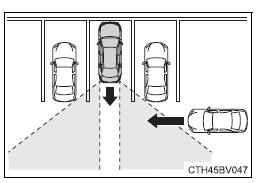
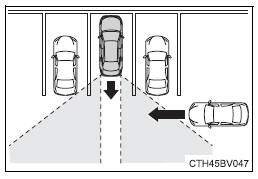
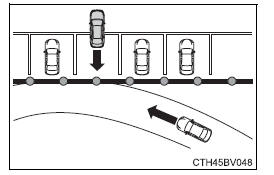
Rear Camera Detection function (vehicles with panoramic view monitor)
When the vehicle is backing up, the rear camera detection function can detect pedestrians in the detection area behind the vehicle. If a pedestrian is detected, a buzzer will sound and an icon on the audio system screen will be displayed to inform the driver of the pedestrian.
Display
- Pedestrian detection icon
Displayed automatically when a pedestrian is detected. - Mute switch
Select to mute the buzzer. The buzzer will be re-enabled when the shift lever is shifted to a position other than R.
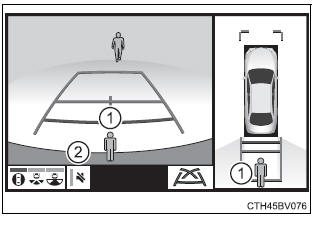
When a pedestrian is detected
If the rear camera detection function detects a pedestrian in the detection area, the buzzer and icon will operate as shown in the following table:
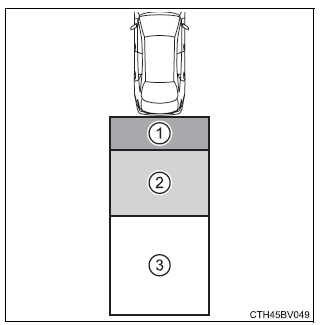
| Area |
Buzzer |
Icon |
| 1 | Sounds repeatedly | Blinks 3 times and then stays on |
| 2 | When the vehicle is stationary: Sounds 3 times When the vehicle is backing up: Sounds repeatedly | |
| 3 | When it is determined that a pedestrian will enter area 1 within a few seconds: Sounds repeatedly | When it is determined that a pedestrian will enter area 1 within a few seconds: Blinks 3 times and then stays on |
■The rear camera detection function is operational when
The rear camera detection function is operational when the following conditions are met:
- The engine switch is in the IGNITION ON mode.
- The shift lever is in R.
■Setting the buzzer volume The buzzer volume of this function changes with the RCTA buzzer volume.
■If the rear camera detection function is malfunctioning If a malfunction of the rear camera detection function is detected, one of the following messages will be displayed on the audio system screen. Have the vehicle inspected by your Toyota dealer.
- "RCD malfunction."
- "Visit your dealer."
- "RCD unavailable."
■If "Clean dirt from lens" is displayed on the audio system screen A rear camera lens may be dirty or covered with snow or ice. In such cases, if it is removed from the rear camera lens, the system should return to normal.
(It may be necessary to drive the vehicle for some time before the system returns to normal.)
■If "RCD unavailable" is displayed on the audio system screen
- If this message is displayed after the battery has been disconnected and reconnected, fully turn the steering wheel to the left and then the right on level ground.
- If this message is displayed only when the R shift position is selected, the rear camera lens may be dirty. Clean the rear camera lens.
■Situations in which the system may not operate properly
- Some pedestrians, such as the following, may not be detected by the rear camera detection function, preventing the function from operating properly:
- Pedestrians who are squatting
- Pedestrians who are lying down
- Pedestrians who are running
- Pedestrians who suddenly enter the detection area
- Pedestrians riding a bicycle, skateboard, or other light vehicle
- Pedestrians wearing unusual clothing, such as a costume
- Pedestrians whose body is partially hidden by a cart or other object
- Pedestrians which are obscured by darkness, such as at night
- In some situations, such as the following, pedestrians may not be detected by the rear camera detection function, preventing the function from operating properly:
- When backing up in inclement weather (rain, snow, fog, etc.)
- When the rear camera is obscured (dirt, snow, ice, etc. are attached) or scratched
- When a very bright light, such as the sun, or the headlights of another vehicle, shines directly into the rear camera
- When backing up in a place where the surrounding brightness changes suddenly, such as at the entrance or exit of a garage or underground parking lot
- In some situations, such as the following, the rear camera detection function may operate even though there are no pedestrians in the detection area.
- When a three dimensional object, such as a pole, traffic cone, fence, or parked vehicle, is detected
- When a moving object, such as a car or motorcycle is detected
- When backing up toward moving objects such as flags or puddles, or airborne matter, such as smoke, steam, rain, or snow
- When there is a pattern on the road, due to the road being made of cobblestone or gravel or having tram rails, traces of repair, white lines, pedestrian crossings or fallen leaves on the surface
- When backing up on a metal cover (grating), such as those used for drainage ditches
- When backing up toward the roadside or a bump in the road
- When an object is reflected in a puddle or on a wet road surface
- When there are shadows on the road
- When backing up over a bump in the road
- If the vehicle is significantly tilted, such as when carrying a heavy load
- When backing up toward an incline/decline
- If the suspension has been modified or tires of a size other than specified are installed
- If the rear of the vehicle is raised or lowered due to the carried load
- If an electronic component, such as a backlit license plate or rear fog light, is installed near the rear camera
- If a bumper protector, such as an additional trim strip, is installed to the rear bumper
- If the orientation of the rear camera has been changed due to a collision or other impact, or removal and installation
- If a towing eyelet is installed to the rear of the vehicle
- When the rear camera is obscured (dirt, snow, ice, etc. are attached) or scratched
- When water is flowing over the rear camera lens
- If there is a flashing light in the detection area, such as the emergency flashers of another vehicle
■Situations in which the rear camera detection function may be difficult to notice
- If buzzer may be difficult to hear if the surrounding area is noisy, the volume of the audio system volume is high, the air conditioning system is being used, etc.
- If the temperature in the cabin is extremely high or low, the audio system screen may not operate correctly.
Intuitive parking assist
The distance from your vehicle to nearby obstacles when parallel parking or maneuvering into a garage is measured by the sensors and communicated via the displays and a buzzer.
Always check the surrounding area when using this system.
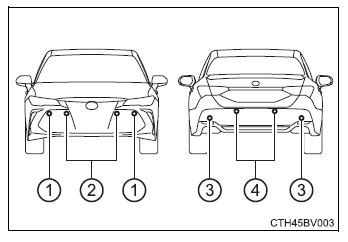
Types of sensors
- Front corner sensors
- Front center sensors
- Rear corner sensors
- Rear center sensors
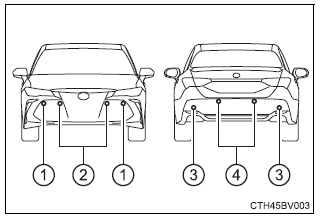
Turning the intuitive parking assist on/off
1. Press  of the meter control switches, select .
2. Press  of the meter control switches, select
  .
.
3. Press  of the meter control switch.
Each time is pressed, the function changes on/off.
When on, the indicator light comes on to inform the driver that the system is operational.
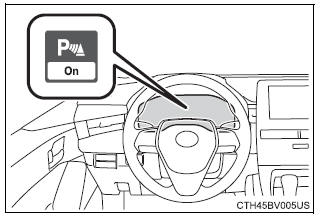
Display
When the sensors detect an obstacle, the following displays inform the driver of the position and distance to the obstacle.
■ Multi-information display
- Front corner sensor operation
- Front center sensor operation
- Rear corner sensor operation
- Rear center sensor operation
- Select to mute the buzzer sounds.
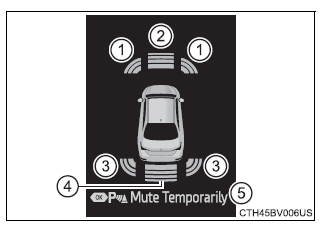
■ Audio system screen
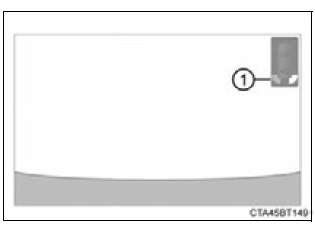
- Intuitive parking assist
When the vehicle is moving backward.A simplified image is displayed on the upper part of the screen when an obstacle is detected.
■Muting the buzzer sound
- To mute the buzzer sound
The buzzer can be temporarily muted by pressing of the meter control switches while an obstacle detection display is shown on the multi-information display. - To cancel the mute
Mute will be automatically cancelled in the following situations.- When the shift position is changed
- When the vehicle speed has reached or exceeded approximately 6 mph (10 km/h) with the shift lever in D
- When the intuitive parking assist is turned off once and turned on again
- When the engine switch is turned off once and turned to IGNITION ON mode again
- When a sensor is malfunctioning
Sensor detection display, obstacle distance
■ Distance display Sensors that detect an obstacle will illuminate continuously or blink.
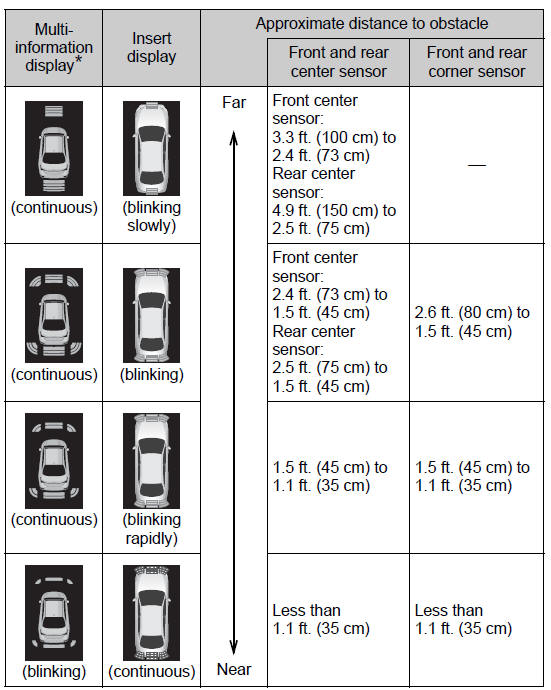
*: The images may differ from those shown in the illustrations.
■ Buzzer operation and distance to an obstacle A buzzer sounds when the sensors are operating.
- The buzzer sounds faster as the vehicle approaches an obstacle.
When the vehicle comes within the following distance of the obstacle, the buzzer sounds continuously: Approximately 1.2 ft. (35 cm).
- When 2 or more obstacles are detected simultaneously, the buzzer system responds to the nearest obstacle. If one or both come within the above distances, the beep will repeat a long tone, followed by fast beeps.
Detection range of the sensors
- Approximately 3.3 ft. (100 cm)
- Approximately 4.9 ft. (150 cm)
- Approximately 2.6 ft. (80 cm)
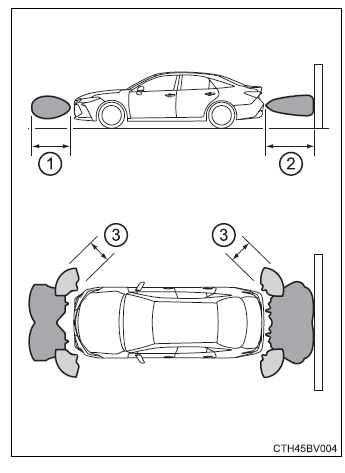
The diagram shows the detection range of the sensors. Note that the sensors cannot detect obstacles that are extremely close to the vehicle.
The range of the sensors may change depending on the shape of the object, etc.
■The intuitive parking assist can be operated when
- Front corner sensors:
- The engine switch is in IGNITION ON mode.
- The shift lever is in other than P.
- The vehicle speed is less than about 6 mph (10 km/h).
- Front center sensors:
- The engine switch is in IGNITION ON mode.
- The shift lever is in other than P or R.
- The vehicle speed is less than about 6 mph (10 km/h).
- Rear corner and rear center sensors:
- The engine switch is in IGNITION ON mode.
- The shift lever is in R.
- The vehicle speed is less than about 6 mph (10 km/h).
■Intuitive parking assist display When an obstacle is detected while the Toyota parking assist monitor or panoramic view monitor is in use, the warning indicator will appear in the upper part of the screen even if the display setting has been set to off.
■Sensor detection information
- The sensor's detection areas are limited to the areas around the vehicle's bumper.
- Depending on the shape of the obstacle and other factors, the detection distance may shorten, or detection may be impossible.
- Obstacles may not be detected if they are too close to the sensor.
- There will be a short delay between obstacle detection and display. Even at slow speeds, there is a possibility that the obstacle will come within the sensor's detection areas before the display is shown and the buzzer sounds.
- Thin posts or objects lower than the sensor may not be detected when approached, even if they have been detected once.
- It might be difficult to hear beeps due to the volume of audio system or air flow noise of the air conditioning system.
■If "Parking Assist Unavailable Clean Parking Assist Sensor" is displayed on the multi-information display A sensor may be dirty or covered with snow or ice. In such cases, if it is removed from the sensor, the system should return to normal.
Also, due to the sensor being frozen at low temperatures, a malfunction display may appear or an obstacle may not be detected. If the sensor thaws out, the system should return to normal.
■Certification
For vehicles sold in Canada
This ISM device complies with Canadian ICES-001.
Cet appareil ISM est conforme a la norme NMB-001 du Canada.
■Customization Some functions can be customized.
| WARNING
■When using the intuitive parking assist Observe the following precautions. Failing to do so may result in the vehicle being unable to be driven safely and possibly cause an accident.
|
| WARNING
■Sensors Certain vehicle conditions and the surrounding environment may affect the ability of a sensor to correctly detect an obstacle. Particular instances where this may occur are listed below.
In addition to the examples above, there are instances in which, because of their shape, signs and other objects may be judged by a sensor to be closer than they are. |
| WARNING
■Obstacles which may not be properly detected The shape of the obstacle may prevent a sensor from detecting it. Pay particular attention to the following obstacles:
|
| NOTICE
■When using intuitive parking assist In the following situations, the system may not function correctly due to a sensor malfunction, etc. Have the vehicle checked by your Toyota dealer.
■Notes when washing the vehicle Do not apply intensive bursts of water or steam to the sensor area. Doing so may result in the sensor malfunctioning. |
Intelligent Clearance Sonar (ICS)
|
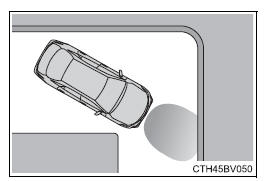
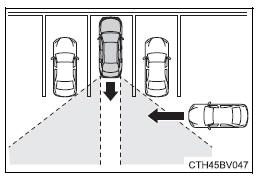
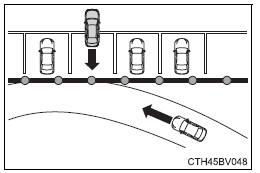
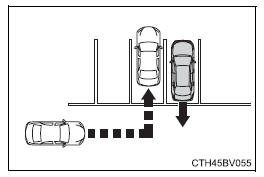
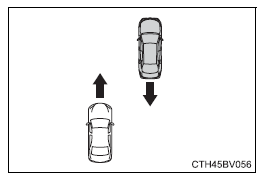
If a collision with an object may occur due to the vehicle suddenly moving forward due to an accidental accelerator pedal operation, the vehicle moving the unintended direction due to the wrong shift position being selected, or while parking or traveling at low speeds, the sensors detect objects, such as a wall, in the traveling direction of the vehicle, and the system operates to lessen an impact with an object and reduce the resulting damage. Examples of system operation The system will operate in situations such as the following if an object is detected in the traveling direction of the vehicle. When traveling at a low speed and the brake pedal is not depressed, or is depressed late
When the accelerator pedal is depressed excessively
When the vehicle moves in the unintended direction due to the wrong shift position being selected
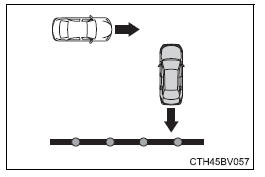
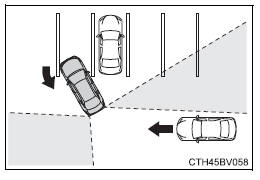
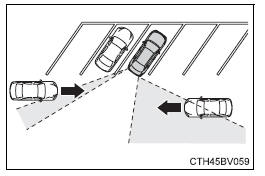
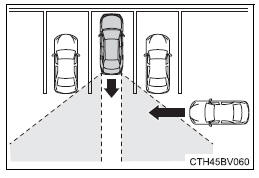
Rear Cross Traffic Auto Brake function If a radar sensor detects a vehicle approaching from the right or left at the rear of the vehicle and a collision may occur, this function will perform brake control to reduce the likelihood of an impact with the approaching vehicle. ■ Examples of system operation The system will operate in situations such as the following if an object is detected in the traveling direction of the vehicle. When reversing, a vehicle is approaching and the brake pedal is not depressed, or is depressed late
Types of sensors
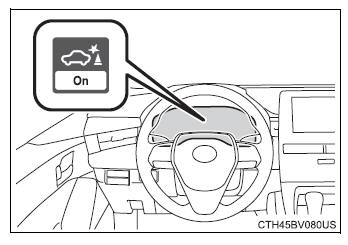
Turning the Intelligent Clearance Sonar system on/off 1. Press 2. Press 3. Press 4. Select the "Yes" and push When the Intelligent Clearance Sonar is disabled, the ICS OFF indicator illuminates. To re-enable the system when it was disabled, select
Displays and buzzers for engine output restriction control and brake control If the engine output restriction control or brake control operates, a buzzer will sound and a message will be displayed on the multi-information display to alert the driver. Depending on the situation, engine output restriction control will operate to either limit acceleration or restrict output as much as possible.
|
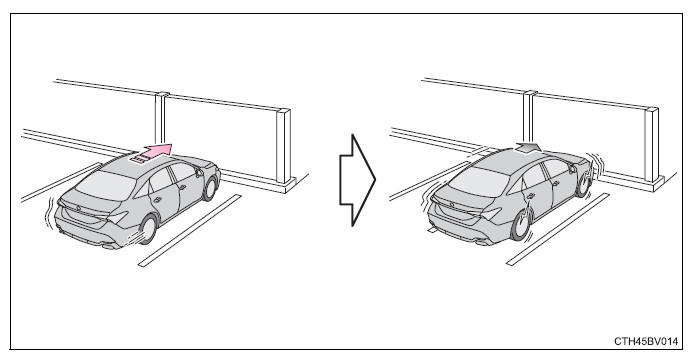
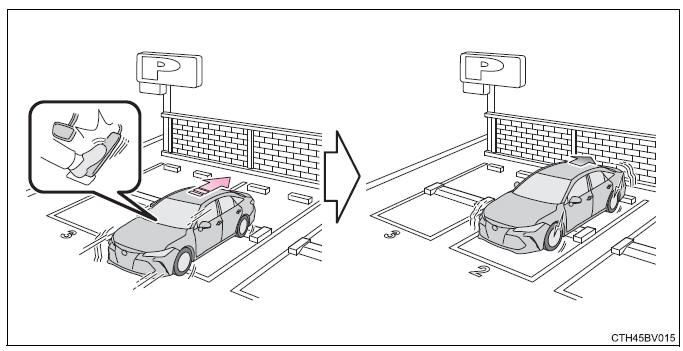
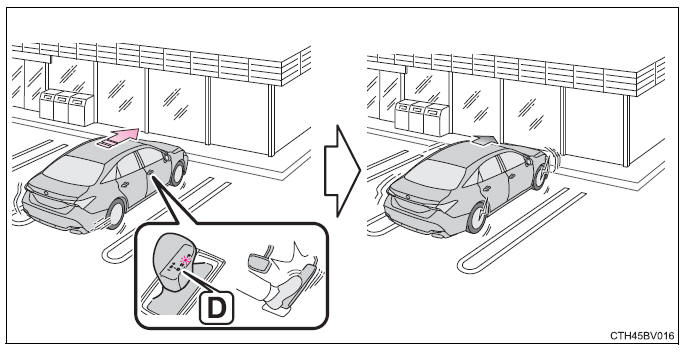
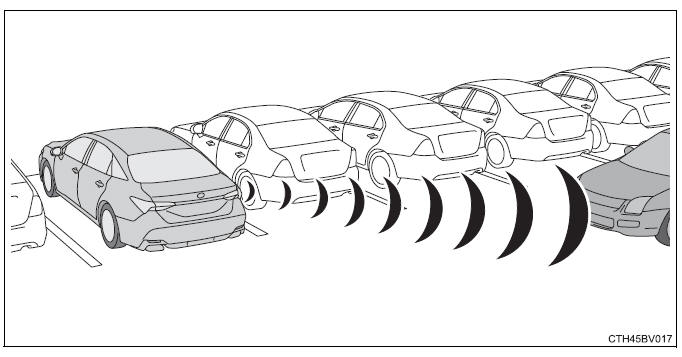
 .
.
Intelligent Clearance Sonar function
|
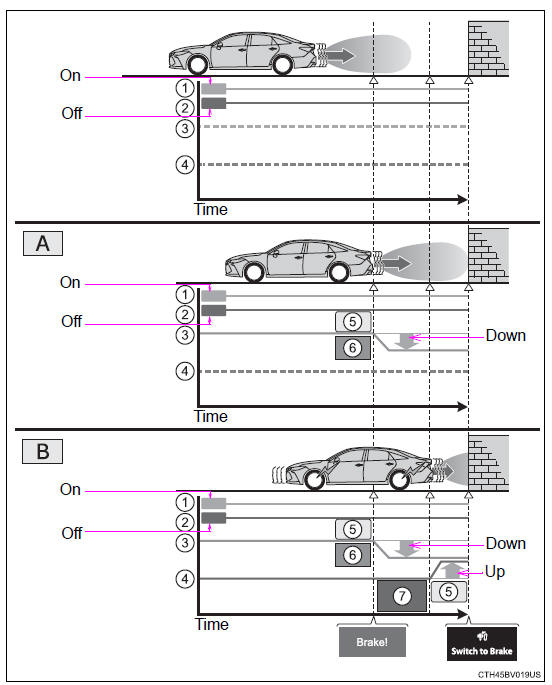
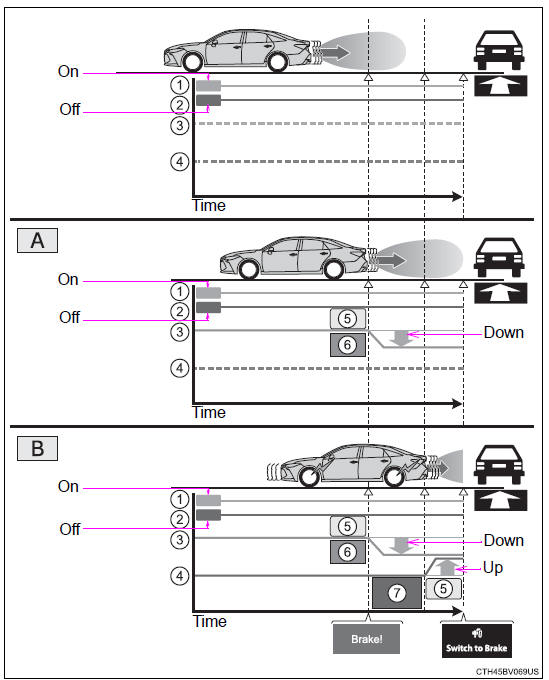
If the Intelligent Clearance Sonar function detects that a collision with an object is possible, the engine output will be restricted to restrain any increase in the vehicle speed. (Engine output restriction control: See A below.) Additionally, if the accelerator pedal continues to be depressed, the brakes will be applied automatically to reduce the vehicle speed. (Brake control: See B below.)
■The Intelligent Clearance Sonar function will operate when The function will operate when the ICS OFF indicator is not illuminated or flashing and all of the following conditions are met:
■The Intelligent Clearance Sonar function will stop operating when The function will stop operating if any of the following conditions are met:
■Detection range of the Intelligent Clearance Sonar function The detection range of the Intelligent Clearance Sonar function differs from the detection range of the intuitive parking assist. Therefore, even if the intuitive parking assist detects an object and provides a warning, the Intelligent Clearance Sonar function may not start operating. ■If the Intelligent Clearance Sonar function has operated If the vehicle is stopped due to operation of the Intelligent Clearance Sonar function, the Intelligent Clearance Sonar system will be disabled and the ICS OFF indicator will illuminate. ■Re-enabling the Intelligent Clearance Sonar system To re-enable the Intelligent Clearance Sonar system when it is disabled due to operation of the Intelligent Clearance Sonar function, either enable the system again, or turn the engine switch off and then back to IGNITION ON mode. Additionally, if the object becomes no longer in the traveling direction of the vehicle or if the traveling direction of the vehicle changes (such as changing from moving forward to backing up, or from backing up to moving forward), the system will be re-enabled automatically. ■Objects that the Intelligent Clearance Sonar function may not detect The sensors may not be able to detect certain objects, such as the following.
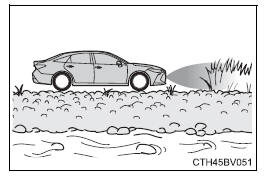
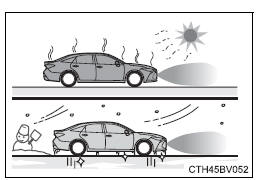
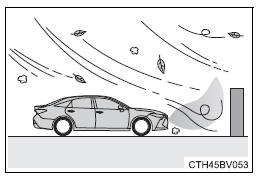
■Intuitive parking assist buzzer Regardless of whether the intuitive parking assist system is enabled or not, if the Intelligent Clearance Sonar system is enabled, the front or rear sensors detect an object and brake control is performed, the intuitive parking assist buzzer will sound to notify the driver of the approximate distance to the object. ■Situations in which the Intelligent Clearance Sonar function may operate even if there is no possibility of a collision In some situations such as the following, the Intelligent Clearance Sonar function may operate even though there is no possibility of a collision.
■If the Intelligent Clearance Sonar function operates unnecessarily such as at a railroad crossing Even in the event that the Intelligent Clearance Sonar function operates unnecessarily, such as at a railroad crossing, brake control will be canceled after approximately 2 seconds, allowing you to proceed forward and leave the area, Brake control can also be canceled by depressing the brake pedal. Depressing the accelerator pedal again will allow you to proceed forward and leave the area. ■Situations in which the Intelligent Clearance Sonar Brake function may not operate properly In some situations such as the following, this function may not operate properly.
■If a battery terminal has been disconnected and reconnected The system needs to be initialized. To initialize the system, drive the vehicle straight ahead for 5 seconds or more at a speed of approximately 22 mph (35 km/h) or more. ■If "ICS Unavailable" is displayed on the multi-information display and the ICS OFF indicator is flashing
|
Rear Cross Traffic Auto Brake function
|
If the Rear Cross Traffic Auto Brake function detects that a collision with an approaching vehicle is possible, the engine output will be restricted to restrain any increase in vehicle speed. (Engine output restriction control: See A below.) Additionally, if the accelerator pedal continues to be depressed, the brakes will be applied automatically to reduce the vehicle speed. (Brake control: See B below.)
■The Rear Cross Traffic Auto Brake function will operate when The function will operate when the ICS OFF indicator is not illuminated or flashing and all of the following conditions are met:
■The Rear Cross Traffic Auto Brake function will stop operating when The function will stop operating if any of the following conditions are met:
■Detection area of the Rear Cross Traffic Auto Brake function The detection area of the Rear Cross Traffic Auto Brake function differs from the detection area of the RCTA function. Therefore, even if the RCTA function detects a vehicle and provides an alert, the Rear Cross Traffic Auto Brake function may not start operating. ■If the Rear Cross Traffic Auto Brake function has operated If the vehicle is stopped due to operation of the Rear Cross Traffic Auto Brake function, the Rear Cross Traffic Auto Brake function will be disabled and the ICS OFF indicator will illuminate. ■Re-enabling the Rear Cross Traffic Auto Brake function To re-enable the Rear Cross Traffic Auto Brake function when it is disabled while it is operating, either enable the Intelligent Clearance Sonar system again, or turn the engine switch off and then back to IGNITION ON mode. When the function is disabled, the ICS OFF indicator will illuminate. If there is no longer a vehicle approaching from the right or left at the rear of the vehicle when backing up, or if the traveling direction of the vehicle changes (such as changing from backing up to moving forward), the system will be re-enabled automatically. When the function is re-enabled, the ICS OFF indicator will turn off. ■Conditions under which the Rear Cross Traffic Auto Brake function will not detect a vehicle The Rear Cross Traffic Auto Brake function is not designed to detect the following types of vehicles and/or objects.
*: Depending on the conditions, detection of a vehicle and/or object may occur. ■RCTA function buzzer Regardless of whether the RCTA function is enabled or not, if the Rear Cross Traffic Auto Brake function is enabled and brake control is performed, a buzzer will sound to notify the driver. ■Situations in which the system may operate even though there is no possibility of a collision In some situations such as the following, the Rear Cross Traffic Auto Brake function may operate even though there is no possibility of a collision.
■Situations in which the Rear Cross Traffic Auto Brake function may not operate properly In some situations such as the following, this function may not operate properly.
*: Depending on conditions, detection of a vehicle and/or object may occur.
|
Driving mode select switches
The driving modes can be selected to suit driving condition.
Vehicles without AVS (Adaptive Variable Suspension System)
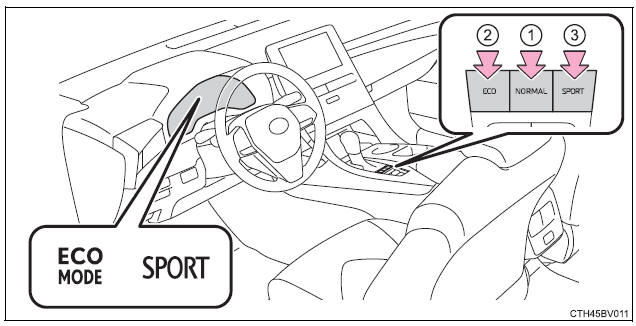
- Normal mode
Use for normal driving.While in Eco drive mode or Sport mode, press the "NORMAL" switch to change the driving mode to normal mode.
- Eco drive mode
Use Eco drive mode to help achieve low fuel consumption during trips that involve frequent accelerating.When the "ECO" switch is pressed, the "ECO MODE" indicator comes on in the multi-information display.
- Sport mode
Use sport mode when increased acceleration response and precise handling is desired, for example, when driving on mountain roads.When the "SPORT" switch is pressed, the "SPORT" indicator comes on in the multi-information display.
Vehicles with AVS (Adaptive Variable Suspension System)
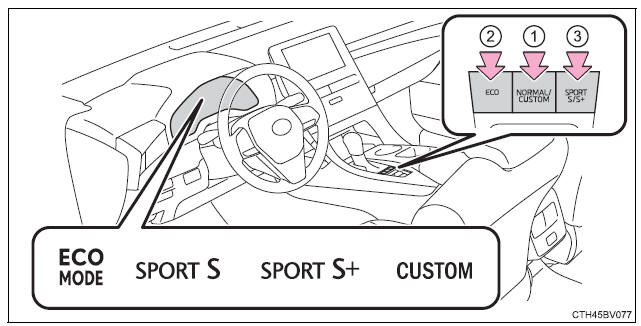
- Normal mode/Custom mode
- Normal mode
Use for normal driving.While in Eco drive mode, Sport mode or Custom mode press the "NORMAL/ CUSTOM" switch to change the driving mode to normal mode.
- Custom mode
Allows you to drive with the following functions set to your preferred settings.Custom mode settings can only be changed on the drive mode customization display of the audio system screen.
(Displaying the drive mode customization display)
When the "NORMAL/CUSTOM" switch is pressed, the "CUSTOM" indicator comes on in the multi-information display.
- Normal mode
| Function | Setting |
|
Powertrain |
Normal |
| Power | |
| Eco | |
| Chassis | Normal |
| Sport | |
| Air conditioning system | Normal |
| Eco |
- Eco drive mode
Use Eco drive mode to help achieve low fuel consumption during trips that involve frequent accelerating.When the "ECO" switch is pressed, the "ECO MODE" indicator comes on in the multi-information display.
- Sport mode
- SPORT S mode
Controls the transmission and engine to provide quick, powerful acceleration. This mode is suitable for when agile driving response is desired, such as when driving on roads with many curves.When not in SPORT S mode, if the "SPORT S/S+" switch is pressed, the "SPORT S" indicator will come on in the multi-information display.
- SPORT S+ mode
Helps to ensure steering performance and driving stability by simultaneously controlling the steering and suspension in addition to the transmission and engine. Suitable for sportier driving.When in SPORT S mode, if the "SPORT S/S+" switch is pressed, the "SPORT S+" indicator will come on in the multi-information display.
- SPORT S mode
■Operation of the air conditioning system in Eco drive mode Eco drive mode controls the heating/cooling operations and fan speed of the air conditioning system to enhance fuel efficiency. To improve air conditioning performance, adjust the fan speed or turn off Eco drive mode.
■Automatic deactivation of sport mode and custom mode If the engine switch is turned off after driving in sport mode or custom mode, the drive mode will be changed to normal mode.
Driving assist systems
To keep driving safety and performance, the following systems operate automatically in response to various driving situations.
Be aware, however, that these systems are supplementary and should not be relied upon too heavily when operating the vehicle.
ABS (Anti-lock Brake System)
Helps to prevent wheel lock when the brakes are applied suddenly, or if the brakes are applied while driving on a slippery road surface
Brake assist
Generates an increased level of braking force after the brake pedal is depressed when the system detects a panic stop situation
VSC (Vehicle Stability Control)
Helps the driver to control skidding when swerving suddenly or turning on slippery road surfaces.
Enhanced VSC (Enhanced Vehicle Stability Control)
Provides cooperative control of the ABS, TRAC, VSC and EPS.
Helps to maintain directional stability when swerving on slippery road surfaces by controlling steering performance.
Secondary Collision Brake
When the airbag sensor detects a collision, the brakes and brake lights are automatically controlled to reduce the vehicle speed and that helps reduce the possibility of further damage due to a secondary collision
TRAC (Traction Control)
Helps to maintain drive power and prevent the drive wheels from spinning when starting the vehicle or accelerating on slippery roads
Hill-start assist control
Helps to reduce the backward movement of the vehicle when starting on an uphill
EPS (Electric Power Steering)
Employs an electric motor to reduce the amount of effort needed to turn the steering wheel
Adaptive Variable Suspension System (if equipped)
By independently controlling the damping force of the shock absorbers for each of the 4 wheels according to the road and driving conditions, this system helps riding comfort with superior vehicle stability, and helps good vehicle posture
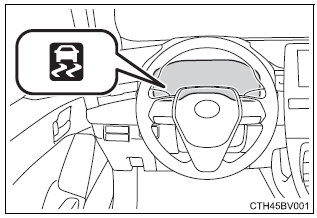
When the TRAC/VSC systems are operating
The slip indicator light will flash while the TRAC/VSC systems are operating.
Disabling the TRAC system
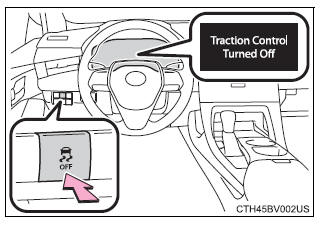
If the vehicle gets stuck in mud, dirt or snow, the TRAC system may reduce power from the engine to the wheels. Pressing  to turn the system off may make it easier for you to rock the vehicle in order to free it.
To turn the TRAC system off, quickly press and release .
"Traction Control Turned Off" will be shown on the multi-information display.
Press again to turn the system back on.
■Turning off both TRAC and VSC systems To turn the TRAC and VSC systems off, press and hold for more than 3 seconds while the vehicle is stopped.
The VSC OFF indicator light will come on and the "Traction Control Turned Off" will be shown on the multi-information display*.
Press again to turn the systems back on.
*: Pre-collision brake assist and pre-collision braking will also be disabled.
The pre-collision system warning light will come on and the message will be shown on the multi-information display.
■When the message is displayed on the multi-information display showing that TRAC has been disabled even if has not been pressed TRAC cannot be operated. Contact your Toyota dealer.
■Operating conditions of hill-start assist control
When the following four conditions are met, the hill-start assist control will operate:
- The shift lever is in a position other than P or N (when starting off forward/ backward on an upward incline)
- The vehicle is stopped
- The accelerator pedal is not depressed
- The parking brake is not engaged
■Automatic system cancelation of hill-start assist control
The hill-start assist control will turn off in any of the following situations:
- The shift lever is shifted to P or N
- The accelerator pedal is depressed
- The parking brake is engaged
- 2 seconds at maximum elapsed after the brake pedal is released
■Sounds and vibrations caused by the ABS, brake assist, VSC, TRAC and hill-start assist control systems
- A sound may be heard from the engine compartment when the brake pedal is depressed repeatedly, when the engine is started or just after the vehicle begins to move. This sound does not indicate that a malfunction has occurred in any of these systems.
- Any of the following conditions may occur when the above systems are operating. None of these indicates that a malfunction has occurred.
- Vibrations may be felt through the vehicle body and steering.
- A motor sound may be heard also after the vehicle comes to a stop.
- The brake pedal may pulsate slightly after the ABS is activated.
- The brake pedal may move down slightly after the ABS is activated.
■EPS operation sound When the steering wheel is operated, a motor sound (whirring sound) may be heard. This does not indicate a malfunction.
■Automatic reactivation of TRAC and VSC systems After turning the TRAC and VSC systems off, the systems will be automatically re-enabled in the following situations:
- When the engine switch is turned off
- If only the TRAC system is turned off, the TRAC will turn on when vehicle speed increases.
If both the TRAC and VSC systems are turned off, automatic re-enabling will not occur when vehicle speed increases.
■Secondary Collision Brake operating conditions The vehicle speed is approximately 6 mph (10 km/h) or more and the airbag sensor detects a collision. (The Secondary Collision Brake will not operate when the vehicle speed is below approximately 6 mph [10km/h].)
■Secondary Collision Brake automatic cancellation
The Secondary Collision Brake is automatically canceled in the following situations:
- The vehicle speed drops below approximately 6 mph (10 km/h)
- A certain amount of time elapses during operation
- The accelerator pedal is depressed a large amount
■Reduced effectiveness of the EPS system The effectiveness of the EPS system is reduced to prevent the system from overheating when there is frequent steering input over an extended period of time. The steering wheel may feel heavy as a result.
Should this occur, refrain from excessive steering input or stop the vehicle and turn the engine off. The EPS system should return to normal within 10 minutes.
| WARNING
■The ABS does not operate effectively when
■Stopping distance when the ABS is operating may exceed that of normal conditions The ABS is not designed to shorten the vehicle's stopping distance. Always maintain a safe distance from the vehicle in front of you, especially in the following situations:
■TRAC/VSC may not operate effectively when Directional control and power may not be achievable while driving on slippery road surfaces, even if the TRAC/VSC system is operating. Drive the vehicle carefully in conditions where stability and power may be lost. ■Hill- start assist control does not operate effectively when
■When the TRAC/VSC is activated The slip indicator light flashes. Always drive carefully. Reckless driving may cause an accident. Exercise particular care when the indicator light flashes. ■When the TRAC/VSC systems are turned off Be especially careful and drive at a speed appropriate to the road conditions. As these are the systems to help ensure vehicle stability and driving force, do not turn the TRAC/VSC systems off unless necessary. ■Secondary Collision Brake Do not overly rely on the Secondary Collision Brake. This system is designed to help reduce the possibility of further damage due to a secondary collision, however, that effect changes according to various conditions. Overly relying on the system may result in death or serious injury. ■Replacing tires Make sure that all tires are of the specified size, brand, tread pattern and total load capacity. In addition, make sure that the tires are inflated to the recommended tire inflation pressure level. The ABS, TRAC and VSC systems will not function correctly if different tires are installed on the vehicle. Contact your Toyota dealer for further information when replacing tires or wheels. ■Handling of tires and the suspension Using tires with any kind of problem or modifying the suspension will affect the driving assist systems, and may cause a system to malfunction. |
Download Manual