Head-up display
Summary of functions
The head-up display is linked to the meters and navigation system and projects a variety of information in front of the driver, such as the current vehicle speed.
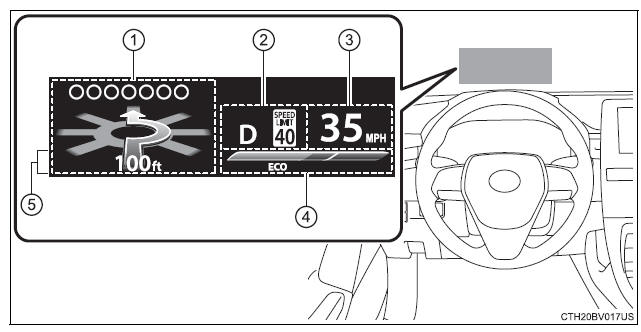
- Driving assist system status/navigation system-linked display area
The following pop-up displays will be displayed in certain situations:- Pre-collision warning (pre-collision system)
- Alert from the Intelligent Clearance Sonar system (if equipped)
- Shift position/speed limit display area
- Shift position
- Speed limit (vehicles with a navigation system) (U.S.A. only)
- Vehicle speed display
- Eco Driving Indicator/Tachometer
- Information display area
The following pop-up displays will be displayed in certain situations:- Warning/message
- Hands-free system status
- Audio system operation status
Using the head-up display
Select  on the multi-information display and then
  .
.
Enabling/disabling the head-up display
Press to enable/disable the head-up display.
Changing the head-up display settings
Press and hold to change the following settings:
■ Display brightness/position
Select to adjust the brightness and position of the head-up display.
■ Display content
Select to enable/disable the following items:
-
Route guidance to destination
-
Driving assist system status
-
Compass
Select to change the display between the following:
-
Eco Driving Indicator
-
Tachometer
-
No content
■ Display angle
Select to adjust the angle of the head-up display.
Driving assist system status/navigation system-linked display area
Driving assist system status display
Displays the operational status of the following systems:
-
Dynamic radar cruise control with full-speed range
-
LDA (Lane Departure Alert with steering control)
-
Intuitive parking assist (if equipped)
Navigation system-linked display area
Displays the following items, which are linked to the navigation system:
■ Street name When the navigation system is performing route guidance, the name of the next street will be displayed on the top of the display area.
■ Route guidance to destination Displayed when the navigation system is performing route guidance.
When approaching an intersection, an arrow will be displayed to indicate the suggested direction of travel.
■ Compass Displays the direction of travel.
Eco Driving Indicator/Tachometer
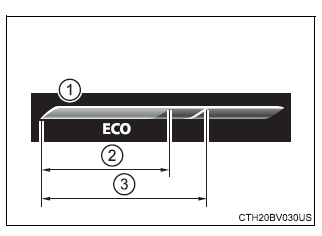
■ Eco Driving Indicator
-
Eco Driving Indicator Zone Display
-
Eco driving ratio based on acceleration
-
Zone of Eco driving
Displayed content is the same as that displayed on the multi-information display (Eco Driving Indicator).
■ Tachometer Displays the engine speed in revolutions per minute.
Information display area
Displays the following items in the appropriate situation:
■ Warning/Message
- Alert from the LDA (Lane Departure Alert with steering control)
- Dynamic radar cruise control with full-speed range
 message
Displayed when a suggestion/advice pop-up display is displayed on the multi-information display. message
Displayed when a warning message is displayed on the multi-information display.- Outside temperature
Displayed in the following situations:- When the engine switch is turned to IGNITION ON mode
- When the low outside temperature indicator is flashing
Displayed content is the same as that displayed on the multi-information display. For details, refer to the explanation of the outside temperature display on the multi-information display.
■ Hands-free system status Displayed when the hands-free system is operated.
■ Audio system operation status Displayed when the audio system is operated.
■Head-up display The head-up display may seem dark or hard to see when viewed through sunglasses, especially polarized sunglasses.
Adjust the brightness of the head-up display or remove your sunglasses.
■Display brightness The brightness of the head-up display can be adjusted on  of the multi-information display. Also, it is automatically adjusted according to the ambient brightness.
■Enabling/disabling of the head-up display If the head-up display is disabled, it will remain disabled when the engine switch is turned off then back to IGNITION ON mode.
■Street name display Only street names which are included in the map data will be displayed.
| WARNING
■Before using the head-up display
■Caution for changing settings of the head-up display As the engine needs to be running while changing the settings of the head-up display, ensure that the vehicle is parked in a place with adequate ventilation. In a closed area such as a garage, exhaust gases including harmful carbon monoxide (CO) may collect and enter the vehicle. This may lead to death or a serious health hazard. |
| NOTICE
■To prevent damage to components
■When changing the settings of the head-up display To prevent battery discharge, ensure that the engine is running while the changing the settings of the head-up display. |
Download Manual