Theft-alarm system
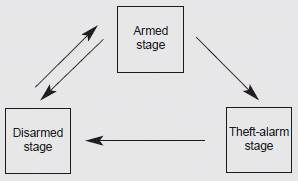
This system is designed to provide protection from unauthorized entry into the vehicle. This system is operated in three stages: the first is the "Armed" stage, the second is the "Theft-alarm" stage, and the third is the "Disarmed" stage. If triggered, the system provides an audible alarm with blinking of the hazard warning lights.
Armed stage
Park the vehicle and stop the engine. Arm the system as described below.
1. Remove the ignition key from the ignition switch and exit the vehicle.
2. Make sure that all doors (and trunk) and engine hood are closed and latched.
3. Lock the doors using the transmitter of the keyless entry system (or smart key) or ignition key.
After completion of the steps above, the hazard warning lights will blink once (for smart key) once to indicate that the system is armed. If the lock button is pressed once more within 4 seconds, the hazard warning lights will blink and the horn will sound once.
If any door (or trunk) or engine hood remains open, the hazard warning lights and the chime will not operate and the theft-alarm will not arm. If all doors and trunk and engine hood are closed after the lock button is pressed, the hazard warning lights blink once.
The system can also be armed by locking the doors with the key from the front doors; however, the hazard warning lights will not blink using this method.
✽ NOTICE
The theft-alarm system can be deactivated by an authorized Kia dealer. If you want this feature, consult an authorized Kia dealer.
Do not arm the system until all passengers have left the vehicle. If the system is armed while a passenger( s) remains in the vehicle, the alarm may be activated when the remaining passenger(s) leave the vehicle. If any door (or trunk) or engine hood is opened within 30 seconds after the system enters the armed stage, the system is disarmed to prevent an unnecessary alarm.
Theft-alarm stage, Disarmed stage
Theft-alarm stage
The alarm will be activated if any of the following occurs while the system is armed.
- A front or rear door is opened without using the ignition key or transmitter (or smart key).
- The trunk is opened without using the transmitter (or smart key).
- The engine hood is opened.
The horn will sound and the hazard warning lights will blink continuously for approximately 27 seconds, and repeat the horn 3 times unless the system is disarmed. To turn off the system, unlock the doors with the ignition key or transmitter (or smart key).
Disarmed stage
The system will be disarmed when
• The doors (and trunk) are unlocked with the transmitter (or smart key) or the ignition key.
After depressing the unlock button, the hazard warning lights will blink and the chime will sound twice (in smart key) to indicate that the system is disarmed.
After depressing the unlock button, if any door (or trunk) is not opened within 30 seconds, the system will be rearmed.
✽ NOTICE
- Avoid trying to start the engine while the alarm is activated. The vehicle starting motor is disabled during the theft-alarm stage.
- If the system is not disarmed with the transmitter, insert the key into the ignition switch, turn the ignition switch to the ON position and wait for 30 seconds. Then, the system will be disarmed.
- If the system is not disarmed with the smart key, press the engine start/stop button with the smart key. The side with the lock button should contact the engine start/stop button directly. - If you lose your keys, consult your authorized Kia dealer.
CAUTION - Adjusting alarm system
Do not change, alter or adjust the theft-alarm system because it could cause the theft-alarm system to malfunction and should only be serviced by an authorized Kia dealer.
✽ NOTICE
Malfunctions caused by improper alterations, adjustments or modifications to the theft-alarm system are not covered by your vehicle manufacturer warranty.
Download Manual