Door locks
Operating door locks from outside the vehicle
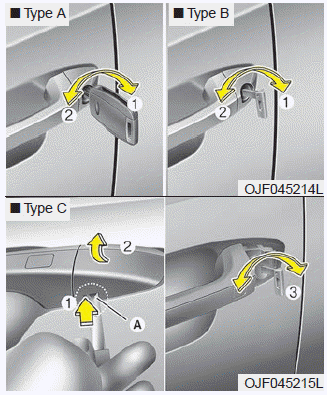
To remove the cover (For Type C):
1. Pull out the door handle.
2. Press the lever (3) located inside the bottom part of the cover with a key or flat-head screwdriver.
3. Push out the cover while pressing the lever.
- Turn the key clockwise to lock (1) and counterclockwise to unlock (2).
- If you lock the driver’s door with a key, all vehicle doors will lock automatically.
- From the driver’s door, turn the key to the right once to unlock the door and once more within 4 seconds to unlock all door (and trunk).
- Doors can also be locked and unlocked with the transmitter.
- Once the doors are unlocked, they may be opened by pulling the door handle.
- When closing the door, push the door by hand. Make sure the doors are closed securely.
✽ NOTICE
- In cold and wet climates, door lock and door mechanisms may not work properly due to freezing conditions.
- If the door is locked/unlocked multiple times in rapid succession with either the vehicle key or door lock switch, the system may stop operating temporarily in order to protect the circuit and prevent damage to system components.
WARNING
If people must spend a longer time in the vehicle while it is very hot or cold outside, there is risk of severe personal injuries or death. Do not lock the vehicle from the outside when there are people in it.
CAUTION
Do not open and close the door repeatedly if unnecessary or with excessive force. Such action can damage the vehicle door.
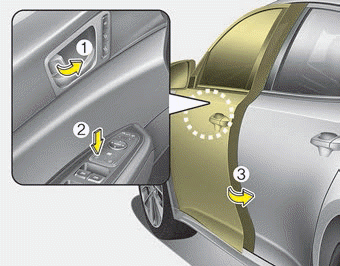
- To lock a door without the key, push the inside door lock button (1) or central door lock switch (2) to the “Lock” position when the ignition switch is in the OFF position and close the door (3).
- If you lock the door with the central door lock switch (2), all vehicle doors will lock automatically.
✽ NOTICE
Always remove the ignition key, engage the parking brake, close all windows, and lock all doors when leaving your vehicle unattended.
Operating door locks from inside the vehicle
With the door lock button
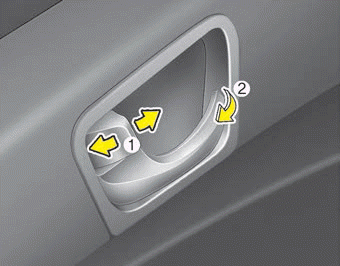
- To unlock a door, push the door lock button (1) to the “Unlock” position. The red mark on the button will be visible.
- To lock a door, push the door lock button (1) to the “Lock” position. If the door is locked properly, the red mark on the door lock button will not be visible.
- To open a door, pull the door handle (2) outward.
- If the inner door handle of the driver’s (or front passenger’s) door is pulled when the door lock button is in the lock position, the button will unlock and the door will open.
- Front doors cannot be locked if the ignition key is in the ignition switch and any front door or rear door is opened.
- Doors cannot be locked if the smart key is in the vehicle and a door is open.
WARNING
Do not pull the inner door handle of any door while the vehicle is moving as the door could open causing serious injury or death to occupant.
If a power door lock ever fails to function while you are in the vehicle, try one or more of the following techniques to exit:
- Operate the door unlock feature repeatedly (both electronic and manual) while simultaneously pulling on the door handle.
- Operate the other door locks and handles, front and rear.
- Lower a front window and use the key to unlock the door from outside.
WARNING
Do not pull the inner door handle of driver’s (or passenger’s) door while the vehicle is moving.
With central door lock switch
■ Driver side
■ Passenger side
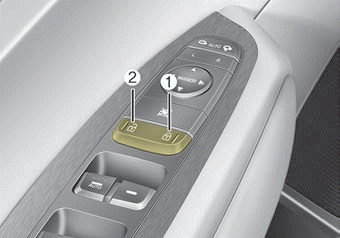
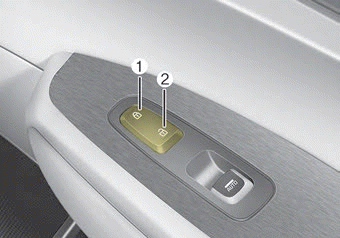
Operate by pressing the central door lock switch.
- When pressing the right portion(1) for driver side or the upper portion( 1) for passenger side of the switch, all vehicle doors will lock.
- When pressing the left portion(2) for driver side or the lower portion( 2) for passenger side of the switch, all vehicle doors will unlock.
- If the key is in the ignition switch (or if the smart key is in the vehicle) and any door is opened, the doors will not lock even though the right portion(1) for driver side or upper portion(1) for passenger side of the central door lock switch is pressed.
WARNING - Doors
The doors should always be fully closed and locked while the vehicle is in motion to prevent the accidental opening of the door, which could lead to serious injuries or death.
WARNING - Unattended children/animals
Never leave children or animals unattended in your vehicle. An enclosed vehicle can become extremely hot, causing death or severe injury to unattended children or animals who cannot escape the vehicle.
Impact sensing door unlock system
In the event of air bag deployment resulting from a vehicle impact, all doors will automatically unlock.
✽ NOTICE
You can select some auto door lock/unlock features in “User Settings”
❈ For more information, refer to “User Settings” in this chapter.
Child-protector rear door lock
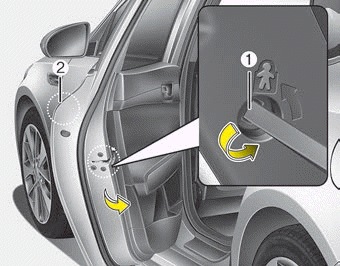
The child safety lock is provided to help prevent children from accidentally opening the rear doors from inside the vehicle. The rear door safety locks should be used whenever children are in the vehicle.
1. Open the rear door.
2. Turn the child safety lock (1) located on the rear edge of the door to the lock ( ) position. When the child safety lock is in the lock position, the rear door will not open even when the inner door handle is pulled.
3. Close the rear door.
To open the rear door, pull the outside door handle (2).
Even though the doors may be unlocked, the rear door will not open by pulling the inner door handle until the rear door child safety lock is unlocked.
WARNING - Rear door locks
Use the rear door safety locks whenever children are in the vehicle. If a child accidentally opens the rear doors while the vehicle is moving, the child could suffer severe injuries or death if they fall out of a moving vehicle.
Download Manual