Smart key
Record your key number
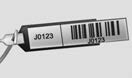
The key code number is stamped on the bar code tag attached to the key set. Should you lose your keys, this number will enable an authorized Kia dealer to duplicate the keys easily. Remove the bar code tag and store it in a safe place. Also, record the code number and keep it in a safe and handy place, but not in the vehicle.
Smart key function
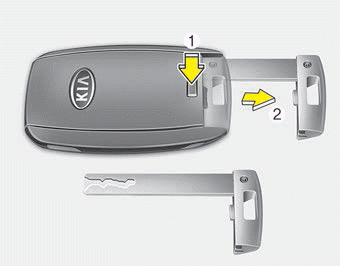
To remove the mechanical key, press and hold the release button(1) and remove the mechanical key (2).
To reinstall the mechanical key, put the key into the hole and push it until a click sound is heard.
With a smart key, you can lock or unlock a door (and trunk) and start the engine.
Refer to the following for more details.
WARNING - Ignition key (smart key)
Never leave the keys in your vehicle with unsupervised children. Leaving children unattended in a vehicle with a manual ignition key or a smart key is dangerous. Children copy adults and they could place the key in the ignition switch or press the start button. The key would enable children to operate power windows or other controls, or even make the vehicle move, which could result in serious bodily injury or death.
Locking
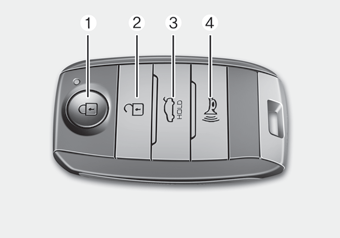
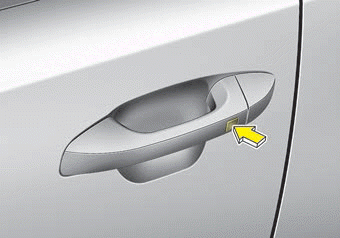
Pressing the button of the front outside door handles with all doors (and hood and trunk) closed and any door unlocked, locks all the doors (and trunk).
The hazard warning lights will blink once to indicate that all doors (and trunk) are locked. The button will only operate when the smart key is within 0.7 ~ 1 m (28 ~ 40 in.) from the outside door handle. If you want to make sure that a door has locked or not, you should check the door lock button inside the vehicle or pull the outside door handle.
Even though you press the button, the doors will not lock and the chime sounds if any of the following occurs:
- The smart key is in the vehicle.
- The ENGINE START/STOP button is in the ACC or ON position.
- Any door except the trunk is opened.
Unlocking
Pressing the button of the driver's (or front passenger’s) outside door handle with all doors closed and locked, unlocks the driver's door.
The hazard warning lights will blink twice to indicate that the driver's door is unlocked. Also, the outside rearview mirrors will automatically unfold if the outside rearview mirror folding switch is in the AUTO position.
The button will only operate when the smart key is within 0.7 ~ 1 m (28 ~ 40 in.) from the outside door handle.
When Two press unlock function is activated,
- If you press the driver's outside door handle button, the driver's door will unlock.
- If you press the driver's outside door handle button within four seconds again, then all the doors and trunk will unlock.
✽ NOTICE
You can activate or deactivate the Two Press Unlock function. Refer to “User settings” in this chapter
Trunk unlocking
If you are within 0.7 ~ 1 m (28 ~ 40 in.) from the outside trunk handle, with your smart key in possession, the trunk will unlock and open when you press the trunk handle switch.
The hazard warning lights will blink twice to indicate that the trunk is unlocked.
Also, once the trunk is opened and then closed, the trunk will lock automatically.
Panic
1. Press the panic button (4) for more than 1 second.
2. The horn sounds and hazard warning light flash for about 27 seconds.
✽ NOTICE
To stop the horn and lights, press any button on the smart key.
Start-up
You can start the engine without inserting the key.
❈ For detailed information refer to the “Engine start/stop button” in chapter 5.
Loss of the smart key, Smart key precautions
Loss of the smart key
A maximum of 2 smart keys can be registered to a single vehicle. If you happen to lose your smart key, you will not be able to start the engine. You should immediately take the vehicle and remaining key to your authorized Kia dealer (tow the vehicle, if necessary) to protect it from potential theft.
Smart key precautions
- The smart key will not work if any of the following occur:
- The smart key is close to a radio transmitter such as a radio station or an airport which can interfere with normal operation of the smart key.
- The smart key is near a mobile two way radio system or a cellular phone.
- Another vehicle’s smart key is being operated close to your vehicle. - If the smart key does not work correctly, you may lock and unlock the driver’s door with the mechanical key. If you have a problem with the smart key, contact an authorized Kia dealer.
- If the smart key is in close proximity to your cell phone or smart phone, the signal from the smart key could be blocked by normal operation of your cell phone or smart phone. This is especially important when the phone is active such as making a call, receiving calls, text messaging, and/or sending/receiving emails. Avoid placing the smart key and your cell phone or smart phone in the same pants or jacket pocket and maintain adequate distance between the two devices.
CAUTION - Transmitter
Keep the transmitter away from water or any liquid, as it can become damaged and not function properly.
✽ NOTICE
If the keyless entry system is inoperative due to exposure to water or liquids, it will not be covered by your manufacturer’s vehicle warranty.
Battery replacement
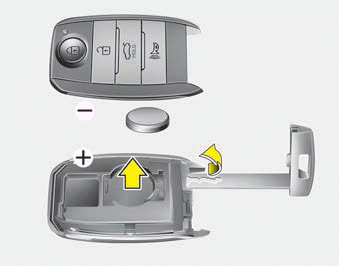
A smart key battery should last for several years, but if the smart key is not working properly, try replacing the battery with a new one. If you are unsure how to use your smart key or replace the battery, contact an authorized Kia dealer.
1. Remove the mechanical key.
2. Pry open the rear cover.
3. Replace the battery with a new battery (CR2032). When replacing the battery, make sure the battery is in the correct position.
4. Install the battery in the reverse order of removal.
- The smart key is designed to give you years of trouble-free use, however it can malfunction if exposed to moisture or static electricity. If you are unsure how to use or replace the battery, contact an authorized Kia dealer.
- Using the wrong battery can cause the smart key to malfunction. Be sure to use the correct battery.
- To avoid damaging the smart key, don't drop it, get it wet, or expose it to heat or sunlight.
 An inappropriately disposed battery can be harmful to the environment and human health. Dispose the battery according to your local law(s) or regulations.
CAUTION - Smart key damage
Do not drop, get wet or expose the smart key to heat or sunlight, or it will be damaged.
IC WARNING
This device complies with Industry Canada licenceexempt RSS standard(s).
Operation is subject to the following two conditions: (1) this device may not cause interference, and (2) this device must accept any interference, including interference that may cause undesired operation of the device.
Smart key immobilizer system
Your vehicle is equipped with an electronic engine immobilizer system to reduce the risk of unauthorized vehicle use.
Your immobilizer system is comprised of a small transponder in the smart key and electronic devices inside the vehicle.
With the immobilizer system, whenever you turn the engine start/stop button to the ON position by pressing the button while carrying the smart key, it verifies if the smart key is valid. If the key is determined to be valid, the engine will start.
If the key is determined to be invalid, the engine will not start.
To deactivate the immobilizer system:
Turn the engine start/stop button to the ON position by pressing the button while carrying the smart key.
In order to prevent theft of your vehicle, do not leave spare keys anywhere in your vehicle.
To activate the immobilizer system:
Turn the engine start/stop button to the OFF position. The immobilizer system activates automatically. Without a valid smart key for your vehicle, the engine will not start.
✽ NOTICE
When starting the engine, do not use the key with other immobilizer keys around. Otherwise the engine may not start or may stop soon after it starts. Keep each key separate in order to avoid a starting malfunction.
✽ NOTICE
If you need additional keys or lose your keys, contact an authorized Kia dealer.
This device complies with Industry Canada licence-exempt RSS standard(s).
Operation is subject to the following two conditions:
(1) This device may not cause interference, and
(2) This device must accept any interference, including interference that may cause undesired operation of the device.
✽ NOTICE
Changes or modifications not expressly approved by the party responsible for compliance could void the user’s authority to operate the equipment. If the keyless entry system is inoperative due to changes or modifications not expressly approved by the party responsible for compliance, it will not be covered by your manufacturer’s vehicle warranty.
Download Manual