3Rd Party Apps
If equipped, your vehicle may contain some 3rd party apps, which will further enhance your Uconnect system.
McIntosh
McIntosh is a 3rd party app that can enhance your Uconnect system’s media player. For the app to be effective, there must be audio playback in the Uconnect media player. McIntosh can control the playback of audio as well as display the output level decibel meters.
To launch the app, begin playing audio and follow these steps:
-
Press the Apps button.
-
Press the McIntosh app.
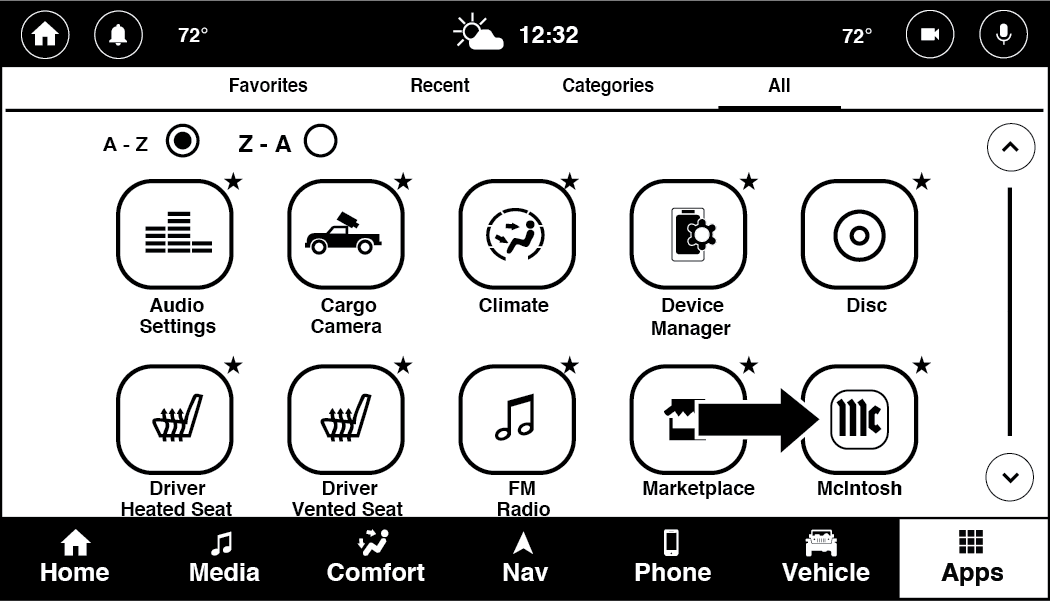
McIntosh
The McIntosh app will allow you to perform the following when listening to music:
|
Skip Backward |
Press to skip backward. Press and hold to fast rewind. |
|
Play/Pause |
Press to play/pause the track. |
|
Skip Forward |
Press to skip forward. Press and hold to fast forward. |
|
Repeat |
Press to repeat track. Press again to repeat playlist. Press again to turn off (works only with a USB device). |
|
Change Channel Down |
Press to change channel down. Press and hold to seek channel down. While using AM/FM, pressing the channel down will change the frequency by 0.2. Pressing and holding in AM/FM will seek channels. |
|
Change Channel Up |
Press to change channel up. Press and hold to seek channel up. While using AM/FM, pressing the channel up will change the frequency by 0.2. Pressing and holding in AM/FM will seek channels. |
Note:
-
The seek feature will not work while using Bluetooth®.
-
To change the source within the app, press the source name. Pressing this will open a menu with all available sources. To change the audio source outside of the app, press the Media button, and then press the Sources button.
To exit the app, press any of the buttons on the Bottom Menu Bar.
For more information on the McIntosh app and its functionality, please visit .
Download Manual