Interior Convenience Items
Interior Lights
Interior Light Switches
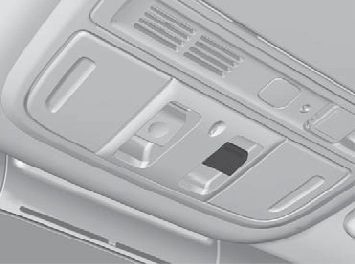 ON
ON
The interior lights come on regardless of whether the doors are open or closed.
The interior lights come on in the following situations:
OFF
The interior lights remain off regardless of whether the doors are open or closed.
* Not available on all models
Continued
uuInterior Convenience ItemsuInterior Lights
The map lights can be turned on and off by pressing the lenses.
uuInterior Convenience ItemsuStorage Items
Pull the handle to open the glove box.
Models with trunk main switch
You can lock the glove box with the built-in key.
Push the cover to open the pocket.
Continued
225
uuInterior Convenience ItemsuStorage Items
Pull the handle to open the console compartment.
The tray in the console compartment is detachable. To remove the tray, simply pull it up.
226
uuInterior Convenience ItemsuStorage Items
Are located in the console between the front seats.
Are located on the both of front and rear door side pockets.
Continued 227
uuInterior Convenience ItemsuStorage Items
Fold the armrest down to use the rear seat beverage holders.
228
uuInterior Convenience ItemsuStorage Items
There is a coat hook on the rear left grab handle. Pull it down to use it.
The cargo hooks in the trunk can be used to install a net for securing items.
Continued 229
uuInterior Convenience ItemsuStorage Items
To open the sunglasses holder, push and release the indent. To close, push it again until it latches.
You can store eyeglasses and other small items in this holder.
uuInterior Convenience ItemsuOther Interior Convenience Items
Open the center pocket and the cover to use it.
Open the console lid and the cover to use it.
Continued
231
uuInterior Convenience ItemsuOther Interior Convenience Items
To use the wireless charger, the power mode must be in ACCESSORY or ON. Charge any devices compatible with Qi wireless charging on the area indicated by the  mark as follows:
 (power) button.
u When the system is activated, the green indicator light comes on.
u The system will automatically start charging the device, and the amber indicator light will come on.
u Make sure that the device is compatible with the system, and placed with the chargeable side in the center of the charging area.
u Depending on the device, the amber indicator light will stay on.
* Not available on all models
uuInterior Convenience ItemsuOther Interior Convenience Items
Perform one of the solutions in the following table.
|
Indicator |
Cause |
Solution |
|
|
Green & Amber |
Blinking simulta- neously |
There is an obstacle(s) between the charging area and the device. |
Remove the obstacle(s). |
|
The device is not within the charging area. |
Reset the device to the center of the charging area where |
||
|
The temperature of the wireless charger pad increases. |
Temporary suspend charging the device. Wait for temperature to drop and attempt to charge the device again. |
||
|
Amber |
Blinking |
The wireless charger is faulty. |
Contact a dealer for repairs. |
 is located.
* Not available on all models
Continued 233
uuInterior Convenience ItemsuOther Interior Convenience Items
* Not available on all models
uuInterior Convenience ItemsuOther Interior Convenience Items
* Not available on all models
Continued 235
uuInterior Convenience ItemsuOther Interior Convenience Items
Canadian models
The power mode must be in ON to use the heated steering wheel.
Press the button on the lower side of the steering wheel.
When a comfortable temperature is reached, press the button again to turn it off.
The heated steering wheel is turned off every time you start the engine, even if you turned it on the last time you drove the vehicle.
* Not available on all models
uuInterior Convenience ItemsuOther Interior Convenience Items
The power mode must be in ON to use the seat heaters.
Press the seat heater button:
Once - The HI setting (three indicators on) Twice - The MID setting (two indicators on) Three times - The LO setting (one indicator on) Four times - The OFF setting (no indicators on)
When the power mode is turned on after it is turned off, the previous setting of front seat heaters are maintained.
* Not available on all models
Continued 237
uuInterior Convenience ItemsuOther Interior Convenience Items
The seat heaters or ventilators can be used when the power mode is in ON.
The seat heaters: Use them to warm up the seat.
The seat ventilators: Use them when you want to ventilate the surface of the seats.
When used with the air conditioning, the surface of the seats will become easier to cool.
Press the seat heater or the seat ventilation button:
Once - The HI setting (three indicators on) Twice - The MID setting (two indicators on) Three times - The LO setting (one indicator on) Four times - The OFF setting (no indicators on)
When the power mode is turned on after it is turned off, the previous setting of front seat heaters and ventilation are maintained.
* Not available on all models
uuInterior Convenience ItemsuOther Interior Convenience Items
The power mode must be in ON to use the seat heaters.
There is no heater in the rear center seating position.
Press the seat heater button:
Once - The HI setting (three indicators on) Twice - The MID setting (two indicators on) Three times - The LO setting (one indicator on) Four times - The OFF setting (no indicators on)
* Not available on all models
239
Download Manual