Cruise Control
If equipped with cruise control, a speed of about 40 km/h (25 mph) or more can be maintained without keeping your foot on the accelerator. Cruise control does not work at speeds below about
40 km/h (25 mph).
If the cruise control is being used and the Traction Control System (TCS) or StabiliTrak/Electronic Stability Control (ESC) begins to limit wheel spin, the cruise control
will automatically disengage. See Traction Control/Electronic Stability Control 0 231. If a collision alert occurs when cruise control is activated, cruise control is disengaged. See Forward Collision Alert (FCA) System 0 264. When road conditions allow you to safely use it again, cruise control can be turned back on.
Turning off the TCS or StabiliTrak/ ESC system will disengage the cruise control.
If the brakes are applied, cruise control disengages.
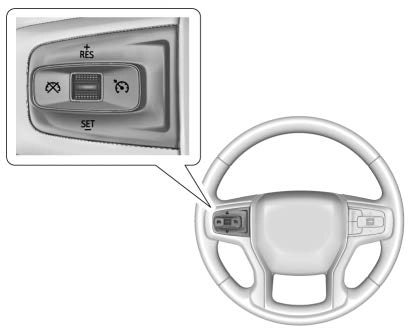
5 : Press to turn cruise control on or off. A white indicator comes on or off in the instrument cluster.
+RES : If there is a set speed in memory, press the control up briefly to resume to that speed or press and hold to accelerate. If cruise control is already engaged, use to increase vehicle speed.
SET− : Press the control down briefly to set the speed and activate cruise control. If cruise control is already engaged, use to decrease vehicle speed.
* : Press to disengage cruise control without erasing the set speed from memory.
Setting Cruise Control
If 5 is on when not in use, SET− or
+RES could get pressed and go into cruise when not desired. Keep 5 off when cruise is not being used.
The cruise control indicator on the instrument cluster turns green after cruise control has been set to the desired speed. See Instrument Cluster 0 124.
Resuming a Set Speed
If the cruise control is set at a desired speed and then the brakes are applied or * is pressed, the cruise control is disengaged without erasing the set speed from memory.
Once the vehicle reaches about 40 km/h (25 mph) or more, press RES+ up briefly. The vehicle returns to the previously set speed.
Increasing Speed While Using Cruise Control
Do one of the following:
. To increase vehicle speed in small increments, press +RES up briefly. For each press, the vehicle goes about 1 km/h
(1 mph) faster.
The speedometer reading can be displayed in either English or metric units. See Instrument Cluster 0 124. The increment value used depends on the units displayed.
Reducing Speed While Using Cruise Control
Do one of the following:
(1 mph) slower.
The speedometer reading can be displayed in either English or metric units. See Instrument Cluster 0 124. The increment value used depends on the units displayed.
Passing Another Vehicle While Using Cruise Control
Use the accelerator pedal to increase the vehicle speed. When you take your foot off the pedal, the vehicle will slow down to the previously set cruise speed. While pressing the accelerator pedal or shortly following the release to override cruise control, briefly pressing SET– will result in cruise control set to the current vehicle speed.
Using Cruise Control on Hills
How well the cruise control works on hills depends on the vehicle speed, the load, and the steepness of the hills. When going up steep hills, pressing the accelerator pedal may be necessary to maintain vehicle speed.
While going downhill, cruise braking helps maintain driver selected speed.
Cruise Grade Braking is enabled when the vehicle is started and cruise control is active. It is not enabled in Range Selection Mode.
It assists in maintaining driver selected speed when driving on downhill grades by using the engine and transmission to slow the vehicle.
For other forms of descent control, see Hill Descent Control (HDC)
0 233, Automatic Transmission
0 217, and Tow/Haul Mode 0 223.
Ending Cruise Control
There are four ways to end cruise control:
Erasing Speed Memory
The cruise control set speed is erased from memory if 5 is pressed or the ignition is turned off.
If equipped, Adaptive Cruise Control (ACC) allows the cruise control set speed and following gap to be selected. Read this entire section before using this system. The following gap is the following time between your vehicle and a vehicle detected directly ahead in your path, moving in the same direction. If no vehicle is detected in your path, ACC works like regular cruise control. ACC uses a windshield mounted front camera sensor.
If a vehicle is detected in your path, ACC can apply acceleration or limited, moderate braking to maintain the selected following gap. To disengage ACC, apply the brake. If ACC is controlling the vehicle speed when the Traction Control System (TCS) or StabiliTrak/ Electronic Stability Control (ESC) system activates, ACC may automatically disengage. See Traction Control/Electronic Stability Control 0 231. When road conditions allow ACC to be safely
used, ACC can be turned back on. Disabling the TCS or StabiliTrak/ ESC system will disengage and prevent engagement of ACC.
ACC can reduce the need for you to frequently brake and accelerate, especially when used on expressways, freeways, and interstate highways. When used on other roads, you may need to take over the control of braking or acceleration more often.
J : Press to turn the system on or off. The indicator turns white on the instrument cluster when ACC is
turned on.
RES+ : Press briefly to resume the previous set speed or to increase vehicle speed if ACC is already activated. To increase speed by about 1 km/h (1 mph), press RES+ briefly. To increase speed to the next 5 km/h (5 mph) mark on the speedometer, hold RES+.
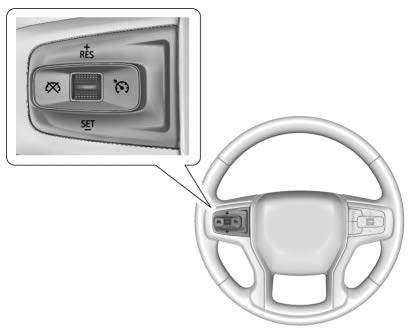 SET– : Press briefly to set the speed and activate ACC or to decrease vehicle speed if ACC is already activated. To decrease speed by about 1 km/h (1 mph), press SET– briefly. To decrease speed to the next 5 km/h (5 mph) mark on the speedometer,
hold SET–.
* : Press to disengage ACC without erasing the selected set speed.
[ : Press to select a following gap setting for ACC of Far, Medium,
or Near.
The speedometer reading can be displayed in either English or metric units. See Instrument Cluster 0 124. The increment value used depends on the units displayed.
Switching Between ACC and Regular Cruise Control
To switch between ACC and regular cruise control, press and hold *.
A Driver Information Display (DIC) message displays. See Vehicle Messages 0 152.

ACC Indicator Regular Cruise
Control Indicator
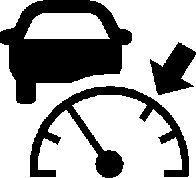
When ACC is engaged, a green  indicator will be lit on the instrument cluster and the following gap will be displayed. When the regular cruise control is engaged, a green J
indicator will be lit on the instrument
cluster; the following gap will not display.
When the vehicle is turned on, the cruise control mode will be set to the last mode used before the vehicle was turned off.
Setting Adaptive Cruise Control
If J is on when not in use, SET–/ RES+ could be pressed by mistake and engage ACC when not desired. Keep J off when cruise is not being used.
Select the set speed desired for ACC. This is the vehicle speed when no vehicle is detected in your path.
While the vehicle is moving, ACC will not set at a speed less than 25 km/h (15 mph), although it can be resumed when driving at lower speeds.
To set ACC while moving:
After ACC is set, it may immediately apply the brakes if a vehicle ahead is detected closer than the selected following gap.
ACC can also be set while the vehicle is stopped if ACC is on and the brake pedal is applied.
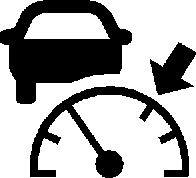
The ACC indicator displays on the instrument cluster. When ACC is turned on, the indicator will be lit white.
Be mindful of speed limits, surrounding traffic speeds, and weather conditions when selecting the set speed.
Resuming a Set Speed
If the ACC is set at a desired speed and then the brakes are applied, ACC is disengaged without erasing the set speed from memory.
To begin using ACC again, press RES+ briefly while moving more than 5 km/h (5 mph). The vehicle returns to the previous set speed.
A green ACC indicator and the set speed display on the instrument cluster. The vehicle ahead indicator may be flashing if a vehicle ahead
was present and moved. See “Approaching and Following a Vehicle” later in this section.
Once ACC has resumed, if there is no vehicle ahead, if the vehicle ahead is beyond the selected following gap, or if the vehicle has exited a sharp curve, then the vehicle speed will increase to the set speed.
Increasing Speed While ACC Is at a Set Speed
If ACC is already activated, do one of the following:
Release SET– and the accelerator pedal. The vehicle will now cruise at the higher speed.
When the accelerator pedal is pressed, ACC will not brake because it is overridden. The ACC indicator will turn blue on the instrument cluster.
5 km/h (5 mph) step, then continues to increase by 5 km/h (5 mph) at a time.
The set speed can also be increased while the vehicle is stopped.
When it is determined that there is no vehicle ahead or the vehicle ahead is beyond the selected following gap, then the vehicle speed will increase to the set speed.
Reducing Speed While ACC Is at a Set Speed
If ACC is already activated, do one of the following:
While holding SET−, the vehicle speed decreases to the next
5 km/h (5 mph) step, then continues to decrease by 5 km/h (5 mph) at a time.
The set speed can also be decreased while the vehicle is stopped.
Selecting the Follow Distance Gap
When a slower moving vehicle is detected ahead within the selected following gap, ACC will adjust the vehicle's speed and attempt to maintain the follow distance gap selected.
Press [ on the steering wheel to adjust the following gap. Each press cycles the gap button through three settings: Far, Medium, or Near.
When pressed, the current gap setting displays briefly on the instrument cluster. The gap setting will be maintained until it is changed.
Since each gap setting corresponds to a following time (Far, Medium,
or Near), the following distance will vary based on vehicle speed. The faster the vehicle speed, the further back your vehicle will follow a vehicle detected ahead. Consider traffic and weather conditions when
selecting the following gap. The range of selectable gaps may not be appropriate for all drivers and driving conditions.
Changing the gap setting automatically changes the alert timing sensitivity (Far, Medium, or Near) for the Forward Collision Alert (FCA) feature. See Forward
Collision Alert (FCA) System 0 264.
Alerting the Driver

With Head-Up Display

Without Head-Up Display
If ACC is engaged, driver action may be required when ACC cannot apply sufficient braking because of approaching a vehicle too rapidly.
When this condition occurs, six red lights will flash on the windshield. Either eight beeps will sound from the front, or both sides of the Safety Alert Seat will pulse five times. See “Collision/Detection Systems” under Vehicle Personalization 0 153.
See Defensive Driving 0 184.
Approaching and Following a Vehicle

The vehicle ahead indicator is in the instrument cluster. It only displays when a vehicle is detected in your vehicle’s path moving in the same direction. If this symbol is not displaying, ACC will not respond to or brake for vehicles ahead.
ACC automatically slows the vehicle down and adjusts vehicle speed to follow a detected vehicle ahead at the selected following gap. The vehicle speed increases or decreases to follow a detected vehicle in front of your vehicle when that vehicle is traveling slower than your vehicle set speed. It may apply limited braking, if necessary. When braking is active, the brake lamps will come on. The automatic braking may feel or sound different than if the brakes were applied manually. This is normal.
Stationary or Very Slow-Moving Objects
Irregular Objects Affecting ACC
ACC may have difficulty detecting the following objects:
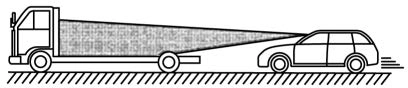
ACC Automatically Disengages
ACC may automatically disengage and the driver will need to manually apply the brakes to slow the vehicle if:
The ACC indicator will turn white when ACC is no longer active.
In some cases, when ACC is temporarily unavailable, regular cruise control may be used. See “Switching Between ACC and Regular Cruise Control” previously in this section. Always consider driving conditions before using either cruise control system.
Notification to Resume ACC
ACC will maintain a follow gap behind a detected vehicle and slow your vehicle to a stop behind that vehicle.
If the stopped vehicle ahead has driven away and ACC has not resumed, the vehicle ahead indicator will flash as a reminder to check traffic ahead before proceeding. In addition, the left and right sides of the Safety Alert Seat will pulse three times, or three beeps will sound. See ”Alert Type” and “Adaptive Cruise Go Notifier” in “Collision/Detection Systems” under Vehicle Personalization 0 153.
When the vehicle ahead drives away, press RES+ or the accelerator pedal to resume ACC.
If stopped for more than
two minutes or if the driver door is opened and the driver seat belt is unbuckled, the ACC automatically applies the Electric Parking Brake (EPB) to hold the vehicle. The EPB status light will turn on. See Electric Parking Brake 0 229.
A DIC warning message may display indicating to shift to P (Park) before exiting the vehicle. See Vehicle Messages 0 152.
ACC Override
If using the accelerator pedal while ACC is active, the ACC indicator turns blue on the instrument cluster indicating ACC braking will not occur. ACC will resume operation when the accelerator pedal is not being pressed.
Curves in the Road
ACC may operate differently in a sharp curve. It may reduce the vehicle speed if the curve is too sharp.
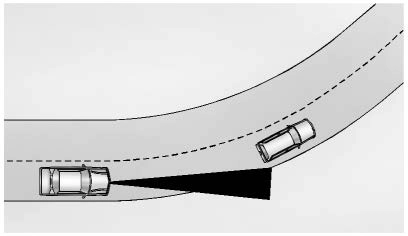
When following a vehicle and entering a curve, ACC may not detect the vehicle ahead and accelerate to the set speed. When this happens, the vehicle ahead indicator will not appear.
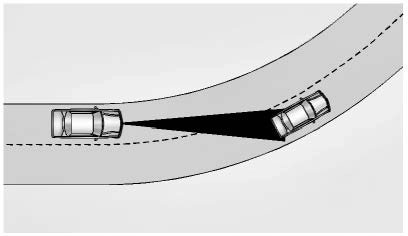
ACC may detect a vehicle that is not in your lane and apply the brakes.
ACC may occasionally provide an alert and/or braking that is considered unnecessary. It could respond to vehicles in different lanes or stationary objects when entering or exiting a curve. This is normal operation. The vehicle does not need service.
Other Vehicle Lane Changes
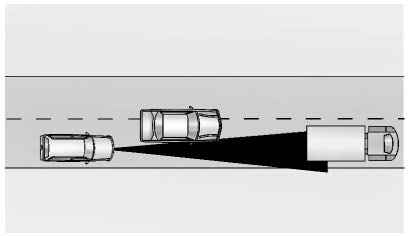
ACC will not detect a vehicle ahead until it is completely in the lane. The brakes may need to be manually applied.
Objects Not Directly in Front of Your Vehicle
The detection of objects in front of the vehicle may not be possible if:
Driving in Narrow Lanes
Vehicles in adjacent traffic lanes or roadside objects may be incorrectly detected when located along the roadway.
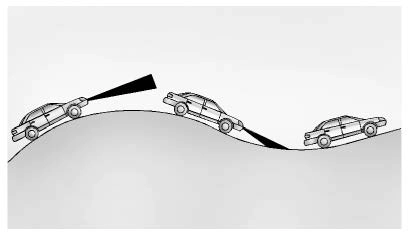 Do Not Use ACC on Hills and When Towing a Trailer
Do not use ACC when driving on steep hills or when towing a trailer. ACC will not detect a vehicle in the lane while driving on steep hills.
If the brakes are applied, ACC disengages.
Disengaging ACC
There are three ways to disengage ACC:
Erasing Speed Memory
The ACC set speed is erased from memory if J is pressed or if the ignition is turned off.
Weather Conditions Affecting ACC
If the interior temperature is extremely high, the instrument cluster may indicate that ACC is temporarily unavailable. This can be caused by extreme hot weather conditions with direct sunlight on the
front camera. ACC will return to normal operation once the cabin temperature is lower.
Conditions that are associated with low visibility, such as fog, rain, snow, or road spray, may limit ACC performance. Water droplets from rain or snow that remain on the windshield may also limit ACC’s ability to detect objects.
Lighting Conditions Affecting ACC
The ACC front camera can be affected by poor lighting conditions, and ACC may have limited performance when:
high-beam headlamps from oncoming traffic.
Accessory Installations and Vehicle Modifications
Do not install or place any object around the front camera windshield area that would obstruct the front camera view.
Do not install objects on top of the vehicle that overhang and obstruct the front camera, such as a canoe, kayak, or other items that can be transported on the vehicle roof.
Do not modify the hood, headlamps, or fog lamps, as this may limit the camera’s ability to detect an object.
Cleaning the Sensing System
The camera sensor on the windshield behind the rearview mirror can become blocked by snow, ice, dirt, mud, or debris. This area needs to be cleaned for ACC to operate properly.
The vehicle headlamps may need to be cleaned due to dirt, snow, or ice. Objects that are not illuminated correctly may be difficult to detect.
If ACC will not operate, regular cruise control may be available. See “Switching Between ACC and Regular Cruise Control” previously in this section. Always consider driving conditions before using either cruise control system.
Download Manual