Setting the Clock
On vehicles with navigation, the time is automatically set using GPS signals.
On vehicles without navigation, use the following steps:
- Press the Home button.
- Select Settings, then press touchpad A.
- Select System, then press touchpad A.
- Select Date & Time, then press touchpad A.
- Select Set Date & Time, then press touchpad A.
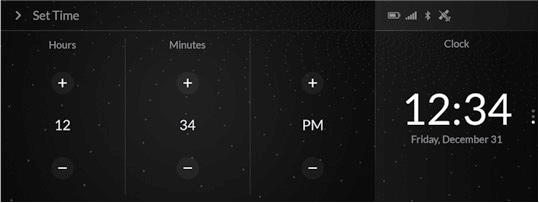
- Select Set Time, then press touchpad A.
- Select +/-the Up or Down arrow, then press touchpad A.
- Press the Back button to set the time.
Learn how to operate the vehicle’s audio system.
- Connect audio devices and operate buttons and displays for the audio system.
Download Manual