Making a Call
You can make calls by inputting any phone number, or by using the imported phonebook, call history, speed dial entries, or redial.
■Dialing a Number
- Go to the phone screen.

- Select Enter Number.
- Write the number on the inking screen, then press the touchpad A.
You can enter the number through the on screen keyboard. Select KEYPAD on the upper right of the screen.
- Press touchpad A.
Dialing starts automatically.
If the on screen keyboard is displayed, select CALL.
■Using the Phonebook
- Go to the phone screen.

- Select Contacts.
- Select a name.
You can sort by First Name or Last Name. Select the icon on the upper right of the screen.
- Select a number.
Dialing starts automatically.
■Storing Speed Dial Entries
Store up to 20 numbers for quick dialing. To store a speed dial number:
- Go to the phone screen.
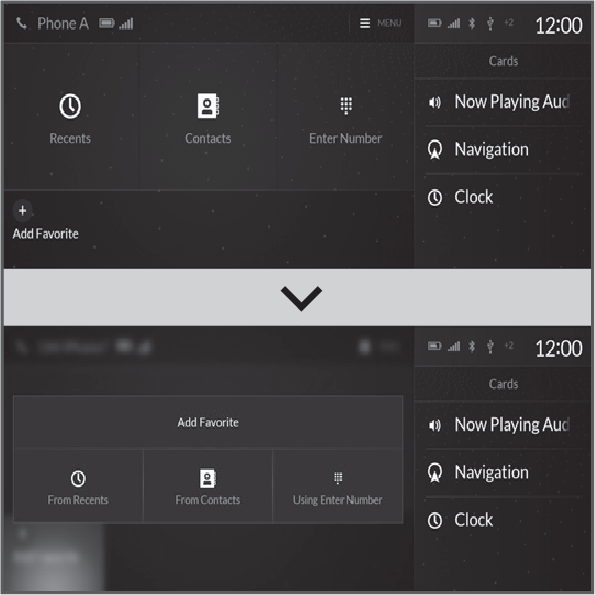
- Select Add Favorite.
- Select a place to choose a number.
From Recents:
Select a number from the call history.
From Contacts:
Select a number from the connected cellular phone’s imported phonebook.
From Enter Number:
Write the number on the inking screen, then press touchpad A.
When KEYPAD is selected on the upper right of the screen, the on screen keyboard appears.
- Select a number.
■Using Speed Dial
Make calls quickly using stored speed dial entries or call history numbers.
- Go to the phone screen.
- Select desired favorite contact.
Dialing starts automatically.
Download Manual